> For the complete documentation index, see [llms.txt](https://unsloth.ai/docs/llms.txt). Markdown versions of documentation pages are available by appending `.md` to page URLs; this page is available as [Markdown](https://unsloth.ai/docs/zh/kuai-su-kai-shi/reinforcement-learning-rl-guide/tutorial-train-your-own-reasoning-model-with-grpo.md).

# 教程：使用 GRPO 训练你自己的推理模型

面向初学者的指南，通过使用 Unsloth 和 GRPO，将 Llama 3.1（8B）之类的模型转变为推理模型。

DeepSeek 开发了 [GRPO](https://unsloth.ai/blog/grpo) （群体相对策略优化，Group Relative Policy Optimization）来训练他们的 R1 推理模型。

### 快速入门

这些说明适用于我们预制的 Google Colab [笔记本](/docs/zh/kuai-su-kai-shi/unsloth-notebooks.md)。如果你是在本地安装 Unsloth，也可以把我们的笔记本复制到你最喜欢的代码编辑器中。我们将使用以下任意一个笔记本：

| [**Qwen3.5（4B）**](https://colab.research.google.com/github/unslothai/notebooks/blob/main/nb/Qwen3_5_\(4B\)_Vision_GRPO.ipynb) **- 视觉 - 新** | [**gpt-oss-20b**](https://colab.research.google.com/github/unslothai/notebooks/blob/main/nb/gpt-oss-\(20B\)-GRPO.ipynb) **-** GSPO   | [Gemma 3（4B）](https://colab.research.google.com/github/unslothai/notebooks/blob/main/nb/Gemma3_\(4B\)-Vision-GRPO.ipynb) - 视觉 GSPO       |
| ------------------------------------------------------------------------------------------------------------------------------------------ | ------------------------------------------------------------------------------------------------------------------------------------ | ---------------------------------------------------------------------------------------------------------------------------------------- |
| [**Qwen3（4B）**](https://colab.research.google.com/github/unslothai/notebooks/blob/main/nb/Qwen3_\(4B\)-GRPO.ipynb) - 高级                    | [Qwen3-VL-8B](https://colab.research.google.com/github/unslothai/notebooks/blob/main/nb/Qwen3_VL_\(8B\)-Vision-GRPO.ipynb) - 视觉 GSPO | [Llama 3.2（3B）](https://colab.research.google.com/github/unslothai/notebooks/blob/main/nb/Advanced_Llama3_2_\(3B\)_GRPO_LoRA.ipynb) - 高级 |

{% stepper %}
{% step %}

#### 安装 Unsloth

如果你使用的是我们的 Colab 笔记本，请点击 **Runtime > Run all**。我们强烈建议你在开始之前先查看我们的 [微调指南](/docs/zh/kuai-su-kai-shi/fine-tuning-llms-guide.md) 。

如果是在本地安装，请确保你具备正确的 [依赖项](/docs/zh/kuai-su-kai-shi/fine-tuning-for-beginners/unsloth-requirements.md) 并在 `pip install unsloth` Linux 上使用，或按照我们的 [Windows 安装 ](/docs/zh/kuai-su-kai-shi/install/windows-installation.md)说明。

<figure><img src="https://2657992854-files.gitbook.io/~/files/v0/b/gitbook-x-prod.appspot.com/o/spaces%2FxhOjnexMCB3dmuQFQ2Zq%2Fuploads%2Fgit-blob-313fa39c229225ae9d39b7c7a0d05c9005ddb94c%2Fimage.png?alt=media" alt=""><figcaption></figcaption></figure>
{% endstep %}

{% step %}

#### 了解 GRPO 与奖励函数

在开始之前，建议先了解更多关于 GRPO、奖励函数以及它们的工作方式。阅读更多相关内容，包括 [提示与技巧](/docs/zh/kuai-su-kai-shi/reinforcement-learning-rl-guide.md#basics-tips)[ 这里](/docs/zh/kuai-su-kai-shi/reinforcement-learning-rl-guide.md#basics-tips).

你还需要足够的 VRAM。一般来说，模型参数量 = 你所需的 VRAM 量。在 Colab 中，我们使用他们免费的 16GB VRAM GPU，它们可以训练参数量最高达 16B 的任何模型。
{% endstep %}

{% step %}

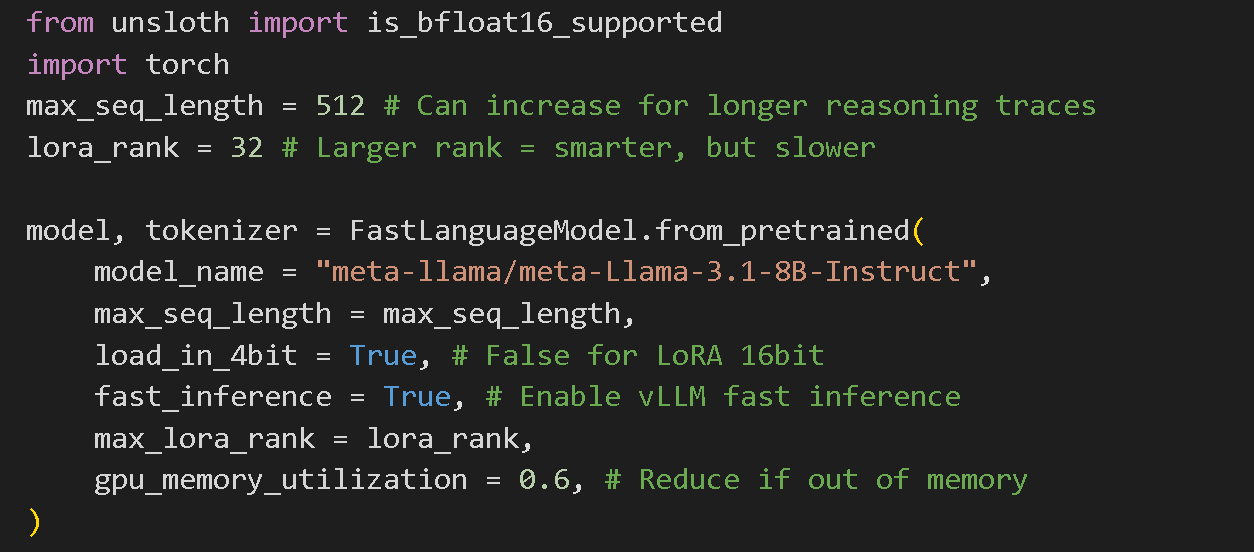
#### 配置所需设置

我们已经为你预先选择了最优设置以获得最佳结果，你也可以把模型改成我们 [支持的模型](/docs/zh/kuai-su-kai-shi/unsloth-model-catalog.md)中列出的任何一个。不建议初学者更改其他设置。

{% hint style="success" %}
对于 **高级 GRPO** 关于批处理、生成和训练参数的文档， [阅读我们的指南！](/docs/zh/kuai-su-kai-shi/reinforcement-learning-rl-guide/advanced-rl-documentation.md)
{% endhint %}

<figure><img src="https://2657992854-files.gitbook.io/~/files/v0/b/gitbook-x-prod.appspot.com/o/spaces%2FxhOjnexMCB3dmuQFQ2Zq%2Fuploads%2Fgit-blob-b1e9fac448706ac87dff7e7eff1298655dda456e%2Fimage.png?alt=media" alt="" width="563"><figcaption></figcaption></figure>
{% endstep %}

{% step %}

#### 数据准备

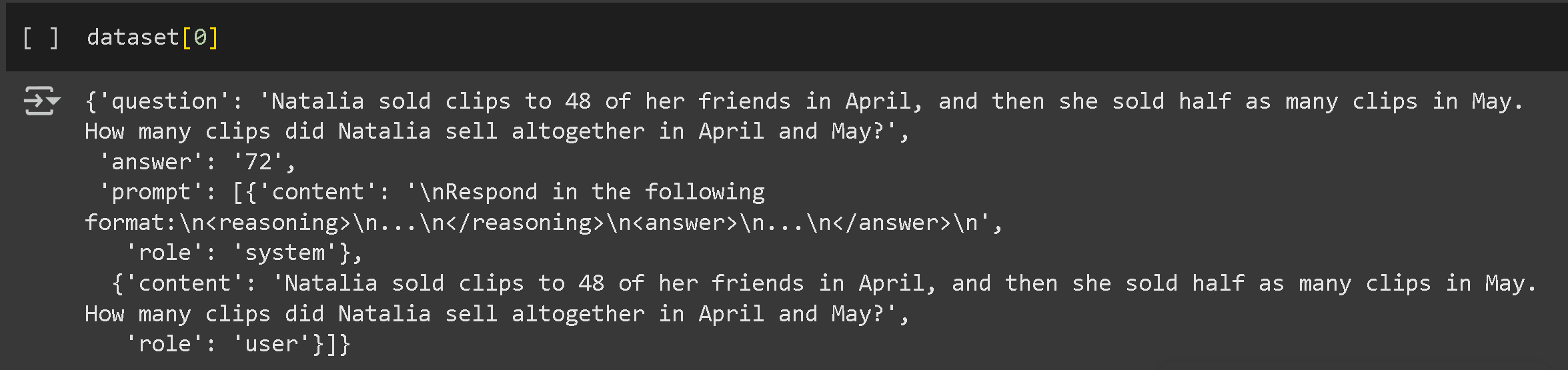
我们预先选择了 OpenAI 的 [GSM8K](https://huggingface.co/datasets/openai/gsm8k) 数据集，它包含小学数学问题，但你也可以把它改成你自己的数据集，或 Hugging Face 上任何公开数据集。你可以在这里阅读更多关于 [数据集的信息](/docs/zh/kuai-su-kai-shi/fine-tuning-llms-guide/datasets-guide.md).

你的数据集仍应至少包含两列，分别用于问题和答案配对。不过，答案不得泄露其如何从问题推导出答案的推理过程。示例如下：

<figure><img src="https://2657992854-files.gitbook.io/~/files/v0/b/gitbook-x-prod.appspot.com/o/spaces%2FxhOjnexMCB3dmuQFQ2Zq%2Fuploads%2Fgit-blob-14a1ee796547f725abbd1097f2b0f9e4e6cc5976%2Fimage.png?alt=media" alt=""><figcaption></figcaption></figure>

我们将把数据结构化，让模型在给出答案之前先阐述其推理过程。首先，我们会为提示和响应建立清晰的格式。

```
# 定义系统提示，指示模型使用特定格式
"""
按以下格式回答：
<reasoning>
...
</reasoning>
<answer>
...
</answer>
"""

"""\\
<reasoning>
{reasoning}
</reasoning>
<answer>
{answer}
</answer>
"""
```

现在，准备数据集：

```
import re
from datasets import load_dataset, Dataset


# 从不同格式中提取答案的辅助函数
def extract_xml_answer(text: str) -> str:
    answer = text.split("<answer>")[-1]
    answer = answer.split("</answer>")[0]
    return answer.strip()


def extract_hash_answer(text: str) -> str | None:
    if "####" not in text:
        return None
    return text.split("####")[1].strip()


# 准备 GSM8K 数据集的函数
def get_gsm8k_questions(split="train") -> Dataset:
    data = load_dataset("openai/gsm8k", "main")[split]
    data = data.map(
        lambda x: {
            "prompt": [
                {"role": "system", "content": SYSTEM_PROMPT},
                {"role": "user", "content": x["question"]},
            ],
            "answer": extract_hash_answer(x["answer"]),
        }
    )
    return data


dataset = get_gsm8k_questions()
```

该数据集通过提取答案并将其格式化为结构化字符串来进行准备。
{% endstep %}

{% step %}

#### 奖励函数/验证器

[奖励函数/验证器](/docs/zh/kuai-su-kai-shi/reinforcement-learning-rl-guide.md#reward-functions-verifier) 让我们根据你提供的数据集了解模型表现是否良好。每次生成运行都会根据其相对于其余生成结果平均得分的表现进行评估。你可以创建自己的奖励函数，不过我们已经为你预先选择了 [Will 的 GSM8K](/docs/zh/kuai-su-kai-shi/reinforcement-learning-rl-guide.md#gsm8k-reward-functions) 奖励函数。有了这些，我们就有 5 种不同的方式来奖励每次生成。

你可以把生成结果输入到像 ChatGPT 4o 或 Llama 3.1（8B）这样的 LLM 中，并设计一个奖励函数和验证器来评估它。例如，把你的生成结果输入你选择的 LLM，并设置规则："如果答案听起来太机械化，就扣 3 分。"这有助于根据质量标准优化输出。 **查看示例** 看看它们可能是什么样子 [这里](/docs/zh/kuai-su-kai-shi/reinforcement-learning-rl-guide.md#reward-function-examples).

**电子邮件自动化任务的奖励函数示例：**

* **问题：** 收到的邮件
* **答案：** 发出的邮件
* **奖励函数：**
  * 如果答案包含必需的关键词 → **+1**
  * 如果答案与理想响应完全匹配 → **+1**
  * 如果回复过长 → **-1**
  * 如果包含收件人姓名 → **+1**
  * 如果包含签名块（电话、电子邮件、地址）→ **+1**

<figure><img src="https://2657992854-files.gitbook.io/~/files/v0/b/gitbook-x-prod.appspot.com/o/spaces%2FxhOjnexMCB3dmuQFQ2Zq%2Fuploads%2Fgit-blob-95cd00b6a52b8161b31a2399e25863ee0349920e%2Fimage.png?alt=media" alt=""><figcaption></figcaption></figure>
{% endstep %}

{% step %}

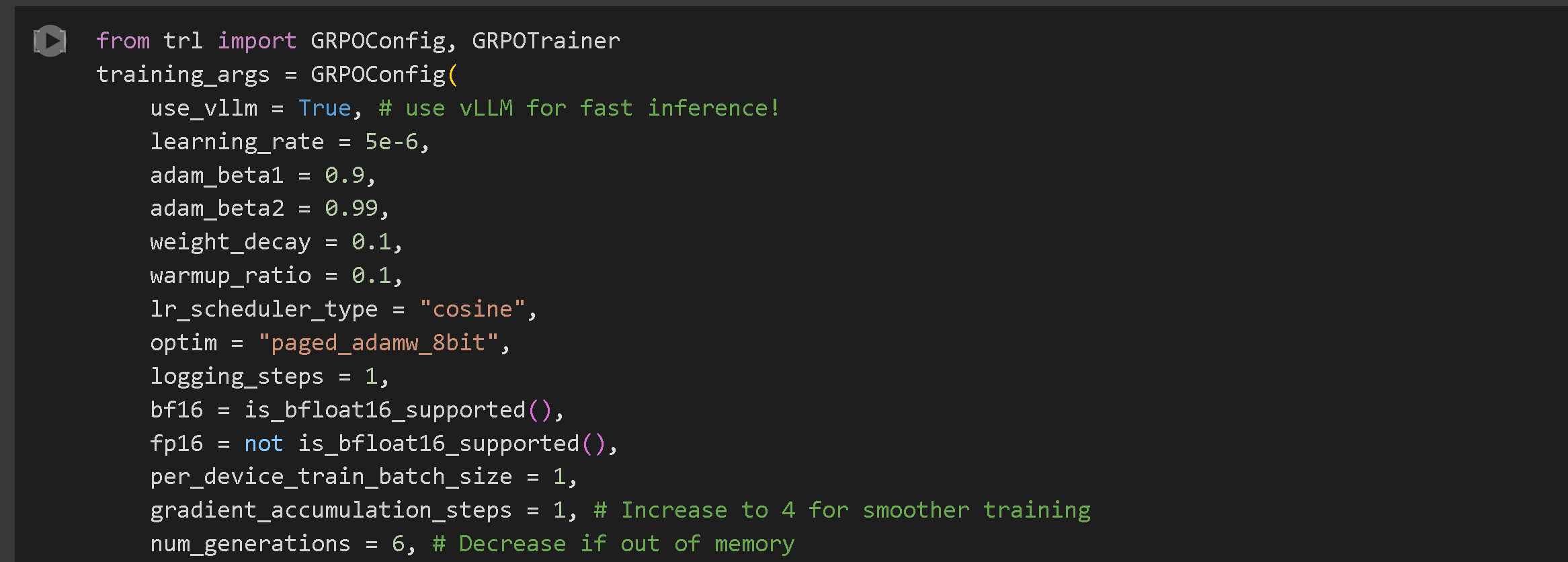
#### 训练你的模型

我们已预先选择了超参数，以获得最优结果，不过你也可以更改它们。了解更多关于 [此处的参数](/docs/zh/kuai-su-kai-shi/fine-tuning-llms-guide/lora-hyperparameters-guide.md)。对于 **高级 GRPO** 关于批处理、生成和训练参数的文档， [阅读我们的指南！](/docs/zh/kuai-su-kai-shi/reinforcement-learning-rl-guide/advanced-rl-documentation.md)

<figure><img src="https://2657992854-files.gitbook.io/~/files/v0/b/gitbook-x-prod.appspot.com/o/spaces%2FxhOjnexMCB3dmuQFQ2Zq%2Fuploads%2Fgit-blob-a22d3475d925d2d858c9fcc228f0e13893eff0f9%2Fimage.png?alt=media" alt="" width="563"><figcaption></figcaption></figure>

“ **GRPOConfig** 定义训练的关键超参数：

* `use_vllm`：启用使用 vLLM 的快速推理。
* `learning_rate`：决定模型的学习速度。
* `num_generations`：指定每个提示生成的完成数。
* `max_steps`：设置总训练步数。

{% hint style="success" %}
**新！** 我们现在支持 DAPO、Dr. GRPO 以及大多数其他新的 GRPO 技术。你可以在 GRPOConfig 中尝试以下参数来启用：

```python
epsilon=0.2,
epsilon_high=0.28, # 单边
delta=1.5 # 双边

loss_type='bnpo',
# 或：
loss_type='grpo',
# 或：
loss_type='dr_grpo',
# 或：
loss_type='dapo',

mask_truncated_completions=True,
```

{% endhint %}

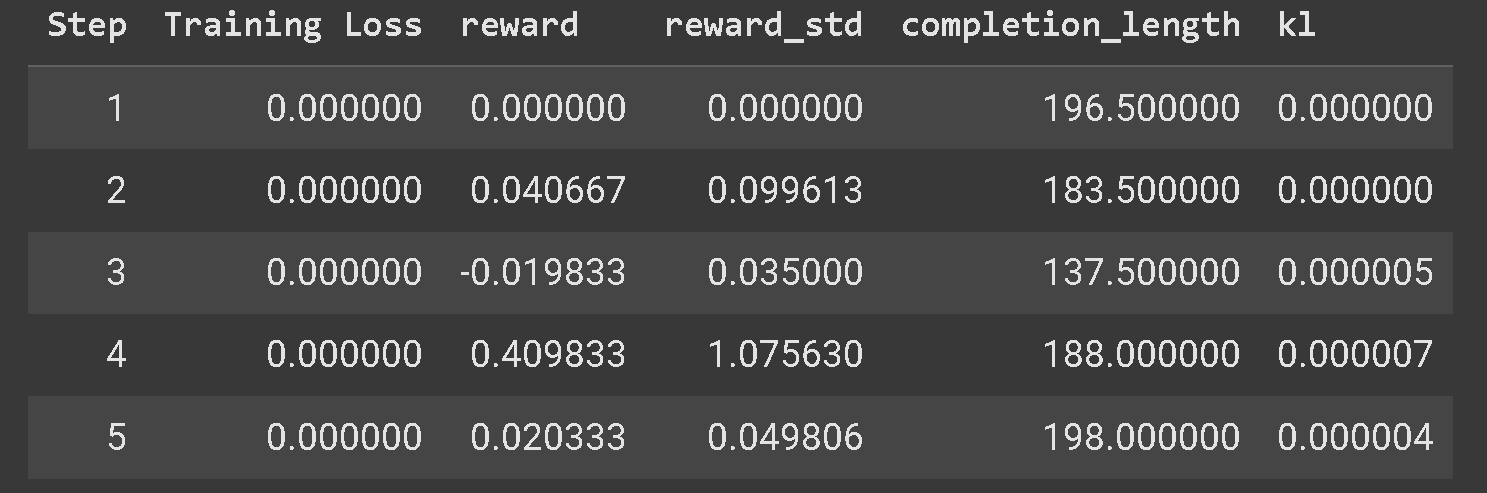
你应该会看到奖励随时间增加。我们建议你至少训练 300 步，这可能需要 30 分钟，不过为了获得最佳结果，你应该训练更长时间。

{% hint style="warning" %}
如果你遇到 GRPO 模型无法学习的问题，我们强烈建议你使用我们的 [高级 GRPO 笔记本](/docs/zh/kuai-su-kai-shi/unsloth-notebooks.md#grpo-reasoning-notebooks) 因为它拥有更好的奖励函数，你应该会更快、更频繁地看到结果。
{% endhint %}

你还会看到示例答案，这能让你了解模型是如何学习的。有些答案可能包含步骤、XML 标签、尝试等，而这样做的思路是：随着训练进行，它会变得越来越好，因为它会获得越来越高的分数，直到我们得到带有长推理链的理想输出。

<figure><img src="https://2657992854-files.gitbook.io/~/files/v0/b/gitbook-x-prod.appspot.com/o/spaces%2FxhOjnexMCB3dmuQFQ2Zq%2Fuploads%2Fgit-blob-f33d6f494605ab9ca69a0b697ed5865dd3a30b18%2Fimage.png?alt=media" alt="" width="563"><figcaption></figcaption></figure>
{% endstep %}

{% step %}

#### 运行并评估你的模型

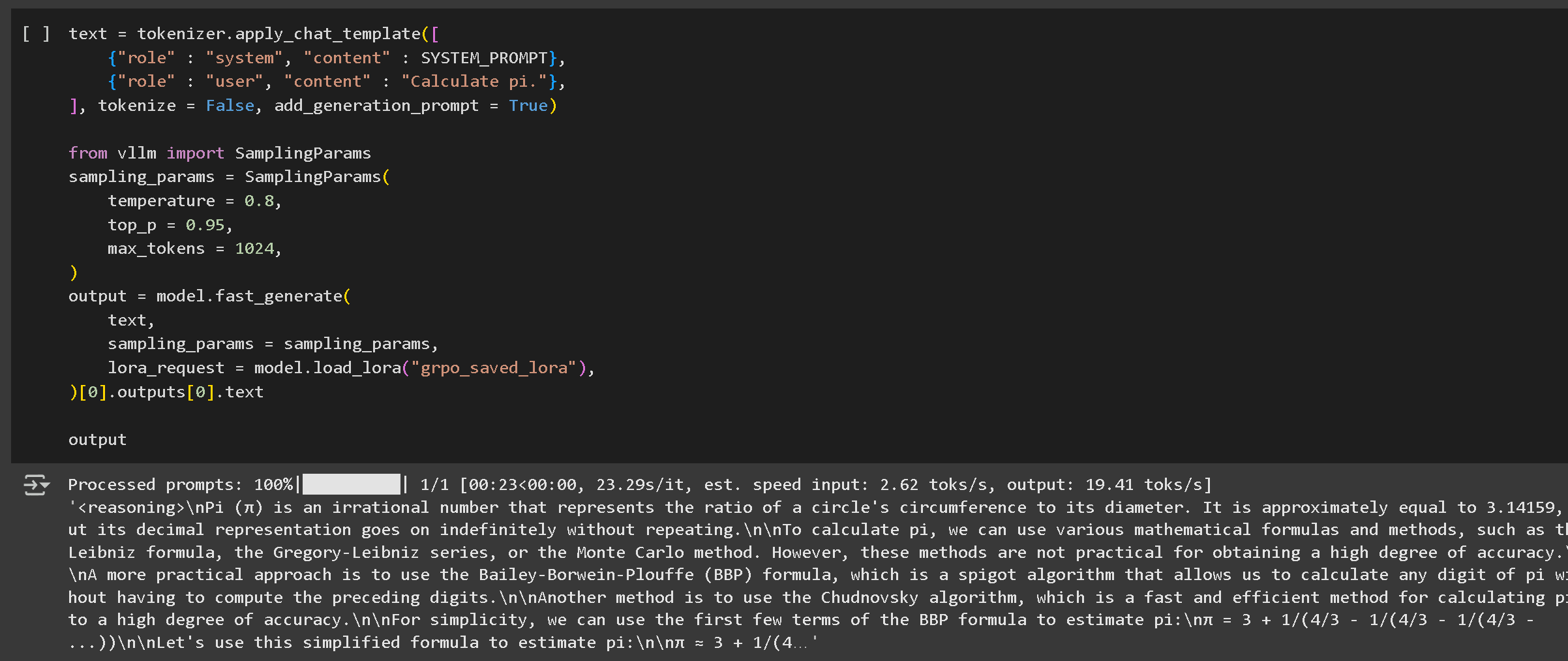
点击播放按钮运行你的模型。在第一个示例中，答案通常没有推理过程；要查看推理过程，我们需要先使用以下命令保存刚才用 GRPO 训练的 LoRA 权重：

<pre><code><strong>model.save_lora("grpo_saved_lora")
</strong></code></pre>

<figure><img src="https://2657992854-files.gitbook.io/~/files/v0/b/gitbook-x-prod.appspot.com/o/spaces%2FxhOjnexMCB3dmuQFQ2Zq%2Fuploads%2Fgit-blob-1ab351622655983aeda4d9d6d217cf354cb280be%2Fimage%20(10)%20(1)%20(1).png?alt=media" alt=""><figcaption><p>第一个推理示例运行没有推理过程。你必须加载 LoRA 并对其进行测试，才能显示推理。</p></figcaption></figure>

然后我们加载 LoRA 并测试它。我们的推理模型要好得多——但并不总是正确，因为我们只训练了大约一个小时；如果我们延长序列长度并训练更久，它会更好！

你可以按照我们的 [这里的指南](https://unsloth.ai/docs/zh/kuai-su-kai-shi/reinforcement-learning-rl-guide/pages/e722e86e330786e5915445b91f900d9f9e0ba067#id-7.-running--saving-the-model).

<figure><img src="https://2657992854-files.gitbook.io/~/files/v0/b/gitbook-x-prod.appspot.com/o/spaces%2FxhOjnexMCB3dmuQFQ2Zq%2Fuploads%2Fgit-blob-38fa0c97184487aaa6b259f5b23b7f27345871d8%2Fimage.png?alt=media" alt=""><figcaption></figcaption></figure>

将模型保存为 GGUF、Ollama 等格式。如果你仍然没有得到任何推理过程，可能是训练步数太少，或者你的奖励函数/验证器不够理想。
{% endstep %}

{% step %}

#### 保存你的模型

我们有多种方式来保存你的微调模型，但我们将重点介绍最简单、最流行的方法，你可以在这里阅读更多关于 [这里](/docs/zh/ji-chu-zhi-shi/inference-and-deployment.md)

**以 16 位精度保存**

你可以使用以下命令以 16 位精度保存模型：

```python
# 保存为 16 位精度
model.save_pretrained_merged("model", tokenizer, save_method="merged_16bit")
```

**推送到 Hugging Face Hub**

为了分享你的模型，我们将使用 `push_to_hub_merged` 方法将其推送到 Hugging Face Hub。这样可以将模型保存为多种量化格式。

```python
# 推送到 Hugging Face Hub（需要令牌）
model.push_to_hub_merged(
    "your-username/model-name", tokenizer, save_method="merged_16bit", token="your-token"
)
```

**以 GGUF 格式保存用于 llama.cpp**

Unsloth 也支持保存为 **GGUF 格式**，使其兼容 **llama.cpp** 和 **Ollama**.

```python
model.push_to_hub_gguf(
    "your-username/model-name",
    tokenizer,
    quantization_method=["q4_k_m", "q8_0", "q5_k_m"],
    token="your-token",
)
```

一旦保存为 GGUF 格式，模型就可以使用 **llama.cpp** 在轻量级环境中轻松部署，或者用于其他推理引擎。
{% endstep %}
{% endstepper %}

## 视频教程

以下是由一些出色的 YouTuber 制作的视频教程，我们认为他们非常棒！

{% embed url="<https://www.youtube.com/watch?v=9t-BAjzBWj8>" %}

{% columns %}
{% column width="50%" %}
{% embed url="<https://www.youtube.com/watch?t=3289s&v=bbFEYPx9Hpo>" %}
适合学习如何准备你的数据集，以及强化学习 + GRPO 基础知识背后的解释
{% endembed %}

{% embed url="<https://www.youtube.com/watch?v=oF0_eMhzRaQ>" %}
{% endcolumn %}

{% column width="50%" %}
{% embed url="<https://www.youtube.com/watch?v=juOh1afy-IE>" %}

{% embed url="<https://www.youtube.com/watch?v=SoPE1cUz3Hs>" %}
在你自己的设备上进行本地 GRPO
{% endembed %}
{% endcolumn %}
{% endcolumns %}


---

# Agent Instructions
This documentation is published with GitBook. GitBook is the documentation platform designed so that both humans and AI agents can read, navigate, and reason over technical content effectively. Learn more at gitbook.com.

## Querying This Documentation
If you need additional information that is not directly available in this page, you can query the documentation by asking a question.

Perform an HTTP GET request on the following URL with the `ask` and `goal` query parameters:

```
GET https://unsloth.ai/docs/zh/kuai-su-kai-shi/reinforcement-learning-rl-guide/tutorial-train-your-own-reasoning-model-with-grpo.md?ask=<question>&goal=<user_goal>
```

`ask` is the immediate question: it should be specific, self-contained, and written in natural language.
`goal` is what the user is ultimately trying to achieve, the reason they need the answer. Sharing it helps GitBook give you a better, more relevant answer. A goal is most helpful when it describes the outcome the user wants rather than restating the question. For example, with `ask=how do I create an API token`, a goal like `automate deployments from our CI pipeline` lets GitBook tailor the answer to that use case.

The response will contain a direct answer to the question and relevant excerpts and sources from the documentation.

Use this mechanism when the answer is not explicitly present in the current page, you need clarification or additional context, or you want to retrieve related documentation sections.