> For the complete documentation index, see [llms.txt](https://unsloth.ai/docs/llms.txt). Markdown versions of documentation pages are available by appending `.md` to page URLs; this page is available as [Markdown](https://unsloth.ai/docs/zh/kuai-su-kai-shi/reinforcement-learning-rl-guide/memory-efficient-rl.md).

# 内存高效的 RL

我们很高兴在 Unsloth 中推出更高效的强化学习（RL），并带来多项算法改进：

* **上下文长度增加 1.2 到 1.7 倍** 且不会变慢，也不会额外占用内存！
* **RL 训练运行速度提升 10%** 采用了重做的 kernel 和异步数据传输
* **快 2 倍 `torch.compile` 倍** 在模型加载期间

Unsloth **已经** 会提升 RL 训练速度、上下文窗口，并且相较于所有其他使用 FA2 的方案将 VRAM 使用量降低 50–90%，但现在 [**Unsloth 的 Standby**](#unsloth-standby) 进一步提升了这一点。我们的 Standby 功能与其他实现相比，独特地限制了速度下降，有时甚至还能让训练更快！

现在，Qwen3-32B LoRA 16-bit 可达到 6,144 的上下文长度，而之前只有 3,600（**长 1.7 倍**）。在 1xH100 80GB GPU 上。Llama-3.1-8B QLoRA 4bit 可达到 47,500 长度，而之前是 42,000（长 1.13 倍）。

我们通过各种 kernel 优化让 RL 运行速度提升了 10%，并在从训练切换到推理模式时移除了 CPU 与 GPU 之间的 LoRA 通信通道。最后，我们使用了自定义 `torch.compile` 标志，使 vLLM 的 rollout 速度提升 10%，并将编译时间缩短了 2 倍。

## :sparkles:如何启用这些优化

为启用 **Unsloth 的 Standby** 功能，请在任何 Unsloth 导入之前设置环境变量 `UNSLOTH_VLLM_STANDBY` 。然后设置 `gpu_memory_utilization = 0.95` ，就这么简单！

```python
import os
os.environ["UNSLOTH_VLLM_STANDBY"] = "1"

from unsloth import FastLanguageModel
import torch
model, tokenizer = FastLanguageModel.from_pretrained(
    model_name = "unsloth/Qwen3-8B-Base",
    max_seq_length = 2048, # 可增大以获得更长的推理轨迹
    load_in_4bit = False, # LoRA 16bit 时为 False
    fast_inference = True,
    max_lora_rank = 32, # rank 越大 = 更聪明，但更慢
    gpu_memory_utilization = 0.95,
)
```

## :mortar\_board:不再需要 `gpu_memory_utilization`!

借助 Unsloth 全新的 RL 改进，你再也不用担心调节或设置 `gpu_memory_utilization` 了——只需将其设为 GPU 利用率的 90% 或 95% 即可——100% 很遗憾行不通，因为还需要一些空间给小张量。以前必须在 30% 到 95% 之间调参——现在 აღარ需要了！直接设到最大，剩下的交给 Unsloth！

## :interrobang:为什么 RL 会占用这么多内存？

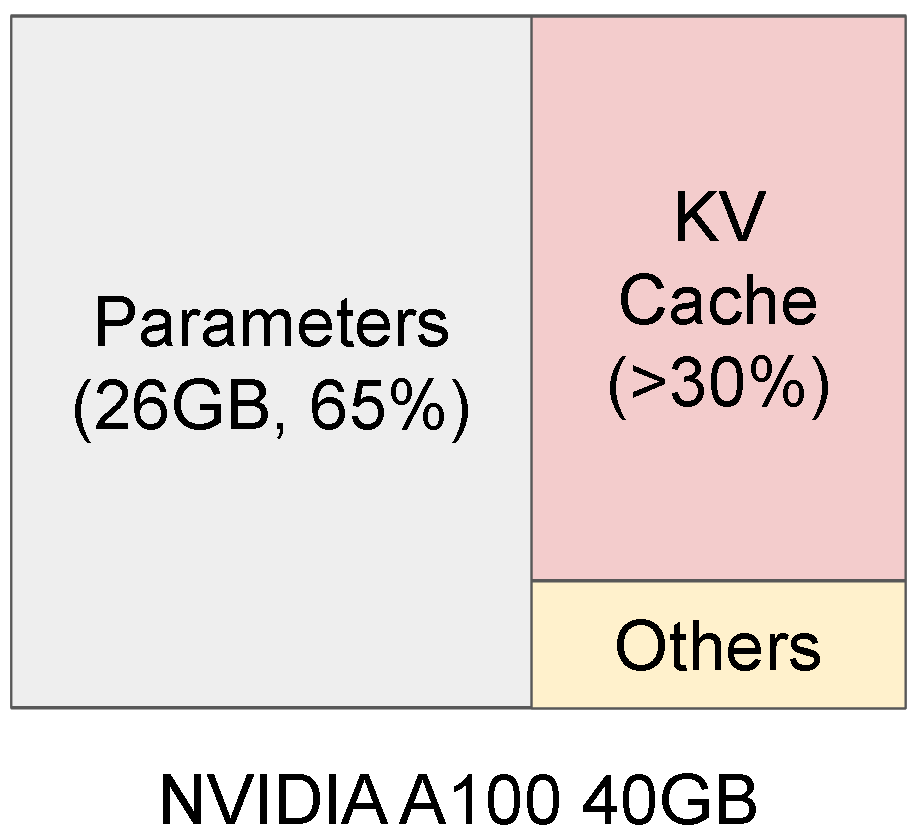
GRPO（以及许多 RL 变体）高度依赖生成，而生成主要由 vLLM 驱动。但这也带来很高的成本，因为它需要持续的 **GPU 内存来存放权重、激活值和 KV Cache**.

{% columns %}
{% column %}
推理会占用大量 VRAM

<figure><img src="https://2657992854-files.gitbook.io/~/files/v0/b/gitbook-x-prod.appspot.com/o/spaces%2FxhOjnexMCB3dmuQFQ2Zq%2Fuploads%2Fgit-blob-7e25501083081b201d59f6000219cafa535d2b2d%2Fimage.png?alt=media" alt=""><figcaption></figcaption></figure>
{% endcolumn %}

{% column %}
而训练同样也会使用 VRAM！

<figure><img src="https://2657992854-files.gitbook.io/~/files/v0/b/gitbook-x-prod.appspot.com/o/spaces%2FxhOjnexMCB3dmuQFQ2Zq%2Fuploads%2Fgit-blob-189fd45a9e7a6fa1e98d1c9646b57bd0ec48481d%2Ffig6-2.avif?alt=media" alt=""><figcaption></figcaption></figure>
{% endcolumn %}
{% endcolumns %}

这意味着 RL 需要在 GPU 上同时保留两套 VRAM / 内存：

1. 推理引擎（包含模型权重、KV cache）
2. 训练引擎（包含模型权重、激活值、梯度、优化器状态）

当前 RL 框架在一块 80GB GPU 上必须 50/50 划分，50% 给推理，50% 给训练。而把权重从训练模式移动到推理模式可能要花相当长的时间。

<table><thead><tr><th width="251.51666259765625">80GB GPU</th><th>推理引擎（50%）</th><th>训练引擎（50%）</th></tr></thead><tbody><tr><td>模型权重</td><td>16GB</td><td>16GB</td></tr><tr><td>KV 缓存</td><td>24GB</td><td></td></tr><tr><td>激活值、梯度、优化器状态</td><td></td><td>24GB</td></tr></tbody></table>

之前的 Unsloth 版本已经在智能优化上述内容，因为我们 **直接共享了 vLLM 的权重空间，从而移除了模型权重的双重内存占用**。例如这可以释放 16GB 空间，可用于增加上下文长度或提升生成速度。此外，我们也不需要进行内存搬移，因此训练更快。

| 80GB GPU     | 推理引擎（50%）            | 训练引擎（50%）           |
| ------------ | -------------------- | ------------------- |
| 模型权重         | **16GB 共享**          | **<<< 共享**          |
| KV 缓存        | 24GB + 8GB= **32GB** |                     |
| 激活值、梯度、优化器状态 |                      | 24GB + 8GB=**32GB** |

## 🦥Unsloth 待机模式

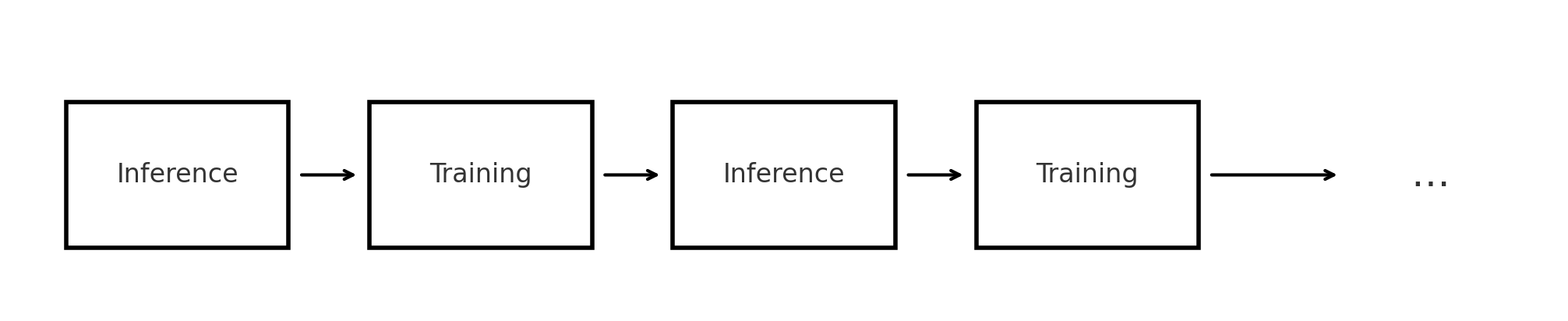
但我们还能更进一步——首先要注意，RL 是先推理，再训练，再推理，再训练，依此类推。

<figure><img src="https://2657992854-files.gitbook.io/~/files/v0/b/gitbook-x-prod.appspot.com/o/spaces%2FxhOjnexMCB3dmuQFQ2Zq%2Fuploads%2Fgit-blob-6e9b6a2f7381de84ed6eeb0feedc566cd443acf3%2F5b957843-eb58-4778-8b90-f25767c51495.png?alt=media" alt=""><figcaption></figcaption></figure>

这意味着，理论上推理和训练的内存空间可以复用，因为推理和训练是分开的模式——这就是 [vLLM 的睡眠模式功能](https://docs.vllm.ai/en/latest/features/sleep_mode.html#rlhf-weight-updates) 发挥作用的地方，它有 2 个选项：

1. `级别 = 1` 将权重复制到 CPU 并删除 KV cache
2. `级别 = 2` 删除权重并删除 KV cache

但请注意，在 Unsloth 中我们与 vLLM 共享权重的内存空间——这意味着我们需要一种新的方式来删除 KV cache，并忽略对权重的删除，我们把这称为 Unsloth Standby。

| 80GB GPU                                                                                                                                               | 推理引擎        | 训练引擎         |
| ------------------------------------------------------------------------------------------------------------------------------------------------------ | ----------- | ------------ |
| 模型权重                                                                                                                                                   | **16GB 共享** | **<<< 共享**   |
| <p><mark style="background-color:purple;"><strong>多用途</strong></mark></p><p><mark style="background-color:purple;"><strong>64GB 空间</strong></mark></p> | KV 缓存       | 激活值、梯度、优化器状态 |

要启用此功能，只需在任何 Unsloth 导入之前，将下面内容添加到所有 RL / GRPO 训练运行中：

```python
import os
os.environ["UNSLOTH_VLLM_STANDBY"] = "1"
```

## 🧪性能实验

在这里你可以了解我们如何对 GRPO 的内存使用和上下文长度进行基准测试。请注意，我们 **对每个提示生成 2 次，因为 GRPO 要生效**，我们至少需要 2 次生成来计算样本均值和方差。 **如果没有 2 次生成，单个样本的标准差就是 0**。这会导致使用该项的优势函数：(reward - mean)/std **变得未定义**.

$$
Z=\frac{r\_i - \mu}{\sqrt{\frac{1}{n}\sum(r\_i-\mu)^2}} \\
Z\_{n=1}=\frac{r\_1 - \mu}{\sqrt{\frac{1}{1}\sum(r\_1-\mu)^2}}=\frac{0}{0}=\text{undefined}
$$

这意味着，就 GRPO 而言，Qwen-3 32B 的最大上下文长度 6,144，实际上是 6,144 乘以 2 次生成，也就是长度 12,288。

下面我们提供 Llama-3.1 8B 在 LoRA（16bit）和 QLoRA（4bit）下的实验：

<figure><img src="https://2657992854-files.gitbook.io/~/files/v0/b/gitbook-x-prod.appspot.com/o/spaces%2FxhOjnexMCB3dmuQFQ2Zq%2Fuploads%2Fgit-blob-2f83185e373186aa67bc2ce7d1814b2edb0f3ce6%2Foutput%20(10).png?alt=media" alt="" width="563"><figcaption></figcaption></figure>

**如果你注意到任何训练时间差异，其实并不大**。在我们的一对一对比中，我们观察到训练时间慢于 1% 甚至更快的情况，这可以归因于误差范围。

我们还推测，由于内存压力降低，速度提升是可能的，因此 CUDA 内存分配器侧可能需要更少的内存清理。

<figure><img src="https://2657992854-files.gitbook.io/~/files/v0/b/gitbook-x-prod.appspot.com/o/spaces%2FxhOjnexMCB3dmuQFQ2Zq%2Fuploads%2Fgit-blob-db26f62f9080dba942add171880537c3f516f065%2Fgpu%20mem%20cofigure.png?alt=media" alt=""><figcaption></figcaption></figure>

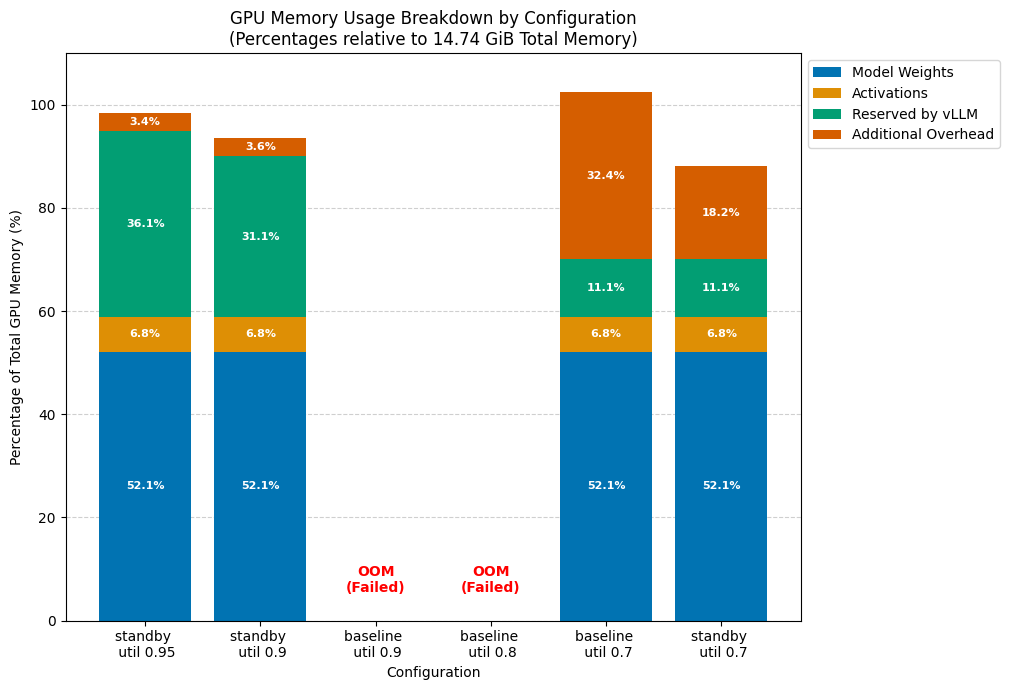
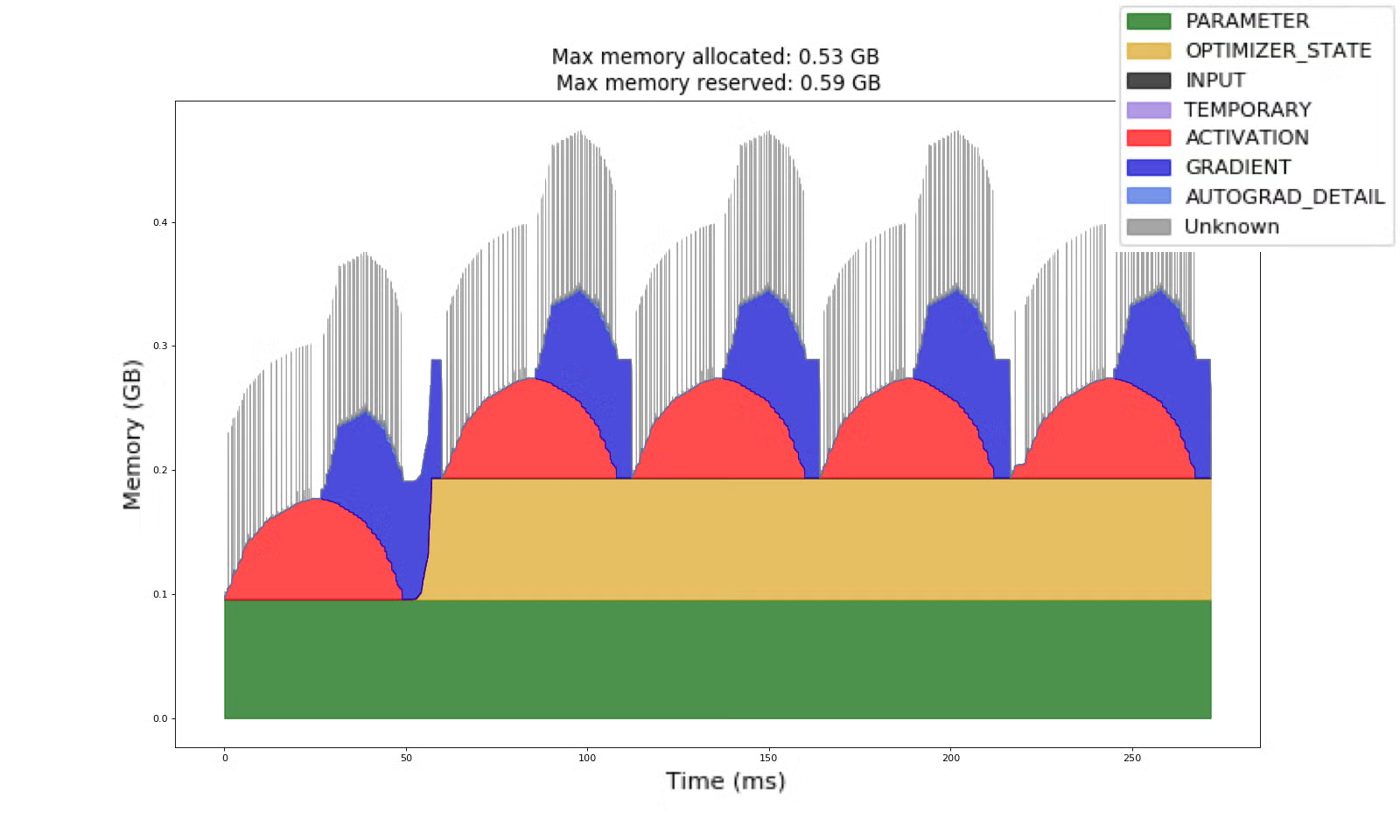
在上图中，你可以看到在单块 T4 GPU 上，Qwen 3 4B 的基线模式与待机模式之间的差异。 <mark style="background-color:green;">**我们可以将 vllm 的**</mark><mark style="background-color:green;">**&#x20;**</mark><mark style="background-color:green;">**`gpu_memory_utilisation`**</mark><mark style="background-color:green;">**&#x20;**</mark><mark style="background-color:green;">**提高到 0.95 这么高，而不用担心会影响训练**</mark>。这意味着你可以适配更长的序列长度，并处理更多序列。例如在第一种情况下，只要训练允许，我们就有足够的内存来容纳并处理 32K 长度的序列；而之前，任何超过 2K 的输入都可能装不进去，并最终导致 OOM（内存不足）。

<table data-full-width="true"><thead><tr><th>实验</th><th>配置</th><th>状态</th><th>GPU 内存使用</th><th>备注</th></tr></thead><tbody><tr><td><ol><li><a href="https://colab.research.google.com/drive/18CssBY5C0mStnLvu2Hlt4aFLoPugRG0K?usp=sharing">u0.95gen2ga1s Qwen3_(4B)-GRPO.ipynb</a></li></ol></td><td><p><code>standby True</code></p><p><code>vllm_gpu_util 0.95</code></p><p><code>num_gen 2</code></p><p><code>grad_acc_steps 2</code></p></td><td>运行 40 步 / 40 分钟</td><td><p>14.5 GiB（由 vllm_gpu_util 设置）</p><p><br></p></td><td>足以容纳 32K KVCache，并带有 2-4K 的 chunk，或者说 16K KVCache + 16K chunks</td></tr><tr><td><ol start="2"><li><a href="https://colab.research.google.com/drive/1q0TOUychygfreI2wKpg51sqnRhs5cYnX?usp=sharing">u9ge2ga2s Qwen3_(4B)-GRPO.ipynb</a></li></ol></td><td><p><code>standby True</code></p><p><code>vllm_gpu_util 0.9</code></p><p><code>num_gen 2</code></p><p><code>grad_acc_steps 2</code></p></td><td>40 分钟内运行 32 步</td><td>13.8 GiB（由…设置）</td><td>大致足以容纳约 28K KVCache，并带有 2-4K 的 chunk，或者说 15K KVCache + 15K chunks</td></tr><tr><td><ol start="3"><li><a href="https://colab.research.google.com/drive/12Uw8y5beLzPtx11mCWCYyh9Z_PEHHdId?usp=sharing">u9ge2ga2ns Qwen3_(4B)-GRPO.ipynb</a></li></ol></td><td><p><code>standby False</code></p><p><code>vllm_gpu_util 0.9</code></p><p><code>num_gen 2</code></p><p><code>grad_acc_steps 2</code></p></td><td>模型可以加载，但无法训练，因为即使 batch size 为 1 也放不下</td><td>OOM</td><td><br></td></tr><tr><td><ol start="4"><li><a href="https://colab.research.google.com/drive/1GwTlaP5CLsW-BcE1LqZWkz6S8VTWYdJ2?usp=sharing">u8ge2ga2ns Qwen3_(4B)-GRPO.ipynb</a></li></ol></td><td><p><code>standby False</code></p><p><code>vllm_gpu_util 0.8</code></p><p><code>num_gen 2</code></p><p><code>grad_acc_steps 2</code></p></td><td>模型可以加载，但无法训练，因为即使 batch size 为 1 也放不下</td><td>OOM</td><td><br></td></tr><tr><td><ol start="5"><li><a href="https://colab.research.google.com/drive/1IuSUNzEBTiURK-vbTQuRDuUl0Ya2pz2t?usp=sharing">u7ge2ga2ns Qwen3_(4B)-GRPO.ipynb</a></li></ol></td><td><p><code>standby False</code></p><p><code>vllm_gpu_util 0.7</code></p><p><code>num_gen 2</code></p><p><code>grad_acc_steps 2</code></p></td><td><p>训练正常</p><p>28 步耗时 39 分钟</p></td><td>约 15.1GiB</td><td>任何稍长一点的输入都会在 colab 中导致 OOM</td></tr><tr><td><ol start="6"><li><a href="https://colab.research.google.com/drive/1RY7HwpZ0luJT70OyLJ6zXKZQ2COdT9QJ?usp=sharing">u7gen2ga2s Qwen3_(4B)-GRPO.ipynb</a></li></ol></td><td><p><code>standby True</code></p><p><code>vllm_gpu_util 0.7</code></p><p><code>num_gen 2</code></p><p><code>grad_acc_steps 2</code></p></td><td><p>训练正常</p><p>29 步耗时 40 分钟</p></td><td>13GiB，但大多数时间大约在 10-11GB</td><td>在相同配置下，我们在这里节省了 2GiB，也就是 15% 的内存。\n对于更长的序列，这个节省量可能更高</td></tr></tbody></table>

### H100 实验

| 模型                   | GPU                   | 序列长度   | 生成次数 | 梯度累积步数 |
| -------------------- | --------------------- | ------ | ---- | ------ |
| Qwen2.5-14B-Instruct | NVIDIA H100 80GB PCIe | 32,768 | 8    | 4      |

在下面可折叠的结果中，你可以看到峰值内存使用有 9GiB 的差异（注意，在我们的情况下，90% 的时间里，GPU 内存使用量等于峰值内存）。 **从直观上看，使用 TRL 和 LoRA 时，我们最多只能微调一个 8B 参数模型，且上下文长度最多为 1024（少 32 倍）。** 任何更长的序列长度（在类似配置下）都会导致进程因 OOM 而失败。

<details>

<summary>点击查看 Unsloth Standby 模式 vs. 无 Standby 基准测试</summary>

```
已启用 Standby 模式：

|===========================================================================|
|                  PyTorch CUDA 内存摘要，设备 ID 0                 |
|---------------------------------------------------------------------------|
|            CUDA OOM：0            |        cudaMalloc 重试：0         |
|===========================================================================|
|        指标         | 当前使用量 | 峰值使用量 | 总分配量 | 总释放量 |
|---------------------------------------------------------------------------|
| 已分配内存      |  32249 MiB |  43042 MiB | 128336 GiB | 128305 GiB |
|       来自大池 |  31415 MiB |  42165 MiB | 127204 GiB | 127173 GiB |
|       来自小池 |    834 MiB |   1184 MiB |   1132 GiB |   1131 GiB |
|---------------------------------------------------------------------------|
| 活跃内存         |  32249 MiB |  43042 MiB | 128336 GiB | 128305 GiB |
|       来自大池 |  31415 MiB |  42165 MiB | 127204 GiB | 127173 GiB |
|       来自小池 |    834 MiB |   1184 MiB |   1132 GiB |   1131 GiB |
|---------------------------------------------------------------------------|
| 请求内存      |  32199 MiB |  42987 MiB | 128176 GiB | 128145 GiB |
|       来自大池 |  31364 MiB |  42110 MiB | 127047 GiB | 127016 GiB |
|       来自小池 |    834 MiB |   1184 MiB |   1129 GiB |   1128 GiB |
|---------------------------------------------------------------------------|
| GPU 保留内存   |  37644 MiB |  47504 MiB | 705806 MiB | 668162 MiB |
|       来自大池 |  36376 MiB |  46588 MiB | 682818 MiB | 646442 MiB |
|       来自小池 |   1268 MiB |   1284 MiB |  22988 MiB |  21720 MiB |
|---------------------------------------------------------------------------|
| 不可释放内存 | 713142 KiB |   4633 MiB | 103206 GiB | 103205 GiB |
|       来自大池 | 525312 KiB |   4594 MiB | 101923 GiB | 101922 GiB |
|       来自小池 | 187830 KiB |    250 MiB |   1283 GiB |   1283 GiB |
|---------------------------------------------------------------------------|
| 分配次数           |    3460    |    4809    |   15606 K  |   15603 K  |
|       来自大池 |     395    |     563    |    2812 K  |    2811 K  |
|       来自小池 |    3065    |    4270    |   12794 K  |   12791 K  |
|---------------------------------------------------------------------------|
| 活跃分配           |    3460    |    4809    |   15606 K  |   15603 K  |
|       来自大池 |     395    |     563    |    2812 K  |    2811 K  |
|       来自小池 |    3065    |    4270    |   12794 K  |   12791 K  |
|---------------------------------------------------------------------------|
| GPU 保留段 |     913    |     920    |   13260    |   12347    |
|       来自大池 |     279    |     305    |    1766    |    1487    |
|       来自小池 |     634    |     642    |   11494    |   10860    |
|---------------------------------------------------------------------------|
| 不可释放分配 |     422    |     628    |    4766 K  |    4765 K  |
|       来自大池 |      66    |      92    |    1290 K  |    1289 K  |
|       来自小池 |     356    |     555    |    3476 K  |    3475 K  |
|---------------------------------------------------------------------------|
| 超大分配  |       0    |       0    |       0    |       0    |
|---------------------------------------------------------------------------|
| 超大 GPU 段 |       0    |       0    |       0    |       0    |
|===========================================================================|


无 Standby：

|===========================================================================|
|                  PyTorch CUDA 内存摘要，设备 ID 0                 |
|---------------------------------------------------------------------------|
|            CUDA OOM：0            |        cudaMalloc 重试：0         |
|===========================================================================|
|        指标         | 当前使用量 | 峰值使用量 | 总分配量 | 总释放量 |
|---------------------------------------------------------------------------|
| 已分配内存      |  32711 MiB |  52084 MiB | 142756 GiB | 142724 GiB |
|       来自大池 |  31877 MiB |  51207 MiB | 141499 GiB | 141467 GiB |
|       来自小池 |    834 MiB |   1184 MiB |   1257 GiB |   1256 GiB |
|---------------------------------------------------------------------------|
| 活跃内存         |  32711 MiB |  52084 MiB | 142756 GiB | 142724 GiB |
|       来自大池 |  31877 MiB |  51207 MiB | 141499 GiB | 141467 GiB |
|       来自小池 |    834 MiB |   1184 MiB |   1257 GiB |   1256 GiB |
|---------------------------------------------------------------------------|
| 请求内存      |  32572 MiB |  51658 MiB | 141898 GiB | 141866 GiB |
|       来自大池 |  31738 MiB |  50780 MiB | 140644 GiB | 140613 GiB |
|       来自小池 |    833 MiB |   1184 MiB |   1253 GiB |   1252 GiB |
|---------------------------------------------------------------------------|
| GPU 保留内存   |  49552 MiB |  52188 MiB |  86354 MiB |  36802 MiB |
|       来自大池 |  48320 MiB |  51300 MiB |  84740 MiB |  36420 MiB |
|       来自小池 |   1232 MiB |   1232 MiB |   1614 MiB |    382 MiB |
|---------------------------------------------------------------------------|
| 不可释放内存 |      0 B   |      0 B   |      0 B   |      0 B   |
|       来自大池 |      0 B   |      0 B   |      0 B   |      0 B   |
|       来自小池 |      0 B   |      0 B   |      0 B   |      0 B   |
|---------------------------------------------------------------------------|
| 分配次数           |    3460    |    4809    |   17440 K  |   17437 K  |
|       来自大池 |     395    |     564    |    2742 K  |    2741 K  |
|       来自小池 |    3065    |    4270    |   14698 K  |   14695 K  |
|---------------------------------------------------------------------------|
| 活跃分配           |    3460    |    4809    |   17440 K  |   17437 K  |
|       来自大池 |     395    |     564    |    2742 K  |    2741 K  |
|       来自小池 |    3065    |    4270    |   14698 K  |   14695 K  |
|---------------------------------------------------------------------------|
| GPU 保留段 |       0    |       0    |       0    |       0    |
|       来自大池 |       0    |       0    |       0    |       0    |
|       来自小池 |       0    |       0    |       0    |       0    |
|---------------------------------------------------------------------------|
| 不可释放分配 |       0    |       0    |       0    |       0    |
|       来自大池 |       0    |       0    |       0    |       0    |
|       来自小池 |       0    |       0    |       0    |       0    |
|---------------------------------------------------------------------------|
| 超大分配  |       0    |       0    |       0    |       0    |
|---------------------------------------------------------------------------|
| 超大 GPU 段 |       0    |       0    |       0    |       0    |
|===========================================================================|
```

</details>

下图展示了在 Unsloth 中，Standby 与非 Standby 训练的对比。结果已对 3 次运行取平均，以确保指标不受噪声影响。实际上，如果你放大得足够近，你会看到启用 Standby 也让它更快，这大概是因为前面提到的内存压力更小。

<figure><img src="https://2657992854-files.gitbook.io/~/files/v0/b/gitbook-x-prod.appspot.com/o/spaces%2FxhOjnexMCB3dmuQFQ2Zq%2Fuploads%2Fgit-blob-2f285043ea8afa38d1082513e424662d8cd04b90%2Ftrainglobalstep.png?alt=media" alt=""><figcaption></figcaption></figure>

### 之前的 A100 40GB 实验

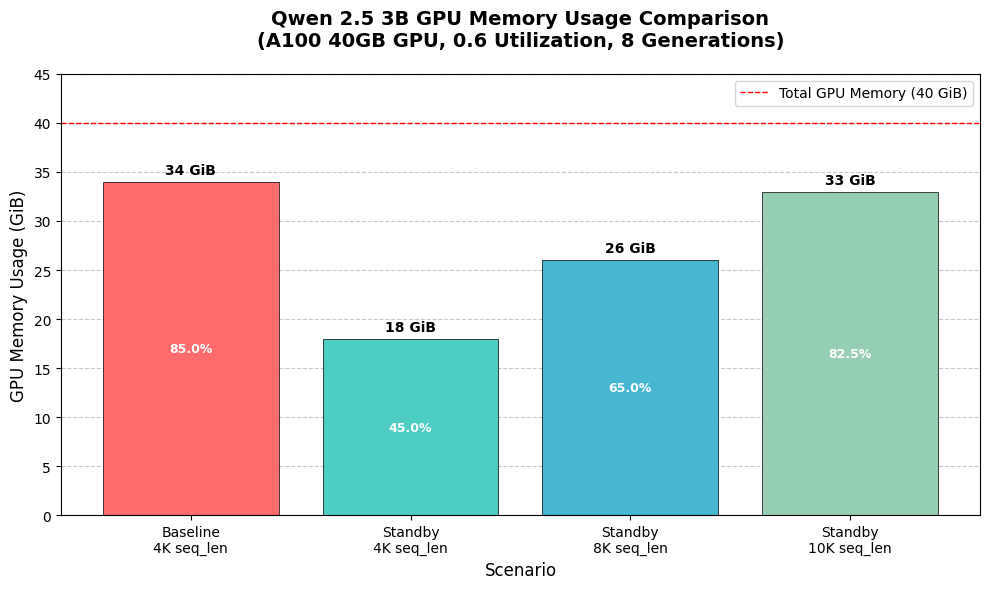
在我们之前使用 A100 40GB GPU、Qwen-2.5-3b-instruct 和每个样本 8 次生成的实验中，我们观察到，在没有 standby 的情况下，GRPO 训练（模型以 16bit 加载、LoRA、只有权重可训练）最多只能容纳 6K 序列长度。借助我们的 standby 功能，我们能够容纳 10K 甚至更长！ **相比之下，TRL 在保持相同批大小的情况下，只能提供最多 1K 的上下文长度。**

<figure><img src="https://2657992854-files.gitbook.io/~/files/v0/b/gitbook-x-prod.appspot.com/o/spaces%2FxhOjnexMCB3dmuQFQ2Zq%2Fuploads%2Fgit-blob-c7cd807b5d513b04f5f3a6219bfcea0fb12e442a%2Fqwen3%20gpu%20mem.png?alt=media" alt="" width="563"><figcaption></figcaption></figure>

## :tada:其他优化

我们现在选择更好的编译标志，并将编译时间减少 50% 或更多。我们还成功动态修补了任意 vLLM 版本以处理 `gc.collect` 以获得更好的向后兼容性，这一灵感来自这个 [vLLM 拉取请求](https://github.com/vllm-project/vllm/pull/21146)。这将编译时间从 2 分钟缩短到 40 秒以内。

我们还优化了 `torch.compile` 标志，并尝试开启一些标志——不幸的是 `combo_kernels` 和 `multi_kernel` 在 vLLM 0.10 和 Torch 2.8/2.9 nightly 上无法正常工作，而且 `coordinate_descent_tuning` 使所有 kernel 的自动调优速度大幅变慢。过去编译不到 1 分钟，而启用它后却花了 13 分钟以上，而且性能提升很小。

## :books:GRPO 笔记本

我们所有的 GRPO 笔记本默认都开启了 Unsloth Standby 和全部优化！查看 <https://docs.unsloth.ai/get-started/unsloth-notebooks> 以获取我们全部的 GRPO 笔记本，或者试试下面这些：

* [**Qwen3（4B）**](https://colab.research.google.com/github/unslothai/notebooks/blob/main/nb/Qwen3_\(4B\)-GRPO.ipynb) **-** 高级 GRPO LoRA
* [**DeepSeek-R1-0528-Qwen3（8B）**](https://colab.research.google.com/github/unslothai/notebooks/blob/main/nb/DeepSeek_R1_0528_Qwen3_\(8B\)_GRPO.ipynb) （用于多语言场景）
* [Gemma 3（1B）](https://colab.research.google.com/github/unslothai/notebooks/blob/main/nb/Gemma3_\(1B\)-GRPO.ipynb)
* [Llama 3.2（3B）](https://colab.research.google.com/github/unslothai/notebooks/blob/main/nb/Advanced_Llama3_2_\(3B\)_GRPO_LoRA.ipynb) - 高级 GRPO LoRA
* [Llama 3.1（8B）](https://colab.research.google.com/github/unslothai/notebooks/blob/main/nb/Llama3.1_\(8B\)-GRPO.ipynb)
* [Phi-4（14B）](https://colab.research.google.com/github/unslothai/notebooks/blob/main/nb/Phi_4_\(14B\)-GRPO.ipynb)
* [Mistral v0.3（7B）](https://colab.research.google.com/github/unslothai/notebooks/blob/main/nb/Mistral_v0.3_\(7B\)-GRPO.ipynb)
* [Qwen2.5（3B）](https://colab.research.google.com/github/unslothai/notebooks/blob/main/nb/Qwen2.5_\(3B\)-GRPO.ipynb)


---

# Agent Instructions
This documentation is published with GitBook. GitBook is the documentation platform designed so that both humans and AI agents can read, navigate, and reason over technical content effectively. Learn more at gitbook.com.

## Querying This Documentation
If you need additional information that is not directly available in this page, you can query the documentation by asking a question.

Perform an HTTP GET request on the following URL with the `ask` and `goal` query parameters:

```
GET https://unsloth.ai/docs/zh/kuai-su-kai-shi/reinforcement-learning-rl-guide/memory-efficient-rl.md?ask=<question>&goal=<user_goal>
```

`ask` is the immediate question: it should be specific, self-contained, and written in natural language.
`goal` is what the user is ultimately trying to achieve, the reason they need the answer. Sharing it helps GitBook give you a better, more relevant answer. A goal is most helpful when it describes the outcome the user wants rather than restating the question. For example, with `ask=how do I create an API token`, a goal like `automate deployments from our CI pipeline` lets GitBook tailor the answer to that use case.

The response will contain a direct answer to the question and relevant excerpts and sources from the documentation.

Use this mechanism when the answer is not explicitly present in the current page, you need clarification or additional context, or you want to retrieve related documentation sections.