> For the complete documentation index, see [llms.txt](https://unsloth.ai/docs/llms.txt). Markdown versions of documentation pages are available by appending `.md` to page URLs; this page is available as [Markdown](https://unsloth.ai/docs/zh/ji-cheng/jiang-python-sdk-lian-jie-dao-unsloth.md).
# 将 Python SDK 连接到 Unsloth
指南:使用官方 OpenAI 或 Anthropic SDK 从 Python 调用 Unsloth 的本地 API,包括流式输出、视觉、函数调用,以及 Unsloth 内置的服务器端工具。
Unsloth 在同一个基础 URL 上提供三种与 OpenAI 兼容的方言:Chat Completions、Responses 和 Anthropic Messages,因此所有主流 Python SDK 都可以对接它。\
\
你只需更改 `base_url` 和 `api_key` 客户端上的;其他一切(流式传输、工具调用、视觉、结构化输出)都按照 SDK 文档中的方式运行。本页涵盖大多数开发者首先会用到的两个 SDK:官方的 **OpenAI Python SDK** 以及官方的 **Anthropic Python SDK**.
{% hint style="info" %}
如果你不确定该使用哪个 URL / key / 模型名称,请先阅读 API 概览。它会引导你完成启动、加载模型以及创建 `sk-unsloth-…` 密钥。
{% endhint %}
### 🔑 前置条件
在运行下面任何代码片段之前,你需要:
* **本地运行的 Unsloth** ,并已加载模型(注意端口:通常 `8000` 或 `8888`).
* **一个 `sk-unsloth-…` API key** 创建自 **设置 → API**.
* **一个模型名称。** Unsloth 中 GGUF 模型的名称(例如 `qwen-local`, `unsloth/Qwen3.6-27B-GGUF`)。如果你忘记了它,请运行:
```bash
curl http://localhost:8888/v1/models -H "Authorization: Bearer sk-unsloth-…"
```
并复制 `id` 字段。
将密钥设置为环境变量,这样你就不用把它粘贴到代码里:
```bash
export UNSLOTH_STUDIO_AUTH_TOKEN=sk-unsloth-xxxxxxxxxxxx
```
#### 🤖 OpenAI SDK
Unsloth 的 `/v1/chat/completions` 端点可直接替换 OpenAI Python SDK 使用。该客户端把 Unsloth 视为任何其他与 OpenAI 兼容的提供方。
**1. 安装 SDK:**
```bash
pip install openai
```
**2. 创建一个客户端** ,指向 Unsloth:
```python
import os
from openai import OpenAI
client = OpenAI(
base_url="http://localhost:8888/v1", # 你的 unsloth 端口 + /v1
api_key=os.environ["UNSLOTH_STUDIO_AUTH_TOKEN"], # 你的 sk-unsloth-… 密钥
)
```
#### 基础聊天补全
```python
response = client.chat.completions.create(
model="default", # 你在 unsloth 中给模型起的名字,或 default
messages=[
{"role": "user", "content": "给我两个关于巴黎的事实"}
],
)
print(response.choices[0].message.content)
```
 #### 流式传输
将 `stream=True` 并遍历返回的生成器:
```python
stream = client.chat.completions.create(
model="qwen-local",
messages=[{"role": "user", "content": "写一首关于本地运行 LLM 的俳句。"}],
stream=True,
)
for chunk in stream:
if chunk.choices:
delta = chunk.choices[0].delta.content
if delta:
print(delta, end="", flush=True)
```
#### 流式传输
将 `stream=True` 并遍历返回的生成器:
```python
stream = client.chat.completions.create(
model="qwen-local",
messages=[{"role": "user", "content": "写一首关于本地运行 LLM 的俳句。"}],
stream=True,
)
for chunk in stream:
if chunk.choices:
delta = chunk.choices[0].delta.content
if delta:
print(delta, end="", flush=True)
```
 #### 图像(视觉)
将图像作为一个 `image_url` 内容部分附加。Unsloth 接受 HTTP(S) URL 或 `data:` base64 URI:
```python
import base64
from pathlib import Path
img_b64 = base64.b64encode(Path("test.jpg").read_bytes()).decode()
response = client.chat.completions.create(
model="default",
messages=[
{
"role": "user",
"content": [
{
"type": "image_url",
"image_url": {"url": f"data:image/jpeg;base64,{img_b64}"},
},
{"type": "text", "text": "这张图片里有什么?"},
],
}
],
)
print(response.choices[0].message.content)
```
{% hint style="info" %}
加载的模型必须支持多模态。如果你加载的是纯文本模型,视觉请求在结构上会成功,但模型将无法“看见”图像。
{% endhint %}
#### 图像(视觉)
将图像作为一个 `image_url` 内容部分附加。Unsloth 接受 HTTP(S) URL 或 `data:` base64 URI:
```python
import base64
from pathlib import Path
img_b64 = base64.b64encode(Path("test.jpg").read_bytes()).decode()
response = client.chat.completions.create(
model="default",
messages=[
{
"role": "user",
"content": [
{
"type": "image_url",
"image_url": {"url": f"data:image/jpeg;base64,{img_b64}"},
},
{"type": "text", "text": "这张图片里有什么?"},
],
}
],
)
print(response.choices[0].message.content)
```
{% hint style="info" %}
加载的模型必须支持多模态。如果你加载的是纯文本模型,视觉请求在结构上会成功,但模型将无法“看见”图像。
{% endhint %}
 #### 函数调用(OpenAI 工具)
传入 OpenAI 风格的 `tools` 以及(可选的) `tool_choice` ,Unsloth 会把它们转发到后端。你的客户端负责执行每次工具调用,并在下一轮返回结果:
```python
tools = [
{
"type": "function",
"function": {
"name": "get_weather",
"description": "获取某个城市的当前天气",
"parameters": {
"type": "object",
"properties": {
"city": {"type": "string", "description": "城市名称,例如 'Paris'"},
},
"required": ["city"],
},
},
}
]
response = client.chat.completions.create(
model="default",
messages=[{"role": "user", "content": "珀斯现在的天气怎么样?"}],
tools=tools,
tool_choice="auto",
)
tool_call = response.choices[0].message.tool_calls[0]
print(tool_call.function.name, tool_call.function.arguments)
```
#### 函数调用(OpenAI 工具)
传入 OpenAI 风格的 `tools` 以及(可选的) `tool_choice` ,Unsloth 会把它们转发到后端。你的客户端负责执行每次工具调用,并在下一轮返回结果:
```python
tools = [
{
"type": "function",
"function": {
"name": "get_weather",
"description": "获取某个城市的当前天气",
"parameters": {
"type": "object",
"properties": {
"city": {"type": "string", "description": "城市名称,例如 'Paris'"},
},
"required": ["city"],
},
},
}
]
response = client.chat.completions.create(
model="default",
messages=[{"role": "user", "content": "珀斯现在的天气怎么样?"}],
tools=tools,
tool_choice="auto",
)
tool_call = response.choices[0].message.tool_calls[0]
print(tool_call.function.name, tool_call.function.arguments)
```
 #### Unsloth 服务器端工具(简写)
除了 OpenAI 风格的客户端工具之外,Unsloth 还可以在 **Python**, **bash**,以及 **网页搜索** 服务器端执行,并自动把结果流式返回。通过 `extra_body` 参数启用,这样这些字段就会直接透传给 Unsloth:
```python
stream = client.chat.completions.create(
model="default",
messages=[{"role": "user", "content": "123 * 456 等于多少?用 Python 计算它。"}],
stream=True,
extra_body={
"enable_tools": True,
"enabled_tools": ["python", "web_search"],
"session_id": "my-session",
},
)
for chunk in stream:
if chunk.choices:
delta = chunk.choices[0].delta.content
if delta:
print(delta, end="", flush=True)
```
#### Unsloth 服务器端工具(简写)
除了 OpenAI 风格的客户端工具之外,Unsloth 还可以在 **Python**, **bash**,以及 **网页搜索** 服务器端执行,并自动把结果流式返回。通过 `extra_body` 参数启用,这样这些字段就会直接透传给 Unsloth:
```python
stream = client.chat.completions.create(
model="default",
messages=[{"role": "user", "content": "123 * 456 等于多少?用 Python 计算它。"}],
stream=True,
extra_body={
"enable_tools": True,
"enabled_tools": ["python", "web_search"],
"session_id": "my-session",
},
)
for chunk in stream:
if chunk.choices:
delta = chunk.choices[0].delta.content
if delta:
print(delta, end="", flush=True)
```

 “ `session_id` 是可选的。可用它在多次调用之间持久化工具状态(例如一个 Python 内核)。
{% hint style="info" %}
`enabled_tools` 目前支持 `"python"`, `"bash"`,以及 `"web_search"`。工具结果会以 `tool_result` 事件流式返回,以便模型在下一轮看到它们。
{% endhint %}
**列出模型**
```python
models = client.models.list()
for m in models.data:
print(m.id)
```
“ `session_id` 是可选的。可用它在多次调用之间持久化工具状态(例如一个 Python 内核)。
{% hint style="info" %}
`enabled_tools` 目前支持 `"python"`, `"bash"`,以及 `"web_search"`。工具结果会以 `tool_result` 事件流式返回,以便模型在下一轮看到它们。
{% endhint %}
**列出模型**
```python
models = client.models.list()
for m in models.data:
print(m.id)
```
 #### 🧠 Anthropic SDK
Unsloth 的 `/v1/messages` 端点可直接替换 Anthropic Python SDK 使用。
**1. 安装 SDK:**
```bash
pip install anthropic
```
**2. 创建一个客户端** ,指向 Unsloth:
{% code overflow="wrap" %}
```python
import os
from anthropic import Anthropic
client = Anthropic(
base_url="http://localhost:8888", # 你的 unsloth 端口(这里不要带 /v1——SDK 会自动添加)
api_key="dummy", # 任意非空随机值
default_headers={"Authorization": f"Bearer {os.environ['UNSLOTH_STUDIO_AUTH_TOKEN']}"} # 你的 sk-unsloth-… 密钥
)
```
{% endcode %}
#### 基础消息
```python
message = client.messages.create(
model="default",
max_tokens=1024,
messages=[
{"role": "user", "content": "用三种语言说你好。"}
],
)
print(message.content[0].text)
```
#### 🧠 Anthropic SDK
Unsloth 的 `/v1/messages` 端点可直接替换 Anthropic Python SDK 使用。
**1. 安装 SDK:**
```bash
pip install anthropic
```
**2. 创建一个客户端** ,指向 Unsloth:
{% code overflow="wrap" %}
```python
import os
from anthropic import Anthropic
client = Anthropic(
base_url="http://localhost:8888", # 你的 unsloth 端口(这里不要带 /v1——SDK 会自动添加)
api_key="dummy", # 任意非空随机值
default_headers={"Authorization": f"Bearer {os.environ['UNSLOTH_STUDIO_AUTH_TOKEN']}"} # 你的 sk-unsloth-… 密钥
)
```
{% endcode %}
#### 基础消息
```python
message = client.messages.create(
model="default",
max_tokens=1024,
messages=[
{"role": "user", "content": "用三种语言说你好。"}
],
)
print(message.content[0].text)
```
 #### 流式传输
该 SDK 提供了一个上下文管理器,可产出文本增量:
```python
with client.messages.stream(
model="default",
max_tokens=1024,
messages=[{"role": "user", "content": "用两句话解释 LoRA。"}],
) as stream:
for text in stream.text_stream:
print(text, end="", flush=True)
```
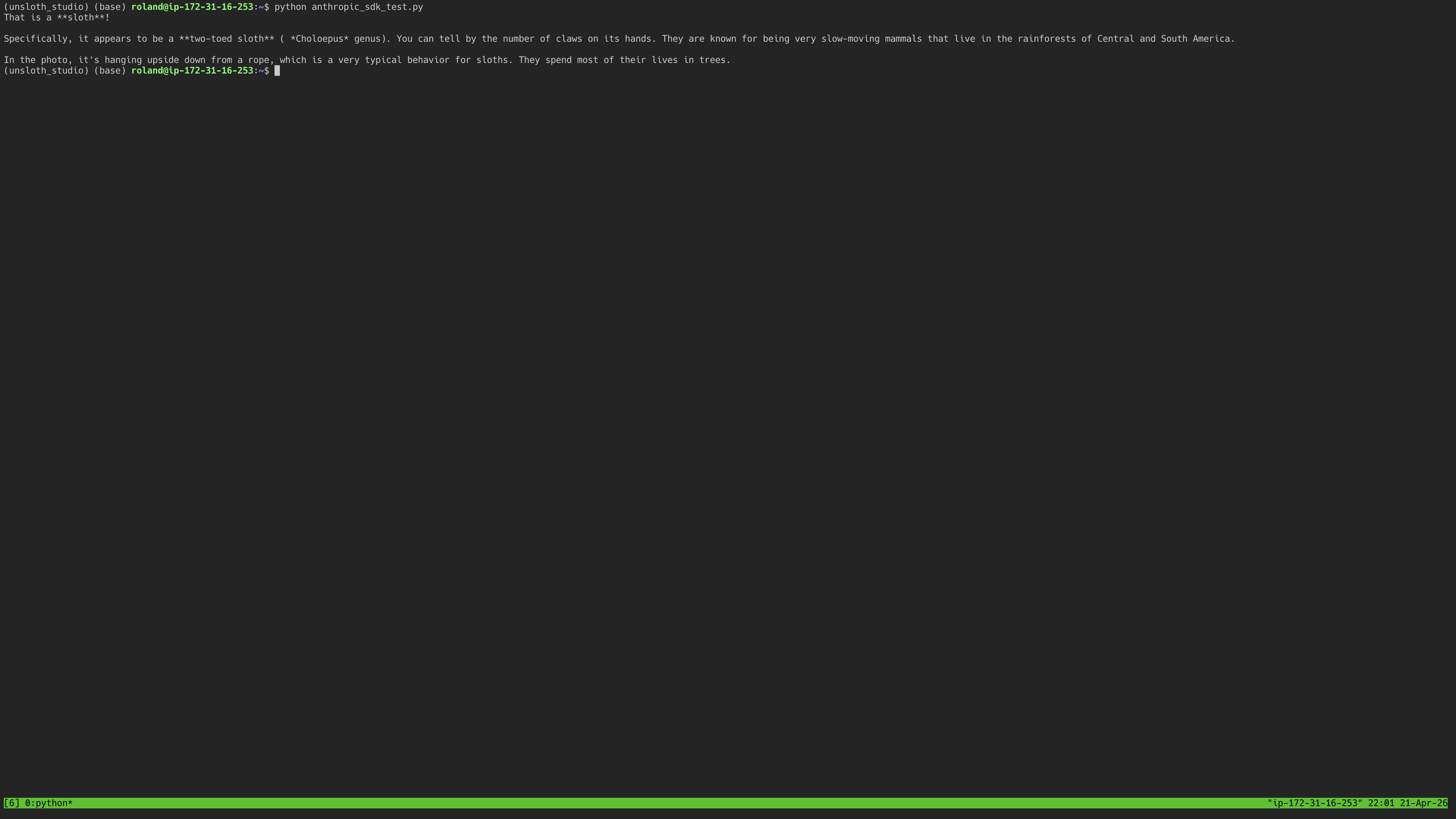
#### 图像(视觉)
Anthropic 风格的图像内容使用一个 `source` 包含 base64 数据的块:
```python
import base64
from pathlib import Path
img_b64 = base64.standard_b64encode(Path("photo.jpg").read_bytes()).decode()
message = client.messages.create(
model="default",
max_tokens=1024,
messages=[
{
"role": "user",
"content": [
{
"type": "image",
"source": {
"type": "base64",
"media_type": "image/jpeg",
"data": img_b64,
},
},
{"type": "text", "text": "这张图片里有什么?"},
],
}
],
)
print(message.content[0].text)
```
#### 流式传输
该 SDK 提供了一个上下文管理器,可产出文本增量:
```python
with client.messages.stream(
model="default",
max_tokens=1024,
messages=[{"role": "user", "content": "用两句话解释 LoRA。"}],
) as stream:
for text in stream.text_stream:
print(text, end="", flush=True)
```
#### 图像(视觉)
Anthropic 风格的图像内容使用一个 `source` 包含 base64 数据的块:
```python
import base64
from pathlib import Path
img_b64 = base64.standard_b64encode(Path("photo.jpg").read_bytes()).decode()
message = client.messages.create(
model="default",
max_tokens=1024,
messages=[
{
"role": "user",
"content": [
{
"type": "image",
"source": {
"type": "base64",
"media_type": "image/jpeg",
"data": img_b64,
},
},
{"type": "text", "text": "这张图片里有什么?"},
],
}
],
)
print(message.content[0].text)
```
 #### 工具调用(Anthropic 工具)
传入 Anthropic 风格的 `tools` 带有一个 `input_schema` ,Unsloth 会原生转发它们:
```python
tools = [
{
"name": "get_weather",
"description": "获取某个城市的当前天气",
"input_schema": {
"type": "object",
"properties": {
"city": {"type": "string", "description": "城市名称,例如 'Tokyo'"},
},
"required": ["city"],
},
}
]
message = client.messages.create(
model="default",
max_tokens=1024,
tools=tools,
tool_choice={"type": "auto"},
messages=[{"role": "user", "content": "东京现在的天气怎么样?"}],
)
for block in message.content:
if block.type == "tool_use":
print(block.name, block.input)
```
#### 工具调用(Anthropic 工具)
传入 Anthropic 风格的 `tools` 带有一个 `input_schema` ,Unsloth 会原生转发它们:
```python
tools = [
{
"name": "get_weather",
"description": "获取某个城市的当前天气",
"input_schema": {
"type": "object",
"properties": {
"city": {"type": "string", "description": "城市名称,例如 'Tokyo'"},
},
"required": ["city"],
},
}
]
message = client.messages.create(
model="default",
max_tokens=1024,
tools=tools,
tool_choice={"type": "auto"},
messages=[{"role": "user", "content": "东京现在的天气怎么样?"}],
)
for block in message.content:
if block.type == "tool_use":
print(block.name, block.input)
```
 #### Unsloth 服务器端工具(简写)
同样的 `enable_tools` / `enabled_tools` / `session_id` 简写也适用于 `/v1/messages` 将其透传 `extra_body`:
```python
with client.messages.stream(
model="default",
max_tokens=1024,
messages=[{"role": "user", "content": "搜索 Python 3.13 的功能并做个总结。"}],
extra_body={
"enable_tools": True,
"enabled_tools": ["web_search", "python"],
"session_id": "my-session",
},
) as stream:
for text in stream.text_stream:
print(text, end="", flush=True)
```
#### Unsloth 服务器端工具(简写)
同样的 `enable_tools` / `enabled_tools` / `session_id` 简写也适用于 `/v1/messages` 将其透传 `extra_body`:
```python
with client.messages.stream(
model="default",
max_tokens=1024,
messages=[{"role": "user", "content": "搜索 Python 3.13 的功能并做个总结。"}],
extra_body={
"enable_tools": True,
"enabled_tools": ["web_search", "python"],
"session_id": "my-session",
},
) as stream:
for text in stream.text_stream:
print(text, end="", flush=True)
```

 Unsloth 会发出自定义的 `tool_result` SSE 事件,用于呈现模型对每次工具调用输出的视图。Anthropic SDK 会原样将这些事件透传到它的事件流中。
#### JSON 解码(`response_format`)
Unsloth 通过 `response_format`支持 OpenAI 风格的结构化输出。传入一个 JSON Schema,模型就会被约束为生成与之匹配的 JSON。
````python
import json
import os
import re
from openai import OpenAI
client = OpenAI(
base_url="http://localhost:8888/v1",
api_key=os.environ["UNSLOTH_STUDIO_AUTH_TOKEN"],
)
response = client.chat.completions.create(
model="default",
stream=False,
temperature=0.0,
max_tokens=1024,
messages=[
{
"role": "user",
"content": "选择一个国家:日本、埃及或秘鲁。用一句话解释原因。",
},
],
response_format={
"type": "json_schema",
"json_schema": {
"name": "country_pick",
"schema": {
"type": "object",
"properties": {
"country": {"type": "string", "enum": ["Japan", "Egypt", "Peru"]},
"reason": {"type": "string"},
},
"required": ["country", "reason"],
"additionalProperties": False,
},
"strict": True,
},
},
)
raw = response.choices[0].message.content
# 先去掉 Gemma 4 在 JSON 外包裹的 markdown 代码围栏,然后解析。
cleaned = re.sub(r"^```(?:json)?\s*", "", raw)
cleaned = re.sub(r"\s*```$", "", cleaned)
parsed = json.loads(cleaned)
print(json.dumps(parsed, indent=2))
print()
print("国家:", parsed["country"])
print("原因:", parsed["reason"])
````
“ `strict: True` 这个标志会让 Unsloth 在解码过程中强制执行该模式,而不是依赖模型自己遵守。 `additionalProperties: False` 和 `required` 与标准 JSON Schema 中的含义相同。
终端输出大致应如下所示:
Unsloth 会发出自定义的 `tool_result` SSE 事件,用于呈现模型对每次工具调用输出的视图。Anthropic SDK 会原样将这些事件透传到它的事件流中。
#### JSON 解码(`response_format`)
Unsloth 通过 `response_format`支持 OpenAI 风格的结构化输出。传入一个 JSON Schema,模型就会被约束为生成与之匹配的 JSON。
````python
import json
import os
import re
from openai import OpenAI
client = OpenAI(
base_url="http://localhost:8888/v1",
api_key=os.environ["UNSLOTH_STUDIO_AUTH_TOKEN"],
)
response = client.chat.completions.create(
model="default",
stream=False,
temperature=0.0,
max_tokens=1024,
messages=[
{
"role": "user",
"content": "选择一个国家:日本、埃及或秘鲁。用一句话解释原因。",
},
],
response_format={
"type": "json_schema",
"json_schema": {
"name": "country_pick",
"schema": {
"type": "object",
"properties": {
"country": {"type": "string", "enum": ["Japan", "Egypt", "Peru"]},
"reason": {"type": "string"},
},
"required": ["country", "reason"],
"additionalProperties": False,
},
"strict": True,
},
},
)
raw = response.choices[0].message.content
# 先去掉 Gemma 4 在 JSON 外包裹的 markdown 代码围栏,然后解析。
cleaned = re.sub(r"^```(?:json)?\s*", "", raw)
cleaned = re.sub(r"\s*```$", "", cleaned)
parsed = json.loads(cleaned)
print(json.dumps(parsed, indent=2))
print()
print("国家:", parsed["country"])
print("原因:", parsed["reason"])
````
“ `strict: True` 这个标志会让 Unsloth 在解码过程中强制执行该模式,而不是依赖模型自己遵守。 `additionalProperties: False` 和 `required` 与标准 JSON Schema 中的含义相同。
终端输出大致应如下所示:
 ### 🧪 选择一个 SDK
两个 SDK 都可以对接 Unsloth。正确选择取决于你技术栈的其余部分:
* 使用 **OpenAI SDK** 如果你的代码已经依赖 OpenAI Python 包,你想要 OpenAI 风格的 `tools` / `tool_choice`,或者你计划调用 Responses API。
* 使用 **Anthropic SDK** 如果你的代码已经依赖 Anthropic 包,你更喜欢 Anthropic 的 `input_schema` 工具格式,或者你想要 Anthropic 原生的流式事件类型。
你也可以在同一个项目中同时使用二者。Unsloth 在同一个端口上提供它们,因此一个 `sk-unsloth-…` 密钥即可同时验证两者。
### ❔ 故障排除
**`401 未授权`** “ `UNSLOTH_STUDIO_AUTH_TOKEN` 环境变量未设置,或者密钥有误。重新导出并用 `echo $UNSLOTH_STUDIO_AUTH_TOKEN`.
**`404 Not Found` 来自 OpenAI SDK** 检查 `base_url` 是否以 `/v1`结尾。OpenAI SDK 会按原样将端点路径追加到基础 URL。
**`404 Not Found` 来自 Anthropic SDK** 检查 `base_url` 不 **不会** 以 `/v1`结尾。Anthropic SDK 会自动添加 `/v1/messages` 它。
**`extra_body` 字段没有传到 Unsloth** 请确保你使用的是较新的 `openai` / `anthropic` SDK。旧版本会静默丢弃未知字段。可通过以下命令升级: `pip install -U openai anthropic`.
**流式传输“卡住”,然后一下子全部吐出** 包裹你输出的东西在缓冲。脚本中, `print(..., flush=True)`;在 notebook 中通常没问题;在代理之后,请在代理上禁用响应缓冲。
关于端点级别的问题(端口错误、模型未加载、连接丢失等),请参见 API 概览页面。
### 可选:设置服务器默认值
在使用 Python SDK 连接之前,你可以配置默认的服务器行为,当使用 `unsloth run` 命令。
```bash
# 使用自定义默认值启动服务器
unsloth run \\
--model unsloth/Qwen3-1.7B-GGUF \
--reasoning off \\
--temp 0.6 \\
-p 8888
```
使用 `--reasoning off` 可关闭思考,或者 `--reasoning on` 可为支持推理的模型开启它。
```bash
# 在本地网络上暴露 API
unsloth run \\
--model unsloth/Qwen3-1.7B-GGUF \
-H 0.0.0.0 \\
-p 8888
```
这将把服务器启动在 `0.0.0.0:8888`,从而允许本地网络上的其他设备连接。
当请求未指定自己的生成参数时,这些设置会成为服务器默认值。
像 `temperature`, `top_p`, `max_tokens`,以及 `stream` 这样的请求级别值仍然可以覆盖该请求的默认值。
---
# Agent Instructions
This documentation is published with GitBook. GitBook is the documentation platform designed so that both humans and AI agents can read, navigate, and reason over technical content effectively. Learn more at gitbook.com.
## Querying This Documentation
If you need additional information that is not directly available in this page, you can query the documentation by asking a question.
Perform an HTTP GET request on the following URL with the `ask` and `goal` query parameters:
```
GET https://unsloth.ai/docs/zh/ji-cheng/jiang-python-sdk-lian-jie-dao-unsloth.md?ask=&goal=
```
`ask` is the immediate question: it should be specific, self-contained, and written in natural language.
`goal` is what the user is ultimately trying to achieve, the reason they need the answer. Sharing it helps GitBook give you a better, more relevant answer. A goal is most helpful when it describes the outcome the user wants rather than restating the question. For example, with `ask=how do I create an API token`, a goal like `automate deployments from our CI pipeline` lets GitBook tailor the answer to that use case.
The response will contain a direct answer to the question and relevant excerpts and sources from the documentation.
Use this mechanism when the answer is not explicitly present in the current page, you need clarification or additional context, or you want to retrieve related documentation sections.
### 🧪 选择一个 SDK
两个 SDK 都可以对接 Unsloth。正确选择取决于你技术栈的其余部分:
* 使用 **OpenAI SDK** 如果你的代码已经依赖 OpenAI Python 包,你想要 OpenAI 风格的 `tools` / `tool_choice`,或者你计划调用 Responses API。
* 使用 **Anthropic SDK** 如果你的代码已经依赖 Anthropic 包,你更喜欢 Anthropic 的 `input_schema` 工具格式,或者你想要 Anthropic 原生的流式事件类型。
你也可以在同一个项目中同时使用二者。Unsloth 在同一个端口上提供它们,因此一个 `sk-unsloth-…` 密钥即可同时验证两者。
### ❔ 故障排除
**`401 未授权`** “ `UNSLOTH_STUDIO_AUTH_TOKEN` 环境变量未设置,或者密钥有误。重新导出并用 `echo $UNSLOTH_STUDIO_AUTH_TOKEN`.
**`404 Not Found` 来自 OpenAI SDK** 检查 `base_url` 是否以 `/v1`结尾。OpenAI SDK 会按原样将端点路径追加到基础 URL。
**`404 Not Found` 来自 Anthropic SDK** 检查 `base_url` 不 **不会** 以 `/v1`结尾。Anthropic SDK 会自动添加 `/v1/messages` 它。
**`extra_body` 字段没有传到 Unsloth** 请确保你使用的是较新的 `openai` / `anthropic` SDK。旧版本会静默丢弃未知字段。可通过以下命令升级: `pip install -U openai anthropic`.
**流式传输“卡住”,然后一下子全部吐出** 包裹你输出的东西在缓冲。脚本中, `print(..., flush=True)`;在 notebook 中通常没问题;在代理之后,请在代理上禁用响应缓冲。
关于端点级别的问题(端口错误、模型未加载、连接丢失等),请参见 API 概览页面。
### 可选:设置服务器默认值
在使用 Python SDK 连接之前,你可以配置默认的服务器行为,当使用 `unsloth run` 命令。
```bash
# 使用自定义默认值启动服务器
unsloth run \\
--model unsloth/Qwen3-1.7B-GGUF \
--reasoning off \\
--temp 0.6 \\
-p 8888
```
使用 `--reasoning off` 可关闭思考,或者 `--reasoning on` 可为支持推理的模型开启它。
```bash
# 在本地网络上暴露 API
unsloth run \\
--model unsloth/Qwen3-1.7B-GGUF \
-H 0.0.0.0 \\
-p 8888
```
这将把服务器启动在 `0.0.0.0:8888`,从而允许本地网络上的其他设备连接。
当请求未指定自己的生成参数时,这些设置会成为服务器默认值。
像 `temperature`, `top_p`, `max_tokens`,以及 `stream` 这样的请求级别值仍然可以覆盖该请求的默认值。
---
# Agent Instructions
This documentation is published with GitBook. GitBook is the documentation platform designed so that both humans and AI agents can read, navigate, and reason over technical content effectively. Learn more at gitbook.com.
## Querying This Documentation
If you need additional information that is not directly available in this page, you can query the documentation by asking a question.
Perform an HTTP GET request on the following URL with the `ask` and `goal` query parameters:
```
GET https://unsloth.ai/docs/zh/ji-cheng/jiang-python-sdk-lian-jie-dao-unsloth.md?ask=&goal=
```
`ask` is the immediate question: it should be specific, self-contained, and written in natural language.
`goal` is what the user is ultimately trying to achieve, the reason they need the answer. Sharing it helps GitBook give you a better, more relevant answer. A goal is most helpful when it describes the outcome the user wants rather than restating the question. For example, with `ask=how do I create an API token`, a goal like `automate deployments from our CI pipeline` lets GitBook tailor the answer to that use case.
The response will contain a direct answer to the question and relevant excerpts and sources from the documentation.
Use this mechanism when the answer is not explicitly present in the current page, you need clarification or additional context, or you want to retrieve related documentation sections.