> For the complete documentation index, see [llms.txt](https://unsloth.ai/docs/llms.txt). Markdown versions of documentation pages are available by appending `.md` to page URLs; this page is available as [Markdown](https://unsloth.ai/docs/zh/ji-cheng/connections/jiang-llama.cpp-lian-jie-dao-unsloth-shi-yong-llamaserver-yun-xing-gguf-mo-xing.md).
# 将 llama.cpp 连接到 Unsloth:使用 llama-server 运行 GGUF 模型
Llama.cpp 是一个开源推理引擎,用于在本地硬件上高效运行 GGUF 模型,并且 [Unsloth](https://github.com/unslothai/unsloth) 它可以轻松地将这些模型直接运行到一个开源 UI 聊天界面中。通过启动一个本地 `llama-server`,你可以从你的机器或 Hugging Face 提供一个 GGUF 模型服务,将其连接到 Unsloth,并像其他外部聊天模型一样使用它。
本指南将带你完成安装 llama.cpp、启动 `llama-server`,将其连接到 Unsloth,启用你的模型,并配置提示缓存、上下文长度、API 密钥、FA 和聊天模板。
## 设置
{% stepper %}
{% step %}
### 安装 llama.cpp
请先安装 llama.cpp,以便你可以运行 `llama-server` 命令。
请使用以下官方安装方式之一:
* 下载预编译的 [llama.cpp 二进制文件](https://github.com/ggml-org/llama.cpp/releases)
* 从……构建 llama.cpp [source](https://github.com/ggml-org/llama.cpp/blob/master/docs/build.md)
安装后,请在终端中检查 llama-server 是否正常工作:
`llama-server --help`
{% endstep %}
{% step %}
### 选择一个 GGUF 模型
llama-server 可以加载本地 .gguf 文件,或从 Hugging Face 下载 GGUF 模型。
若要直接提供 Hugging Face 的 GGUF 仓库服务,请使用仓库和量化名称:
`llama-server -hf unsloth/Qwen3.6-27B-GGUF:UD-Q4_K_XL`
如果你想加载本地模型,也可以按照以下步骤操作。
开始 `llama-server` 以及你要提供服务的模型:
```bash
llama-server \
--model /path/to/model.gguf \\
--host 0.0.0.0 \\
--port 8080
```
这会在以下地址暴露一个 API 端点: `http://localhost:8080/v1`
若要要求 API 密钥,请添加:
```bash
--api-key 1234-myapi-key
```
{% endstep %}
{% step %}
### 将 Llama.cpp 连接到 Unsloth
打开 **设置 → 连接**,然后点击 **添加连接**。选择 **llama.cpp**,然后输入你的服务器详细信息:
如果你没有使用以下参数启动 llama-server `--api-key`,则将 API 密钥字段留空。输入你的服务器基础 URL,例如 `http://localhost:8080/v1`\
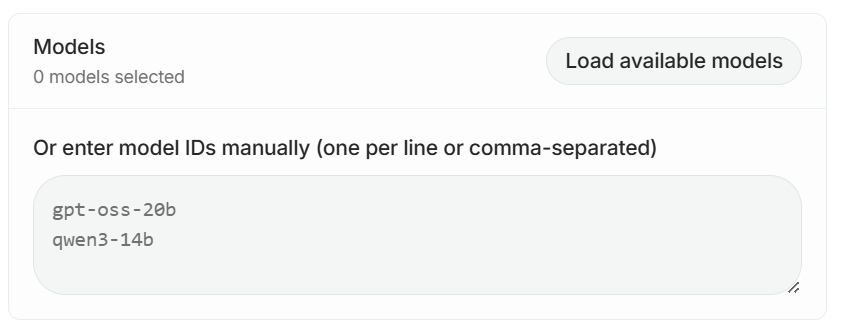
点击 **加载模型** 以获取可用的模型 ID;如果你的服务器没有暴露 `/models`.
然后,在你点击 **添加连接,** 你启用的模型现在将显示在 **已连接** 在 **选择模型** 下拉菜单中。
{% endstep %}
{% step %}
### 准备聊天
保存连接后,你的 llama.cpp 模型将显示在 **连接** 在模型下拉菜单中。选择它即可开始通过它聊天 **llama-server**.
{% endstep %}
{% endstepper %}
### 提示缓存
当请求重复使用相同的长前缀时,提示缓存可降低延迟和成本。使用 **提示缓存** Unsloth 侧边栏中的该设置来控制受支持连接的缓存行为。
在 llama.cpp 中,提示缓存默认启用,并且可以在启动时禁用\
`llama-server` ,使用:
```bash
--no-cache-prompt
```
### **常见的 llama-server 参数**
上面的示例只使用了所需的连接设置。你可以根据你的模型和硬件添加更多 llama-server 参数。
常见选项包括:
```bash
--ctx-size 8192 \\ # 设置上下文长度
--parallel 2 \\ # 设置并行槽位数量
--flash-attn on \\ # 在支持时启用 Flash Attention
--jinja \\ # 使用模型聊天模板
--api-key 1234-key \\ # 需要 API 密钥
--no-cache-prompt # 禁用提示缓存
```
有关服务器参数的完整列表,请参阅官方 [llama.cpp 服务器 README](https://github.com/ggml-org/llama.cpp/blob/master/tools/server/README.md).
---
# Agent Instructions
This documentation is published with GitBook. GitBook is the documentation platform designed so that both humans and AI agents can read, navigate, and reason over technical content effectively. Learn more at gitbook.com.
## Querying This Documentation
If you need additional information that is not directly available in this page, you can query the documentation by asking a question.
Perform an HTTP GET request on the following URL with the `ask` and `goal` query parameters:
```
GET https://unsloth.ai/docs/zh/ji-cheng/connections/jiang-llama.cpp-lian-jie-dao-unsloth-shi-yong-llamaserver-yun-xing-gguf-mo-xing.md?ask=&goal=
```
`ask` is the immediate question: it should be specific, self-contained, and written in natural language.
`goal` is what the user is ultimately trying to achieve, the reason they need the answer. Sharing it helps GitBook give you a better, more relevant answer. A goal is most helpful when it describes the outcome the user wants rather than restating the question. For example, with `ask=how do I create an API token`, a goal like `automate deployments from our CI pipeline` lets GitBook tailor the answer to that use case.
The response will contain a direct answer to the question and relevant excerpts and sources from the documentation.
Use this mechanism when the answer is not explicitly present in the current page, you need clarification or additional context, or you want to retrieve related documentation sections.


.png?alt=media&token=ade433bf-5eaf-4146-a266-525a85a6c98d)