> For the complete documentation index, see [llms.txt](https://unsloth.ai/docs/llms.txt). Markdown versions of documentation pages are available by appending `.md` to page URLs; this page is available as [Markdown](https://unsloth.ai/docs/zh/desktop.md).

# 介绍 Unsloth Desktop

Unsloth Desktop 是一款适用于 Mac、Windows 和 Linux 的免费开源应用。

<h2 align="center"><strong>介绍 Unsloth Desktop</strong></h2>

<p align="center"><strong>Unsloth Desktop（测试版）</strong> 是一个免费的， <strong>开源的</strong> 用于在你自己的本地硬件上运行和训练 AI 模型的应用。适用于 macOS、Windows 和 Linux。</p>

<p align="center">Unsloth 可让你运行、训练和部署 LLM， <strong>扩散模型</strong> 图像/视频， <strong>MLX</strong>，GGUF 和音频模型。</p>

<p align="center"><a href="https://unsloth.ai/download" class="button primary" data-icon="down-to-bracket">下载</a><a href="/docs/zh/desktop.md#feature-deep-dive" class="button secondary" data-icon="sparkles">功能</a><a href="https://github.com/unslothai/unsloth" class="button secondary" data-icon="github">GitHub</a></p>

{% columns %}
{% column %}

{% endcolumn %}

{% column width="83.33333333333333%" %}

<figure><img src="https://3215535692-files.gitbook.io/~/files/v0/b/gitbook-x-prod.appspot.com/o/spaces%2FxhOjnexMCB3dmuQFQ2Zq%2Fuploads%2FHTlw8oO7wDIYyGqilty0%2Funsloth%20qwen3.8%20final.png?alt=media&#x26;token=b8b32558-d0c8-4de8-bedf-7ad10e2c4c4a" alt=""><figcaption></figcaption></figure>
{% endcolumn %}

{% column width="8.333333333333314%" %}

{% endcolumn %}
{% endcolumns %}

<h2 align="center"><strong>功能</strong> ✨</h2>

<p align="center"><strong>在我们的功能深度解析中探索所有功能：</strong> <a href="#feature-deep-dive" class="button primary">功能深度解析 -></a></p>

<table data-view="cards"><thead><tr><th></th><th></th><th data-hidden data-card-target data-type="content-ref"></th><th data-hidden data-card-cover data-type="image">封面图</th></tr></thead><tbody><tr><td><h3>准确的工具调用</h3></td><td>获得准确度提升 50% 的自我修复工具调用和安全代码执行。 <strong>并行聊天</strong> 也受支持。</td><td><a href="/docs/zh/xin/studio/chat.md">Chat with models</a></td><td><a href="https://3215535692-files.gitbook.io/~/files/v0/b/gitbook-x-prod.appspot.com/o/spaces%2FxhOjnexMCB3dmuQFQ2Zq%2Fuploads%2FLL8RSnAuc7XdutjAVD4n%2Fcode%20exec.png?alt=media&#x26;token=566a7385-69e0-46db-a022-bef8e2cad677">https://3215535692-files.gitbook.io/~/files/v0/b/gitbook-x-prod.appspot.com/o/spaces%2FxhOjnexMCB3dmuQFQ2Zq%2Fuploads%2FLL8RSnAuc7XdutjAVD4n%2Fcode%20exec.png?alt=media&#x26;token=566a7385-69e0-46db-a022-bef8e2cad677</a></td></tr><tr><td><h3>扩散图像/视频</h3></td><td>运行和训练诸如 Qwen-Image-2.1<strong>,</strong> MiniMax H3，推理更快。</td><td><a href="#image-and-video-generation">#image-and-video-generation</a></td><td><a href="https://3215535692-files.gitbook.io/~/files/v0/b/gitbook-x-prod.appspot.com/o/spaces%2FxhOjnexMCB3dmuQFQ2Zq%2Fuploads%2FHD8yIrQN6pS7qCNYMVxp%2Ffklrfklf.gif?alt=media&#x26;token=9e7daea2-c9cc-404c-af53-325833224c94">https://3215535692-files.gitbook.io/~/files/v0/b/gitbook-x-prod.appspot.com/o/spaces%2FxhOjnexMCB3dmuQFQ2Zq%2Fuploads%2FHD8yIrQN6pS7qCNYMVxp%2Ffklrfklf.gif?alt=media&#x26;token=9e7daea2-c9cc-404c-af53-325833224c94</a></td></tr><tr><td><h3>让你的智能体本地化</h3></td><td>通过模型切换将本地 LLM 连接到 Claude Code 和 Codex 等智能体工具， <strong>模型切换。</strong></td><td><a href="/docs/zh/ji-cheng/unsloth-start.md">Unsloth Start</a></td><td><a href="https://3215535692-files.gitbook.io/~/files/v0/b/gitbook-x-prod.appspot.com/o/spaces%2FxhOjnexMCB3dmuQFQ2Zq%2Fuploads%2FaXmr0nHDKoSkhX6ESjLz%2Fclaude%20code%20image.png?alt=media&#x26;token=67e609e9-b329-4c19-9e4d-2aed0fe34f9c">https://3215535692-files.gitbook.io/~/files/v0/b/gitbook-x-prod.appspot.com/o/spaces%2FxhOjnexMCB3dmuQFQ2Zq%2Fuploads%2FaXmr0nHDKoSkhX6ESjLz%2Fclaude%20code%20image.png?alt=media&#x26;token=67e609e9-b329-4c19-9e4d-2aed0fe34f9c</a></td></tr><tr><td><h3>无限网页搜索</h3></td><td>获得无限制、私密且安全的网页搜索和深度研究</td><td><a href="/docs/zh/xin/studio.md#web-search-upgraded">Unsloth Studio</a></td><td><a href="https://3215535692-files.gitbook.io/~/files/v0/b/gitbook-x-prod.appspot.com/o/spaces%2FxhOjnexMCB3dmuQFQ2Zq%2Fuploads%2F6hy8X5V7FVW0NSWJfQAj%2Fwebsearch%20nice.png?alt=media&#x26;token=8a02b6ac-3c85-484f-9bc7-f7d3eee24cd9">https://3215535692-files.gitbook.io/~/files/v0/b/gitbook-x-prod.appspot.com/o/spaces%2FxhOjnexMCB3dmuQFQ2Zq%2Fuploads%2F6hy8X5V7FVW0NSWJfQAj%2Fwebsearch%20nice.png?alt=media&#x26;token=8a02b6ac-3c85-484f-9bc7-f7d3eee24cd9</a></td></tr><tr><td><h3>运行最新模型</h3></td><td>发现、管理并训练最新的 Qwen3.8-27B、MiniMax-H3、Muse Glimmer、Kimi K3 等模型。</td><td><a href="/docs/zh/mo-xing/tutorials.md">Complete LLM Directory</a></td><td><a href="https://3215535692-files.gitbook.io/~/files/v0/b/gitbook-x-prod.appspot.com/o/spaces%2FxhOjnexMCB3dmuQFQ2Zq%2Fuploads%2FTSjv63MOktgx6PbgHAi2%2Fmodel%20hub%20models.png?alt=media&#x26;token=b884e283-ff8b-4d4c-b4cb-7864d4335aa0">https://3215535692-files.gitbook.io/~/files/v0/b/gitbook-x-prod.appspot.com/o/spaces%2FxhOjnexMCB3dmuQFQ2Zq%2Fuploads%2FTSjv63MOktgx6PbgHAi2%2Fmodel%20hub%20models.png?alt=media&#x26;token=b884e283-ff8b-4d4c-b4cb-7864d4335aa0</a></td></tr><tr><td><h3><strong>部署到任何地方</strong></h3></td><td>在你的本地网络中提供模型服务，或通过安全的 Cloudflare HTTPS 在任何地方公开它们，或者 <a href="/docs/zh/ji-chu-zhi-shi/lan.md">LAN</a>.</td><td><a href="/docs/zh/ji-chu-zhi-shi/ru-he-zai-ren-he-di-fang-ti-gong-ben-di-llm-fu-wu-shi-yong-cloudflare-he-unsloth-shi-xian-an-quan-yu.md">Serve Models with HTTPS</a></td><td><a href="https://3215535692-files.gitbook.io/~/files/v0/b/gitbook-x-prod.appspot.com/o/spaces%2FxhOjnexMCB3dmuQFQ2Zq%2Fuploads%2FJDIIEQ8fFZy2g5snC2kp%2Fcloudflare%20url.png?alt=media&#x26;token=aadb42b5-16f0-42d1-8059-c2611e7cd931">https://3215535692-files.gitbook.io/~/files/v0/b/gitbook-x-prod.appspot.com/o/spaces%2FxhOjnexMCB3dmuQFQ2Zq%2Fuploads%2FJDIIEQ8fFZy2g5snC2kp%2Fcloudflare%20url.png?alt=media&#x26;token=aadb42b5-16f0-42d1-8059-c2611e7cd931</a></td></tr></tbody></table>

<h2 align="center"><strong>开始使用</strong> 🦥</h2>

<p align="center">Unsloth 是一个 <strong>基于 Tauri 的</strong> 应用。安装后，下载模型并开始聊天！</p>

<p align="center"><strong>下载 Unsloth Desktop：</strong><a href="https://unsloth.ai/download/mac" class="button primary" data-icon="apple">macOS</a><a href="https://unsloth.ai/download/windows" class="button primary" data-icon="windows">Windows</a><a href="https://unsloth.ai/download/linux" class="button primary" data-icon="linux">Linux 和 WSL</a></p>

{% columns %}
{% column width="16.666666666666664%" %}

{% endcolumn %}

{% column width="66.66666666666667%" %}
{% stepper %}
{% step %}

### 安装 Unsloth Desktop <a href="#install-jan" id="install-jan"></a>

1. 下载 [Unsloth Desktop](https://unsloth.ai/download)
2. 安装适用于 [macOS](/docs/zh/kuai-su-kai-shi/install/mac.md), [Windows](/docs/zh/kuai-su-kai-shi/install/windows-installation.md), [Linux](/docs/zh/kuai-su-kai-shi/install/linux.md)
3. 启动应用
   {% endstep %}

{% step %}

### 选择模型

打开顶部的“选择模型”下拉菜单或“模型中心”选项卡，选择适合你设备的模型和量化版本，然后下载。完成后即可开始聊天——无需设置。

<figure><img src="https://3215535692-files.gitbook.io/~/files/v0/b/gitbook-x-prod.appspot.com/o/spaces%2FxhOjnexMCB3dmuQFQ2Zq%2Fuploads%2FLMeRGP8AuuS5X4LA27kS%2FScreenshot%202026-08-08%20at%207.46.09%E2%80%AFAM.png?alt=media&#x26;token=16c3dfbb-3c98-47a2-9be3-ce77f3e9b806" alt="" width="563"><figcaption></figcaption></figure>
{% endstep %}

{% step %}

### Unsloth 现已准备就绪

要聊天，请输入消息并按 Enter。

* **连接工具：** [Claude Code](/docs/zh/ji-chu-zhi-shi/claude-code.md), [Codex](/docs/zh/ji-chu-zhi-shi/codex.md), [网页搜索](/docs/zh/xin/studio/chat.md#advanced-web-search), [MCP](/docs/zh/ji-chu-zhi-shi/mcp.md) 以及更多
* **训练模型：** 微调文本、扩散， [嵌入](/docs/zh/ji-chu-zhi-shi/embedding-finetuning.md)以及更多
* **生成媒体：** 创建并训练 [图像](/docs/zh/ji-chu-zhi-shi/diffusion-image.md)，视频， [TTS](/docs/zh/ji-chu-zhi-shi/text-to-speech-tts-fine-tuning.md) 在本地

<figure><img src="https://3215535692-files.gitbook.io/~/files/v0/b/gitbook-x-prod.appspot.com/o/spaces%2FxhOjnexMCB3dmuQFQ2Zq%2Fuploads%2FTSjv63MOktgx6PbgHAi2%2Fmodel%20hub%20models.png?alt=media&#x26;token=b884e283-ff8b-4d4c-b4cb-7864d4335aa0" alt="" width="563"><figcaption></figcaption></figure>
{% endstep %}
{% endstepper %}
{% endcolumn %}

{% column width="16.666666666666657%" %}

{% endcolumn %}
{% endcolumns %}

<h2 align="center"><strong>功能深度解析 ⭐</strong></h2>

<p align="center">查看 Unsloth Desktop 提供的一切：</p>

{% columns %}
{% column %}

{% endcolumn %}

{% column width="41.66666666666667%" %}

<figure><img src="https://3215535692-files.gitbook.io/~/files/v0/b/gitbook-x-prod.appspot.com/o/spaces%2FxhOjnexMCB3dmuQFQ2Zq%2Fuploads%2FmIpCCk1g8Y0K45dltuRc%2FScreenshot%202026-08-12%20at%202.06.00%E2%80%AFAM.png?alt=media&#x26;token=b3408f39-9bab-41c3-834c-51692e1e4587" alt=""><figcaption></figcaption></figure>
{% endcolumn %}

{% column width="41.666666666666686%" %}

## <i class="fa-shield">:shield:</i> 控制权限

与 Claude Code 和 Codex 一样，Unsloth 为任何使用工具调用的模型提供权限控制。这意味着未经你的批准，模型和 Unsloth 都无法访问、修改或编辑你的文件，也无法使用互联网。

你可以选择所需的访问级别：Unsloth 可以在安全环境中运行工具以保护你的系统；或者，如果你愿意，也可以允许它直接访问并编辑你的文件。
{% endcolumn %}

{% column %}

{% endcolumn %}
{% endcolumns %}

{% columns %}
{% column %}

{% endcolumn %}

{% column width="41.666666666666664%" %}

## <i class="fa-globe-pointer">:globe-pointer:</i> **任何端点。所有工具。**

Unsloth 消除了你的推理设置与工作流程之间的障碍。无论你的模型是通过 Unsloth 的推理运行，还是通过你自己的远程 OpenAI 兼容端点运行，你都可以让它访问 Unsloth 的完整工具套件，包括网页搜索、代码执行、深度研究等。
{% endcolumn %}

{% column width="41.666666666666664%" %}

<figure><img src="https://3215535692-files.gitbook.io/~/files/v0/b/gitbook-x-prod.appspot.com/o/spaces%2FxhOjnexMCB3dmuQFQ2Zq%2Fuploads%2FOTsFpguwJsfJMum5rWr0%2FScreenshot%202026-08-16%20at%202.35.13%E2%80%AFAM.png?alt=media&#x26;token=e566f3f9-3012-467d-8163-0fbbba3de7ba" alt=""><figcaption></figcaption></figure>
{% endcolumn %}

{% column width="8.333333333333332%" %}

{% endcolumn %}
{% endcolumns %}

{% columns %}
{% column %}

{% endcolumn %}

{% column width="41.66666666666667%" %}

<figure><img src="https://3215535692-files.gitbook.io/~/files/v0/b/gitbook-x-prod.appspot.com/o/spaces%2FxhOjnexMCB3dmuQFQ2Zq%2Fuploads%2FlzR5PrKmc1UT3jVlWOjm%2Fmobile_studio1_cropped(1).gif?alt=media&#x26;token=3df768c6-07d8-40c6-9c02-a881547d44bd" alt="" width="180"><figcaption></figcaption></figure>
{% endcolumn %}

{% column width="41.666666666666686%" %}

## <i class="fa-comment">:comment:</i> 在任何地方访问模型

通过 Unsloth 免费的 [Cloudflare 隧道](/docs/zh/ji-chu-zhi-shi/ru-he-zai-ren-he-di-fang-ti-gong-ben-di-llm-fu-wu-shi-yong-cloudflare-he-unsloth-shi-xian-an-quan-yu.md)。可从 **你的手机**、你的笔记本电脑，或你所在的任何其他地方查看运行情况。

使用以下方式将应用绑定到你的网络： `-H 0.0.0.0`，或者开启一个免费的 Cloudflare 隧道以启用 HTTPS。
{% endcolumn %}

{% column %}

{% endcolumn %}
{% endcolumns %}

{% columns %}
{% column %}

{% endcolumn %}

{% column width="41.66666666666666%" %}

## <i class="fa-terminal">:terminal:</i> 代码执行

通过可自动检测、修复并重试失败的自我修复工具调用，获得高达 50% 更准确的工具调用。

在安全环境中执行 Bash 和 Python。Unsloth 提供更可靠的调用终止以减少循环、更好的修复以及去重以防止 XML 泄露。
{% endcolumn %}

{% column width="41.66666666666667%" %}

<figure><img src="https://3215535692-files.gitbook.io/~/files/v0/b/gitbook-x-prod.appspot.com/o/spaces%2FxhOjnexMCB3dmuQFQ2Zq%2Fuploads%2F2vV1as2G5j736pz8F6Eq%2Fcode%20exec%20vid.gif?alt=media&#x26;token=17eaa810-9901-4ac0-9de5-4a3e62616ccd" alt=""><figcaption></figcaption></figure>
{% endcolumn %}

{% column %}

{% endcolumn %}
{% endcolumns %}

{% columns %}
{% column width="8.333333333333332%" %}

{% endcolumn %}

{% column width="41.66666666666667%" %}

<figure><img src="https://3215535692-files.gitbook.io/~/files/v0/b/gitbook-x-prod.appspot.com/o/spaces%2FxhOjnexMCB3dmuQFQ2Zq%2Fuploads%2FcMQ75NHKaf3xosAL87cq%2Fremote-lan-settings2.png?alt=media" alt=""><figcaption></figcaption></figure>
{% endcolumn %}

{% column width="41.66666666666667%" %}

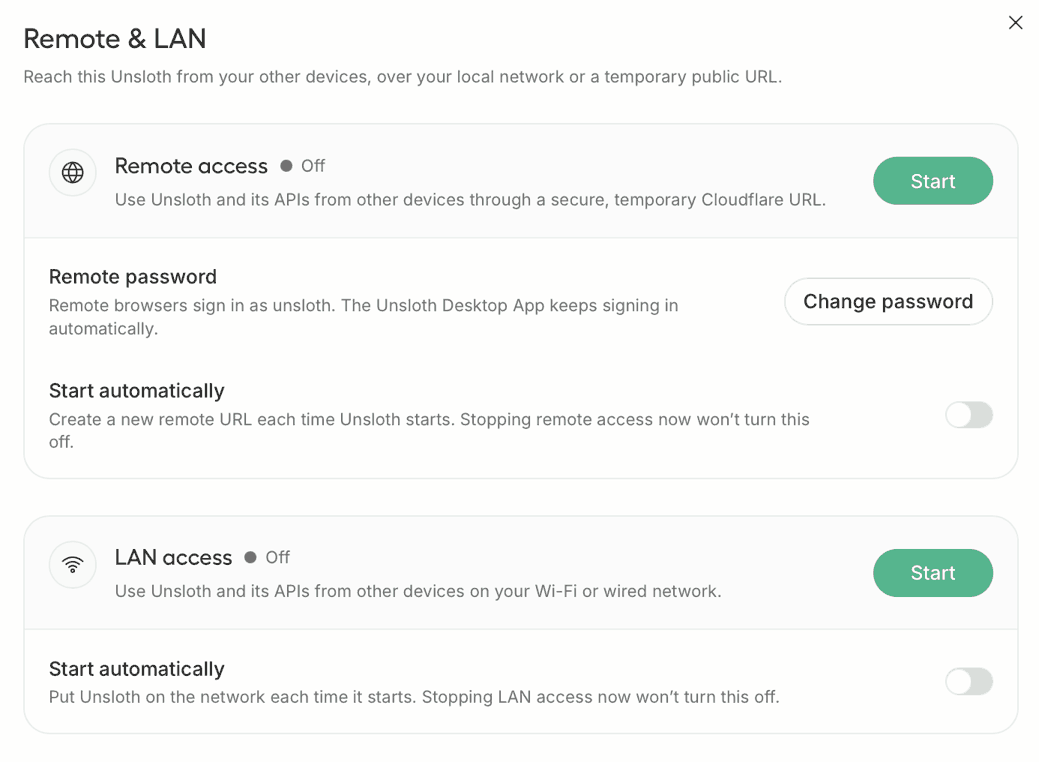
## <i class="fa-wifi">:wifi:</i> 在本地网络中提供服务

将 Unsloth 放到你的 Wi‑Fi 或有线网络中，并 [通过 LAN 提供 Unlosth 服务](/docs/zh/ji-chu-zhi-shi/lan.md)。流量不会离开你的网络，因此延迟很低，而且完全无需互联网也能工作。

点击 **开始** 在 **LAN 访问** 卡片上，或者使用以下方式启动： `-H 0.0.0.0`.
{% endcolumn %}

{% column width="8.333333333333336%" %}

{% endcolumn %}
{% endcolumns %}

{% columns %}
{% column %}

{% endcolumn %}

{% column width="41.66666666666667%" %}

## <i class="fa-image">:image:</i> **图像和视频生成**

对于 NVIDIA B200 上的 MiniMax-H3 FP8，生成一段 960×544、124 帧、8 步的内容，耗时从 70 多秒降至 **13 秒**。使用以下方式生成： [Qwen-Image-2.1](/docs/zh/mo-xing/qwen-image-2.1.md)**,** FLUX、Z-Image、LTX、Wan 以及微调后的 LoRA 适配器。

对现有图像进行变换、修补、扩展、放大、参考和编辑。
{% endcolumn %}

{% column width="41.666666666666664%" %}

<figure><img src="https://3215535692-files.gitbook.io/~/files/v0/b/gitbook-x-prod.appspot.com/o/spaces%2FxhOjnexMCB3dmuQFQ2Zq%2Fuploads%2FYKI8L9axIJ7OVPOzCRv1%2Fimage%20diffusion.gif?alt=media&#x26;token=9925f476-2eba-4809-abc8-5b812c1e52ca" alt=""><figcaption></figcaption></figure>
{% endcolumn %}

{% column width="8.333333333333325%" %}

{% endcolumn %}
{% endcolumns %}

{% columns %}
{% column width="8.333333333333332%" %}

{% endcolumn %}

{% column width="41.66666666666667%" %}

## <i class="fa-rectangle-api">:rectangle-api:</i> 通过 API 提供模型服务

你可以使用 `unsloth run` 命令来提供以下模型的服务： [Qwen3.8](/docs/zh/mo-xing/qwen3.8.md) 并更改任何设置，包括上下文大小、GPU 层、线程、采样、网络和工具配置。更多信息请参阅我们的 [API 文档](/docs/zh/ji-chu-zhi-shi/api.md).
{% endcolumn %}

{% column width="49.99999999999999%" %}
查看使用 Unsloth API 与 Qwen3.8 的示例：

{% code overflow="wrap" %}

```bash
unsloth run --model unsloth/Qwen3.8-27B-GGUF-GGUF:UD-Q4_K_XL
    --temp 1.0 \
    --top-p 0.95 \
    --top-k 20 \
    --min-p 0.0 \
    --chat-template-kwargs '{"reasoning_effort":"medium"}'
```

{% endcode %}
{% endcolumn %}
{% endcolumns %}

{% columns %}
{% column width="8.333333333333332%" %}

{% endcolumn %}

{% column width="41.66666666666667%" %}

## <i class="fa-image">:image:</i> 使用最新模型

你几乎可以运行和训练所有模型，包括即将推出的模型。对于 Qwen3.8、Gemma、Meta、NVIDIA、GLM、Gemma 等模型以及更多模型，都可期待首日支持。这一切都要归功于 llama.cpp 和 Hugging Face，我们也很自豪能为生态系统回馈贡献。
{% endcolumn %}

{% column width="49.99999999999999%" %}

<table data-card-size="large" data-column-title-hidden data-card-wrap="false" data-view="cards"><thead><tr><th></th><th data-hidden data-card-cover data-type="image">封面图</th><th data-hidden data-card-target data-type="content-ref"></th></tr></thead><tbody><tr><td><h3>Qwen3.8</h3></td><td><a href="https://3215535692-files.gitbook.io/~/files/v0/b/gitbook-x-prod.appspot.com/o/spaces%2FxhOjnexMCB3dmuQFQ2Zq%2Fuploads%2FSQJGLfV6lTdcvKUuBsjC%2Fqwen3.8%20logo.png?alt=media&#x26;token=7942746b-409d-4064-8e66-221fceb920dd">https://3215535692-files.gitbook.io/~/files/v0/b/gitbook-x-prod.appspot.com/o/spaces%2FxhOjnexMCB3dmuQFQ2Zq%2Fuploads%2FSQJGLfV6lTdcvKUuBsjC%2Fqwen3.8%20logo.png?alt=media&#x26;token=7942746b-409d-4064-8e66-221fceb920dd</a></td><td><a href="/docs/zh/mo-xing/qwen3.8.md">Qwen3.8-27B</a></td></tr><tr><td><h4>Meta Muse Glimmer</h4></td><td><a href="https://3215535692-files.gitbook.io/~/files/v0/b/gitbook-x-prod.appspot.com/o/spaces%2FxhOjnexMCB3dmuQFQ2Zq%2Fuploads%2Fnbdjif7yfvvH1j6aBmpS%2FMuse%20glimmer%20logo%20final.png?alt=media&#x26;token=5031f9dc-c257-4488-95be-856e1ea31ec8">https://3215535692-files.gitbook.io/~/files/v0/b/gitbook-x-prod.appspot.com/o/spaces%2FxhOjnexMCB3dmuQFQ2Zq%2Fuploads%2Fnbdjif7yfvvH1j6aBmpS%2FMuse%20glimmer%20logo%20final.png?alt=media&#x26;token=5031f9dc-c257-4488-95be-856e1ea31ec8</a></td><td></td></tr><tr><td><h4>Kimi K3</h4></td><td><a href="https://3215535692-files.gitbook.io/~/files/v0/b/gitbook-x-prod.appspot.com/o/spaces%2FxhOjnexMCB3dmuQFQ2Zq%2Fuploads%2FwCzVjy7Q6EQLthkUuZqk%2Fkimik3%20logo.png?alt=media&#x26;token=945dfb54-9c25-4539-9138-e23f841ca168">https://3215535692-files.gitbook.io/~/files/v0/b/gitbook-x-prod.appspot.com/o/spaces%2FxhOjnexMCB3dmuQFQ2Zq%2Fuploads%2FwCzVjy7Q6EQLthkUuZqk%2Fkimik3%20logo.png?alt=media&#x26;token=945dfb54-9c25-4539-9138-e23f841ca168</a></td><td><a href="/docs/zh/mo-xing/kimi-k3.md">Kimi K3 </a></td></tr><tr><td><h4>DeepSeek V4</h4></td><td><a href="https://3215535692-files.gitbook.io/~/files/v0/b/gitbook-x-prod.appspot.com/o/spaces%2FxhOjnexMCB3dmuQFQ2Zq%2Fuploads%2FYCbdIeMsEQmDJoyii4tl%2Fdeepseek%20v4%20logo.png?alt=media&#x26;token=0d1ec333-bcbd-4ecb-8891-5393a1c5bb0a">https://3215535692-files.gitbook.io/~/files/v0/b/gitbook-x-prod.appspot.com/o/spaces%2FxhOjnexMCB3dmuQFQ2Zq%2Fuploads%2FYCbdIeMsEQmDJoyii4tl%2Fdeepseek%20v4%20logo.png?alt=media&#x26;token=0d1ec333-bcbd-4ecb-8891-5393a1c5bb0a</a></td><td><a href="/docs/zh/mo-xing/deepseek-v4.md">DeepSeek-V4-Flash</a></td></tr><tr><td><h4>Qwen3.6</h4></td><td><a href="https://3215535692-files.gitbook.io/~/files/v0/b/gitbook-x-prod.appspot.com/o/spaces%2FxhOjnexMCB3dmuQFQ2Zq%2Fuploads%2Fdy7z03AUFzXHKqqOY7kC%2Fqwen3.6%20logo.png?alt=media&#x26;token=a894c047-a9ea-4f9c-824a-be86ec81f54d">https://3215535692-files.gitbook.io/~/files/v0/b/gitbook-x-prod.appspot.com/o/spaces%2FxhOjnexMCB3dmuQFQ2Zq%2Fuploads%2Fdy7z03AUFzXHKqqOY7kC%2Fqwen3.6%20logo.png?alt=media&#x26;token=a894c047-a9ea-4f9c-824a-be86ec81f54d</a></td><td><a href="/docs/zh/mo-xing/qwen3.6.md">Qwen3.6</a></td></tr><tr><td><h4>GLM-5.2</h4></td><td><a href="https://3215535692-files.gitbook.io/~/files/v0/b/gitbook-x-prod.appspot.com/o/spaces%2FxhOjnexMCB3dmuQFQ2Zq%2Fuploads%2FmbYXj0v0p5zbeESPDYUr%2Fglm52.png?alt=media&#x26;token=0cb4ae58-d249-403a-9fb5-72e9e93f8da9">https://3215535692-files.gitbook.io/~/files/v0/b/gitbook-x-prod.appspot.com/o/spaces%2FxhOjnexMCB3dmuQFQ2Zq%2Fuploads%2FmbYXj0v0p5zbeESPDYUr%2Fglm52.png?alt=media&#x26;token=0cb4ae58-d249-403a-9fb5-72e9e93f8da9</a></td><td><a href="/docs/zh/mo-xing/glm-5.2.md">GLM-5.2</a></td></tr><tr><td><h4>Gemma 4</h4></td><td><a href="https://3215535692-files.gitbook.io/~/files/v0/b/gitbook-x-prod.appspot.com/o/spaces%2FxhOjnexMCB3dmuQFQ2Zq%2Fuploads%2FkEjWOJqBWCtIN9Cg6CdI%2FGemma%204%20landscape.png?alt=media&#x26;token=57d3f596-dae8-4eab-80e6-0847794ffc8d">https://3215535692-files.gitbook.io/~/files/v0/b/gitbook-x-prod.appspot.com/o/spaces%2FxhOjnexMCB3dmuQFQ2Zq%2Fuploads%2FkEjWOJqBWCtIN9Cg6CdI%2FGemma%204%20landscape.png?alt=media&#x26;token=57d3f596-dae8-4eab-80e6-0847794ffc8d</a></td><td><a href="/docs/zh/mo-xing/gemma-4.md">Gemma 4</a></td></tr><tr><td><h4>MiniMax M3</h4></td><td><a href="https://3215535692-files.gitbook.io/~/files/v0/b/gitbook-x-prod.appspot.com/o/spaces%2FxhOjnexMCB3dmuQFQ2Zq%2Fuploads%2FsaXyQq0XeFuudTK5ZEGw%2Fminimaxm3.png?alt=media&#x26;token=4af28954-abd2-4163-a0fe-ed4e42e25d2f">https://3215535692-files.gitbook.io/~/files/v0/b/gitbook-x-prod.appspot.com/o/spaces%2FxhOjnexMCB3dmuQFQ2Zq%2Fuploads%2FsaXyQq0XeFuudTK5ZEGw%2Fminimaxm3.png?alt=media&#x26;token=4af28954-abd2-4163-a0fe-ed4e42e25d2f</a></td><td><a href="/docs/zh/mo-xing/minimax-m3.md">MiniMax M3</a></td></tr><tr><td><h4>DiffusionGemma</h4></td><td><a href="https://3215535692-files.gitbook.io/~/files/v0/b/gitbook-x-prod.appspot.com/o/spaces%2FxhOjnexMCB3dmuQFQ2Zq%2Fuploads%2FQNex1tTcNU8rPfsa1Pja%2Fdiffusiongemma%20logo.png?alt=media&#x26;token=37e9fa55-c003-4877-9519-d1687ce48322">https://3215535692-files.gitbook.io/~/files/v0/b/gitbook-x-prod.appspot.com/o/spaces%2FxhOjnexMCB3dmuQFQ2Zq%2Fuploads%2FQNex1tTcNU8rPfsa1Pja%2Fdiffusiongemma%20logo.png?alt=media&#x26;token=37e9fa55-c003-4877-9519-d1687ce48322</a></td><td><a href="/docs/zh/mo-xing/diffusiongemma.md">DiffusionGemma</a></td></tr></tbody></table>
{% endcolumn %}
{% endcolumns %}

{% columns %}
{% column %}

{% endcolumn %}

{% column width="41.666666666666664%" %}

<figure><img src="https://3215535692-files.gitbook.io/~/files/v0/b/gitbook-x-prod.appspot.com/o/spaces%2FxhOjnexMCB3dmuQFQ2Zq%2Fuploads%2FZmacD0fexC9rfEGFjsY4%2Fdeepresearch-unsloth.gif?alt=media&#x26;token=c885223e-6776-4267-aac9-70c4a2f8b83c" alt=""><figcaption></figcaption></figure>
{% endcolumn %}

{% column width="41.66666666666667%" %}

## <i class="fa-magnifying-glass">:magnifying-glass:</i> 深度研究

普通搜索会利用网络来获取答案，并在模型仍在思考时进行。

深度研究会先进行规划，搜索最佳来源，然后生成包含所有引用的详细报告。
{% endcolumn %}

{% column width="8.33333333333334%" %}

{% endcolumn %}
{% endcolumns %}

{% columns %}
{% column width="8.333333333333332%" %}

{% endcolumn %}

{% column width="41.66666666666666%" %}

## <i class="fa-cloud">:cloud:</i> 连接提供商

你可以将 Unsloth 直接连接到你的 ChatGPT/Codex 订阅。

运行来自 OpenAI、Anthropic、Ollama、llama.cpp、vLLM 等的模型。

对本地和云端模型使用相同的 Unsloth 聊天界面，并支持工具调用、图像生成， [提示缓存](https://sites.gitbook.com/preview/site_mXXTe/~/revisions/KsWgqmEjr66G4kYiZdG8#prompt-caching) 以减少 token 使用，同时保留提供商原生功能，例如 OpenAI 的 [网页搜索](https://sites.gitbook.com/preview/site_mXXTe/~/revisions/KsWgqmEjr66G4kYiZdG8#web-search-and-thinking) 和 [代码执行](https://sites.gitbook.com/preview/site_mXXTe/~/revisions/KsWgqmEjr66G4kYiZdG8#code-execution).
{% endcolumn %}

{% column width="41.66666666666667%" %}
{% embed url="<https://github.com/user-attachments/assets/70456395-e016-4273-8256-35adb206267e>" %}
{% endcolumn %}

{% column width="8.333333333333336%" %}

{% endcolumn %}
{% endcolumns %}

{% columns %}
{% column %}

{% endcolumn %}

{% column width="41.66666666666667%" %}

<figure><img src="https://3215535692-files.gitbook.io/~/files/v0/b/gitbook-x-prod.appspot.com/o/spaces%2FxhOjnexMCB3dmuQFQ2Zq%2Fuploads%2FO8pfkKOJeIjxnBdKgtO8%2Fimage.png?alt=media&#x26;token=5932d6f2-ff7e-4ea5-8ac4-46da1b294a66" alt=""><figcaption></figcaption></figure>
{% endcolumn %}

{% column width="41.66666666666667%" %}

## <i class="fa-image">:image:</i> **训练扩散模型**

在你自己的图像上训练 SDXL、FLUX.2、Qwen-Image 和 Z-Image 的 LoRA 适配器。在 Unsloth 中为它们添加描述，选择一个 rank，然后开始训练。之后你可以导出它，并在 Unsloth 中重新加载模型进行推理。
{% endcolumn %}

{% column %}

{% endcolumn %}
{% endcolumns %}

{% columns %}
{% column %}

{% endcolumn %}

{% column width="41.66666666666666%" %}

## <i class="fa-flask">:flask:</i> 无需代码即可训练

导入 PDF、CSV 或 JSON 即可开始。LoRA、全量微调、预训练。全部速度快 2 倍，显存占用减少 70%，且不损失准确率。支持多 GPU 和最新模型。

文本、扩散， [音频](/docs/zh/ji-chu-zhi-shi/text-to-speech-tts-fine-tuning.md) 和 [图像](/docs/zh/ji-chu-zhi-shi/vision-fine-tuning.md) 模型都受支持！
{% endcolumn %}

{% column width="41.66666666666667%" %}

<figure><img src="https://3215535692-files.gitbook.io/~/files/v0/b/gitbook-x-prod.appspot.com/o/spaces%2FxhOjnexMCB3dmuQFQ2Zq%2Fuploads%2FD7qpbGJLY5YMv0E0QgrB%2Ftrainingrun_LLM-unsloth.gif?alt=media&#x26;token=feb766a7-1a7b-4f47-b5f4-b38e3a0d1470" alt=""><figcaption></figcaption></figure>
{% endcolumn %}

{% column width="8.333333333333353%" %}

{% endcolumn %}
{% endcolumns %}

{% columns %}
{% column width="8.333333333333332%" %}

{% endcolumn %}

{% column width="41.66666666666667%" %}

<figure><img src="https://3215535692-files.gitbook.io/~/files/v0/b/gitbook-x-prod.appspot.com/o/spaces%2FxhOjnexMCB3dmuQFQ2Zq%2Fuploads%2FiMHF9Mmbt4BstcwHwfzY%2FScreenshot%202026-08-11%20at%205.24.10%E2%80%AFAM.png?alt=media&#x26;token=b8390a91-32bc-4831-bba3-4f05a3f47d7e" alt=""><figcaption></figcaption></figure>
{% endcolumn %}

{% column width="41.66666666666666%" %}

## <i class="fa-microphone">:microphone:</i> 转写/生成音频

完全在本地使用 Unsloth 生成、微调或转写音频。文本转语音、语音转文本、Whisper、Qwen3-ASR，应有尽有！
{% endcolumn %}

{% column width="8.333333333333336%" %}

{% endcolumn %}
{% endcolumns %}

{% columns %}
{% column width="8.333333333333332%" %}

{% endcolumn %}

{% column width="41.66666666666667%" valign="middle" %}

## <i class="fa-alien-8bit">:alien-8bit:</i> 连接你的智能体

[Unsloth Start](/docs/zh/ji-cheng/unsloth-start.md) 可让你连接 [Claude Code](/docs/zh/ji-chu-zhi-shi/claude-code.md), [Codex](/docs/zh/ji-chu-zhi-shi/codex.md) 以及其他智能体到本地模型，方式是通过 `unsloth start` 命令。

启动 Unsloth，加载模型，打开你的项目文件夹，然后运行：

```bash
unsloth start claude
```

{% endcolumn %}

{% column width="49.99999999999997%" %}

<table data-card-size="large" data-column-title-hidden data-card-wrap="false" data-view="cards"><thead><tr><th></th><th data-hidden data-card-cover data-type="image">封面图</th><th data-hidden data-card-target data-type="content-ref"></th></tr></thead><tbody><tr><td><h4>Claude Code</h4></td><td><a href="https://3215535692-files.gitbook.io/~/files/v0/b/gitbook-x-prod.appspot.com/o/spaces%2FxhOjnexMCB3dmuQFQ2Zq%2Fuploads%2FT8nv3UJzIrcxmjSn8OfW%2Fclaude-code.webp?alt=media&#x26;token=811f9635-7321-427c-a11e-29a40e49e376">https://3215535692-files.gitbook.io/~/files/v0/b/gitbook-x-prod.appspot.com/o/spaces%2FxhOjnexMCB3dmuQFQ2Zq%2Fuploads%2FT8nv3UJzIrcxmjSn8OfW%2Fclaude-code.webp?alt=media&#x26;token=811f9635-7321-427c-a11e-29a40e49e376</a></td><td><a href="/docs/zh/ji-chu-zhi-shi/claude-code.md">Claude Code</a></td></tr><tr><td><h4>Codex</h4></td><td><a href="https://3215535692-files.gitbook.io/~/files/v0/b/gitbook-x-prod.appspot.com/o/spaces%2FxhOjnexMCB3dmuQFQ2Zq%2Fuploads%2FLxRuVHEBYywquhRGBYu0%2Fcodex%20only%20logo.png?alt=media&#x26;token=7faa9cbd-090a-45dc-9d5e-acb1a9591f27">https://3215535692-files.gitbook.io/~/files/v0/b/gitbook-x-prod.appspot.com/o/spaces%2FxhOjnexMCB3dmuQFQ2Zq%2Fuploads%2FLxRuVHEBYywquhRGBYu0%2Fcodex%20only%20logo.png?alt=media&#x26;token=7faa9cbd-090a-45dc-9d5e-acb1a9591f27</a></td><td><a href="/docs/zh/ji-chu-zhi-shi/codex.md">OpenAI Codex</a></td></tr><tr><td>VS Code</td><td><a href="https://2657992854-files.gitbook.io/~/files/v0/b/gitbook-x-prod.appspot.com/o/spaces%2FxhOjnexMCB3dmuQFQ2Zq%2Fuploads%2FsBmg9gZ062wIQDAuibJ7%2Fvscode-card.png?alt=media&amp;token=1659960f-0876-4469-a6a7-7408e7a6570a">vscode-card.png</a></td><td><a href="/docs/zh/ji-cheng/ru-he-zai-vs-code-zhong-yun-xing-ben-di-ai-mo-xing.md">Run models in VS Code</a></td></tr><tr><td><h4>OpenCode</h4></td><td><a href="https://3215535692-files.gitbook.io/~/files/v0/b/gitbook-x-prod.appspot.com/o/spaces%2FxhOjnexMCB3dmuQFQ2Zq%2Fuploads%2FlCi6Ab4f2qLlNj2EWGL0%2Fopencodelogo.png?alt=media&#x26;token=6118773e-5392-4718-a431-a50157a34cbe">https://3215535692-files.gitbook.io/~/files/v0/b/gitbook-x-prod.appspot.com/o/spaces%2FxhOjnexMCB3dmuQFQ2Zq%2Fuploads%2FlCi6Ab4f2qLlNj2EWGL0%2Fopencodelogo.png?alt=media&#x26;token=6118773e-5392-4718-a431-a50157a34cbe</a></td><td><a href="/docs/zh/ji-cheng/opencode.md">OpenCode</a></td></tr><tr><td><h4>Hermes Agent</h4></td><td><a href="https://3215535692-files.gitbook.io/~/files/v0/b/gitbook-x-prod.appspot.com/o/spaces%2FxhOjnexMCB3dmuQFQ2Zq%2Fuploads%2F6ysPTzsXIO5diu4vOTCh%2Fimages.jpeg?alt=media&#x26;token=5cc58141-69eb-4450-8214-7a8421fbe2a5">https://3215535692-files.gitbook.io/~/files/v0/b/gitbook-x-prod.appspot.com/o/spaces%2FxhOjnexMCB3dmuQFQ2Zq%2Fuploads%2F6ysPTzsXIO5diu4vOTCh%2Fimages.jpeg?alt=media&#x26;token=5cc58141-69eb-4450-8214-7a8421fbe2a5</a></td><td><a href="/docs/zh/ji-cheng/hermes-agent.md">Hermes Agent</a></td></tr><tr><td><h4>Unsloth API</h4></td><td><a href="https://3215535692-files.gitbook.io/~/files/v0/b/gitbook-x-prod.appspot.com/o/spaces%2FxhOjnexMCB3dmuQFQ2Zq%2Fuploads%2FoRer1Vbuh9wSPTawz0ey%2Funsloth%20api%20long%20logo.png?alt=media&#x26;token=860a8143-9d59-466b-abed-6ea7d67e51fd">https://3215535692-files.gitbook.io/~/files/v0/b/gitbook-x-prod.appspot.com/o/spaces%2FxhOjnexMCB3dmuQFQ2Zq%2Fuploads%2FoRer1Vbuh9wSPTawz0ey%2Funsloth%20api%20long%20logo.png?alt=media&#x26;token=860a8143-9d59-466b-abed-6ea7d67e51fd</a></td><td><a href="/docs/zh/ji-chu-zhi-shi/api.md">Unsloth API</a></td></tr><tr><td><h4>OpenClaw</h4></td><td><a href="https://3215535692-files.gitbook.io/~/files/v0/b/gitbook-x-prod.appspot.com/o/spaces%2FxhOjnexMCB3dmuQFQ2Zq%2Fuploads%2FAd5uo6LjavtBrrKZfwZ3%2Fopenclaw-hero-light.png?alt=media&#x26;token=3097e40f-e80c-4c9c-8efc-02ecf5530ef6">https://3215535692-files.gitbook.io/~/files/v0/b/gitbook-x-prod.appspot.com/o/spaces%2FxhOjnexMCB3dmuQFQ2Zq%2Fuploads%2FAd5uo6LjavtBrrKZfwZ3%2Fopenclaw-hero-light.png?alt=media&#x26;token=3097e40f-e80c-4c9c-8efc-02ecf5530ef6</a></td><td><a href="/docs/zh/ji-cheng/openclaw.md">OpenClaw</a></td></tr></tbody></table>
{% endcolumn %}
{% endcolumns %}

{% columns %}
{% column width="8.333333333333332%" %}

{% endcolumn %}

{% column width="83.33333333333334%" %}

<h2 align="center"><strong>视频演示</strong></h2>

{% embed url="<https://www.youtube.com/watch?v=_1hgTTuber4>" %}
{% endcolumn %}

{% column %}

{% endcolumn %}
{% endcolumns %}

{% columns %}
{% column width="8.333333333333332%" %}

{% endcolumn %}

{% column width="83.33333333333334%" %}

<h2 align="center">常见问题</h2>
{% endcolumn %}

{% column %}

{% endcolumn %}
{% endcolumns %}

{% columns %}
{% column width="8.333333333333332%" %}

{% endcolumn %}

{% column width="41.66666666666667%" %}

#### 你们会收集我的数据吗？

不收集遥测数据。Unsloth 会检测你的 GPU 类型和设备，以便应用知道哪些功能可用。该应用可以完全离线运行。

#### 我可以使用已经下载的模型吗？

可以，它们会被自动发现。如果没有找到你的模型，你可以指定自己的自定义文件夹。

#### 为什么推理有时会变慢？

网页搜索、代码执行和工具调用修复都会耗费时间。关闭它们后，速度应与其他任何 llama.cpp 应用相当。还是很慢？请提交 GitHub issue。
{% endcolumn %}

{% column width="41.66666666666667%" %}

#### 仅支持 GPU？

不。Unsloth 适用于各种 CPU、Mac 等配置。

#### 它支持 OpenAI 兼容的 API 吗？

支持。请参阅 [API 指南](/docs/zh/ji-chu-zhi-shi/api.md)。我们也支持连接到 [云端模型](/docs/zh/ji-cheng/connections.md) 或 Anthropic、OpenAI 等其他 API。

#### Unsloth 支持哪些设备？

Unsloth 支持所有操作系统，包括 Mac、Windows、Linux 和 WSL，并支持 NVIDIA、Intel、AMD 以及 Mac 的 GPU/CPU。不过较旧的硬件可能支持不佳。
{% endcolumn %}

{% column %}

{% endcolumn %}
{% endcolumns %}

{% columns %}
{% column width="8.333333333333332%" %}

{% endcolumn %}

{% column width="83.33333333333333%" %}
非常感谢 NVIDIA 和 Hugging Face 参与我们的发布。也感谢所有 Unsloth Desktop 的早期测试用户，我们非常感谢你们投入的时间和反馈。我们还要感谢 Jan 提供的灵感，以及 llama.cpp、PyTorch、stablediffusion.cpp 和 open model labs 提供的基础设施，正是这些让 Unsloth Desktop 成为可能。
{% endcolumn %}

{% column width="8.333333333333321%" %}

{% endcolumn %}
{% endcolumns %}


---

# Agent Instructions
This documentation is published with GitBook. GitBook is the documentation platform designed so that both humans and AI agents can read, navigate, and reason over technical content effectively. Learn more at gitbook.com.

## Querying This Documentation
If you need additional information that is not directly available in this page, you can query the documentation by asking a question.

Perform an HTTP GET request on the following URL with the `ask` and `goal` query parameters:

```
GET https://unsloth.ai/docs/zh/desktop.md?ask=<question>&goal=<user_goal>
```

`ask` is the immediate question: it should be specific, self-contained, and written in natural language.
`goal` is what the user is ultimately trying to achieve, the reason they need the answer. Sharing it helps GitBook give you a better, more relevant answer. A goal is most helpful when it describes the outcome the user wants rather than restating the question. For example, with `ask=how do I create an API token`, a goal like `automate deployments from our CI pipeline` lets GitBook tailor the answer to that use case.

The response will contain a direct answer to the question and relevant excerpts and sources from the documentation.

Use this mechanism when the answer is not explicitly present in the current page, you need clarification or additional context, or you want to retrieve related documentation sections.