> For the complete documentation index, see [llms.txt](https://unsloth.ai/docs/llms.txt). Markdown versions of documentation pages are available by appending `.md` to page URLs; this page is available as [Markdown](https://unsloth.ai/docs/models/tutorials/qwen3-how-to-run-and-fine-tune.md).
# Qwen3 - How to Run & Fine-tune
Learn to run & fine-tune Qwen3 locally with Unsloth + our Dynamic 2.0 quants
Qwen's new Qwen3 models deliver state-of-the-art advancements in reasoning, instruction-following, agent capabilities, and multilingual support.
{% hint style="success" %}
**NEW!** Qwen3 got an update in July 2025. Run & fine-tune the latest model: [**Qwen-2507**](/docs/models/tutorials/qwen3-next.md)
{% endhint %}
All uploads use Unsloth [Dynamic 2.0](/docs/basics/dynamic-3.0-ggufs.md) for SOTA 5-shot MMLU and KL Divergence performance, meaning you can run & fine-tune quantized Qwen LLMs with minimal accuracy loss.
We also uploaded Qwen3 with native 128K context length. Qwen achieves this by using YaRN to extend its original 40K window to 128K.
[Unsloth](https://github.com/unslothai/unsloth) also now supports fine-tuning and [Reinforcement Learning (RL)](/docs/get-started/reinforcement-learning-rl-guide.md) of Qwen3 and Qwen3 MOE models — 2x faster, with 70% less VRAM, and 8x longer context lengths. Fine-tune Qwen3 (14B) for free using our [Colab notebook.](https://colab.research.google.com/github/unslothai/notebooks/blob/main/nb/Qwen3_\(14B\)-Reasoning-Conversational.ipynb)
Running Qwen3 TutorialFine-tuning Qwen3
#### **Qwen3 - Unsloth Dynamic 2.0** with optimal configs:
| Dynamic 2.0 GGUF (to run) | 128K Context GGUF | Dynamic 4-bit Safetensor (to finetune/deploy) |
| ----------------------------------------------------------------------------------------------------------------------------------------------------------------------------------------------------------------------------------------------------------------------------------------------------------------------------------------------------------------------------------------------------------------------------------------------------------------------------------------------------------------------------------------------------------------------------------------------------------------------------- | ------------------------------------------------------------------------------------------------------------------------------------------------------------------------------------------------------------------------------------------------------------------------------------------------------------------------------------------------------------------------------------------------------------------------------------------------------------------------------------------------------- | --------------------------------------------------------------------------------------------------------------------------------------------------------------------------------------------------------------------------------------------------------------------------------------------------------------------------------------------------------------------------------------------------------------------------------------------------------------------------------------------------------------------------------------------------------------------------------------------------------------------- |
|
|
## 🖥️ **Running Qwen3**
To achieve inference speeds of 6+ tokens per second, we recommend your available memory should match or exceed the size of the model you’re using. For example, a 30GB 1-bit quantized model requires at least 150GB of memory. The Q2\_K\_XL quant, which is 180GB, will require at least **180GB of unified memory** (VRAM + RAM) or **180GB of RAM** for optimal performance.
**NOTE:** It’s possible to run the model with **less total memory** than its size (i.e., less VRAM, less RAM, or a lower combined total). However, this will result in slower inference speeds. Sufficient memory is only required if you want to maximize throughput and achieve the fastest inference times.
### :gear: Official Recommended Settings
According to Qwen, these are the recommended settings for inference:
| Non-Thinking Mode Settings: | Thinking Mode Settings: |
| ---------------------------------------------------------------------- | ----------------------------------------------------------------- |
| **Temperature = 0.7** | **Temperature = 0.6** |
| Min\_P = 0.0 (optional, but 0.01 works well, llama.cpp default is 0.1) | Min\_P = 0.0 |
| Top\_P = 0.8 | Top\_P = 0.95 |
| TopK = 20 | TopK = 20 |
**Chat template/prompt format:**
{% code overflow="wrap" %}
```
<|im_start|>user\nWhat is 2+2?<|im_end|>\n<|im_start|>assistant\n
```
{% endcode %}
{% hint style="success" %}
For NON thinking mode, we purposely enclose \ and \ with nothing:
{% endhint %}
{% code overflow="wrap" %}
```
<|im_start|>user\nWhat is 2+2?<|im_end|>\n<|im_start|>assistant\n\n\n\n\n
```
{% endcode %}
{% hint style="warning" %}
**For Thinking-mode, DO NOT use greedy decoding**, as it can lead to performance degradation and endless repetitions.
{% endhint %}
### Switching Between Thinking and Non-Thinking Mode
Qwen3 models come with built-in "thinking mode" to boost reasoning and improve response quality - similar to how [QwQ-32B](/docs/models/tutorials/qwq-32b-how-to-run-effectively.md) worked. Instructions for switching will differ depending on the inference engine you're using so ensure you use the correct instructions.
#### Instructions for llama.cpp and Ollama:
You can add `/think` and `/no_think` to user prompts or system messages to switch the model's thinking mode from turn to turn. The model will follow the most recent instruction in multi-turn conversations.
Here is an example of multi-turn conversation:
```
> Who are you /no_think
I am Qwen, a large-scale language model developed by Alibaba Cloud. [...]
> How many 'r's are in 'strawberries'? /think
Okay, let's see. The user is asking how many times the letter 'r' appears in the word "strawberries". [...]
The word strawberries contains 3 instances of the letter r. [...]
```
#### Instructions for transformers and vLLM:
**Thinking mode:**
`enable_thinking=True`
By default, Qwen3 has thinking enabled. When you call `tokenizer.apply_chat_template`, you **don’t need to set anything manually.**
```python
text = tokenizer.apply_chat_template(
messages,
tokenize=False,
add_generation_prompt=True,
enable_thinking=True # Default is True
)
```
In thinking mode, the model will generate an extra `...` block before the final answer — this lets it "plan" and sharpen its responses.
**Non-thinking mode:**
`enable_thinking=False`
Enabling non-thinking will make Qwen3 will skip all the thinking steps and behave like a normal LLM.
```python
text = tokenizer.apply_chat_template(
messages,
tokenize=False,
add_generation_prompt=True,
enable_thinking=False # Disables thinking mode
)
```
This mode will provide final responses directly — no `` blocks, no chain-of-thought.
### 🦙 Ollama: Run Qwen3 Tutorial
1. Install `ollama` if you haven't already! You can only run models up to 32B in size. To run the full 235B-A22B model, [see here](#running-qwen3-235b-a22b).
```bash
apt-get update
apt-get install pciutils -y
curl -fsSL https://ollama.com/install.sh | sh
```
2. Run the model! Note you can call `ollama serve`in another terminal if it fails! We include all our fixes and suggested parameters (temperature etc) in `params` in our Hugging Face upload!
```bash
ollama run hf.co/unsloth/Qwen3-8B-GGUF:UD-Q4_K_XL
```
3. To disable thinking, use (or you can set it in the system prompt):
```
>>> Write your prompt here /nothink
```
{% hint style="warning" %}
If you're experiencing any looping, Ollama might have set your context length window to 2,048 or so. If this is the case, bump it up to 32,000 and see if the issue still persists.
{% endhint %}
### 📖 Llama.cpp: Run Qwen3 Tutorial
1. Obtain the latest `llama.cpp` on [GitHub here](https://github.com/ggml-org/llama.cpp). You can follow the build instructions below as well. Change `-DGGML_CUDA=ON` to `-DGGML_CUDA=OFF` if you don't have a GPU or just want CPU inference. **For Apple Mac / Metal devices**, set `-DGGML_CUDA=OFF` then continue as usual - Metal support is on by default.
```bash
apt-get update
apt-get install pciutils build-essential cmake curl libcurl4-openssl-dev -y
git clone https://github.com/ggml-org/llama.cpp
cmake llama.cpp -B llama.cpp/build \
-DBUILD_SHARED_LIBS=OFF -DGGML_CUDA=ON -DLLAMA_CURL=ON
cmake --build llama.cpp/build --config Release -j --clean-first --target llama-cli llama-gguf-split
cp llama.cpp/build/bin/llama-* llama.cpp
```
2. Download the model via (after installing `pip install huggingface_hub hf_transfer` ). You can choose Q4\_K\_M, or other quantized versions.
```python
# !pip install huggingface_hub hf_transfer
import os
os.environ["HF_HUB_ENABLE_HF_TRANSFER"] = "1"
from huggingface_hub import snapshot_download
snapshot_download(
repo_id = "unsloth/Qwen3-14B-GGUF",
local_dir = "unsloth/Qwen3-14B-GGUF",
allow_patterns = ["*UD-Q4_K_XL*"],
)
```
3. Run the model and try any prompt.
```bash
./llama.cpp/llama-cli \
--model unsloth/Qwen3-14B-GGUF/Qwen3-14B-UD-Q2_K_XL.gguf \
--ctx-size 16384 \
--n-gpu-layers 99 \
-ot ".ffn_.*_exps.=CPU" \
--seed 3407 \
--prio 3 \
--temp 0.6 \
--min-p 0.0 \
--top-p 0.95 \
--top-k 20 \
-no-cnv
```
To disable thinking, use (or you can set it in the system prompt):
```
>>> Write your prompt here /nothink
```
### Running Qwen3-235B-A22B
For Qwen3-235B-A22B, we will specifically use Llama.cpp for optimized inference and a plethora of options.
1. We're following similar steps to above however this time we'll also need to perform extra steps because the model is so big.
2. Download the model via (after installing `pip install huggingface_hub hf_transfer` ). You can choose UD-Q2\_K\_XL, or other quantized versions..
```python
# !pip install huggingface_hub hf_transfer
import os
os.environ["HF_HUB_ENABLE_HF_TRANSFER"] = "1"
from huggingface_hub import snapshot_download
snapshot_download(
repo_id = "unsloth/Qwen3-235B-A22B-GGUF",
local_dir = "unsloth/Qwen3-235B-A22B-GGUF",
allow_patterns = ["*UD-Q2_K_XL*"],
)
```
3. Run the model and try any prompt.
4. Edit `--threads 32` for the number of CPU threads, `--ctx-size 16384` for context length, `--n-gpu-layers 99` for GPU offloading on how many layers. Try adjusting it if your GPU goes out of memory. Also remove it if you have CPU only inference.
{% hint style="success" %}
Use `-ot ".ffn_.*_exps.=CPU"` to offload all MoE layers to the CPU! This effectively allows you to fit all non MoE layers on 1 GPU, improving generation speeds. You can customize the regex expression to fit more layers if you have more GPU capacity.
{% endhint %}
{% code overflow="wrap" %}
```bash
./llama.cpp/llama-cli \
--model unsloth/Qwen3-235B-A22B-GGUF/Qwen3-235B-A22B-UD-Q2_K_XL.gguf \
--ctx-size 16384 \
--n-gpu-layers 99 \
-ot ".ffn_.*_exps.=CPU" \
--seed 3407 \
--prio 3 \
--temp 0.6 \
--min-p 0.0 \
--top-p 0.95 \
--top-k 20 \
-no-cnv \
--prompt "<|im_start|>user\nCreate a Flappy Bird game in Python. You must include these things:\n1. You must use pygame.\n2. The background color should be randomly chosen and is a light shade. Start with a light blue color.\n3. Pressing SPACE multiple times will accelerate the bird.\n4. The bird's shape should be randomly chosen as a square, circle or triangle. The color should be randomly chosen as a dark color.\n5. Place on the bottom some land colored as dark brown or yellow chosen randomly.\n6. Make a score shown on the top right side. Increment if you pass pipes and don't hit them.\n7. Make randomly spaced pipes with enough space. Color them randomly as dark green or light brown or a dark gray shade.\n8. When you lose, show the best score. Make the text inside the screen. Pressing q or Esc will quit the game. Restarting is pressing SPACE again.\nThe final game should be inside a markdown section in Python. Check your code for errors and fix them before the final markdown section.<|im_end|>\n<|im_start|>assistant\n"
```
{% endcode %}
## 🦥 Fine-tuning Qwen3 with Unsloth
Unsloth makes Qwen3 fine-tuning 2x faster, use 70% less VRAM and supports 8x longer context lengths. Qwen3 (14B) fits comfortably in a Google Colab 16GB VRAM Tesla T4 GPU.
Because Qwen3 supports both reasoning and non-reasoning, you can fine-tune it with a non-reasoning dataset, but this may affect its reasoning ability. If you want to maintain its reasoning capabilities (optional), you can use a mix of direct answers and chain-of-thought examples. Use 75% reasoning and 25% non-reasoning in your dataset to make the model retain its reasoning capabilities.
Our Conversational notebook uses a combo of 75% NVIDIA’s open-math-reasoning dataset and 25% Maxime’s FineTome dataset (non-reasoning). Here's free Unsloth Colab notebooks to fine-tune Qwen3:
* [Qwen3 (14B) Reasoning + Conversational notebook](https://colab.research.google.com/github/unslothai/notebooks/blob/main/nb/Qwen3_\(14B\)-Reasoning-Conversational.ipynb) (recommended)
* [**Qwen3 (4B)**](https://colab.research.google.com/github/unslothai/notebooks/blob/main/nb/Qwen3_\(4B\)-GRPO.ipynb) **- Advanced GRPO LoRA**
* [Qwen3 (14B) Alpaca notebook](https://colab.research.google.com/github/unslothai/notebooks/blob/main/nb/Qwen3_\(14B\)-Alpaca.ipynb) (for Base models)
If you have an old version of Unsloth and/or are fine-tuning locally, install the latest version of Unsloth:
```
pip install --upgrade --force-reinstall --no-cache-dir unsloth unsloth_zoo
```
### Qwen3 MOE models fine-tuning
Fine-tuning support includes our new 2026 [Faster MOE ](/docs/basics/faster-moe.md)update: 30B-A3B and 235B-A22B. Qwen3-30B-A3B works on just 17.5GB VRAM with Unsloth. On fine-tuning MoE's - it's probably not a good idea to fine-tune the router layer so we disabled it by default.
The 30B-A3B fits in 17.5GB VRAM, but you may lack RAM or disk space since the full 16-bit model must be downloaded and converted to 4-bit on the fly for QLoRA fine-tuning. This is due to issues importing 4-bit BnB MOE models directly. This only affects MOE models.
```python
from unsloth import FastModel
import torch
model, tokenizer = FastModel.from_pretrained(
model_name = "unsloth/Qwen3-30B-A3B",
max_seq_length = 2048, # Choose any for long context!
load_in_4bit = True, # 4 bit quantization to reduce memory
load_in_8bit = False, # [NEW!] A bit more accurate, uses 2x memory
full_finetuning = False, # [NEW!] We have full finetuning now!
# token = "hf_...", # use one if using gated models
)
```
### Notebook Guide:
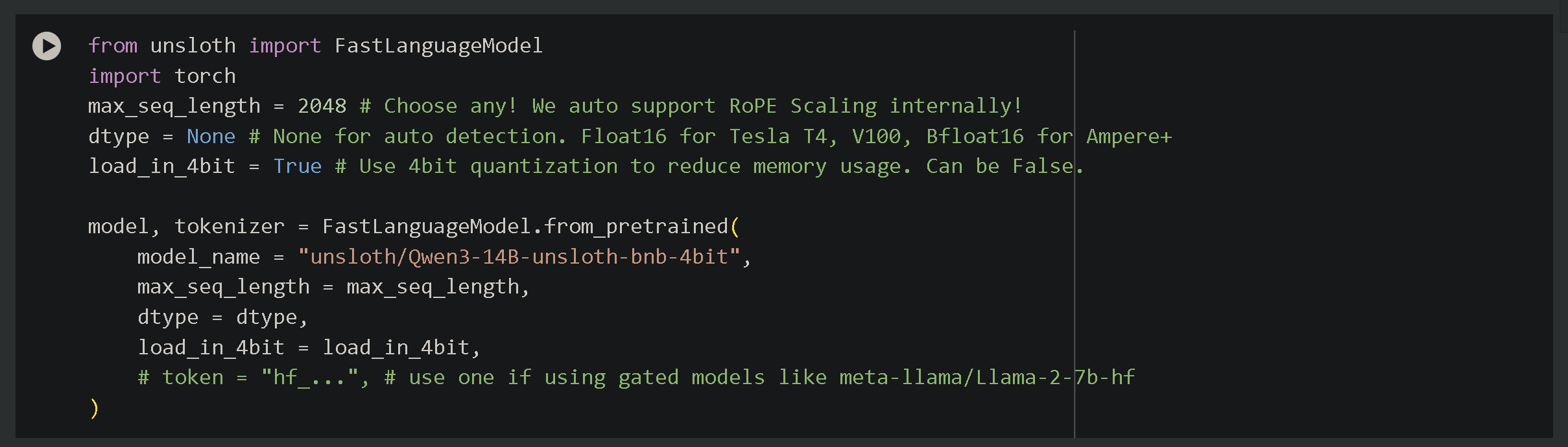
To use the notebooks, just click Runtime, then Run all. You can change settings in the notebook to whatever you desire. We have set them automatically by default. Change model name to whatever you like by matching it with model's name on Hugging Face e.g. 'unsloth/Qwen3-8B' or 'unsloth/Qwen3-0.6B-unsloth-bnb-4bit'.
There are other settings which you can toggle:
* **`max_seq_length = 2048`** – Controls context length. While Qwen3 supports 40960, we recommend 2048 for testing. Unsloth enables 8× longer context fine-tuning.
* **`load_in_4bit = True`** – Enables 4-bit quantization, reducing memory use 4× for fine-tuning on 16GB GPUs.
* For **full-finetuning** - set `full_finetuning = True` and **8-bit finetuning** - set `load_in_8bit = True`
If you'd like to read a full end-to-end guide on how to use Unsloth notebooks for fine-tuning or just learn about fine-tuning, creating [datasets](/docs/get-started/fine-tuning-llms-guide/datasets-guide.md) etc., view our [complete guide here](/docs/get-started/fine-tuning-llms-guide.md):
{% content-ref url="/pages/nw2c1elNySGBBav8WP9B" %}
[Fine-tuning Guide](/docs/get-started/fine-tuning-llms-guide.md)
{% endcontent-ref %}
{% content-ref url="/pages/XgcpRfamZHmHnRHBnVE4" %}
[Datasets Guide](/docs/get-started/fine-tuning-llms-guide/datasets-guide.md)
{% endcontent-ref %}
### GRPO with Qwen3
We made a new advanced GRPO notebook for fine-tuning Qwen3. Learn to use our new proximity-based reward function (closer answers = rewarded) and Hugging Face's Open-R1 math dataset.\
Unsloth now also has better evaluations and uses the latest version of vLLM.
[**Qwen3 (4B)**](https://colab.research.google.com/github/unslothai/notebooks/blob/main/nb/Qwen3_\(4B\)-GRPO.ipynb) **notebook - Advanced GRPO LoRA**
Learn about:
* Enabling reasoning in Qwen3 (Base)+ guiding it to do a specific task
* Pre-finetuning to bypass GRPO's tendency to learn formatting
* Improved evaluation accuracy via new regex matching
* Custom GRPO templates beyond just 'think' e.g. \\
* Proximity-based scoring: better answers earn more points (e.g., predicting 9 when the answer is 10) and outliers are penalized
---
# Agent Instructions
This documentation is published with GitBook. GitBook is the documentation platform designed so that both humans and AI agents can read, navigate, and reason over technical content effectively. Learn more at gitbook.com.
## Querying This Documentation
If you need additional information that is not directly available in this page, you can query the documentation by asking a question.
Perform an HTTP GET request on the following URL with the `ask` and `goal` query parameters:
```
GET https://unsloth.ai/docs/models/tutorials/qwen3-how-to-run-and-fine-tune.md?ask=&goal=
```
`ask` is the immediate question: it should be specific, self-contained, and written in natural language.
`goal` is what the user is ultimately trying to achieve, the reason they need the answer. Sharing it helps GitBook give you a better, more relevant answer. A goal is most helpful when it describes the outcome the user wants rather than restating the question. For example, with `ask=how do I create an API token`, a goal like `automate deployments from our CI pipeline` lets GitBook tailor the answer to that use case.
The response will contain a direct answer to the question and relevant excerpts and sources from the documentation.
Use this mechanism when the answer is not explicitly present in the current page, you need clarification or additional context, or you want to retrieve related documentation sections.