> For the complete documentation index, see [llms.txt](https://unsloth.ai/docs/llms.txt). Markdown versions of documentation pages are available by appending `.md` to page URLs; this page is available as [Markdown](https://unsloth.ai/docs/models/tutorials/minimax-m27.md).
# MiniMax-M2.7 - How to Run Locally
Run MiniMax-M2.7 LLM locally on your own device!
MiniMax-M2.7 is a new open model for agentic coding and chat use-cases. The model achieves SOTA performance in SWE-Pro (56.22%) and Terminal Bench 2 (57.0%).
The **230B parameters** (10B active) model is the successor to [MiniMax-M25](/docs/models/tutorials/minimax-m25.md) and has a **200K context** window. The unquantized bf16 requires **457GB**. Unsloth Dynamic **4-bit** GGUF reduces the size to **108GB** **(-60%)** so it can run on a **128GB RAM** device**:** [**MiniMax-M2.7 GGUF**](https://huggingface.co/unsloth/MiniMax-M2.7-GGUF)
All uploads use Unsloth [Dynamic 2.0](/docs/basics/dynamic-3.0-ggufs.md) for SOTA quantization performance - so important layers are upcasted to higher bits (e.g. 8 or 16-bit). Thank you MiniMax for day zero access.
{% hint style="success" %}
NEW MiniMax-M2.7 GGUF Benchmarks available! [See here](#gguf-benchmarks)
{% endhint %}
### :gear: Usage Guide
The 4-bit dynamic quant `UD-IQ4_XS` uses **108GB** of disk space - this fits nicely on a **128GB unified memory Mac** for \~15+ tokens/s, and also works faster with a **1x16GB GPU and 96GB of RAM** for 25+ tokens/s. **2-bit** quants or the biggest 2-bit will fit on a 96GB device.
For near **full precision**, use `Q8_0` (8-bit) which utilizes 243GB and will fit on a 256GB RAM device / Mac for 15+ tokens/s.
{% hint style="success" %}
For best performance, make sure your total available memory (VRAM + system RAM) exceeds the size of the quantized model file you’re downloading. If it doesn’t, llama.cpp can still run via SSD/HDD offloading, but inference will be slower.
{% endhint %}
### Recommended Settings
MiniMax recommends using the following parameters for best performance: `temperature=1.0`, `top_p = 0.95`, `top_k = 40`.
{% columns %}
{% column %}
| Default Settings (Most Tasks) |
| ----------------------------- |
| `temperature = 1.0` |
| `top_p = 0.95` |
| `top_k = 40` |
| {% endcolumn %} |
{% column %}
* **Maximum context window:** `196,608`
* Default system prompt:
{% code overflow="wrap" %}
```
You are a helpful assistant. Your name is MiniMax-M2.7 and is built by MiniMax.
```
{% endcode %}
{% endcolumn %}
{% endcolumns %}
## Run MiniMax-M2.7 Tutorials:
To make MiniMax-M2.7 work on a 128GB RAM device, we will be utilizing the 4-bit [`UD-IQ4_XS` quant](https://huggingface.co/unsloth/MiniMax-M2.7-GGUF?show_file_info=UD-IQ4_XS%2FMiniMax-M2.7-UD-IQ4_XS-00001-of-00004.gguf). You can now run MiniMax-M2.7 in [llama.cpp](#run-in-llama.cpp) and [Unsloth Studio](#run-in-unsloth-studio).
{% hint style="warning" %}
Do NOT use CUDA 13.2 to run any model as it may cause gibberish or poor outputs. NVIDIA is working on a fix.
{% endhint %}
### 🦥 Run in Unsloth Studio
MiniMax-M2.7 can now run in [Unsloth Studio](/docs/new/studio.md), our new open-source web UI for local AI. Unsloth Studio lets you run models locally on **MacOS, Windows**, Linux and:
{% columns %}
{% column %}
* Search, download, [run GGUFs](/docs/new/studio.md#run-models-locally) and safetensor models
* [**Self-healing** tool calling](/docs/new/studio.md#execute-code--heal-tool-calling) + **web search**
* [**Code execution**](/docs/new/studio.md#run-models-locally) (Python, Bash)
* [Automatic inference](https://unsloth.ai/docs/desktop#feature-deep-dive) parameter tuning (temp, top-p, etc.)
* Uses llama.cpp for Fast CPU + GPU inference and CPU offloading
{% endcolumn %}
{% column %}
{% endcolumn %}
{% endcolumns %}
{% stepper %}
{% step %}
#### Install Unsloth
Run in your terminal:
**MacOS, Linux, WSL:**
```bash
curl -fsSL https://unsloth.ai/install.sh | sh
```
**Windows PowerShell:**
```bash
irm https://unsloth.ai/install.ps1 | iex
```
{% endstep %}
{% step %}
#### Launch Unsloth
**MacOS, Linux, WSL and Windows:**
```bash
unsloth studio -H 0.0.0.0 -p 8888
```
**Then open `http://localhost:8888` in your browser.**
{% endstep %}
{% step %}
#### Search and download MiniMax-M2.7
On first launch you will need to create a password to secure your account and sign in again later. You’ll then see a brief onboarding wizard to choose a model, dataset, and basic settings. You can skip it at any time.
You can choose `UD-IQ4_XS` (dynamic 4bit quant) or other quantized versions like `UD-Q4_K_XL` . If downloads get stuck, see [Hugging Face Hub, XET debugging](/docs/basics/troubleshooting-and-faqs/hugging-face-hub-xet-debugging.md)
Then go to the [Unsloth Chat](/docs/new/studio/chat.md) tab and search for MiniMax-M2.7 in the search bar and download your desired model and quant. It will take some time to download due to the size so please wait. To ensure fast inference, ensure you have [enough RAM/VRAM](#usage-guide), otherwise inference will still work, but Unsloth will offload to your CPU.
{% endstep %}
{% step %}
#### Run MiniMax-M2.7
Inference parameters should be auto-set when using Unsloth Studio, however you can still change it manually. You can also edit the context length, chat template and other settings.
For more information, you can view our [Unsloth Studio inference guide](/docs/new/studio/chat.md).
{% endstep %}
{% endstepper %}
### ✨ Run in llama.cpp
{% hint style="warning" %}
Do NOT use CUDA 13.2 to run any model as it may cause gibberish or poor outputs. NVIDIA is working on a fix.
{% endhint %}
{% stepper %}
{% step %}
Obtain the latest `llama.cpp` on [GitHub here](https://github.com/ggml-org/llama.cpp). You can follow the build instructions below as well. Change `-DGGML_CUDA=ON` to `-DGGML_CUDA=OFF` if you don't have a GPU or just want CPU inference. **For Apple Mac / Metal devices**, set `-DGGML_CUDA=OFF` then continue as usual - Metal support is on by default.
{% code overflow="wrap" %}
```bash
apt-get update
apt-get install pciutils build-essential cmake curl libcurl4-openssl-dev -y
git clone https://github.com/ggml-org/llama.cpp
cmake llama.cpp -B llama.cpp/build \
-DBUILD_SHARED_LIBS=OFF -DGGML_CUDA=ON
cmake --build llama.cpp/build --config Release -j --clean-first --target llama-cli llama-mtmd-cli llama-server llama-gguf-split
cp llama.cpp/build/bin/llama-* llama.cpp
```
{% endcode %}
{% endstep %}
{% step %}
If you want to use `llama.cpp` directly to load models, you can do the below: (:IQ4\_XS) is the quantization type. You can also download via Hugging Face (point 3). This is similar to `ollama run` . Use `export LLAMA_CACHE="folder"` to force `llama.cpp` to save to a specific location. Remember the model has only a maximum of 200K context length.
Follow this for **most default** use-cases:
```bash
export LLAMA_CACHE="unsloth/MiniMax-M2.7-GGUF"
./llama.cpp/llama-cli \
-hf unsloth/MiniMax-M2.7-GGUF:UD-IQ4_XS \
--temp 1.0 \
--top-p 0.95 \
--top-k 40
```
{% endstep %}
{% step %}
Download the model (after installing `pip install huggingface_hub hf_transfer`). You can choose UD-IQ4\_XS (dynamic 4-bit quant) or other quantized versions like `UD-Q6_K_XL` . We recommend using our 4bit dynamic quant UD-IQ4\_XS to balance size and accuracy. If downloads get stuck, see [Hugging Face Hub, XET debugging](/docs/basics/troubleshooting-and-faqs/hugging-face-hub-xet-debugging.md)
```bash
hf download unsloth/MiniMax-M2.7-GGUF \
--local-dir unsloth/MiniMax-M2.7-GGUF \
--include "*UD-IQ4_XS*" # Use "*Q8_0*" for 8-bit
```
{% endstep %}
{% step %}
You can edit `--threads 32` for the number of CPU threads, `--ctx-size 16384` for context length, `--n-gpu-layers 2` for GPU offloading on how many layers. Try adjusting it if your GPU goes out of memory. Also remove it if you have CPU only inference.
{% code overflow="wrap" %}
```bash
./llama.cpp/llama-cli \
--model unsloth/MiniMax-M2.7-GGUF/UD-IQ4_XS/MiniMax-M2.7-UD-IQ4_XS-00001-of-00004.gguf \
--temp 1.0 \
--top-p 0.95 \
--top-k 40
```
{% endcode %}
{% endstep %}
{% endstepper %}
#### 🦙 Llama-server & OpenAI's completion library
To deploy MiniMax-M2.7 for production, we use `llama-server` or OpenAI API. In a new terminal say via tmux, deploy the model via:
{% code overflow="wrap" %}
```bash
./llama.cpp/llama-server \
--model unsloth/MiniMax-M2.7-GGUF/UD-IQ4_XS/MiniMax-M2.7-UD-IQ4_XS-00001-of-00004.gguf \
--alias "unsloth/MiniMax-M2.7" \
--prio 3 \
--temp 1.0 \
--top-p 0.95 \
--min-p 0.01 \
--top-k 40 \
--port 8001
```
{% endcode %}
Then in a new terminal, after doing `pip install openai`, do:
{% code overflow="wrap" %}
```python
from openai import OpenAI
import json
openai_client = OpenAI(
base_url = "http://127.0.0.1:8001/v1",
api_key = "sk-no-key-required",
)
completion = openai_client.chat.completions.create(
model = "unsloth/MiniMax-M2.7",
messages = [{"role": "user", "content": "Create a Snake game."},],
)
print(completion.choices[0].message.content)
```
{% endcode %}
## 📊 Benchmarks
### GGUF Benchmarks
Below are KLD 99% benchmarks for MiniMax-M2.7. Lower left is better:
Because MiniMax-M2.7 utilizes the same architecture as MiniMax-M2.5, GGUF quantization benchmarks for M2.7 should be very similar to M2.5. So, we'll also refer to previous quant benchmark conducted for M2.5:
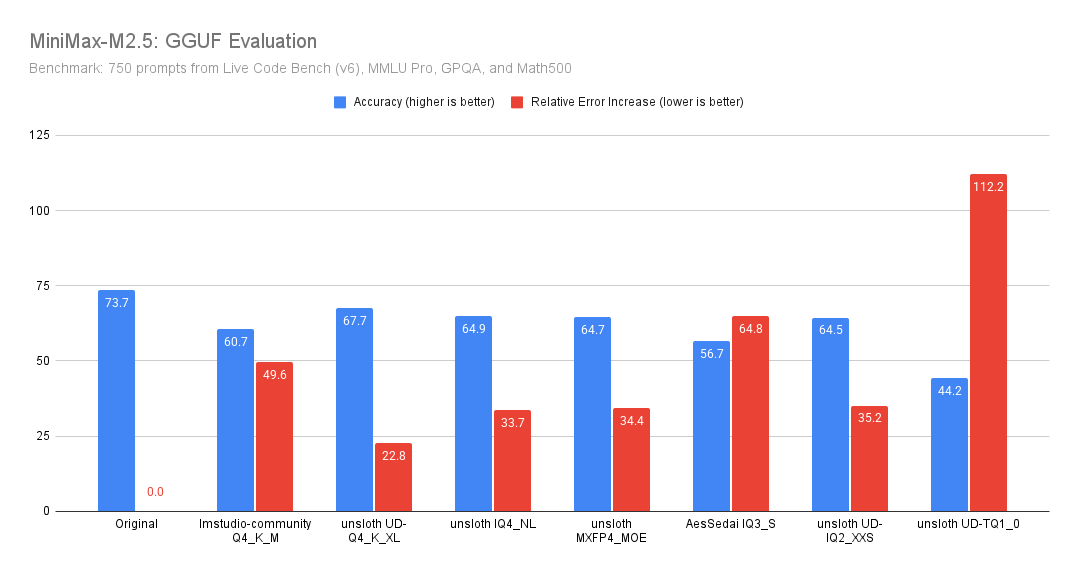
[Benjamin Marie (third-party) benchmarked](https://x.com/bnjmn_marie/status/2027043753484021810/photo/1) **MiniMax-M2.5** using **Unsloth GGUF quantizations** on a **750-prompt mixed suite** (LiveCodeBench v6, MMLU Pro, GPQA, Math500), reporting both **overall accuracy** and **relative error increase** (how much more often the quantized model makes mistakes vs. the original).
Unsloth quants, no matter their precision perform much better than their non-Unsloth counterparts for both accuracy and relative error (despite being 8GB smaller).
**Key results:**
* **Best quality/size tradeoff here: `unsloth UD-Q4_K_XL`.**\
It’s the closest to Original: only **6.0 points** down, and “only” **+22.8%** more errors than baseline.
* **Other Unsloth Q4 quants perform closely together (\~64.5–64.9 accuracy).**\
`IQ4_NL`, `MXFP4_MOE`, and `UD-IQ2_XXS` are all basically the same quality on this benchmark, with **\~33–35%** more errors than Original.
* Unsloth GGUFs perform much better than other non-Unsloth GGUFs, e.g. see `lmstudio-community - Q4_K_M` (despite being 8GB smaller) and `AesSedai - IQ3_S`.
### Official Benchmarks
---
# Agent Instructions
This documentation is published with GitBook. GitBook is the documentation platform designed so that both humans and AI agents can read, navigate, and reason over technical content effectively. Learn more at gitbook.com.
## Querying This Documentation
If you need additional information that is not directly available in this page, you can query the documentation by asking a question.
Perform an HTTP GET request on the following URL with the `ask` and `goal` query parameters:
```
GET https://unsloth.ai/docs/models/tutorials/minimax-m27.md?ask=&goal=
```
`ask` is the immediate question: it should be specific, self-contained, and written in natural language.
`goal` is what the user is ultimately trying to achieve, the reason they need the answer. Sharing it helps GitBook give you a better, more relevant answer. A goal is most helpful when it describes the outcome the user wants rather than restating the question. For example, with `ask=how do I create an API token`, a goal like `automate deployments from our CI pipeline` lets GitBook tailor the answer to that use case.
The response will contain a direct answer to the question and relevant excerpts and sources from the documentation.
Use this mechanism when the answer is not explicitly present in the current page, you need clarification or additional context, or you want to retrieve related documentation sections.


(1).png?alt=media&token=ce73524f-1db2-410a-ac2f-a26cba04d270)