# MiniMax-M2.5: How to Run Guide

MiniMax-M2.5 is a new open LLM achieving SOTA in coding, agentic tool use and search and office work, scoring 80.2% in [SWE-Bench](#benchmarks) Verified, 51.3% in Multi-SWE-Bench, and 76.3% in BrowseComp.

The **230B parameters** (10B active) model has a **200K context** window and unquantized bf16 requires **457GB**. Unsloth Dynamic **3-bit** GGUF reduces size to **101GB** **(-62%):** [**MiniMax-M2.5 GGUF**](https://huggingface.co/unsloth/MiniMax-M2.5-GGUF)

All uploads use Unsloth [Dynamic 2.0](https://unsloth.ai/docs/basics/unsloth-dynamic-2.0-ggufs) for SOTA quantization performance - so 3-bit has important layers upcasted to 8 or 16-bit. You can also fine-tune the model via Unsloth, using multiGPUs.

{% hint style="success" %}
**Feb 26:** See how well our GGUF quants [perform on benchmarks here](#unsloth-gguf-benchmarks).
{% endhint %}

### :gear: Usage Guide

The 3-bit dynamic quant UD-Q3\_K\_XL uses **101GB** of disk space - this fits nicely on a **128GB unified memory Mac** for \~20+ tokens/s, and also works faster with a **1x16GB GPU and 96GB of RAM** for 25+ tokens/s. **2-bit** quants or the biggest 2-bit will fit on a 96GB device.

For near **full precision**, use `Q8_0` (8-bit) which utilizes 243GB and will fit on a 256GB RAM device / Mac for 10+ tokens/s.

{% hint style="success" %}
For best performance, make sure your total available memory (VRAM + system RAM) exceeds the size of the quantized model file you’re downloading. If it doesn’t, llama.cpp can still run via SSD/HDD offloading, but inference will be slower.
{% endhint %}

### Recommended Settings

MiniMax recommends using the following parameters for best performance: `temperature=1.0`, `top_p = 0.95`, `top_k = 40`.

{% columns %}
{% column %}

| Default Settings (Most Tasks)      |
| ---------------------------------- |
| `temperature = 1.0`                |
| `top_p = 0.95`                     |
| `top_k = 40`                       |
| `repeat penalty = 1.0` or disabled |
| {% endcolumn %}                    |

{% column %}

* **Maximum context window:** `196,608`
* `Min_P = 0.01` (default might be 0.05)
* Default system prompt:

{% code overflow="wrap" %}

```
You are a helpful assistant. Your name is MiniMax-M2.5 and is built by MiniMax.
```

{% endcode %}
{% endcolumn %}
{% endcolumns %}

## Run MiniMax-M2.5 Tutorials:

For these tutorials, we will be utilizing the 3-bit [UD-Q3\_K\_XL](https://huggingface.co/unsloth/MiniMax-M2.5-GGUF?show_file_info=UD-Q3_K_XL%2FMiniMax-M2.5-UD-Q3_K_XL-00001-of-00004.gguf) quant which fits in a 128GB RAM device.

#### ✨ Run in llama.cpp

{% stepper %}
{% step %}
Obtain the latest `llama.cpp` on [GitHub here](https://github.com/ggml-org/llama.cpp). You can follow the build instructions below as well. Change `-DGGML_CUDA=ON` to `-DGGML_CUDA=OFF` if you don't have a GPU or just want CPU inference. **For Apple Mac / Metal devices**, set `-DGGML_CUDA=OFF` then continue as usual - Metal support is on by default.

{% code overflow="wrap" %}

```bash
apt-get update
apt-get install pciutils build-essential cmake curl libcurl4-openssl-dev -y
git clone https://github.com/ggml-org/llama.cpp
cmake llama.cpp -B llama.cpp/build \
    -DBUILD_SHARED_LIBS=OFF -DGGML_CUDA=ON
cmake --build llama.cpp/build --config Release -j --clean-first --target llama-cli llama-mtmd-cli llama-server llama-gguf-split
cp llama.cpp/build/bin/llama-* llama.cpp
```

{% endcode %}
{% endstep %}

{% step %}
If you want to use `llama.cpp` directly to load models, you can do the below: (:Q3\_K\_XL) is the quantization type. You can also download via Hugging Face (point 3). This is similar to `ollama run` . Use `export LLAMA_CACHE="folder"` to force `llama.cpp` to save to a specific location. Remember the model has only a maximum of 200K context length.

Follow this for **most default** use-cases:

```bash
export LLAMA_CACHE="unsloth/MiniMax-M2.5-GGUF"
./llama.cpp/llama-cli \
    -hf unsloth/MiniMax-M2.5-GGUF:UD-Q3_K_XL \
    --ctx-size 16384 \
    --flash-attn on \
    --temp 1.0 \
    --top-p 0.95 \
    --min-p 0.01 \
    --top-k 40
```

{% endstep %}

{% step %}
Download the model via (after installing `pip install huggingface_hub hf_transfer` ). You can choose `UD-Q3_K_XL` (dynamic 4-bit quant) or other quantized versions like `UD-Q6_K_XL` . We recommend using our 4bit dynamic quant `UD-Q3_K_XL` to balance size and accuracy. If downloads get stuck, see [hugging-face-hub-xet-debugging](https://unsloth.ai/docs/basics/troubleshooting-and-faqs/hugging-face-hub-xet-debugging "mention")

```bash
hf download unsloth/MiniMax-M2.5-GGUF \
    --local-dir unsloth/MiniMax-M2.5-GGUF \
    --include "*UD-Q3_K_XL*" # Use "*Q8_0*" for 8-bit
```

{% endstep %}

{% step %}
You can edit `--threads 32` for the number of CPU threads, `--ctx-size 16384` for context length, `--n-gpu-layers 2` for GPU offloading on how many layers. Try adjusting it if your GPU goes out of memory. Also remove it if you have CPU only inference.

{% code overflow="wrap" %}

```bash
./llama.cpp/llama-cli \
    --model unsloth/MiniMax-M2.5-GGUF/UD-Q3_K_XL/MiniMax-M2.5-UD-Q3_K_XL-00001-of-00004.gguf \
    --temp 1.0 \
    --top-p 0.95 \
    --min-p 0.01 \
    --top-k 40 \
    --ctx-size 16384 \
    --seed 3407
```

{% endcode %}
{% endstep %}
{% endstepper %}

### 🦙 Llama-server & OpenAI's completion library

To deploy MiniMax-M2.5 for production, we use `llama-server` or OpenAI API. In a new terminal say via tmux, deploy the model via:

{% code overflow="wrap" %}

```bash
./llama.cpp/llama-server \
    --model unsloth/MiniMax-M2.5-GGUF/UD-Q3_K_XL/MiniMax-M2.5-UD-Q3_K_XL-00001-of-00004.gguf \
    --alias "unsloth/MiniMax-M2.5" \
    --prio 3 \
    --temp 1.0 \
    --top-p 0.95 \
    --min-p 0.01 \
    --top-k 40 \
    --ctx-size 16384 \
    --port 8001
```

{% endcode %}

Then in a new terminal, after doing `pip install openai`, do:

{% code overflow="wrap" %}

```python
from openai import OpenAI
import json
openai_client = OpenAI(
    base_url = "http://127.0.0.1:8001/v1",
    api_key = "sk-no-key-required",
)
completion = openai_client.chat.completions.create(
    model = "unsloth/MiniMax-M2.5",
    messages = [{"role": "user", "content": "Create a Snake game."},],
)
print(completion.choices[0].message.content)
```

{% endcode %}

## 📊 Benchmarks

### Unsloth GGUF Benchmarks

<figure><img src="https://3215535692-files.gitbook.io/~/files/v0/b/gitbook-x-prod.appspot.com/o/spaces%2FxhOjnexMCB3dmuQFQ2Zq%2Fuploads%2FhfO2gsbz2lWrZXg3ojyE%2FHCGBTzgboAASv_A.png?alt=media&#x26;token=7d6334ca-4f3c-4946-aacd-d55527375fce" alt=""><figcaption></figcaption></figure>

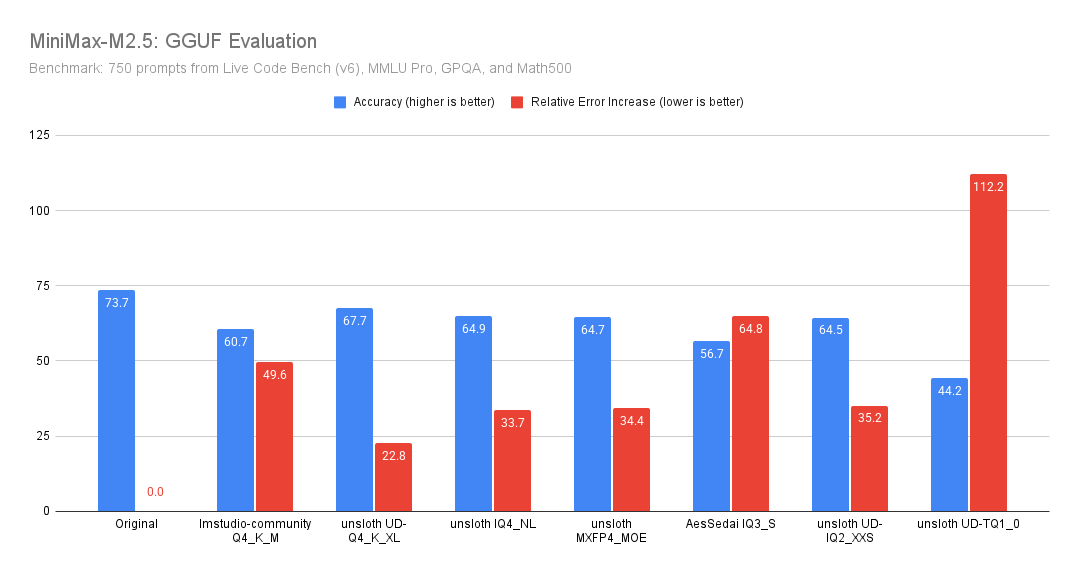
[Benjamin Marie (third-party) benchmarked](https://x.com/bnjmn_marie/status/2027043753484021810/photo/1) **MiniMax-M2.5** using **Unsloth GGUF quantizations** on a **750-prompt mixed suite** (LiveCodeBench v6, MMLU Pro, GPQA, Math500), reporting both **overall accuracy** and **relative error increase** (how much more often the quantized model makes mistakes vs. the original).

Unsloth quants, no matter their precision perform much better than their non-Unsloth counterparts for both accuracy and relative error (despite being 8GB smaller).

**Key results:**

* **Best quality/size tradeoff here: `unsloth UD-Q4_K_XL`.**\
  It’s the closest to Original: only **6.0 points** down, and “only” **+22.8%** more errors than baseline.
* **Other Unsloth Q4 quants perform closely together (\~64.5–64.9 accuracy).**\
  `IQ4_NL`, `MXFP4_MOE`, and `UD-IQ2_XXS` are all basically the same quality on this benchmark, with **\~33–35%** more errors than Original.
* Unsloth GGUFs perform much better than other non-Unsloth GGUFs, e.g. see `lmstudio-community - Q4_K_M` (despite being 8GB smaller) and `AesSedai - IQ3_S`.

### Official Benchmarks

You can view further below for benchmarks in table format:

<figure><img src="https://3215535692-files.gitbook.io/~/files/v0/b/gitbook-x-prod.appspot.com/o/spaces%2FxhOjnexMCB3dmuQFQ2Zq%2Fuploads%2FHtuBCFNe7qeVG538VVQV%2F97f76950-2c60-4a9b-bb96-228454afabe9.png?alt=media&#x26;token=a16edc7e-db1a-4052-aa99-1b516539b896" alt="" width="563"><figcaption></figcaption></figure>

<table data-full-width="true"><thead><tr><th>Benchmark</th><th>MiniMax-M2.5</th><th>MiniMax-M2.1</th><th>Claude Opus 4.5</th><th>Claude Opus 4.6</th><th>Gemini 3 Pro</th><th>GPT-5.2 (thinking)</th></tr></thead><tbody><tr><td>AIME25</td><td>86.3</td><td>83.0</td><td>91.0</td><td>95.6</td><td>96.0</td><td>98.0</td></tr><tr><td>GPQA-D</td><td>85.2</td><td>83.0</td><td>87.0</td><td>90.0</td><td>91.0</td><td>90.0</td></tr><tr><td>SciCode</td><td>44.4</td><td>41.0</td><td>50.0</td><td>52.0</td><td>56.0</td><td>52.0</td></tr><tr><td>IFBench</td><td>70.0</td><td>70.0</td><td>58.0</td><td>53.0</td><td>70.0</td><td>75.0</td></tr><tr><td>AA-LCR</td><td>69.5</td><td>62.0</td><td>74.0</td><td>71.0</td><td>71.0</td><td>73.0</td></tr><tr><td>SWE-Bench Verified</td><td>80.2</td><td>74.0</td><td>80.9</td><td>80.8</td><td>78.0</td><td>80.0</td></tr><tr><td>SWE-Bench Pro</td><td>55.4</td><td>49.7</td><td>56.9</td><td>55.4</td><td>54.1</td><td>55.6</td></tr><tr><td>Terminal Bench 2</td><td>51.7</td><td>47.9</td><td>53.4</td><td>55.1</td><td>54.0</td><td>54.0</td></tr><tr><td>HLE w/o tools</td><td>19.4</td><td>22.2</td><td>28.4</td><td>30.7</td><td>37.2</td><td>31.4</td></tr><tr><td>Multi-SWE-Bench</td><td>51.3</td><td>47.2</td><td>50.0</td><td>50.3</td><td>42.7</td><td>—</td></tr><tr><td>SWE-Bench Multilingual</td><td>74.1</td><td>71.9</td><td>77.5</td><td>77.8</td><td>65.0</td><td>72.0</td></tr><tr><td>VIBE-Pro (AVG)</td><td>54.2</td><td>42.4</td><td>55.2</td><td>55.6</td><td>36.9</td><td>—</td></tr><tr><td>BrowseComp (w/ctx)</td><td>76.3</td><td>62.0</td><td>67.8</td><td>84.0</td><td>59.2</td><td>65.8</td></tr><tr><td>Wide Search</td><td>70.3</td><td>63.2</td><td>76.2</td><td>79.4</td><td>57.0</td><td>—</td></tr><tr><td>RISE</td><td>50.2</td><td>34.0</td><td>50.5</td><td>62.5</td><td>36.8</td><td>50.0</td></tr><tr><td>BFCL multi-turn</td><td>76.8</td><td>37.4</td><td>68.0</td><td>63.3</td><td>61.0</td><td>—</td></tr><tr><td>τ² Telecom</td><td>97.8</td><td>87.0</td><td>98.2</td><td>99.3</td><td>98.0</td><td>98.7</td></tr><tr><td>MEWC</td><td>74.4</td><td>55.6</td><td>82.1</td><td>89.8</td><td>78.7</td><td>41.3</td></tr><tr><td>GDPval-MM</td><td>59.0</td><td>24.6</td><td>61.1</td><td>73.5</td><td>28.1</td><td>54.5</td></tr><tr><td>Finance Modeling</td><td>21.6</td><td>17.3</td><td>30.1</td><td>33.2</td><td>15.0</td><td>20.0</td></tr></tbody></table>

<div><figure><img src="https://3215535692-files.gitbook.io/~/files/v0/b/gitbook-x-prod.appspot.com/o/spaces%2FxhOjnexMCB3dmuQFQ2Zq%2Fuploads%2FfHyJbhPs4k10iiauD3zo%2F1f5a4e78-1a5c-4263-8a65-36c6fe703041.png?alt=media&#x26;token=346519a3-5dee-4ea1-b395-c7de12b6f6cd" alt="" width="563"><figcaption><p>Coding Core Benchmark Scores</p></figcaption></figure> <figure><img src="https://3215535692-files.gitbook.io/~/files/v0/b/gitbook-x-prod.appspot.com/o/spaces%2FxhOjnexMCB3dmuQFQ2Zq%2Fuploads%2FhJmbCVK6CNZPw2FSJLPT%2F2003295c-001c-4381-af89-8859c197b5a0.png?alt=media&#x26;token=aaa9968d-f694-4b1e-b734-086c2cf8988b" alt="" width="563"><figcaption><p>Search and Tool Use</p></figcaption></figure></div>

<div><figure><img src="https://3215535692-files.gitbook.io/~/files/v0/b/gitbook-x-prod.appspot.com/o/spaces%2FxhOjnexMCB3dmuQFQ2Zq%2Fuploads%2FaG1VqXpVwoCWG3RxMWDL%2F91c4825c-1813-4cad-9e36-4b69c6cd0272.png?alt=media&#x26;token=ae956a3f-a25e-4ebc-80cb-97733573e654" alt=""><figcaption><p>Tasks Completed per 100</p></figcaption></figure> <figure><img src="https://3215535692-files.gitbook.io/~/files/v0/b/gitbook-x-prod.appspot.com/o/spaces%2FxhOjnexMCB3dmuQFQ2Zq%2Fuploads%2Fj2PwoDid8zWRyYnXA6of%2F8c25f392-275d-4730-aa92-e9ea27315d83.png?alt=media&#x26;token=a59cf4d3-ff63-4383-90c8-2d089db19b50" alt=""><figcaption><p>Office Capabilities</p></figcaption></figure></div>
