> For the complete documentation index, see [llms.txt](https://unsloth.ai/docs/llms.txt). Markdown versions of documentation pages are available by appending `.md` to page URLs; this page is available as [Markdown](https://unsloth.ai/docs/models/tutorials/glm-4.7-flash.md).
# GLM-4.7-Flash: How To Run Locally
Run & fine-tune GLM-4.7-Flash locally on your device!
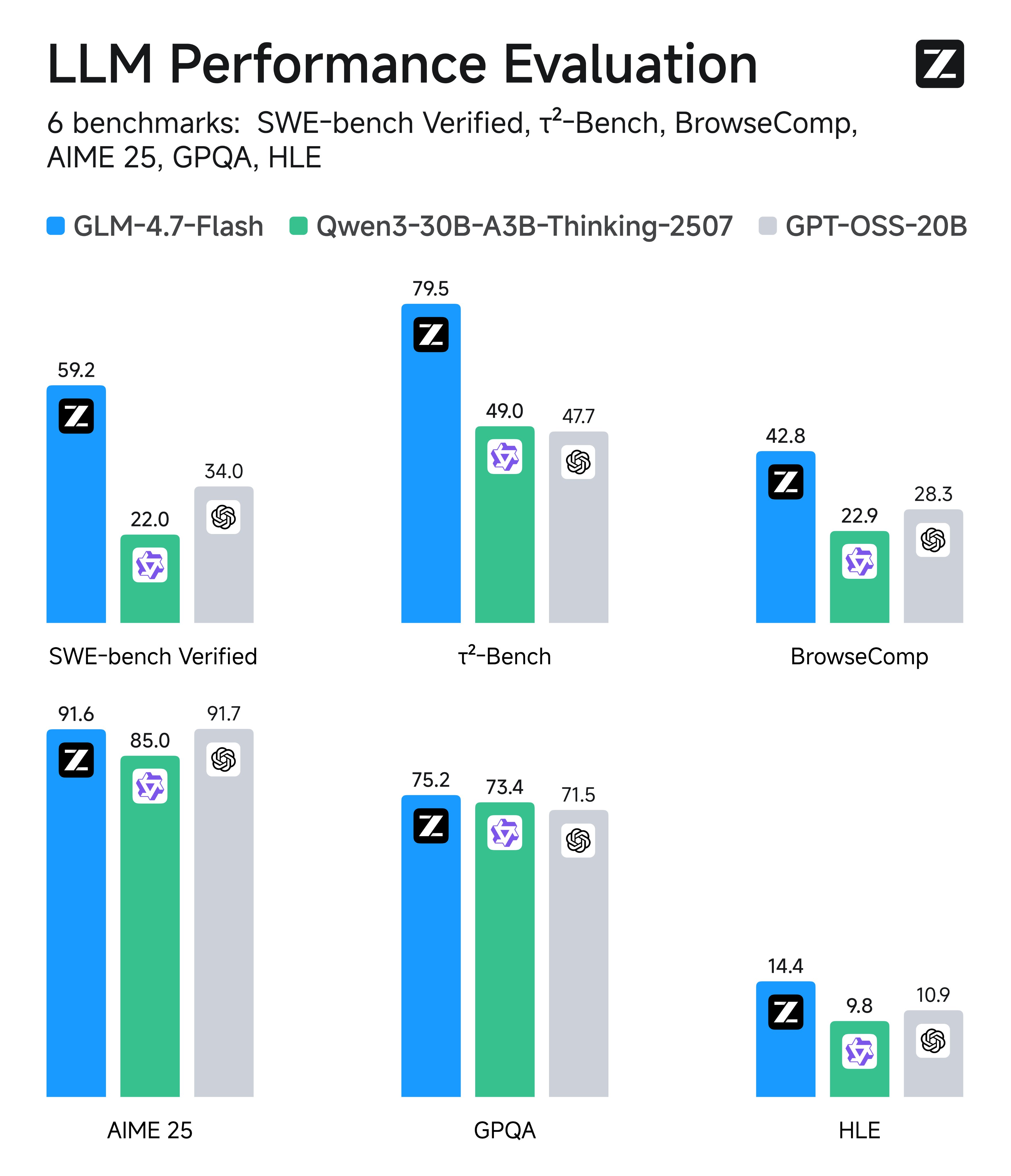
GLM-4.7-Flash is Z.ai’s new 30B MoE reasoning model built for local deployment, delivering best-in-class performance for coding, agentic workflows, and chat. It uses \~3.6B parameters, supports 200K context, and leads SWE-Bench, GPQA, and reasoning/chat benchmarks.
GLM-4.7-Flash runs on **24GB RAM**/VRAM/unified memory (32GB for full precision), and you can now fine-tune with Unsloth. To run GLM 4.7 Flash with vLLM, see [#glm-4.7-flash-in-vllm](#glm-4.7-flash-in-vllm "mention")
{% hint style="success" %}
Jan 21 update: `llama.cpp` fixed a bug specifying the wrong `scoring_func`: `"softmax"` (should be `"sigmoid"`). This caused looping and poor outputs. We updated the GGUFs - please re-download the model for much better outputs.
You can now use Z.ai’s recommended parameters and get great results:
* **For general use-case:** `--temp 1.0 --top-p 0.95`
* **For tool-calling:** `--temp 0.7 --top-p 1.0`
* **Repeat penalty:** Disable it, or set `--repeat-penalty 1.0`
Jan 22: Faster inference is here as the FA fix for CUDA is now merged.
{% endhint %}
Running TutorialFine-tuning
GLM-4.7-Flash GGUF to run: [unsloth/GLM-4.7-Flash-GGUF](https://huggingface.co/unsloth/GLM-4.7-Flash-GGUF)
### ⚙️ Usage Guide
For best performance, make sure your total available memory (VRAM + system RAM) exceeds the size of the quantized model file you’re downloading. If it doesn’t, llama.cpp can still run via SSD/HDD offloading, but inference will be slower.
After speaking with the Z.ai's team, they recommend using their GLM-4.7 sampling parameters:
| Default Settings (Most Tasks) | Terminal Bench, SWE Bench Verified |
| ------------------------------------------------------------------ | ------------------------------------------------------------------ |
| **temperature = 1.0** | **temperature = 0.7** |
| **top\_p = 0.95** | **top\_p = 1.0** |
| repeat penalty = disabled or 1.0 | repeat penalty = disabled or 1.0 |
* For general use-case: `--temp 1.0 --top-p 0.95`
* For tool-calling: `--temp 0.7 --top-p 1.0`
* If using llama.cpp, set `--min-p 0.01` as llama.cpp's default is 0.05
* Sometimes you'll need to experiment what numbers work best for your use-case.
{% hint style="warning" %}
For now, we **don’t recommend** running this GGUF with **Ollama** due to potential chat template compatibility issues. The GGUF works well on llama.cpp (or backends e.g. LM Studio, Jan).
**Remember to disable repeat penalty! Or set** `--repeat-penalty 1.0`
{% endhint %}
* **Maximum context window:** `202,752`
### 🖥️ Run GLM-4.7-Flash
Depending on your use-case you will need to use different settings. Some GGUFs end up similar in size because the model architecture (like [gpt-oss](/docs/models/gpt-oss-how-to-run-and-fine-tune.md)) has dimensions not divisible by 128, so parts can’t be quantized to lower bits.
Because this guide uses 4-bit, you will need around 18GB RAM/unified memory. We recommend using at least 4-bit precision for best performance.
{% hint style="warning" %}
For now, we **don’t recommend** running this GGUF with **Ollama** due to potential chat template compatibility issues. The GGUF works well on llama.cpp (or backends e.g. LM Studio, Jan).
**Remember to disable repeat penalty! Or set** `--repeat-penalty 1.0`
{% endhint %}
#### 🦥 Unsloth Studio Guide
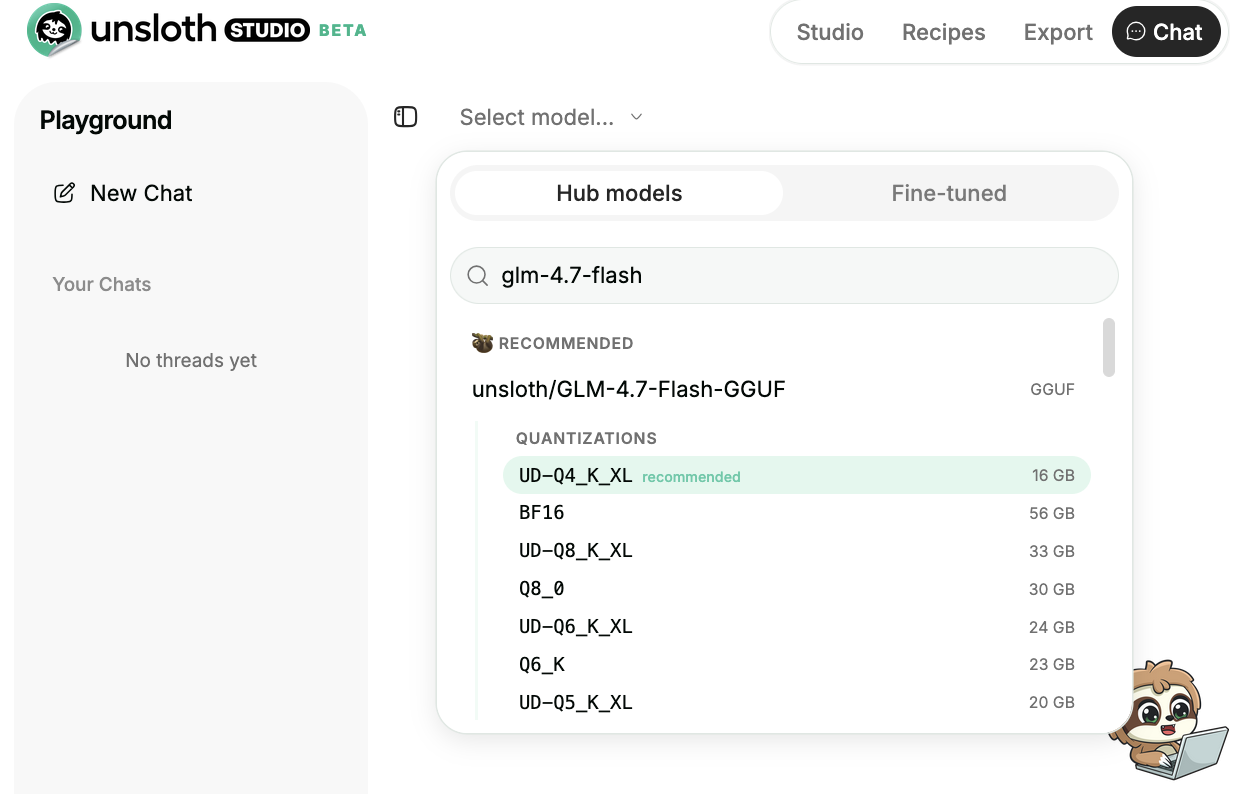
GLM-4.7-Flash can be run and fine-tuned in [Unsloth Studio](/docs/new/studio.md), our new open-source web UI for local AI. With Unsloth Studio, you can run models locally on **MacOS, Windows**, Linux and:
{% columns %}
{% column %}
* Search, download, [run GGUFs](/docs/new/studio.md#run-models-locally) and safetensor models
* [**Self-healing** tool calling](/docs/new/studio.md#execute-code--heal-tool-calling) + **web search**
* [**Code execution**](/docs/new/studio.md#run-models-locally) (Python, Bash)
* [Automatic inference](https://unsloth.ai/docs/desktop#feature-deep-dive) parameter tuning (temp, top-p, etc.)
* Fast CPU + GPU inference via llama.cpp
* [Train LLMs](/docs/new/studio.md#no-code-training) 2x faster with 70% less VRAM
{% endcolumn %}
{% column %}
{% endcolumn %}
{% endcolumns %}
{% stepper %}
{% step %}
**Install Unsloth**
Run in your terminal:
MacOS, Linux, WSL:
```bash
curl -fsSL https://unsloth.ai/install.sh | sh
```
Windows PowerShell:
```bash
irm https://unsloth.ai/install.ps1 | iex
```
{% hint style="success" %}
**Installation will be quick and take approx 1-2 mins.**
{% endhint %}
{% endstep %}
{% step %}
**Launch Unsloth**
MacOS, Linux, WSL and Windows:
```bash
unsloth studio -H 0.0.0.0 -p 8888
```
Then open `http://localhost:8888` in your browser.
{% endstep %}
{% step %}
**Search and download GLM-4.7-Flash**
On first launch you will need to create a password to secure your account and sign in again later. You’ll then see a brief onboarding wizard to choose a model, dataset, and basic settings. You can skip it at any time.
Then go to the [Unsloth Chat](/docs/new/studio/chat.md) tab and search for **GLM-4.7-Flash** in the search bar and download your desired model and quant.
{% endstep %}
{% step %}
**Run GLM-4.7-Flash**
Inference parameters should be auto-set when using Unsloth Studio, however you can still change it manually. You can also edit the context length, chat template and other settings.
For more information, you can view our [Unsloth Studio inference guide](/docs/new/studio/chat.md).
{% endstep %}
{% endstepper %}
#### Llama.cpp Tutorial (GGUF):
Instructions to run in llama.cpp (note we will be using 4-bit to fit most devices):
{% stepper %}
{% step %}
Obtain the latest `llama.cpp` on [GitHub here](https://github.com/ggml-org/llama.cpp). You can follow the build instructions below as well. Change `-DGGML_CUDA=ON` to `-DGGML_CUDA=OFF` if you don't have a GPU or just want CPU inference. **For Apple Mac / Metal devices**, set `-DGGML_CUDA=OFF` then continue as usual - Metal support is on by default.
{% code overflow="wrap" %}
```bash
apt-get update
apt-get install pciutils build-essential cmake curl libcurl4-openssl-dev -y
git clone https://github.com/ggml-org/llama.cpp
cmake llama.cpp -B llama.cpp/build \
-DBUILD_SHARED_LIBS=OFF -DGGML_CUDA=ON
cmake --build llama.cpp/build --config Release -j --clean-first --target llama-cli llama-mtmd-cli llama-server llama-gguf-split
cp llama.cpp/build/bin/llama-* llama.cpp
```
{% endcode %}
{% endstep %}
{% step %}
You can directly pull from Hugging Face. You can increase the context to 200K as your RAM/VRAM allows.
You can also try Z.ai's recommended GLM-4.7 sampling parameters:
* For general use-case: `--temp 1.0 --top-p 0.95`
* For tool-calling: `--temp 0.7 --top-p 1.0`
* **Remember to disable repeat penalty!**
Follow this for **general instruction** use-cases:
```bash
./llama.cpp/llama-cli \
-hf unsloth/GLM-4.7-Flash-GGUF:UD-Q4_K_XL \
--ctx-size 16384 \
--temp 1.0 --top-p 0.95 --min-p 0.01
```
Follow this for **tool-calling** use-cases:
```bash
./llama.cpp/llama-cli \
-hf unsloth/GLM-4.7-Flash-GGUF:UD-Q4_K_XL \
--ctx-size 16384 \
--temp 0.7 --top-p 1.0 --min-p 0.01
```
{% endstep %}
{% step %}
Download the model via (after installing `pip install huggingface_hub`). You can choose `UD-Q4_K_XL` or other quantized versions. If downloads get stuck, see [Hugging Face Hub, XET debugging](/docs/basics/troubleshooting-and-faqs/hugging-face-hub-xet-debugging.md)
{% code overflow="wrap" %}
```bash
pip install -U huggingface_hub
hf download unsloth/GLM-4.7-Flash-GGUF \
--local-dir unsloth/GLM-4.7-Flash-GGUF \
--include "*UD-Q2_K_XL*"
```
{% endcode %}
{% endstep %}
{% step %}
Then run the model in conversation mode:
{% code overflow="wrap" %}
```bash
./llama.cpp/llama-cli \
--model unsloth/GLM-4.7-Flash-GGUF/GLM-4.7-Flash-UD-Q4_K_XL.gguf \
--ctx-size 16384 \
--seed 3407 \
--temp 1.0 \
--top-p 0.95 \
--min-p 0.01
```
{% endcode %}
Also, adjust **context window** as required, up to `202752`
{% endstep %}
{% endstepper %}
### :loop:Reducing repetition and looping
{% hint style="success" %}
**JAN 21 UPDATE: llama.cpp fixed a bug specifying the wrong** `"scoring_func": "softmax"` **that caused looping and poor outputs (should be sigmoid) We updated the GGUFs. Please re-download the model for much better outputs.**
{% endhint %}
This means you can now use Z.ai's recommended parameters and get great results:
* For general use-case: `--temp 1.0 --top-p 0.95`
* For tool-calling: `--temp 0.7 --top-p 1.0`
* If using llama.cpp, set `--min-p 0.01` as llama.cpp's default is 0.05
* **Remember to disable repeat penalty! Or set** `--repeat-penalty 1.0`
We added `"scoring_func": "sigmoid"` to `config.json` for the main model - [see](https://huggingface.co/unsloth/GLM-4.7-Flash/commit/3fd53b491e04f707f307aef2f70f8a7520511e6d).
{% hint style="warning" %}
For now, we **don’t recommend** running this GGUF with **Ollama** due to potential chat template compatibility issues. The GGUF works well on llama.cpp (or backends e.g. LM Studio, Jan).
{% endhint %}
### :bird:Flappy Bird Example with UD-Q4\_K\_XL
As an example, we did the following long conversation by using UD-Q4\_K\_XL via `./llama.cpp/llama-cli --model unsloth/GLM-4.7-Flash-GGUF/GLM-4.7-Flash-UD-Q4_K_XL.gguf --fit on --temp 1.0 --top-p 0.95 --min-p 0.01` :
```
Hi
What is 2+2
Create a Python Flappy Bird game
Create a totally different game in Rust
Find bugs in both
Make the 1st game I mentioned but in a standalone HTML file
Find bugs and show the fixed game
```
which rendered the following Flappy Bird game in HTML form:
Flappy Bird Game in HTML (Expandable)
```html
Flappy Bird Fixed
0
FLAPPY BIRD
Tap or Press Space to Start
GAME OVER
Score: 0
```
And we took some screenshots (4bit works):
### 🦥 Fine-tuning GLM-4.7-Flash
Unsloth now supports fine-tuning of GLM-4.7-Flash, however you will need to use `transformers v5`. The 30B model does not fit on a free Colab GPU; however, you can use our notebook. 16-bit LoRA fine-tuning of GLM-4.7-Flash will use around **60GB VRAM**:
* [GLM-4.7-Flash SFT LoRA notebook](https://colab.research.google.com/github/unslothai/notebooks/blob/main/nb/GLM_Flash_A100\(80GB\).ipynb)
{% hint style="warning" %}
You may encounter out of memory sometimes when using A100 40GB VRAM. You will need to use H100/A100 80GB VRAM for smoother runs.
{% endhint %}
{% embed url="" %}
On fine-tuning MoE's, it's probably not a good idea to fine-tune the router layer so we disabled it by default. If you want to maintain its reasoning capabilities (optional), you can use a mix of direct answers and chain-of-thought examples. Use at least 75% reasoning and 25% non-reasoning in your dataset to make the model retain its reasoning capabilities.
### 🦙Llama-server serving & deployment
To deploy GLM-4.7-Flash for production, we use `llama-server` In a new terminal say via tmux, deploy the model via:
{% code overflow="wrap" %}
```bash
./llama.cpp/llama-server \
--model unsloth/GLM-4.7-Flash-GGUF/GLM-4.7-Flash-UD-Q4_K_XL.gguf \
--alias "unsloth/GLM-4.7-Flash" \
--seed 3407 \
--temp 1.0 \
--top-p 0.95 \
--min-p 0.01 \
--ctx-size 16384 \
--port 8001
```
{% endcode %}
Then in a new terminal, after doing `pip install openai`, do:
{% code overflow="wrap" %}
```python
from openai import OpenAI
import json
openai_client = OpenAI(
base_url = "http://127.0.0.1:8001/v1",
api_key = "sk-no-key-required",
)
completion = openai_client.chat.completions.create(
model = "unsloth/GLM-4.7-Flash",
messages = [{"role": "user", "content": "What is 2+2?"},],
)
print(completion.choices[0].message.content)
```
{% endcode %}
Which will print
{% code overflow="wrap" %}
```
User asks a simple question: "What is 2+2?" The answer is 4. Provide answer.
2 + 2 = 4.
```
{% endcode %}
### :computer: GLM-4.7-Flash in vLLM
You can now use our new [FP8 Dynamic quant](https://huggingface.co/unsloth/GLM-4.7-Flash-FP8-Dynamic) of the model for premium and fast inference. First install vLLM from nightly:
{% code overflow="wrap" %}
```bash
uv pip install --upgrade --force-reinstall vllm --torch-backend=auto --extra-index-url https://wheels.vllm.ai/nightly/cu130
uv pip install --upgrade --force-reinstall git+https://github.com/huggingface/transformers.git
uv pip install --force-reinstall numba
```
{% endcode %}
Then serve [Unsloth's dynamic FP8 version](https://huggingface.co/unsloth/GLM-4.7-Flash-FP8-Dynamic) of the model. We enabled FP8 to reduce KV cache memory usage by 50%, and on 4 GPUs. If you have 1 GPU, use `CUDA_VISIBLE_DEVICES='0'` and set `--tensor-parallel-size 1` or remove this argument. To disable FP8, remove `--quantization fp8 --kv-cache-dtype fp8`
```bash
export PYTORCH_CUDA_ALLOC_CONF=expandable_segments:False
CUDA_VISIBLE_DEVICES='0,1,2,3' vllm serve unsloth/GLM-4.7-Flash-FP8-Dynamic \
--served-model-name unsloth/GLM-4.7-Flash \
--tensor-parallel-size 4 \
--tool-call-parser glm47 \
--reasoning-parser glm45 \
--enable-auto-tool-choice \
--dtype bfloat16 \
--seed 3407 \
--max-model-len 200000 \
--gpu-memory-utilization 0.95 \
--max_num_batched_tokens 16384 \
--port 8001 \
--kv-cache-dtype fp8
```
You can then call the served model via the OpenAI API:
```python
from openai import AsyncOpenAI, OpenAI
openai_api_key = "EMPTY"
openai_api_base = "http://localhost:8001/v1"
client = OpenAI( # or AsyncOpenAI
api_key=openai_api_key,
base_url=openai_api_base,
)
```
#### :star: vLLM GLM-4.7-Flash Speculative Decoding
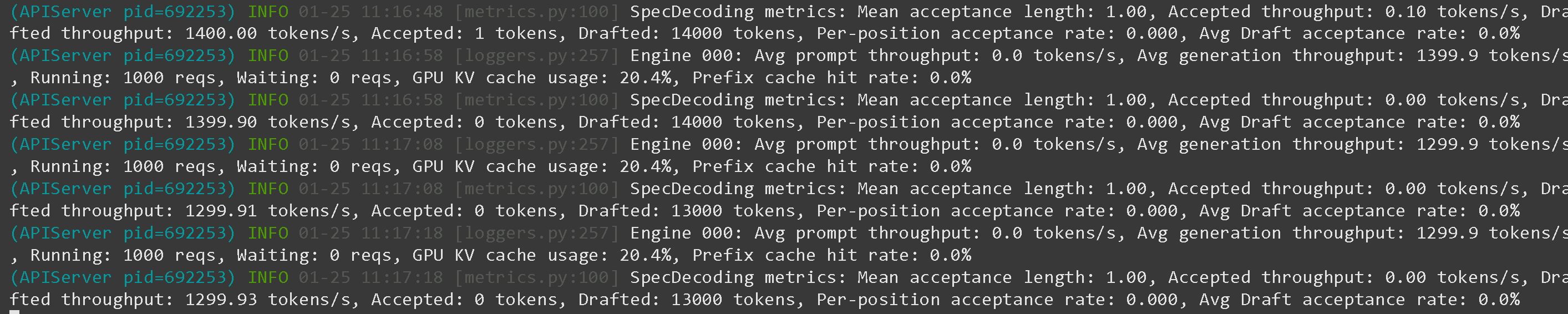
We found using the MTP (multi token prediction) module from GLM 4.7 Flash makes generation throughput drop from 13,000 tokens on 1 B200 to 1,300 tokens! (10x slower) On Hopper, it should be fine hopefully.
```bash
--speculative-config.method mtp \
--speculative-config.num_speculative_tokens 1
```
Only 1,300 tokens / s throughput on 1xB200 (130 tokens / s decoding per user)
And 13,000 tokens / s throughput on 1xB200 (still 130 token /s decoding per user)
### :hammer:Tool Calling with GLM-4.7-Flash
See [Tool Calling Guide](/docs/basics/tool-calling-guide-for-local-llms.md) for more details on how to do tool calling. In a new terminal (if using tmux, use CTRL+B+D), we create some tools like adding 2 numbers, executing Python code, executing Linux functions and much more:
{% code expandable="true" %}
```python
import json, subprocess, random
from typing import Any
def add_number(a: float | str, b: float | str) -> float:
return float(a) + float(b)
def multiply_number(a: float | str, b: float | str) -> float:
return float(a) * float(b)
def subtract_number(a: float | str, b: float | str) -> float:
return float(a) - float(b)
def write_a_story() -> str:
return random.choice([
"A long time ago in a galaxy far far away...",
"There were 2 friends who loved sloths and code...",
"The world was ending because every sloth evolved to have superhuman intelligence...",
"Unbeknownst to one friend, the other accidentally coded a program to evolve sloths...",
])
def terminal(command: str) -> str:
if "rm" in command or "sudo" in command or "dd" in command or "chmod" in command:
msg = "Cannot execute 'rm, sudo, dd, chmod' commands since they are dangerous"
print(msg); return msg
print(f"Executing terminal command `{command}`")
try:
return str(subprocess.run(command, capture_output = True, text = True, shell = True, check = True).stdout)
except subprocess.CalledProcessError as e:
return f"Command failed: {e.stderr}"
def python(code: str) -> str:
data = {}
exec(code, data)
del data["__builtins__"]
return str(data)
MAP_FN = {
"add_number": add_number,
"multiply_number": multiply_number,
"subtract_number": subtract_number,
"write_a_story": write_a_story,
"terminal": terminal,
"python": python,
}
tools = [
{
"type": "function",
"function": {
"name": "add_number",
"description": "Add two numbers.",
"parameters": {
"type": "object",
"properties": {
"a": {
"type": "string",
"description": "The first number.",
},
"b": {
"type": "string",
"description": "The second number.",
},
},
"required": ["a", "b"],
},
},
},
{
"type": "function",
"function": {
"name": "multiply_number",
"description": "Multiply two numbers.",
"parameters": {
"type": "object",
"properties": {
"a": {
"type": "string",
"description": "The first number.",
},
"b": {
"type": "string",
"description": "The second number.",
},
},
"required": ["a", "b"],
},
},
},
{
"type": "function",
"function": {
"name": "subtract_number",
"description": "Subtract two numbers.",
"parameters": {
"type": "object",
"properties": {
"a": {
"type": "string",
"description": "The first number.",
},
"b": {
"type": "string",
"description": "The second number.",
},
},
"required": ["a", "b"],
},
},
},
{
"type": "function",
"function": {
"name": "write_a_story",
"description": "Writes a random story.",
"parameters": {
"type": "object",
"properties": {},
"required": [],
},
},
},
{
"type": "function",
"function": {
"name": "terminal",
"description": "Perform operations from the terminal.",
"parameters": {
"type": "object",
"properties": {
"command": {
"type": "string",
"description": "The command you wish to launch, e.g `ls`, `rm`, ...",
},
},
"required": ["command"],
},
},
},
{
"type": "function",
"function": {
"name": "python",
"description": "Call a Python interpreter with some Python code that will be ran.",
"parameters": {
"type": "object",
"properties": {
"code": {
"type": "string",
"description": "The Python code to run",
},
},
"required": ["code"],
},
},
},
]
```
{% endcode %}
We then use the below functions (copy and paste and execute) which will parse the function calls automatically and call the OpenAI endpoint for any model:
{% code overflow="wrap" expandable="true" %}
```python
from openai import OpenAI
def unsloth_inference(
messages,
temperature = 0.7,
top_p = 1.0,
top_k = -1,
repetition_penalty = 0.0,
):
messages = messages.copy()
openai_client = OpenAI(
base_url = "http://127.0.0.1:8001/v1",
api_key = "sk-no-key-required",
)
model_name = next(iter(openai_client.models.list())).id
print(f"Using model = {model_name}")
has_tool_calls = True
original_messages_len = len(messages)
while has_tool_calls:
print(f"Current messages = {messages}")
response = openai_client.chat.completions.create(
model = model_name,
messages = messages,
temperature = temperature,
top_p = top_p,
tools = tools if tools else None,
tool_choice = "auto" if tools else None,
extra_body = {"top_k": top_k, "min_p": min_p, "dry_multiplier" :repetition_penalty,}
)
tool_calls = response.choices[0].message.tool_calls or []
content = response.choices[0].message.content or ""
tool_calls_dict = [tc.to_dict() for tc in tool_calls] if tool_calls else tool_calls
messages.append({"role": "assistant", "tool_calls": tool_calls_dict, "content": content,})
for tool_call in tool_calls:
fx, args, _id = tool_call.function.name, tool_call.function.arguments, tool_call.id
out = MAP_FN[fx](**json.loads(args))
messages.append({"role": "tool", "tool_call_id": _id, "name": fx, "content": str(out),})
else:
has_tool_calls = False
return messages
```
{% endcode %}
After launching GLM-4.7-Flash via `llama-server` like in [#deploy-with-llama-server-and-openais-completion-library](#deploy-with-llama-server-and-openais-completion-library "mention") or see [Tool Calling Guide](/docs/basics/tool-calling-guide-for-local-llms.md) for more details, we then can do some tool calls:
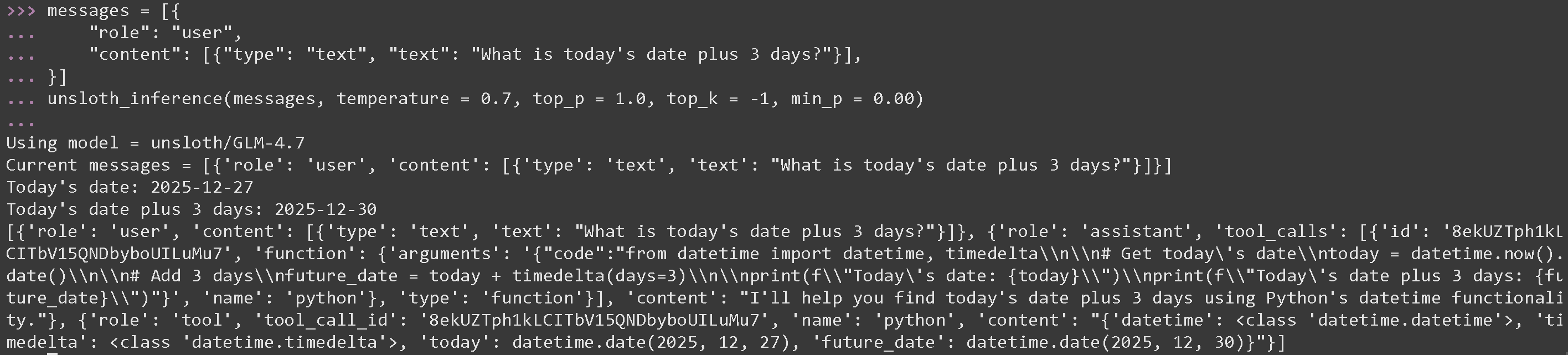
**Tool Call for mathematical operations for GLM 4.7**
{% code overflow="wrap" %}
```python
messages = [{
"role": "user",
"content": [{"type": "text", "text": "What is today's date plus 3 days?"}],
}]
unsloth_inference(messages, temperature = 1.0, top_p = 0.95, top_k = -1, min_p = 0.01)
```
{% endcode %}
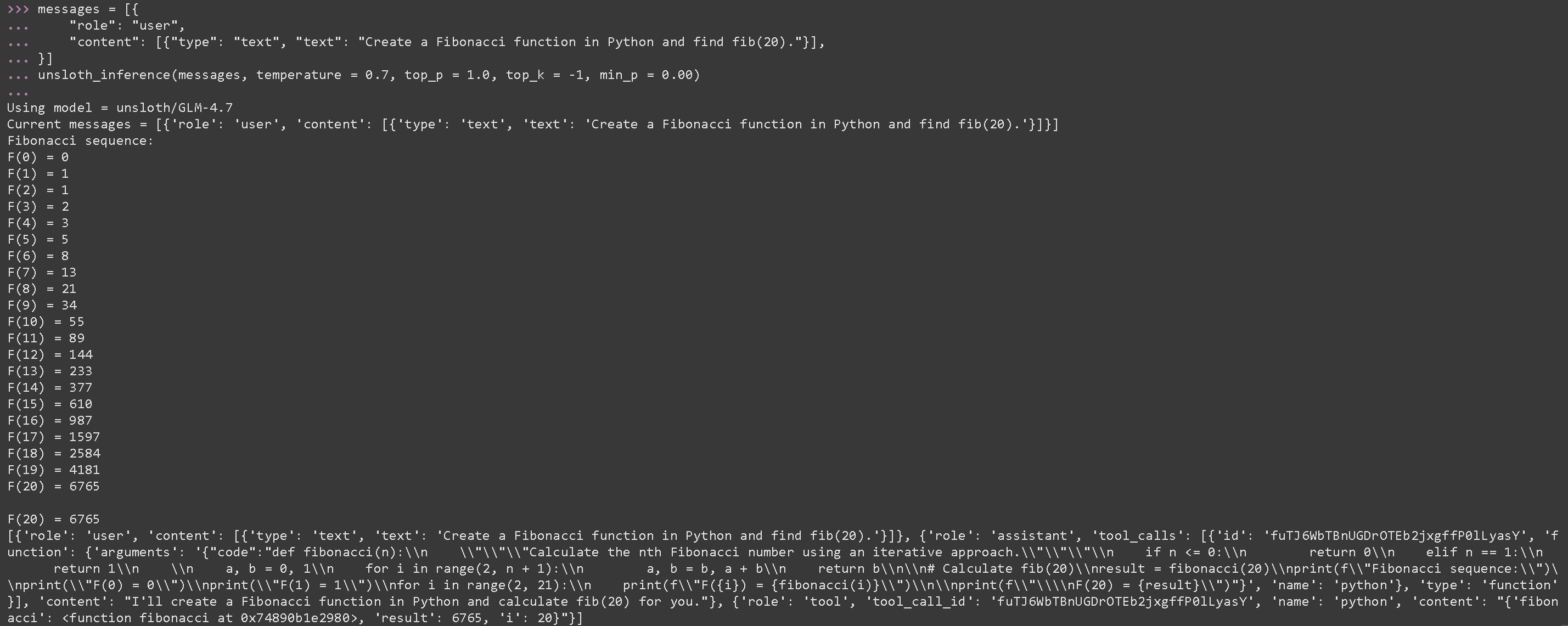
**Tool Call to execute generated Python code for GLM-4.7-Flash**
{% code overflow="wrap" %}
```python
messages = [{
"role": "user",
"content": [{"type": "text", "text": "Create a Fibonacci function in Python and find fib(20)."}],
}]
unsloth_inference(messages, temperature = 1.0, top_p = 0.95, top_k = -1, min_p = 0.01)
```
{% endcode %}
### Benchmarks
GLM-4.7-Flash is the best performing 30B model across all benchmarks except AIME 25.
| Benchmark | GLM-4.7-Flash | Qwen3-30B-A3B-Thinking-2507 | GPT-OSS-20B |
| ------------------ | ------------- | --------------------------- | ----------- |
| AIME 25 | 91.6 | 85.0 | 91.7 |
| GPQA | 75.2 | 73.4 | 71.5 |
| LCB v6 | 64.0 | 66.0 | 61.0 |
| HLE | 14.4 | 9.8 | 10.9 |
| SWE-bench Verified | 59.2 | 22.0 | 34.0 |
| τ²-Bench | 79.5 | 49.0 | 47.7 |
| BrowseComp | 42.8 | 2.29 | 28.3 |
---
# Agent Instructions
This documentation is published with GitBook. GitBook is the documentation platform designed so that both humans and AI agents can read, navigate, and reason over technical content effectively. Learn more at gitbook.com.
## Querying This Documentation
If you need additional information that is not directly available in this page, you can query the documentation by asking a question.
Perform an HTTP GET request on the following URL with the `ask` and `goal` query parameters:
```
GET https://unsloth.ai/docs/models/tutorials/glm-4.7-flash.md?ask=&goal=
```
`ask` is the immediate question: it should be specific, self-contained, and written in natural language.
`goal` is what the user is ultimately trying to achieve, the reason they need the answer. Sharing it helps GitBook give you a better, more relevant answer. A goal is most helpful when it describes the outcome the user wants rather than restating the question. For example, with `ask=how do I create an API token`, a goal like `automate deployments from our CI pipeline` lets GitBook tailor the answer to that use case.
The response will contain a direct answer to the question and relevant excerpts and sources from the documentation.
Use this mechanism when the answer is not explicitly present in the current page, you need clarification or additional context, or you want to retrieve related documentation sections.