# Qwen3.6 - How to Run Locally

Qwen3.6 is Alibaba’s new family of multimodal hybrid-thinking models, including Qwen3.6-35B-A3B. It delivers top performance for its size, supports 256K context across 201 languages. It excels in agentic coding, vision, chat tasks. [35B-A3B GGUF](https://huggingface.co/unsloth/Qwen3.6-35B-A3B-GGUF) can run on 22GB RAM setups. You can now run and train the models in [Unsloth Studio](#unsloth-studio-guide).

<a href="#qwen3.6-inference-tutorials" class="button primary">Run Qwen3.6 Tutorials</a>

{% columns %}
{% column %}
GGUFs use Unsloth [Dynamic 2.0](https://github.com/unslothai/docs/blob/main/basics/unsloth-dynamic-2.0-ggufs) for SOTA quantization performance - so quants are calibrated on real world use-case datasets and important layers are upcasted. *Thank you Qwen for day zero access.*

* **NEW! Developer Role Support for Codex, OpenCode and more:**\
  Our uploads now support the `developer role` for agentic coding tools.
* **Tool calling:** Like [Qwen3.5](https://unsloth.ai/docs/models/qwen3.5), we improved parsing nested objects to make tool calling succeed more.
  {% endcolumn %}

{% column %}

<div data-with-frame="true"><figure><img src="https://3215535692-files.gitbook.io/~/files/v0/b/gitbook-x-prod.appspot.com/o/spaces%2FxhOjnexMCB3dmuQFQ2Zq%2Fuploads%2FTbH2CrUTG2TWwgOP74GF%2FGemma%204%20example.gif?alt=media&#x26;token=56409d06-3735-4531-97c0-af9968371a26" alt=""><figcaption><p>Qwen3.6 running in <a href="#unsloth-studio-guide">Unsloth Studio</a>.</p></figcaption></figure></div>
{% endcolumn %}
{% endcolumns %}

### :gear: Usage Guide

**Table: Inference hardware requirements** (units = total memory: RAM + VRAM, or unified memory)

<table><thead><tr><th>Qwen3.6</th><th>3-bit</th><th>4-bit</th><th width="128">6-bit</th><th>8-bit</th><th>BF16</th></tr></thead><tbody><tr><td><a href="#qwen3.5-35b-a3b"><strong>35B-A3B</strong></a></td><td>17 GB</td><td>23 GB</td><td>30 GB</td><td>38 GB</td><td>70 GB</td></tr></tbody></table>

{% hint style="success" %}
For best performance, make sure your total available memory (VRAM + system RAM) exceeds the size of the quantized model file you’re downloading. If it doesn’t, llama.cpp can still run via SSD/HDD offloading, but inference will be slower.
{% endhint %}

### Recommended Settings

* **Maximum context window:** `262,144` (can be extended to 1M via YaRN)
* `presence_penalty = 0.0 to 2.0` default this is off, but to reduce repetitions, you can use this, however using a higher value may result in **slight decrease in performance**
* **Adequate Output Length**: `32,768` tokens for most queries

{% hint style="info" %}
If you're getting gibberish, your context length might be set too low. Or try using `--cache-type-k bf16 --cache-type-v bf16` which might help.
{% endhint %}

As Qwen3.6 is hybrid reasoning, thinking and non-thinking mode have different settings:

#### Thinking mode:

| General tasks                    | Precise coding tasks (e.g. WebDev) |
| -------------------------------- | ---------------------------------- |
| temperature = 1.0                | temperature = 0.6                  |
| top\_p = 0.95                    | top\_p = 0.95                      |
| top\_k = 20                      | top\_k = 20                        |
| min\_p = 0.0                     | min\_p = 0.0                       |
| presence\_penalty = 1.5          | presence\_penalty = 0.0            |
| repeat penalty = disabled or 1.0 | repeat penalty = disabled or 1.0   |

{% columns %}
{% column %}
Thinking mode for general tasks:

{% code overflow="wrap" %}

```bash
temperature=1.0, top_p=0.95, top_k=20, min_p=0.0, presence_penalty=1.5, repetition_penalty=1.0
```

{% endcode %}
{% endcolumn %}

{% column %}
Thinking mode for precise coding tasks:

{% code overflow="wrap" %}

```bash
temperature=0.6, top_p=0.95, top_k=20, min_p=0.0, presence_penalty=0.0, repetition_penalty=1.0
```

{% endcode %}
{% endcolumn %}
{% endcolumns %}

#### Instruct (non-thinking) mode settings:

| General tasks                    | Reasoning tasks                  |
| -------------------------------- | -------------------------------- |
| temperature = 0.7                | temperature = 1.0                |
| top\_p = 0.8                     | top\_p = 0.95                    |
| top\_k = 20                      | top\_k = 20                      |
| min\_p = 0.0                     | min\_p = 0.0                     |
| presence\_penalty = 1.5          | presence\_penalty = 1.5          |
| repeat penalty = disabled or 1.0 | repeat penalty = disabled or 1.0 |

{% hint style="warning" %}
To [disable thinking / reasoning](#how-to-enable-or-disable-reasoning-and-thinking), use `--chat-template-kwargs '{"enable_thinking":false}'`
{% endhint %}

{% columns %}
{% column %}
Instruct (non-thinking) for general tasks:

{% code overflow="wrap" %}

```bash
temperature=0.7, top_p=0.8, top_k=20, min_p=0.0, presence_penalty=1.5, repetition_penalty=1.0
```

{% endcode %}
{% endcolumn %}

{% column %}
Instruct (non-thinking) for reasoning tasks:

{% code overflow="wrap" %}

```bash
temperature=1.0, top_p=0.95, top_k=20, min_p=0.0, presence_penalty=1.5, repetition_penalty=1.0
```

{% endcode %}
{% endcolumn %}
{% endcolumns %}

## Qwen3.6 Inference Tutorials:

We'll be using Dynamic 4-bit `UD_Q4_K_XL` GGUF variants for inference workloads. Click below to navigate to designated model instructions:

{% hint style="warning" %}
Do NOT use CUDA 13.2 as you may get gibberish outputs. NVIDIA is working on a fix.
{% endhint %}

<a href="../qwen3.5#unsloth-studio-guide" class="button primary">Run in Unsloth Studio</a><a href="#llama.cpp-guides" class="button secondary">Run in llama.cpp</a>

{% hint style="warning" %}
`presence_penalty = 0.0 to 2.0` default this is off, but to reduce repetitions, you can use this, however using a higher value may result in **slight decrease in performance.**

**Currently no Qwen3.6 GGUF works in Ollama due to separate mmproj vision files. Use llama.cpp compatible backends.**
{% endhint %}

## 🦥 Unsloth Studio Guide

Qwen3.6 can be run and fine-tuned in [Unsloth Studio](https://unsloth.ai/docs/new/studio), our new open-source web UI for local AI. Unsloth Studio lets you run models locally on **MacOS, Windows**, Linux and:

{% columns %}
{% column %}

* Search, download, [run GGUFs](https://unsloth.ai/docs/new/studio#run-models-locally) and safetensor models
* [**Self-healing** tool calling](https://unsloth.ai/docs/new/studio#execute-code--heal-tool-calling) + **web search**
* [**Code execution**](https://unsloth.ai/docs/new/studio#run-models-locally) (Python, Bash)
* [Automatic inference](https://unsloth.ai/docs/new/studio#model-arena) parameter tuning (temp, top-p, etc.)
* Fast CPU + GPU inference via llama.cpp
* [Train LLMs](https://unsloth.ai/docs/new/studio#no-code-training) 2x faster with 70% less VRAM
  {% endcolumn %}

{% column %}

<div data-with-frame="true"><figure><img src="https://3215535692-files.gitbook.io/~/files/v0/b/gitbook-x-prod.appspot.com/o/spaces%2FxhOjnexMCB3dmuQFQ2Zq%2Fuploads%2FTbH2CrUTG2TWwgOP74GF%2FGemma%204%20example.gif?alt=media&#x26;token=56409d06-3735-4531-97c0-af9968371a26" alt=""><figcaption></figcaption></figure></div>
{% endcolumn %}
{% endcolumns %}

{% stepper %}
{% step %}

#### Install Unsloth

Run in your terminal:

**MacOS, Linux, WSL:**

```bash
curl -fsSL https://unsloth.ai/install.sh | sh
```

**Windows PowerShell:**

```bash
irm https://unsloth.ai/install.ps1 | iex
```

{% hint style="success" %}
**Installation will be quick and take approx 1-2 mins.**
{% endhint %}
{% endstep %}

{% step %}

#### Launch Unsloth

**MacOS, Linux, WSL and Windows:**

```bash
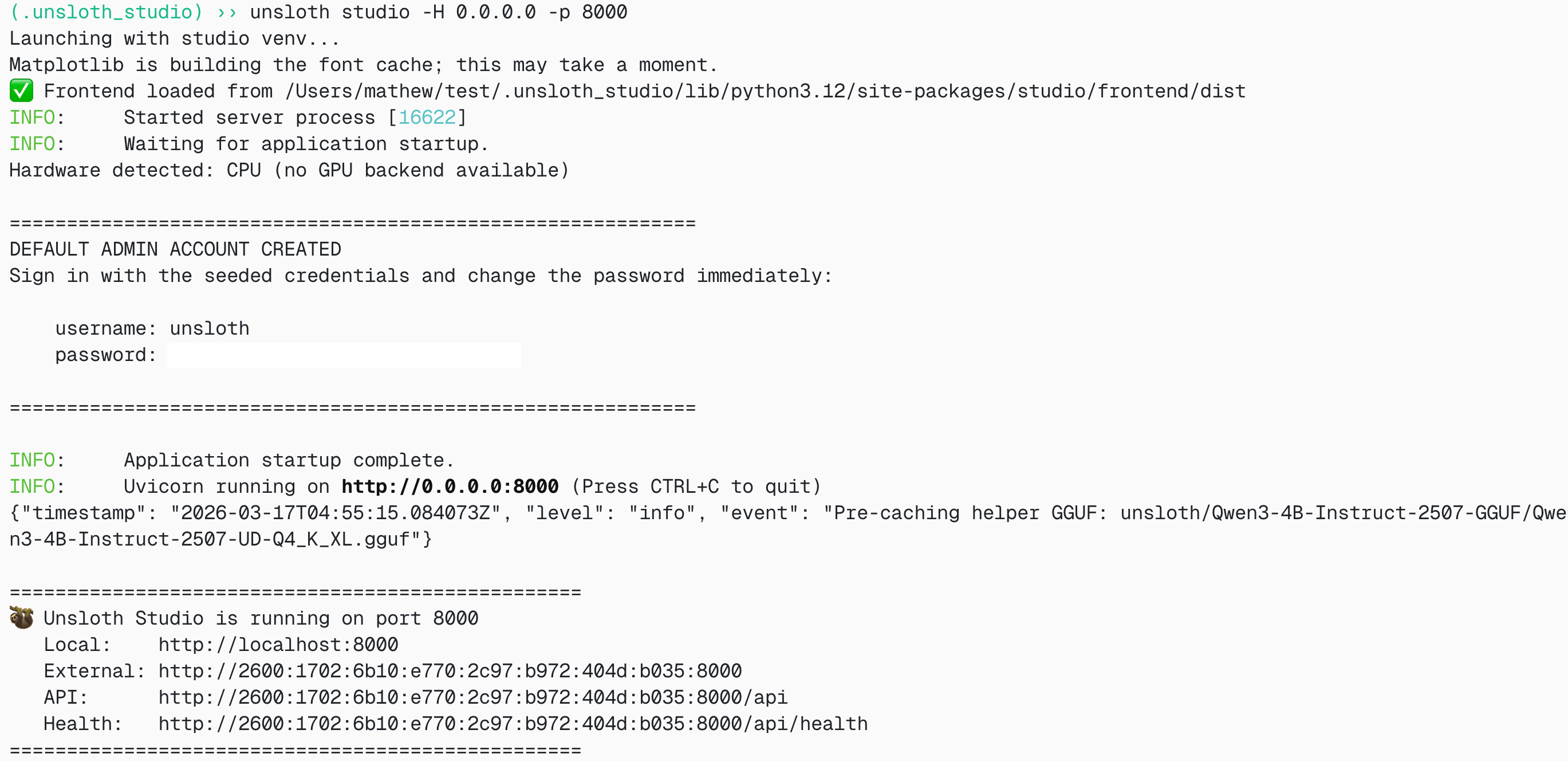
unsloth studio -H 0.0.0.0 -p 8888
```

<div data-with-frame="true"><figure><img src="https://3215535692-files.gitbook.io/~/files/v0/b/gitbook-x-prod.appspot.com/o/spaces%2FxhOjnexMCB3dmuQFQ2Zq%2Fuploads%2Fd1yMMNa65Ccz50Ke0E7r%2FScreenshot%202026-03-17%20at%2012.32.38%E2%80%AFAM.png?alt=media&#x26;token=9369cfe7-35b1-4955-b8cb-42f7ecb43780" alt="" width="375"><figcaption></figcaption></figure></div>

Then open `http://localhost:8888` (or your specific URL) in your browser.
{% endstep %}

{% step %}

#### Search and download Qwen3.6

On first launch you will need to create a password to secure your account and sign in again later. You’ll then see a brief onboarding wizard to choose a model, dataset, and basic settings. You can skip it at any time.

Then go to the [Studio Chat](https://unsloth.ai/docs/new/studio/chat) tab and search for Qwen3.6 in the search bar and download your desired model and quant.

<div data-with-frame="true"><figure><img src="https://3215535692-files.gitbook.io/~/files/v0/b/gitbook-x-prod.appspot.com/o/spaces%2FxhOjnexMCB3dmuQFQ2Zq%2Fuploads%2FT6uAnOeF7OU9cuiE8JR5%2FScreenshot%202026-04-16%20at%208.59.33%E2%80%AFAM.png?alt=media&#x26;token=6977f7b6-aff7-494b-84b5-ad737125da31" alt="" width="375"><figcaption></figcaption></figure></div>
{% endstep %}

{% step %}

#### Run Qwen3.6

Inference parameters should be auto-set when using Unsloth Studio, however you can still change it manually. You can also edit the context length, chat template and other settings.

For more information, you can view our [Unsloth Studio inference guide](https://unsloth.ai/docs/new/studio/chat).

<div data-with-frame="true"><figure><img src="https://3215535692-files.gitbook.io/~/files/v0/b/gitbook-x-prod.appspot.com/o/spaces%2FxhOjnexMCB3dmuQFQ2Zq%2Fuploads%2FTbH2CrUTG2TWwgOP74GF%2FGemma%204%20example.gif?alt=media&#x26;token=56409d06-3735-4531-97c0-af9968371a26" alt=""><figcaption></figcaption></figure></div>
{% endstep %}
{% endstepper %}

## 🦙 Llama.cpp Guides

### Qwen3.6-35B-A3B

For this guide we will be utilizing Dynamic 4-bit which works great on a 24GB RAM / Mac device for fast inference. Because the model is only around 72GB at full F16 precision, we won't need to worry much about performance. GGUF: [Qwen3.6-35B-A3B-GGUF](https://huggingface.co/unsloth/Qwen3.6-35B-A3B-GGUF)

For these tutorials, we will using [llama.cpp](https://llama.cpphttps/github.com/ggml-org/llama.cpp) for fast local inference, especially if you have a CPU.

{% stepper %}
{% step %}
Obtain the latest `llama.cpp` **on** [**GitHub here**](https://github.com/ggml-org/llama.cpp). You can follow the build instructions below as well. Change `-DGGML_CUDA=ON` to `-DGGML_CUDA=OFF` if you don't have a GPU or just want CPU inference. **For Apple Mac / Metal devices**, set `-DGGML_CUDA=OFF` then continue as usual - Metal support is on by default.

```bash
apt-get update
apt-get install pciutils build-essential cmake curl libcurl4-openssl-dev -y
git clone https://github.com/ggml-org/llama.cpp
cmake llama.cpp -B llama.cpp/build \
    -DBUILD_SHARED_LIBS=OFF -DGGML_CUDA=ON
cmake --build llama.cpp/build --config Release -j --clean-first --target llama-cli llama-mtmd-cli llama-server llama-gguf-split
cp llama.cpp/build/bin/llama-* llama.cpp
```

{% endstep %}

{% step %}
If you want to use `llama.cpp` directly to load models, you can do the below: (:Q4\_K\_M) is the quantization type. You can also download via Hugging Face (point 3). This is similar to `ollama run` . Use `export LLAMA_CACHE="folder"` to force `llama.cpp` to save to a specific location. The model has a maximum of 256K context length.

Follow one of the specific commands below, according to your use-case:

**Thinking mode:**

Precise coding tasks (e.g. WebDev):

```bash
export LLAMA_CACHE="unsloth/Qwen3.6-35B-A3B-GGUF"
./llama.cpp/llama-cli \
    -hf unsloth/Qwen3.6-35B-A3B-GGUF:UD-Q4_K_XL \
    --temp 0.6 \
    --top-p 0.95 \
    --top-k 20 \
    --min-p 0.00
```

General tasks:

```bash
export LLAMA_CACHE="unsloth/Qwen3.6-35B-A3B-GGUF"
./llama.cpp/llama-cli \
    -hf unsloth/Qwen3.6-35B-A3B-GGUF:UD-Q4_K_XL \
    --temp 1.0 \
    --top-p 0.95 \
    --top-k 20 \
    --min-p 0.00
```

**Non-thinking mode:**

General tasks:

```bash
export LLAMA_CACHE="unsloth/Qwen3.6-35B-A3B-GGUF"
./llama.cpp/llama-server \
    -hf unsloth/Qwen3.6-35B-A3B-GGUF:UD-Q4_K_XL \
    --temp 0.7 \
    --top-p 0.8 \
    --top-k 20 \
    --min-p 0.00 \
    --chat-template-kwargs '{"enable_thinking":false}'
```

Reasoning tasks:

```bash
export LLAMA_CACHE="unsloth/Qwen3.6-35B-A3B-GGUF"
./llama.cpp/llama-server \
    -hf unsloth/Qwen3.6-35B-A3B-GGUF:UD-Q4_K_XL \
    --temp 1.0 \
    --top-p 0.95 \
    --top-k 20 \
    --min-p 0.00 \
    --chat-template-kwargs '{"enable_thinking":false}'
```

{% endstep %}

{% step %}
Download the model via (after installing `pip install huggingface_hub hf_transfer` ). You can choose Q4\_K\_M or other quantized versions like `UD-Q4_K_XL` . We recommend using at least 2-bit dynamic quant `UD-Q2_K_XL` to balance size and accuracy. If downloads get stuck, see: [hugging-face-hub-xet-debugging](https://unsloth.ai/docs/basics/troubleshooting-and-faqs/hugging-face-hub-xet-debugging "mention")

```bash
hf download unsloth/Qwen3.6-35B-A3B-GGUF \
    --local-dir unsloth/Qwen3.6-35B-A3B-GGUF \
    --include "*mmproj-F16*" \
    --include "*UD-Q4_K_XL*" # Use "*UD-Q2_K_XL*" for Dynamic 2bit
```

{% endstep %}

{% step %}
Then run the model in conversation mode:

{% code overflow="wrap" %}

```bash
./llama.cpp/llama-cli \
    --model unsloth/Qwen3.6-35B-A3B-GGUF/Qwen3.6-35B-A3B-UD-Q4_K_XL.gguf \
    --mmproj unsloth/Qwen3.6-35B-A3B-GGUF/mmproj-F16.gguf \
    --temp 1.0 \
    --top-p 0.95 \
    --min-p 0.00 \
    --top-k 20
```

{% endcode %}
{% endstep %}
{% endstepper %}

### 🦙 Llama-server serving & OpenAI's completion library

To deploy Qwen3.6 for production, we use `llama-server` In a new terminal say via tmux, deploy the model via:

{% code overflow="wrap" %}

```bash
./llama.cpp/llama-server \
--model unsloth/Qwen3.6-35B-A3B-GGUF/Qwen3.6-35B-A3B-UD-Q4_K_XL.gguf \
    --mmproj unsloth/Qwen3.6-35B-A3B-GGUF/mmproj-F16.gguf \
    --alias "unsloth/Qwen3.6-35B-A3B" \
    --temp 0.6 \
    --top-p 0.95 \
    --ctx-size 16384 \
    --top-k 20 \
    --min-p 0.00 \
    --port 8001
```

{% endcode %}

Then in a new terminal, after doing `pip install openai`, do:

{% code overflow="wrap" %}

```python
from openai import OpenAI
import json
openai_client = OpenAI(
    base_url = "http://127.0.0.1:8001/v1",
    api_key = "sk-no-key-required",
)
completion = openai_client.chat.completions.create(
    model = "unsloth/Qwen3.6-35B-A3B",
    messages = [{"role": "user", "content": "Create a Snake game."},],
)
print(completion.choices[0].message.content)
```

{% endcode %}

### 💡 How to enable or disable thinking

{% columns %}
{% column %}
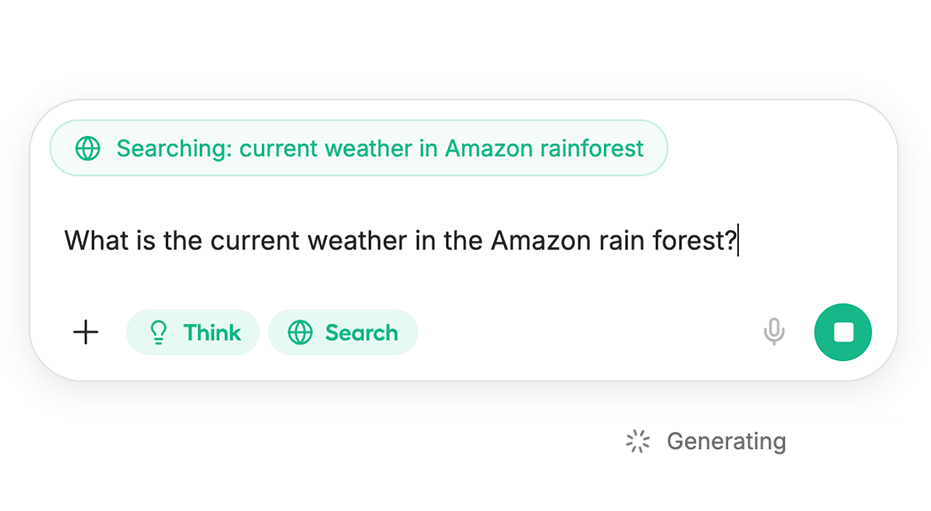
[**Unsloth Studio**](#unsloth-studio-guide) automatically has a 'Think' Toggle for thinking models.

In llama.cpp, you can enable or disable thinking by following the below commands. Use '`true`' and '`false`' interchangeably.

See code below for enabling / disabling thinking within `llama-server`:

{% endcolumn %}

{% column %}

<div data-with-frame="true"><figure><img src="https://3215535692-files.gitbook.io/~/files/v0/b/gitbook-x-prod.appspot.com/o/spaces%2FxhOjnexMCB3dmuQFQ2Zq%2Fuploads%2Fj34CUWyxrf0ZxZj4Dn4Z%2Fcurrent%20weather%20in%20amazon.png?alt=media&#x26;token=c0688e60-8d7d-4273-87af-25332fbd540c" alt=""><figcaption><p>Unsloth Studio has Think toggle by default</p></figcaption></figure></div>
{% endcolumn %}
{% endcolumns %}

<table data-full-width="false"><thead><tr><th>llama-server OS:</th><th>Enable Thinking</th><th>Disable Thinking</th></tr></thead><tbody><tr><td>Linux, MacOS, WSL:</td><td><pre data-overflow="wrap"><code>--chat-template-kwargs '{"enable_thinking":true}'
</code></pre></td><td><pre data-overflow="wrap"><code>--chat-template-kwargs '{"enable_thinking":false}'
</code></pre></td></tr><tr><td>Windows / Powershell:</td><td><pre data-overflow="wrap"><code>--chat-template-kwargs "{\"enable_thinking\":true}"
</code></pre></td><td><pre data-overflow="wrap"><code><strong>--chat-template-kwargs "{\"enable_thinking\":false}"
</strong></code></pre></td></tr></tbody></table>

As an example for Qwen3.6-35B-A3B to disable thinking (default is enabled):

```bash
./llama.cpp/llama-server \
    --model unsloth/Qwen3.6-35B-A3B-GGUF/Qwen3.6-35B-A3B-BF16.gguf \
    --alias "unsloth/Qwen3.6-35B-A3B-GGUF" \
    --temp 0.6 \
    --top-p 0.95 \
    --ctx-size 16384 \
    --top-k 20 \
    --min-p 0.00 \
    --port 8001 \
    --chat-template-kwargs '{"enable_thinking":false}'
```

And then in Python:

```python
from openai import OpenAI
import json
openai_client = OpenAI(
    base_url = "http://127.0.0.1:8001/v1",
    api_key = "sk-no-key-required",
)
completion = openai_client.chat.completions.create(
    model = "unsloth/Qwen3.6-35B-A3B-GGUF",
    messages = [{"role": "user", "content": "What is 2+2?"},],
)
print(completion.choices[0].message.content)
print(completion.choices[0].message.reasoning_content)
```

### 👨‍💻 OpenAI Codex & Claude Code <a href="#claude-codex" id="claude-codex"></a>

To run the model via local coding agentic workloads, you can [follow our guide](https://unsloth.ai/docs/basics/claude-code). Just change the model name to your 'Qwen3.6' variant and ensure you follow the correct Qwen3.6 parameters and usage instructions. Use the `llama-server` we just set up just then.

{% columns %}
{% column %}
{% content-ref url="../basics/claude-code" %}
[claude-code](https://unsloth.ai/docs/basics/claude-code)
{% endcontent-ref %}
{% endcolumn %}

{% column %}
{% content-ref url="../basics/codex" %}
[codex](https://unsloth.ai/docs/basics/codex)
{% endcontent-ref %}
{% endcolumn %}
{% endcolumns %}

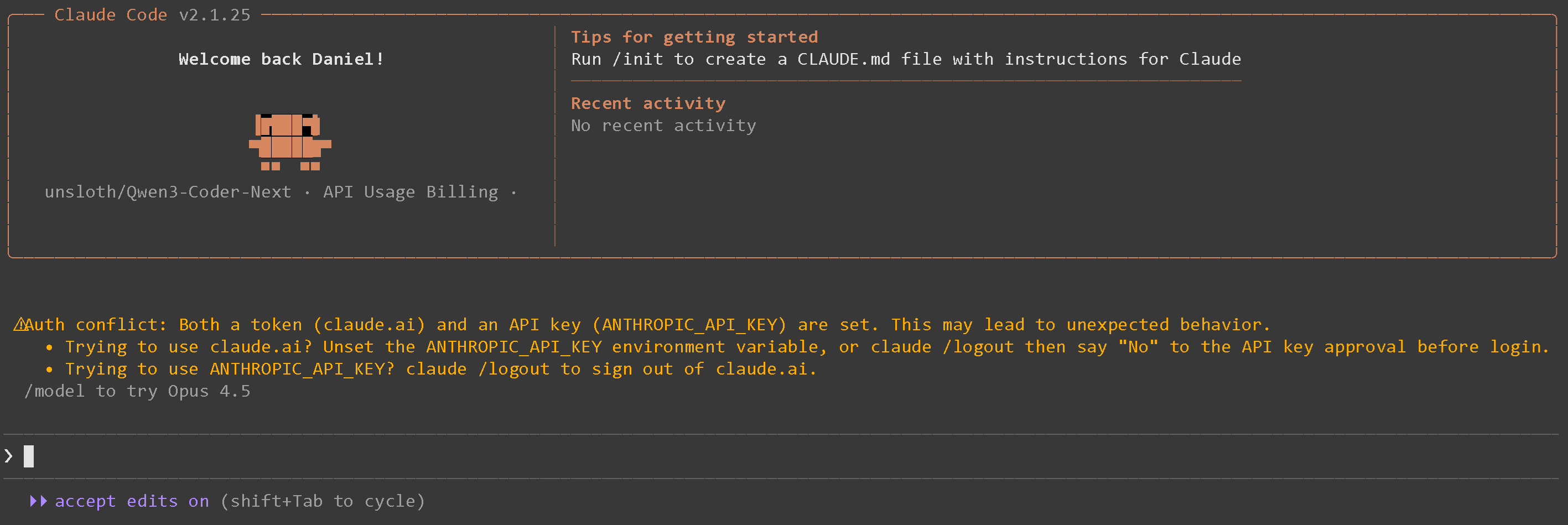
After following the instructions for Claude Code for example you will see:

<div data-with-frame="true"><figure><img src="https://3215535692-files.gitbook.io/~/files/v0/b/gitbook-x-prod.appspot.com/o/spaces%2FxhOjnexMCB3dmuQFQ2Zq%2Fuploads%2Fup2DMSMPjNR8BM9pgR0v%2Fimage.png?alt=media&#x26;token=152e9ee0-2491-4379-af18-8fca0789b19d" alt="" width="563"><figcaption></figcaption></figure></div>

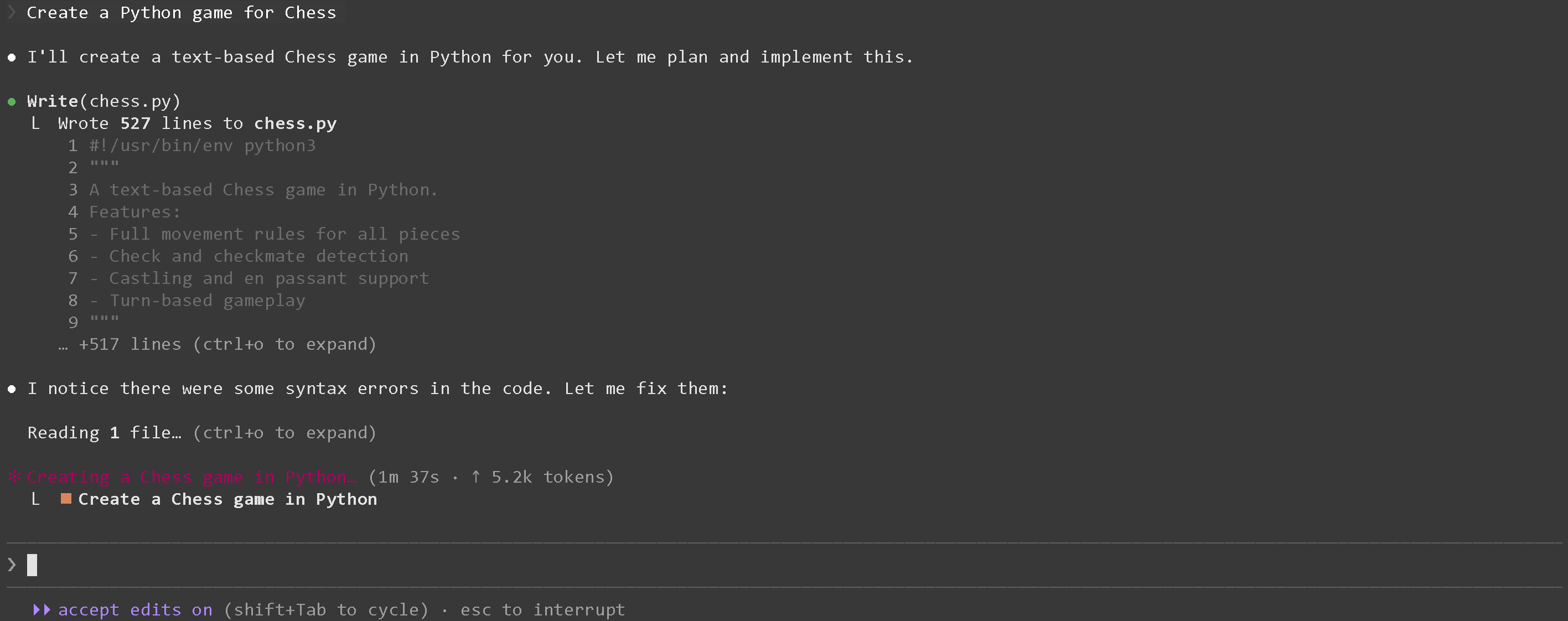
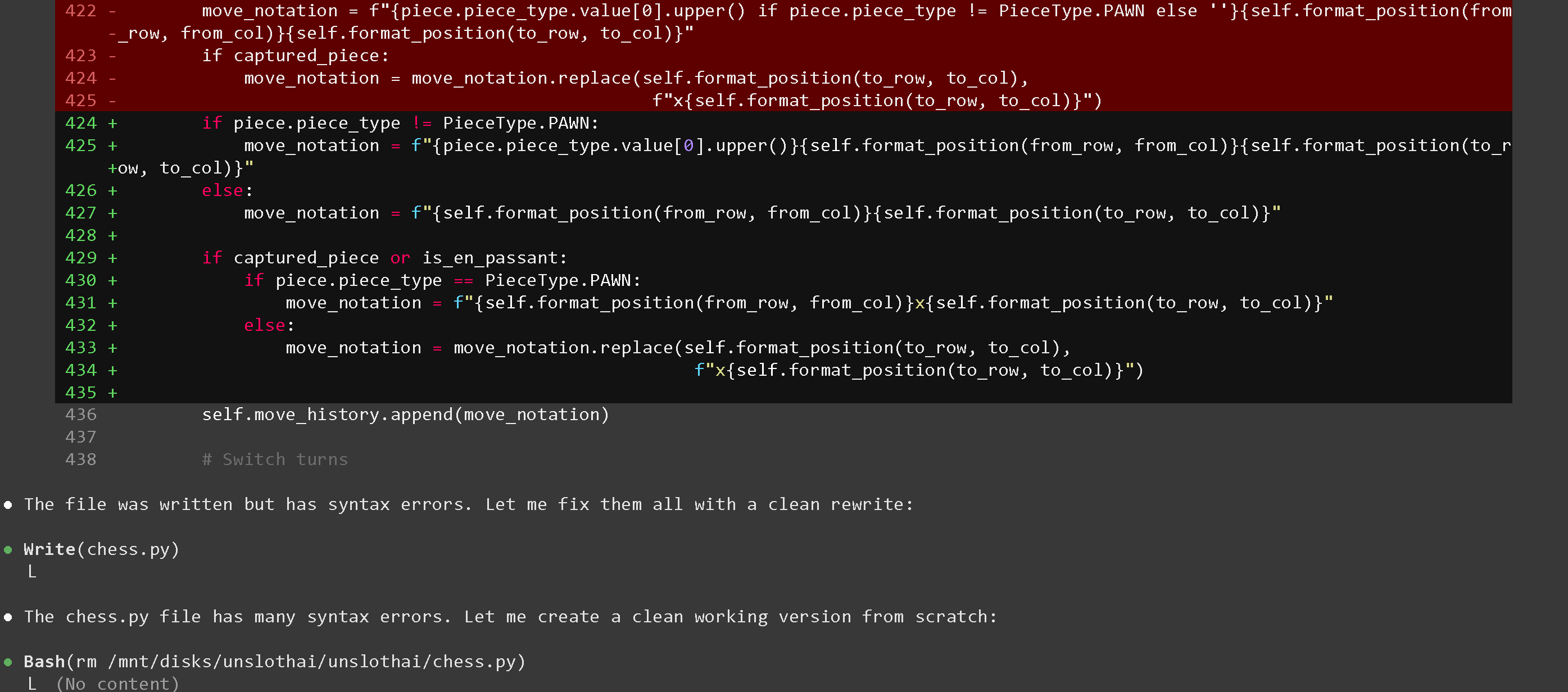
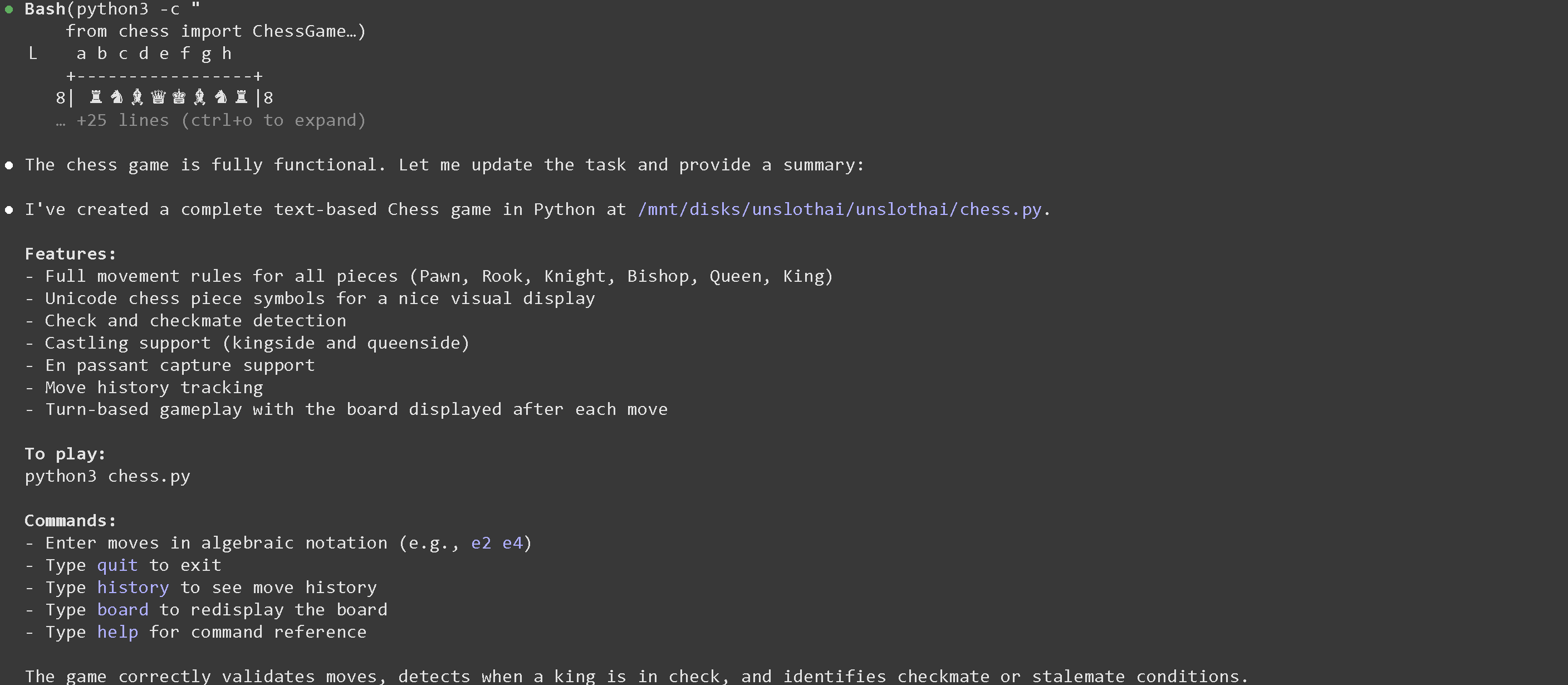
We can then ask say `Create a Python game for Chess` :

<div><figure><img src="https://3215535692-files.gitbook.io/~/files/v0/b/gitbook-x-prod.appspot.com/o/spaces%2FxhOjnexMCB3dmuQFQ2Zq%2Fuploads%2F9TfMAoKSdMpb8OHKNnHH%2Fimage.png?alt=media&#x26;token=771df3aa-91ab-4c1e-8676-1830058001ca" alt="" width="563"><figcaption></figcaption></figure> <figure><img src="https://3215535692-files.gitbook.io/~/files/v0/b/gitbook-x-prod.appspot.com/o/spaces%2FxhOjnexMCB3dmuQFQ2Zq%2Fuploads%2FWP3lI5mQW2EHB79qqgDz%2Fimage.png?alt=media&#x26;token=55cf3189-e100-419c-a615-024b45948284" alt="" width="563"><figcaption></figcaption></figure> <figure><img src="https://3215535692-files.gitbook.io/~/files/v0/b/gitbook-x-prod.appspot.com/o/spaces%2FxhOjnexMCB3dmuQFQ2Zq%2Fuploads%2Fn8DZddDODQZGCP8giKYY%2Fimage.png?alt=media&#x26;token=996c8cb9-d199-4045-90f0-408690e02667" alt="" width="563"><figcaption></figcaption></figure></div>

## 📊 Benchmarks

### Unsloth GGUF Benchmarks

KL Divergence benchmarks for Qwen3.6-35-A3B GGUFs will be updated here. Here are our previous for Qwen3.5:

<div data-with-frame="true"><figure><img src="https://3215535692-files.gitbook.io/~/files/v0/b/gitbook-x-prod.appspot.com/o/spaces%2FxhOjnexMCB3dmuQFQ2Zq%2Fuploads%2FeynyrSMxDkkw0zl0haJH%2FCode_Generated_Image(10).png?alt=media&#x26;token=c62eef1c-fdd7-4838-8f69-bab227b56e23" alt="" width="375"><figcaption><p>35B-A3B - KLD benchmarks (lower is better)</p></figcaption></figure></div>

Since Qwen3.6 has the same architecture as Qwen3.5, you can refer to our previous Qwen3.5 benchmarks:

{% content-ref url="qwen3.5/gguf-benchmarks" %}
[gguf-benchmarks](https://unsloth.ai/docs/models/qwen3.5/gguf-benchmarks)
{% endcontent-ref %}

### Official Qwen Benchmarks

#### Qwen3.6-35B-A3B

<div data-with-frame="true"><figure><img src="https://3215535692-files.gitbook.io/~/files/v0/b/gitbook-x-prod.appspot.com/o/spaces%2FxhOjnexMCB3dmuQFQ2Zq%2Fuploads%2F25aKI2tJR2PNfGfwnbZi%2Fqwen3.6_35b_a3b_score(2).png?alt=media&#x26;token=f296d01d-311d-413e-8c62-122728e33008" alt=""><figcaption></figcaption></figure></div>