> For the complete documentation index, see [llms.txt](https://unsloth.ai/docs/llms.txt). Markdown versions of documentation pages are available by appending `.md` to page URLs; this page is available as [Markdown](https://unsloth.ai/docs/models/qwen3.5/fine-tune.md).
# Qwen3.5 Fine-tuning Guide
Learn how to fine-tune Qwen3.5 LLMs with Unsloth.
You can now fine-tune [Qwen3.5](/docs/models/qwen3.5.md) model family (0.8B, 2B, 4B, 9B, 27B, 35B‑A3B, 122B‑A10B) with [**Unsloth**](https://github.com/unslothai/unsloth). Support includes both [vision](/docs/models/qwen3.5/fine-tune.md#vision-fine-tuning), text and [RL](#reinforcement-learning-rl) fine-tuning. **Qwen3.5‑35B‑A3B** - bf16 LoRA works on **74GB VRAM.**
* Unsloth makes Qwen3.5 train **1.5× faster** and uses **50% less VRAM** than FA2 setups.
* Qwen3.5 bf16 LoRA VRAM use: **0.8B**: 3GB • **2B**: 5GB • **4B**: 10GB • **9B**: 22GB • **27B**: 56GB
* Fine-tune **0.8B**, **2B** and **4B** bf16 LoRA via our **free** **Google Colab notebooks**:
| [Qwen3.5-**0.8B**](https://colab.research.google.com/github/unslothai/notebooks/blob/main/nb/Qwen3_5_\(0_8B\)_Vision.ipynb) | [Qwen3.5-**2B**](https://colab.research.google.com/github/unslothai/notebooks/blob/main/nb/Qwen3_5_\(2B\)_Vision.ipynb) | [Qwen3.5-**4B**](https://colab.research.google.com/github/unslothai/notebooks/blob/main/nb/Qwen3_5_\(4B\)_Vision.ipynb) | [Qwen3.5-4B **GRPO**](https://colab.research.google.com/github/unslothai/notebooks/blob/main/nb/Qwen3_5_\(4B\)_Vision_GRPO.ipynb) |
| --------------------------------------------------------------------------------------------------------------------------- | ----------------------------------------------------------------------------------------------------------------------- | ----------------------------------------------------------------------------------------------------------------------- | --------------------------------------------------------------------------------------------------------------------------------- |
* If you want to **preserve reasoning** ability, you can mix reasoning-style examples with direct answers (keep a minimum of 75% reasoning). Otherwise you can emit it fully.
* **Full fine-tuning (FFT)** works as well. Note it will use 4x more VRAM.
* Qwen3.5 is powerful for multilingual fine-tuning as it supports 201 languages.
* After fine-tuning, you can export to [GGUF](#saving-export-your-fine-tuned-model) (for llama.cpp/Ollama/etc.) or [vLLM](#saving-export-your-fine-tuned-model)
* [Reinforcement Learning](/docs/get-started/reinforcement-learning-rl-guide.md) (RL) for Qwen3.5 [VLM RL](/docs/get-started/reinforcement-learning-rl-guide/vision-reinforcement-learning-vlm-rl.md) also works via Unsloth inference.
* We have **A100** Colab notebooks for [Qwen3.5‑27B](https://colab.research.google.com/github/unslothai/notebooks/blob/main/nb/Qwen_3_5_27B_A100\(80GB\).ipynb) and [Qwen3.5‑35B‑A3B](https://colab.research.google.com/github/unslothai/notebooks/blob/main/nb/Qwen3_5_MoE.ipynb).
If you’re on an older version (or fine-tuning locally), update first:
{% columns %}
{% column width="50%" %}
Unsloth Studio:
{% code expandable="true" %}
```bash
unsloth studio update
```
{% endcode %}
{% endcolumn %}
{% column width="50%" %}
Unsloth code-based:
```bash
pip install --upgrade --force-reinstall --no-cache-dir unsloth unsloth_zoo
```
{% endcolumn %}
{% endcolumns %}
{% hint style="warning" %}
**Please use `transformers v5` for Qwen3.5. Older versions will not work. Unsloth automatically uses transformers v5 by default now (except for Colab environments).**
If training seems **slower than usual**, it’s because Qwen3.5 use custom Mamba Triton kernels. Compiling those kernels can take longer than normal, especially on T4 GPUs.
It is not recommended to do QLoRA (4-bit) training on the Qwen3.5 models, no matter MoE or dense, due to higher than normal quantization differences.
{% endhint %}
### MoE fine-tuning (35B, 122B)
For MoE models like **Qwen3.5‑35B‑A3B / 122B‑A10B / 397B‑A17B**:
* You can use our [Qwen3.5‑35B‑A3B (A100)](https://colab.research.google.com/github/unslothai/notebooks/blob/main/nb/Qwen3_5_MoE.ipynb) fine-tuning notebook
* Supports our recent \~12x faster [MoE training update](/docs/basics/faster-moe.md) with >35% less VRAM & \~6x longer context
* **Best to use bf16 setups (e.g. LoRA or full fine-tuning)** (MoE QLoRA 4‑bit is not recommended due to BitsandBytes limitations).
* Unsloth’s MoE kernels are enabled by default and can use different backends; you can switch with `UNSLOTH_MOE_BACKEND`.
* Router-layer fine-tuning is disabled by default for stability.
* Qwen3.5‑122B‑A10B - bf16 LoRA works on 256GB VRAM. If you're using multiGPUs, add `device_map = "balanced"` or follow our [multiGPU Guide](/docs/basics/multi-gpu-training-with-unsloth.md).
### Quickstart
#### 🦥 Unsloth Studio Guide
Qwen3.5 can be run and fine-tuned in [Unsloth Studio](/docs/new/studio.md), our new open-source web UI for local AI. With Unsloth Studio, you can run models locally on **MacOS, Windows**, Linux and:
{% columns %}
{% column %}
* [Train LLMs](/docs/new/studio.md#no-code-training) 2x faster with 70% less VRAM
* Search, download, [run GGUFs](/docs/new/studio.md#run-models-locally) and safetensor models
* [**Self-healing** tool calling](/docs/new/studio.md#execute-code--heal-tool-calling) + **web search**
* [**Code execution**](/docs/new/studio.md#run-models-locally) (Python, Bash)
* [Automatic inference](https://unsloth.ai/docs/desktop#feature-deep-dive) parameter tuning (temp, top-p, etc.)
* Fast CPU + GPU inference via llama.cpp
{% endcolumn %}
{% column %}
{% endcolumn %}
{% endcolumns %}
{% stepper %}
{% step %}
#### Install Unsloth
Run in your terminal:
**MacOS, Linux, WSL:**
```bash
curl -fsSL https://unsloth.ai/install.sh | sh
```
**Windows PowerShell:**
```bash
irm https://unsloth.ai/install.ps1 | iex
```
{% hint style="success" %}
**Installation will be quick and take approx 1-2 mins.**
{% endhint %}
{% endstep %}
{% step %}
#### Launch Unsloth
**MacOS, Linux, WSL and Windows:**
```bash
unsloth studio -H 0.0.0.0 -p 8888
```
**Then open `http://localhost:8888` in your browser.**
{% endstep %}
{% step %}
#### Train Qwen3.5
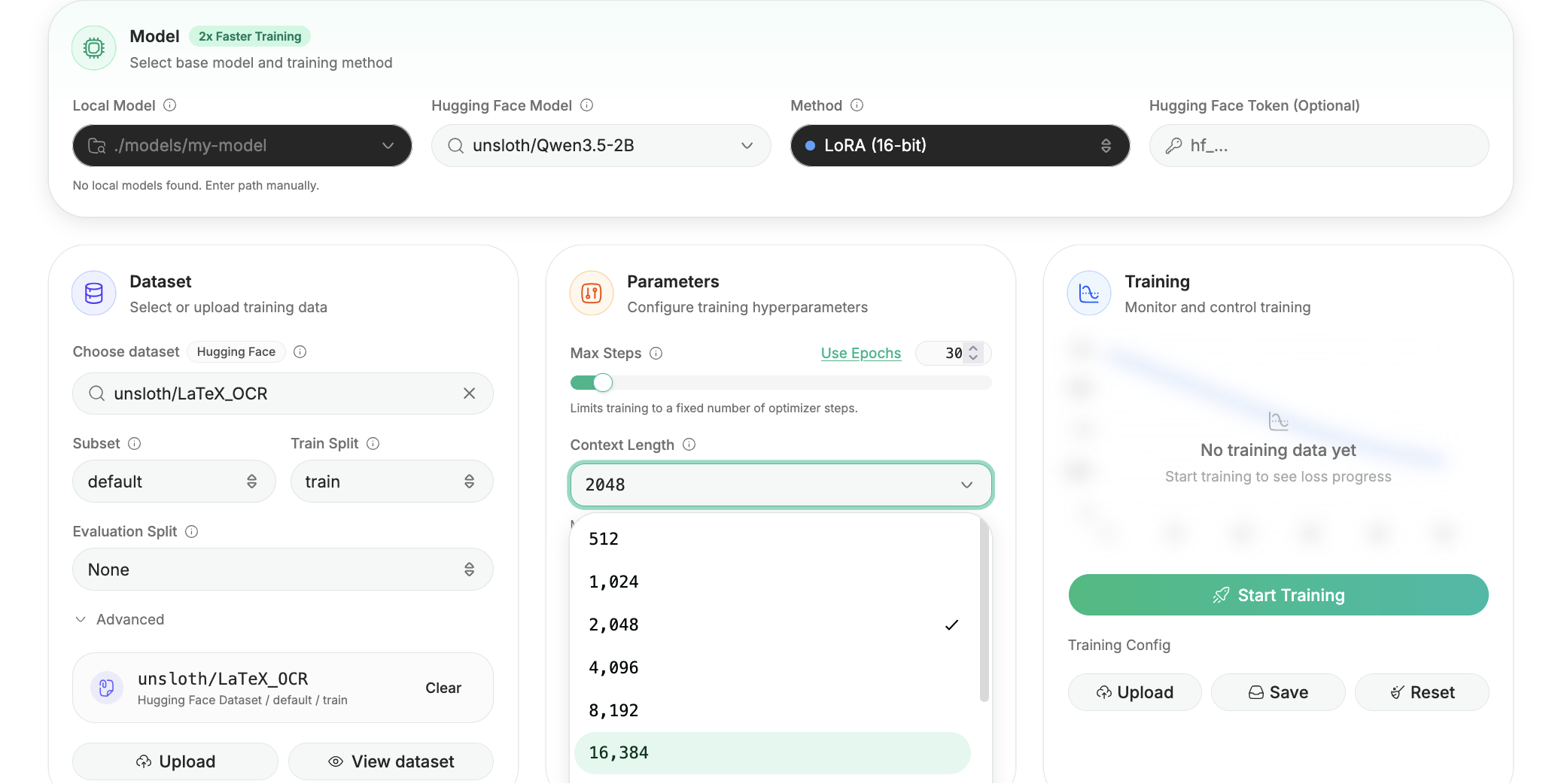
On first launch you will need to create a password to secure your account and sign in again later. You’ll then see a brief onboarding wizard to choose a model, dataset, and basic settings. You can skip it at any time.
Search for Qwen3.5 in the search bar and select your desired model and dataset. Next, adjust your hyperparameters, context length as desired.
{% endstep %}
{% step %}
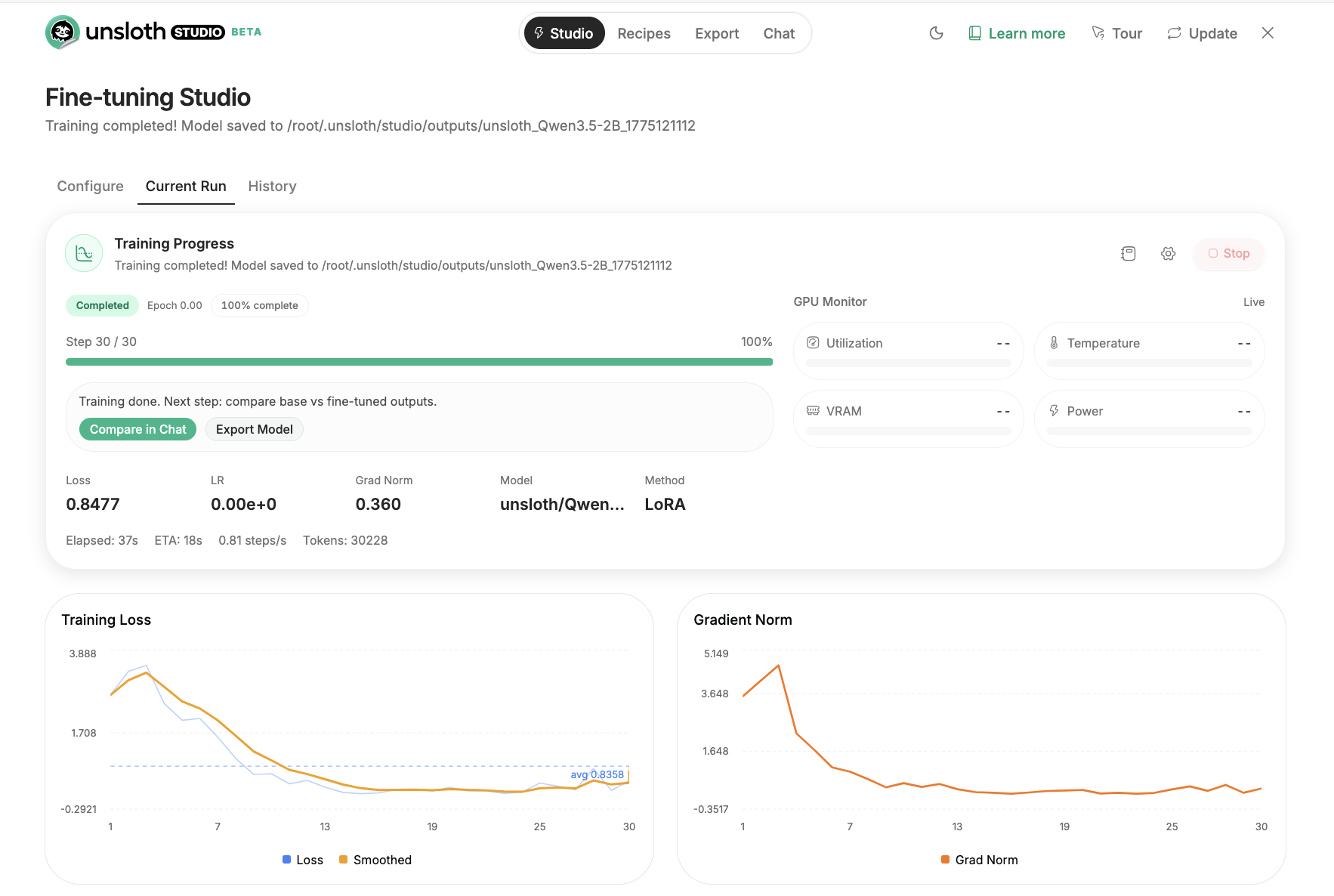
#### Monitor training progress
After you click start training, you will be able to monitor and observe the training progress of the model. The training loss should be steadily decreasing.\
Once done, the model will be automatically saved.
{% endstep %}
{% step %}
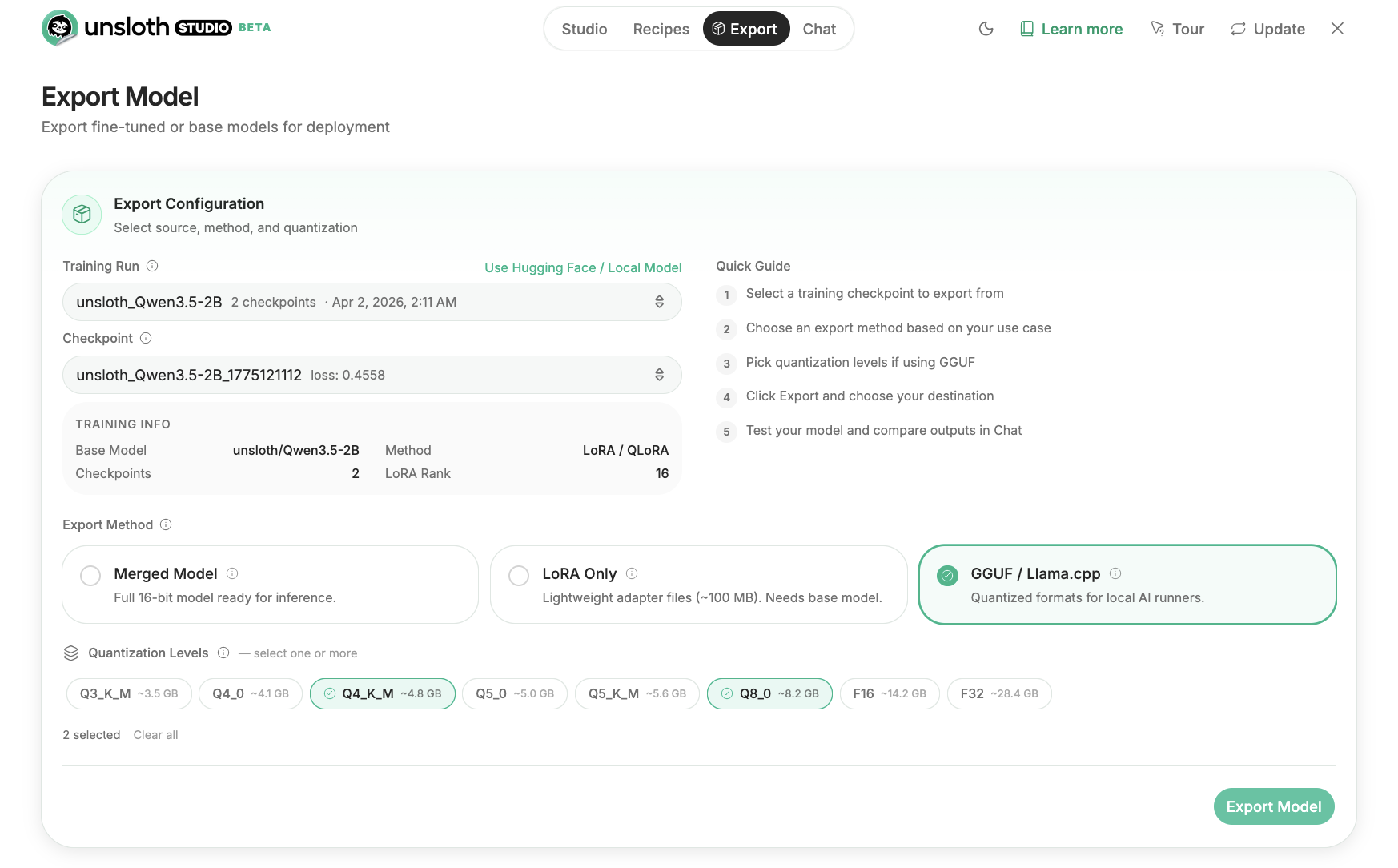
#### Export your fine-tuned model
Once done, Unsloth Studio allows you to export the model to GGUF, safetensor etc formats.
{% endstep %}
{% endstepper %}
#### Unsloth Core (code-based) guide:
Below is a minimal SFT recipe (works for “text-only” fine-tuning). See also our [vision fine-tuning](/docs/basics/vision-fine-tuning.md) section.
{% hint style="info" %}
Qwen3.5 is “Causal Language Model with Vision Encoder” (it’s a unified VLM), so ensure you have the usual vision deps installed (`torchvision`, `pillow`) if needed, and keep Transformers up-to-date. Use the latest Transformers for Qwen3.5.
**If you'd like to do** [**GRPO**](/docs/get-started/reinforcement-learning-rl-guide.md)**, it works in Unsloth if you disable fast vLLM inference and use Unsloth inference instead. Follow our** [**Vision RL**](/docs/get-started/reinforcement-learning-rl-guide/vision-reinforcement-learning-vlm-rl.md) **notebook examples.**
{% endhint %}
{% code expandable="true" %}
```python
from unsloth import FastLanguageModel
import torch
from datasets import load_dataset
from trl import SFTTrainer, SFTConfig
max_seq_length = 2048 # start small; scale up after it works
# Example dataset (replace with yours). Needs a "text" column.
url = "https://huggingface.co/datasets/laion/OIG/resolve/main/unified_chip2.jsonl"
dataset = load_dataset("json", data_files={"train": url}, split="train")
model, tokenizer = FastLanguageModel.from_pretrained(
model_name = "Qwen/Qwen3.5-27B",
max_seq_length = max_seq_length,
load_in_4bit = False, # MoE QLoRA not recommended, dense 27B is fine
load_in_16bit = True, # bf16/16-bit LoRA
full_finetuning = False,
)
model = FastLanguageModel.get_peft_model(
model,
r = 16,
target_modules = [
"q_proj", "k_proj", "v_proj", "o_proj",
"gate_proj", "up_proj", "down_proj",
],
lora_alpha = 16,
lora_dropout = 0,
bias = "none",
# "unsloth" checkpointing is intended for very long context + lower VRAM
use_gradient_checkpointing = "unsloth",
random_state = 3407,
max_seq_length = max_seq_length,
)
trainer = SFTTrainer(
model = model,
train_dataset = dataset,
tokenizer = tokenizer,
args = SFTConfig(
max_seq_length = max_seq_length,
per_device_train_batch_size = 1,
gradient_accumulation_steps = 4,
warmup_steps = 10,
max_steps = 100,
logging_steps = 1,
output_dir = "outputs_qwen35",
optim = "adamw_8bit",
seed = 3407,
dataset_num_proc = 1,
),
)
trainer.train()
```
{% endcode %}
{% hint style="info" %}
If you OOM:
* Drop `per_device_train_batch_size` to **1** and/or reduce `max_seq_length`.
* Keep `use_`[`gradient_checkpointing`](/docs/blog/500k-context-length-fine-tuning.md#unsloth-gradient-checkpointing-enhancements)`="unsloth"` on (it’s designed to reduce VRAM use and extend context length).
{% endhint %}
**Loader example for MoE (bf16 LoRA):**
```python
import os
import torch
from unsloth import FastModel
model, tokenizer = FastModel.from_pretrained(
model_name = "unsloth/Qwen3.5-35B-A3B",
max_seq_length = 2048,
load_in_4bit = False, # MoE QLoRA not recommended, dense 27B is fine
load_in_16bit = True, # bf16/16-bit LoRA
full_finetuning = False,
)
```
Once loaded, you’ll attach LoRA adapters and train similarly to the SFT example above.
### Vision fine-tuning
Unsloth supports [vision fine-tuning](/docs/basics/vision-fine-tuning.md) for the multimodal Qwen3.5 models. Use the below Qwen3.5 notebooks and change the respective model names to your desired Qwen3.5 model.
| [Qwen3.5-**0.8B**](https://colab.research.google.com/github/unslothai/notebooks/blob/main/nb/Qwen3_5_\(0_8B\)_Vision.ipynb) | [Qwen3.5-**2B**](https://colab.research.google.com/github/unslothai/notebooks/blob/main/nb/Qwen3_5_\(2B\)_Vision.ipynb) | [Qwen3.5-**4B**](https://colab.research.google.com/github/unslothai/notebooks/blob/main/nb/Qwen3_5_\(4B\)_Vision.ipynb) | Qwen3.5-**9B** |
| --------------------------------------------------------------------------------------------------------------------------- | ----------------------------------------------------------------------------------------------------------------------- | ----------------------------------------------------------------------------------------------------------------------- | -------------- |
* [Qwen3-VL GRPO/GSPO RL notebook](https://colab.research.google.com/github/unslothai/notebooks/blob/main/nb/Qwen3_VL_\(8B\)-Vision-GRPO.ipynb) (change model name to Qwen3.5-4B etc.)
**Disabling Vision / Text-only fine-tuning:**
To fine-tune vision models, we now allow you to select which parts of the mode to finetune. You can select to only fine-tune the vision layers, or the language layers, or the attention / MLP layers! We set them all on by default!
{% code expandable="true" %}
```python
model = FastVisionModel.get_peft_model(
model,
finetune_vision_layers = True, # False if not finetuning vision layers
finetune_language_layers = True, # False if not finetuning language layers
finetune_attention_modules = True, # False if not finetuning attention layers
finetune_mlp_modules = True, # False if not finetuning MLP layers
r = 16, # The larger, the higher the accuracy, but might overfit
lora_alpha = 16, # Recommended alpha == r at least
lora_dropout = 0,
bias = "none",
random_state = 3407,
use_rslora = False, # We support rank stabilized LoRA
loftq_config = None, # And LoftQ
target_modules = "all-linear", # Optional now! Can specify a list if needed
modules_to_save=[
"lm_head",
"embed_tokens",
],
)
```
{% endcode %}
In order to fine-tune or train Qwen3.5 with multi-images, view our [**multi-image vision guide**](/docs/basics/vision-fine-tuning.md#multi-image-training)**.**
### Reinforcement Learning (RL)
You can now train Qwen3.5 with RL, GSPO, GRPO etc with [our free notebook](https://colab.research.google.com/github/unslothai/notebooks/blob/main/nb/Qwen3_5_\(4B\)_Vision_GRPO.ipynb):
{% embed url="" %}
You can run Qwen3.5 RL with Unsloth even though it is not supported by vLLM, by setting `fast_inference=False` when loading the model:
```python
from unsloth import FastLanguageModel
model, tokenizer = FastLanguageModel.from_pretrained(
model_name="unsloth/Qwen3.5-4B",
fast_inference=False,
)
```
### Saving / export fine-tuned model
You can view our specific inference / deployment guides for [Unsloth Studio](/docs/new/studio/export.md), [llama.cpp](/docs/basics/inference-and-deployment/saving-to-gguf.md), [vLLM](/docs/basics/inference-and-deployment/vllm-guide.md), [llama-server](/docs/basics/inference-and-deployment/llama-server-and-openai-endpoint.md), [Ollama](/docs/basics/inference-and-deployment/saving-to-ollama.md).
#### Save to GGUF
Unsloth supports saving directly to GGUF:
```python
model.save_pretrained_gguf("directory", tokenizer, quantization_method = "q4_k_m")
model.save_pretrained_gguf("directory", tokenizer, quantization_method = "q8_0")
model.save_pretrained_gguf("directory", tokenizer, quantization_method = "f16")
```
Or push GGUFs to Hugging Face:
```python
model.push_to_hub_gguf("hf_username/directory", tokenizer, quantization_method = "q4_k_m")
model.push_to_hub_gguf("hf_username/directory", tokenizer, quantization_method = "q8_0")
```
If the exported model behaves worse in another runtime, Unsloth flags the most common cause: **wrong chat template / EOS token at inference time** (you must use the same chat template you trained with).
#### Save to vLLM
{% hint style="warning" %}
vLLM version `0.16.0` does not support Qwen3.5. Wait until `0.170` or try the Nightly release.
{% endhint %}
To save to 16-bit for vLLM, use:
{% code overflow="wrap" %}
```python
model.save_pretrained_merged("finetuned_model", tokenizer, save_method = "merged_16bit")
## OR to upload to HuggingFace:
model.push_to_hub_merged("hf/model", tokenizer, save_method = "merged_16bit", token = "")
```
{% endcode %}
To save just the LoRA adapters, either use:
```python
model.save_pretrained("finetuned_lora")
tokenizer.save_pretrained("finetuned_lora")
```
Or use our builtin function:
{% code overflow="wrap" %}
```python
model.save_pretrained_merged("finetuned_model", tokenizer, save_method = "lora")
## OR to upload to HuggingFace
model.push_to_hub_merged("hf/model", tokenizer, save_method = "lora", token = "")
```
{% endcode %}
For more details read our inference guides:
{% columns %}
{% column width="50%" %}
{% content-ref url="/pages/gEugERiAw2ztDNt98JVR" %}
[Inference & Deployment](/docs/basics/inference-and-deployment.md)
{% endcontent-ref %}
{% content-ref url="/pages/T7ZPf3SNAwDykZNgXptE" %}
[GGUF & llama.cpp](/docs/basics/inference-and-deployment/saving-to-gguf.md)
{% endcontent-ref %}
{% endcolumn %}
{% column width="50%" %}
{% content-ref url="/pages/5ZU2kPF2eJ7VK0GeEUhu" %}
[Model Export](/docs/new/studio/export.md)
{% endcontent-ref %}
{% content-ref url="/pages/fhJtaLFFXVsGnbMUiACo" %}
[vLLM](/docs/basics/inference-and-deployment/vllm-guide.md)
{% endcontent-ref %}
{% endcolumn %}
{% endcolumns %}
---
# Agent Instructions
This documentation is published with GitBook. GitBook is the documentation platform designed so that both humans and AI agents can read, navigate, and reason over technical content effectively. Learn more at gitbook.com.
## Querying This Documentation
If you need additional information that is not directly available in this page, you can query the documentation by asking a question.
Perform an HTTP GET request on the following URL with the `ask` and `goal` query parameters:
```
GET https://unsloth.ai/docs/models/qwen3.5/fine-tune.md?ask=&goal=
```
`ask` is the immediate question: it should be specific, self-contained, and written in natural language.
`goal` is what the user is ultimately trying to achieve, the reason they need the answer. Sharing it helps GitBook give you a better, more relevant answer. A goal is most helpful when it describes the outcome the user wants rather than restating the question. For example, with `ask=how do I create an API token`, a goal like `automate deployments from our CI pipeline` lets GitBook tailor the answer to that use case.
The response will contain a direct answer to the question and relevant excerpts and sources from the documentation.
Use this mechanism when the answer is not explicitly present in the current page, you need clarification or additional context, or you want to retrieve related documentation sections.