> For the complete documentation index, see [llms.txt](https://unsloth.ai/docs/llms.txt). Markdown versions of documentation pages are available by appending `.md` to page URLs; this page is available as [Markdown](https://unsloth.ai/docs/models/nemotron-3-ultra.md).
# NVIDIA Nemotron 3 Ultra - How To Run Locally
Run Nemotron-3-Ultra-550B-A55B locally on your device!
NVIDIA Nemotron 3 Ultra is an open **550B parameter, 55B active** frontier-reasoning model and is NVIDIA's **largest model** released so far. Nemotron-3-Ultra-550B-A55B is built for long-running autonomous agents and reasoning across coding, deep research workflows. It is the **strongest Western open model**, and adopts the new Open Model, Weights & Data License.
With up to **1M context**, Nemotron 3 Ultra uses a Hybrid Transformer-Mamba MoE architecture and can preserve long agent state, logs, and plans across sustained sessions. GGUFs are at [Nemotron-3-Ultra-550B-A55B](https://huggingface.co/unsloth/NVIDIA-Nemotron-3-Ultra-550B-A55B-GGUF) with dynamic 1bit taking 189GB of disk space. It's also pretrained using NVFP4. We als did [GGUF KLD Benchmarks](#kld-benchmarks).
### ⚙️ Usage Guide
NVIDIA recommends these settings for inference:
* `temperature = 1.0`
* `top_p = 0.95`
| Detail | Nemotron 3 Ultra |
| -------------- | ------------------------------------------------------------------------------------------------------------ |
| Model size | 550B total parameters / 55B active parameters |
| Context length | Up to 1M tokens |
| Architecture | Hybrid Transformer-Mamba MoE with Latent MoE, Multi-Token Prediction (MTP currently not supported for GGUFs) |
| Model I/O | Text input, text output |
The chat template is like below:
{% code overflow="wrap" %}
```
<|im_start|>system\n<|im_end|>\n<|im_start|>user\nWhat is 1+1?<|im_end|>\n<|im_start|>assistant\n2<|im_end|>\n<|im_start|>assistant\n\n
```
{% endcode %}
### Run Nemotron-3-Ultra
The 3-bit versions of the model requires \~256GB RAM, 4-bit needs \~300GB and 8-bit requires 600GB. For these guides, we will be using 3-bit `UD-IQ3_XXS` which fits on a 256GB device and is a good balance between size and accuracy. Depending on your use-case you will need to use [different settings](#usage-guide). **GGUF:** [Nemotron-3-Ultra-550B-A55B](https://huggingface.co/unsloth/NVIDIA-Nemotron-3-Ultra-550B-A55B-GGUF)
Run in Unsloth StudioRun in llama.cpp
### 🦥 Unsloth Studio Guide
For this tutorial, we will be using [Unsloth Studio](/docs/new/studio.md), which is our UI for running and training LLMs. With Unsloth Studio, you can run models and input image and text locally on **Mac, Windows**, and Linux and:
{% columns %}
{% column %}
* Search, download, [run GGUFs](/docs/new/studio.md#run-models-locally) and safetensor models
* **Compare** models **side-by-side**
* [**Self-healing** tool calling](/docs/new/studio.md#execute-code--heal-tool-calling) + **web search**
* [**Code execution**](/docs/new/studio.md#run-models-locally) (Python, Bash)
* [Automatic inference](https://unsloth.ai/docs/desktop#feature-deep-dive) parameter tuning (temp, top-p, etc.)
* [Train LLMs](/docs/new/studio.md#no-code-training) 2x faster with 70% less VRAM
{% endcolumn %}
{% column %}
{% endcolumn %}
{% endcolumns %}
{% stepper %}
{% step %}
#### Install Unsloth
**MacOS, Linux, WSL:**
```bash
curl -fsSL https://unsloth.ai/install.sh | sh
```
**Windows PowerShell:**
```bash
irm https://unsloth.ai/install.ps1 | iex
```
{% endstep %}
{% step %}
#### Setup Unsloth Studio (one time)
Setup automatically installs Node.js (via nvm), builds the frontend, installs all Python dependencies, and builds llama.cpp with CUDA support.
{% hint style="info" %}
**WSL users:** you will be prompted for your `sudo` password to install build dependencies (`cmake`, `git`, `libcurl4-openssl-dev`).
{% endhint %}
{% endstep %}
{% step %}
#### Launch Unsloth
**MacOS, Linux, WSL:**
```bash
source unsloth_studio/bin/activate
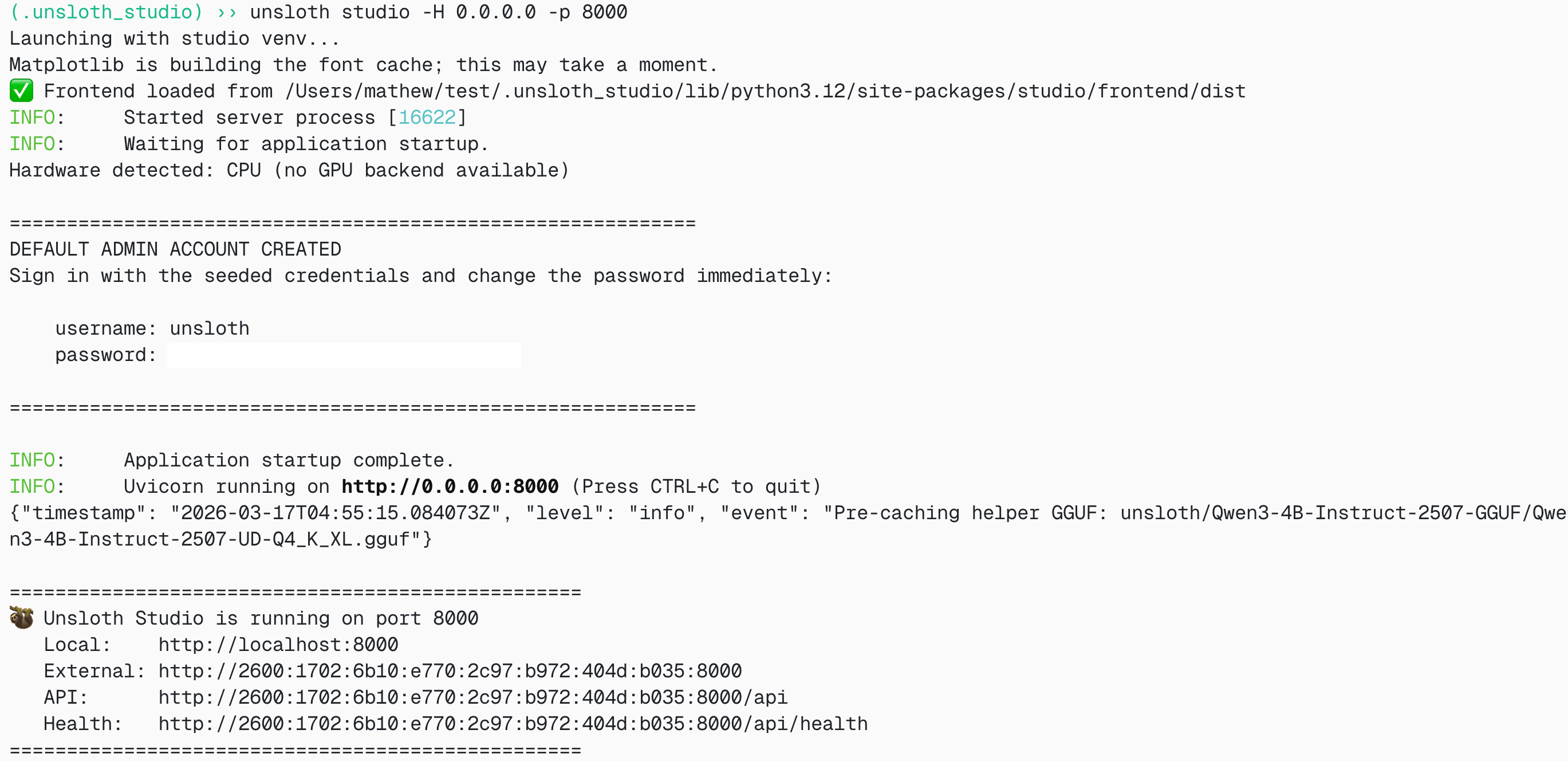
unsloth studio -H 0.0.0.0 -p 8888
```
**Windows Powershell:**
```bash
unsloth studio
```
Then open `http://127.0.0.1:8888` in your browser.
{% endstep %}
{% step %}
#### Search and download Nemotron-3-Ultra
On first launch you will need to create a password to secure your account and sign in again later. Then go to the [Unsloth Chat](/docs/new/studio/chat.md) tab and search for Nemotron-3-Ultra in the search bar and download your desired model and quant.
{% endstep %}
{% step %}
#### Run Nemotron-3-Ultra
Inference parameters should be auto-set when using Unsloth Studio, however you can still change it manually. You can also edit the context length, chat template and other settings.
For more information, you can view our [Unsloth Studio inference guide](/docs/new/studio/chat.md).
{% endstep %}
{% step %}
#### Serving Nemotron-3-Ultra
You can also use `unsloth studio run` to serve the model via llama-server like so:
{% code overflow="wrap" %}
```bash
unsloth studio run --model unsloth/NVIDIA-Nemotron-3-Ultra-550B-A55B-GGUF:UD-Q4_K_XL
```
{% endcode %}
{% endstep %}
{% endstepper %}
### 🦙 Llama.cpp Tutorial:
Instructions to run in llama.cpp (note we will be using 4-bit to fit most devices):
{% stepper %}
{% step %}
Obtain the latest `llama.cpp` on [GitHub here](https://github.com/ggml-org/llama.cpp). You can follow the build instructions below as well. Change `-DGGML_CUDA=ON` to `-DGGML_CUDA=OFF` if you don't have a GPU or just want CPU inference. **For Apple Mac / Metal devices**, set `-DGGML_CUDA=OFF` then continue as usual - Metal support is on by default.
{% code overflow="wrap" %}
```bash
apt-get update
apt-get install pciutils build-essential cmake curl libcurl4-openssl-dev -y
git clone https://github.com/ggml-org/llama.cpp
cmake llama.cpp -B llama.cpp/build \
-DBUILD_SHARED_LIBS=OFF -DGGML_CUDA=ON -DLLAMA_CURL=ON
cmake --build llama.cpp/build --config Release -j --clean-first --target llama-cli llama-mtmd-cli llama-server llama-gguf-split
cp llama.cpp/build/bin/llama-* llama.cpp
```
{% endcode %}
{% endstep %}
{% step %}
Download the model via the code below (after installing `pip install huggingface_hub`). You can choose Q4\_K\_M or other quantized versions like `UD-Q4_K_XL` . We recommend using at least 2-bit dynamic quant `UD-Q2_K_XL` to balance size and accuracy. If downloads get stuck, see: [Hugging Face Hub, XET debugging](/docs/basics/troubleshooting-and-faqs/hugging-face-hub-xet-debugging.md)
{% code overflow="wrap" %}
```bash
pip install huggingface_hub
hf download unsloth/NVIDIA-Nemotron-3-Ultra-550B-A55B-GGUF \
--local-dir unsloth/NVIDIA-Nemotron-3-Ultra-550B-A55B-GGUF \
--include "*UD-IQ3_XXS*" # Use "*UD-Q2_K_XL*" for Dynamic 2bit
```
{% endcode %}
{% endstep %}
{% step %}
Then run the model in conversation mode:
{% code overflow="wrap" %}
```bash
./llama.cpp/llama-cli \
--model unsloth/NVIDIA-Nemotron-3-Ultra-550B-A55B-GGUF/UD-IQ3_XXS/NVIDIA-Nemotron-3-Ultra-550B-A55B-UD-IQ3_XXS-00001-of-00006.gguf \
--temp 1.0 \
--top-p 0.95 \
--min-p 0.01
```
{% endcode %}
{% endstep %}
{% endstepper %}
#### Llama-server serving & deployment
To deploy Nemotron-3-Ultra locally, use `llama-server`. In a new terminal, for example via `tmux`, deploy the model:
```bash
./llama.cpp/llama-server \
-hf unsloth/NVIDIA-Nemotron-3-Ultra-550B-A55B-GGUF:UD-IQ3_XXS \
--alias "unsloth/NVIDIA-Nemotron-3-Ultra-550B-A55B" \
--temp 1.0 \
--top-p 0.95 \
--port 8001
```
If you downloaded the model manually, use:
{% code overflow="wrap" %}
```bash
./llama.cpp/llama-server \
--model unsloth/NVIDIA-Nemotron-3-Ultra-550B-A55B-GGUF/UD-IQ3_XXS/NVIDIA-Nemotron-3-Ultra-550B-A55B-UD-IQ3_XXS-00001-of-00006.gguf \
--alias "unsloth/NVIDIA-Nemotron-3-Ultra-550B-A55B" \
--temp 1.0 \
--top-p 0.95 \
--port 8001
```
{% endcode %}
Then in a new terminal, after installing the OpenAI client with `pip install openai`:
```python
from openai import OpenAI
openai_client = OpenAI(
base_url = "http://127.0.0.1:8001/v1",
api_key = "sk-no-key-required",
)
completion = openai_client.chat.completions.create(
model = "unsloth/NVIDIA-Nemotron-3-Ultra-550B-A55B",
messages = [
{"role": "user", "content": "What is 2+2?"},
],
)
print(completion.choices[0].message.reasoning_content)
print(completion.choices[0].message.content)
```
And on 4 B200s, around 40 tokens / s is seen for generation!
### Unsloth GGUF Benchmarks
We also did KLD analysis for our GGUF quants - on a log mean KLD scale, the model loses very little accuracy when quantized down to even 1bit due to our [dynamic methodology](/docs/basics/dynamic-3.0-ggufs.md) where more important layers are left in higher precision and the rest in lower bits.
For a linear scale:
### Official Benchmarks
Nemotron 3 Ultra is NVIDIA's largest Nemotron 3 reasoning model and is positioned for leading accuracy on frontier reasoning, coding and agentic tasks while optimizing time to task completion through high throughput.
Ultra is especially suited for workloads where task success depends on sustained reasoning rather than short single-turn responses:
* Autonomous coding sessions across large repositories
* Deep research across many sources with conflicting evidence
* Enterprise workflows with persistent tool-using loops
* EDA / chip design verification and failure analysis
As shown in Figure 1 and Figure 2 Nemotron 3 Ultra leads on accuracy on agent productivity, instruction following, and long context tasks and provides leading throughout, saving 30% on costs compared to other leading open models.
Figure 1: Nemotron 3 Ultra leads among open models on agentic benchmarks for agent productivity, coding, and instruction following.
Figure 2: Nemotron 3 Ultra saves up to 30% in costs and leads on the cost efficiency frontier
More benchmarks from NVIDIA:
| Benchmark | N-3-Ultra 550B-A55B | MiniMax-2.7 230B-A10B | GLM-5.1 744B-A40B | Kimi-K2.6 1T-A32B | | | |
| --------------------------------------------- | :-----------------: | :-------------------: | :---------------: | :---------------: | :---: | :---: | :--: |
| **Agentic** | | | | | | | |
| Terminal Bench 2.1 | 56.4 | 55.5 | 59.3 | 67.2 | 49.9 | 49.2 | 54.2 |
| GDPVal | 46.7 | 47.6 | 54.7 | 50.4 | 34.6 | 54.6 | 50.2 |
| SWE-Bench Verified | 71.9 | 72.2 | 73.8 | 69.5 | 69.9 | 74.0 | 72.4 |
| SWE-Bench Multilingual | 67.7 | 69.2 | 73.8 | 65.9 | 67.7 | 71.9 | 72.1 |
| ProfBench (Search) | 56.0 | 52.0 | 46.0 | 56.0 | 53.0 | 59.9 | 57.0 |
| PinchBench | 90.0 | 77.6 | 81.2 | 90.2 | 86.6 | 88.6 | 91.3 |
| TauBench V3 | | | | | | | |
| Airline | 81.5 | 75.3 | 85.0 | 85.8 | 76.5 | 80.8 | 80.8 |
| Retail | 86.4 | 84.9 | 84.1 | 82.9 | 88.5 | 88.9 | 89.1 |
| Telecom | 92.9 | 89.6 | 96.9 | 97.8 | 98.0 | 96.3 | 98.3 |
| Banking | 22.6 | 14.6 | 12.8 | 23.1 | 20.9 | 25.9 | 26.7 |
| Average | 70.9 | 66.1 | 69.7 | 72.4 | 71.0 | 73.2 | 73.7 |
| BrowseComp | 44.4 | 54.1 | 59.4 | 61.3 | 40.5 | 59.4 | 46.9 |
| Vals.ai Financial Agent 1.1 | | | | | | | |
| without web search | 60.1 | 51.3 | 60.2 | 54.0 | 61.3 | 58.9 | 58.4 |
| with web search | 53.7 | 50.5 | 60.7 | 58.8 | 59.0 | 62.3 | 60.1 |
| **Reasoning and Knowledge** | | | | | | | |
| IOI 2025 | 570.0 | -- | 456.5 | 585.0 | 441.3 | 580.1 | -- |
| LiveCodeBench (v6) | 89.0 | 77.2 | 85.7 | 90.2 | 79.3 | 92.5 | 90.9 |
| IMOAnswerBench (no tools) | 88.6 | 68.3 | 86.8 | 91.1 | 83.1 | 93.0 | 91.1 |
| IMOAnswerBench (with tools) | 92.3 | 75.1 | 91.1 | 93.71 | 84.51 | 85.4 | 89.6 |
| Apex-Shortlist (no tools) | 74.9 | 28.9 | 71.1 | 77.4 | 61.4 | 85.8 | 82.4 |
| Apex-Shortlist (with tools) | 84.8 | 51.9 | 79.0 | 73.2 | 60.4 | 86.5 | 82.0 |
| GPQA (no tools) | 87.0 | 86.6 | 86.1 | 91.0 | 87.1 | 87.8 | 88.5 |
| SciCode (subtask) | 44.6 | 38.3 | 47.7 | 52.0 | 48.0 | 50.5 | 48.2 |
| HLE (no tools) | 26.7 | 23.1 | 27.2 | 34.8 | 28.5 | 37.7 | 32.2 |
| HLE (with tools) | 37.4 | -- | 50.4 | 54.0 | 48.3 | 48.2 | 45.1 |
| CritPt (no tools) | 3.1 | 0.6 | 3.7 | 9.1 | 2.4 | 14.0 | 10.6 |
| MMLU-Pro | 86.8 | 81.9 | 85.9 | 88.1 | 88.3 | 87.5 | 86.4 |
| OmniScience Accuracy | 24.1 | 20.5 | 31.3 | 35.5 | 35.9 | 46.8 | 39.9 |
| OmniScience Non-Hallucination | 78.7 | 74.4 | 66.8 | 67.1 | 7.4 | 5.7 | 2.8 |
| **Chat & Instruction Following** | | | | | | | |
| IFBench (prompt loose) | 81.7 | 74.6 | 76.6 | 73.7 | 78.2 | 79.1 | 82.0 |
| Multi-Challenge | 63.8 | 42.5 | 63.0 | 63.1 | 63.9 | 64.1 | 63.5 |
| **Long Context** | | | | | | | |
| AA-LCR | 65.4 | 69.8 | 66.9 | 70.2 | 68.3 | 67.3 | 62.7 |
| RULER (1M) | 94.7 | -- | -- | -- | 90.1 | 94.2 | 87.7 |
| Longbench v2 (≤ 1M) | 61.9 | -- | -- | -- | 68.9 | 62.1 | 57.0 |
| **Multilingual** | | | | | | | |
| MMLU-ProX (avg en/de/fr/es/it/ja/zh/hi/pt/ko) | 83.0 | 78.4 | 85.8 | 85.0 | 86.4 | 85.6 | 84.3 |
| WMT24++ (en→xx) | 83.7 | 82.8 | 84.4 | 84.5 | 86.8 | 85.9 | 85.9 |
---
# Agent Instructions
This documentation is published with GitBook. GitBook is the documentation platform designed so that both humans and AI agents can read, navigate, and reason over technical content effectively. Learn more at gitbook.com.
## Querying This Documentation
If you need additional information that is not directly available in this page, you can query the documentation by asking a question.
Perform an HTTP GET request on the following URL with the `ask` and `goal` query parameters:
```
GET https://unsloth.ai/docs/models/nemotron-3-ultra.md?ask=&goal=
```
`ask` is the immediate question: it should be specific, self-contained, and written in natural language.
`goal` is what the user is ultimately trying to achieve, the reason they need the answer. Sharing it helps GitBook give you a better, more relevant answer. A goal is most helpful when it describes the outcome the user wants rather than restating the question. For example, with `ask=how do I create an API token`, a goal like `automate deployments from our CI pipeline` lets GitBook tailor the answer to that use case.
The response will contain a direct answer to the question and relevant excerpts and sources from the documentation.
Use this mechanism when the answer is not explicitly present in the current page, you need clarification or additional context, or you want to retrieve related documentation sections.



.png?alt=media&token=24eef28f-875f-4cca-a1c5-d5c1d9dfca3e)

