> For the complete documentation index, see [llms.txt](https://unsloth.ai/docs/llms.txt). Markdown versions of documentation pages are available by appending `.md` to page URLs; this page is available as [Markdown](https://unsloth.ai/docs/models/nemotron-3.md).
# NVIDIA Nemotron 3 Nano - How To Run Guide
Run & fine-tune NVIDIA Nemotron 3 Nano locally on your device!
NVIDIA releases **Nemotron-3-Nano-4B**, a 4B open hybrid MoE model that follows [Nemotron-3-Super-120B-A12B](/docs/models/nemotron-3/nemotron-3-super.md) and Nemotron-3-Nano-30B-A3B. The Nemotron family is designed for fast, accurate coding, math, and agentic workloads. They feature a **1M-token context** window and are competitive across reasoning, chat, and throughput benchmarks.
Nemotron-3-Nano-4B runs on **5GB** of RAM, VRAM, or unified memory. Nemotron-3-Nano-30A3B runs on **24GB** RAM. Nemotron 3 can now be fine-tuned locally via [Unsloth](https://github.com/unslothai/unsloth). Thanks to NVIDIA for giving Unsloth day-zero support.
Nemotron-3-Nano-4BNemotron-3-Nano-30B-A3BFine-tuning Nemotron 3
| [Nemotron-3-Nano-**4B**-GGUF](https://huggingface.co/unsloth/NVIDIA-Nemotron-3-Nano-4B-GGUF) | [Nemotron-3-**Nano-30B-A3B**-GGUF](https://huggingface.co/unsloth/Nemotron-3-Nano-30B-A3B-GGUF) |
| -------------------------------------------------------------------------------------------- | ----------------------------------------------------------------------------------------------- |
### ⚙️ Usage Guide
NVIDIA recommends these settings for inference:
{% columns %}
{% column %}
**General chat/instruction (default):**
* `temperature = 1.0`
* `top_p = 1.0`
{% endcolumn %}
{% column %}
**Tool calling use-cases:**
* `temperature = 0.6`
* `top_p = 0.95`
{% endcolumn %}
{% endcolumns %}
**For most local use, set:**
* `max_new_tokens` = `32,768` to `262,144` for standard prompts with a max of 1M tokens
* Increase for deep reasoning or long-form generation as your RAM/VRAM allows.
The chat template format is found when we use the below:
{% code overflow="wrap" %}
```python
tokenizer.apply_chat_template([
{"role" : "user", "content" : "What is 1+1?"},
{"role" : "assistant", "content" : "2"},
{"role" : "user", "content" : "What is 2+2?"}
], add_generation_prompt = True, tokenize = False,
)
```
{% endcode %}
{% hint style="success" %}
Because the model was trained with NoPE, you only need to change `max_position_embeddings`. The model doesn’t use explicit positional embeddings, so YaRN isn’t needed.
{% endhint %}
#### Nemotron 3 chat template format:
{% hint style="info" %}
Nemotron 3 uses `` with token ID 12 and `` with token ID 13 for reasoning. Use `--special` to see the tokens for llama.cpp. You might also need `--verbose-prompt` to see `` since it's prepended.
{% endhint %}
{% code overflow="wrap" lineNumbers="true" %}
```
<|im_start|>system\n<|im_end|>\n<|im_start|>user\nWhat is 1+1?<|im_end|>\n<|im_start|>assistant\n2<|im_end|>\n<|im_start|>user\nWhat is 2+2?<|im_end|>\n<|im_start|>assistant\n\n
```
{% endcode %}
## 🖥️ Run Nemotron-3-Nano-4B
Depending on your use-case you will need to use different settings. Some GGUFs end up similar in size because the model architecture (like [gpt-oss](/docs/models/gpt-oss-how-to-run-and-fine-tune.md)) has dimensions not divisible by 128, so parts can’t be quantized to lower bits.
The 4-bit versions of the model requires \~3GB RAM. 8-bit requires 5GB.
### 🦥 Unsloth Studio Guide
Nemotron 3 can be run and fine-tuned in [Unsloth Studio](/docs/new/studio.md), our new open-source web UI for local AI. With Unsloth Studio, you can run models locally on **MacOS, Windows**, Linux and:
{% columns %}
{% column %}
* Search, download, [run GGUFs](/docs/new/studio.md#run-models-locally) and safetensor models
* [**Self-healing** tool calling](/docs/new/studio.md#execute-code--heal-tool-calling) + **web search**
* [**Code execution**](/docs/new/studio.md#run-models-locally) (Python, Bash)
* [Automatic inference](https://unsloth.ai/docs/desktop#feature-deep-dive) parameter tuning (temp, top-p, etc.)
* Fast CPU + GPU inference via llama.cpp
* [Train LLMs](/docs/new/studio.md#no-code-training) 2x faster with 70% less VRAM
{% endcolumn %}
{% column %}
**Then open `http://localhost:8888` in your browser.**
{% endstep %}
{% step %}
#### Search and download Nemotron-3-Nano-4B
On first launch you will need to create a password to secure your account and sign in again later. You’ll then see a brief onboarding wizard to choose a model, dataset, and basic settings. You can skip it at any time.
Then go to the [Unsloth Chat](/docs/new/studio/chat.md) tab and search for Nemotron-3-Nano-4B in the search bar and download your desired model and quant.
{% endstep %}
{% step %}
#### Run Nemotron-3-Nano-4B
Inference parameters should be auto-set when using Unsloth Studio, however you can still change it manually. You can also edit the context length, chat template and other settings.
For more information, you can view our [Unsloth Studio inference guide](/docs/new/studio/chat.md).
{% endstep %}
{% endstepper %}
### Llama.cpp Tutorial:
Instructions to run in llama.cpp (we'll be using 8-bit for near full precision):
{% stepper %}
{% step %}
Obtain the latest `llama.cpp` on [GitHub here](https://github.com/ggml-org/llama.cpp). You can follow the build instructions below as well. Change `-DGGML_CUDA=ON` to `-DGGML_CUDA=OFF` if you don't have a GPU or just want CPU inference.
{% code overflow="wrap" %}
```bash
apt-get update
apt-get install pciutils build-essential cmake curl libcurl4-openssl-dev -y
git clone https://github.com/ggml-org/llama.cpp
cmake llama.cpp -B llama.cpp/build \
-DBUILD_SHARED_LIBS=OFF -DGGML_CUDA=ON
cmake --build llama.cpp/build --config Release -j --clean-first --target llama-cli llama-mtmd-cli llama-server llama-gguf-split
cp llama.cpp/build/bin/llama-* llama.cpp
```
{% endcode %}
{% endstep %}
{% step %}
You can directly pull from Hugging Face. You can increase the context to 1M as your RAM/VRAM allows.
Follow this for **general instruction** use-cases:
```bash
./llama.cpp/llama-cli \
-hf unsloth/NVIDIA-Nemotron-3-Nano-4B-GGUF:Q8_0 \
--ctx-size 16384 \
--temp 1.0 --top-p 1.0
```
Follow this for **tool-calling** use-cases:
```bash
./llama.cpp/llama-cli \
-hf unsloth/NVIDIA-Nemotron-3-Nano-4B-GGUF:Q8_0 \
--ctx-size 32768 \
--temp 0.6 --top-p 0.95
```
{% endstep %}
{% step %}
Download the model via (after installing `pip install huggingface_hub hf_transfer` ). You can choose `Q8_0` or other quantized versions.
```python
# !pip install huggingface_hub hf_transfer
import os
os.environ["HF_HUB_ENABLE_HF_TRANSFER"] = "1"
from huggingface_hub import snapshot_download
snapshot_download(
repo_id = "unsloth/NVIDIA-Nemotron-3-Nano-4B-GGUF",
local_dir = "unsloth/NVIDIA-Nemotron-3-Nano-4B-GGUF",
allow_patterns = ["*Q8_0*"],
)
```
{% endstep %}
{% step %}
Then run the model in conversation mode:
{% code overflow="wrap" %}
```bash
./llama.cpp/llama-cli \
--model unsloth/NVIDIA-Nemotron-3-Nano-4B-GGUF/NVIDIA-Nemotron-3-Nano-4B-Q8_0.gguf \
--ctx-size 16384 \
--seed 3407 \
--prio 2 \
--temp 0.6 \
--top-p 0.95
```
{% endcode %}
Also, adjust **context window** as required. Ensure your hardware can handle more than a 256K context window. Setting it to 1M may trigger CUDA OOM and crash, which is why the default is 262,144.
{% endstep %}
{% endstepper %}
## 🖥️ Run Nemotron-3-Nano-30B-A3B
Depending on your use-case you will need to use different settings. Some GGUFs end up similar in size because the model architecture (like [gpt-oss](/docs/models/gpt-oss-how-to-run-and-fine-tune.md)) has dimensions not divisible by 128, so parts can’t be quantized to lower bits.
The 4-bit versions of the model requires \~24GB RAM. 8-bit requires 36GB.
### 🦥 Unsloth Studio Guide
For this tutorial, we will be using [Unsloth Studio](/docs/new/studio.md), which is our new web UI for running and training LLMs. With Unsloth Studio, you can run models locally on **Mac, Windows**, and Linux and:
{% columns %}
{% column %}
* Search, download, [run GGUFs](/docs/new/studio.md#run-models-locally) and safetensor models
* **Compare** models **side-by-side**
* [**Self-healing** tool calling](/docs/new/studio.md#execute-code--heal-tool-calling) + **web search**
* [**Code execution**](/docs/new/studio.md#run-models-locally) (Python, Bash)
* [Automatic inference](https://unsloth.ai/docs/desktop#feature-deep-dive) parameter tuning (temp, top-p, etc.)
* [Train LLMs](/docs/new/studio.md#no-code-training) 2x faster with 70% less VRAM
{% endcolumn %}
{% column %}
{% endcolumn %}
{% endcolumns %}
{% stepper %}
{% step %}
#### Install Unsloth
**MacOS, Linux, WSL:**
```bash
curl -fsSL https://unsloth.ai/install.sh | sh
```
**Windows PowerShell:**
```bash
irm https://unsloth.ai/install.ps1 | iex
```
{% endstep %}
{% step %}
#### Setup Unsloth Studio (one time)
Setup automatically installs Node.js (via nvm), builds the frontend, installs all Python dependencies, and builds llama.cpp with CUDA support.
{% hint style="info" %}
**WSL users:** you will be prompted for your `sudo` password to install build dependencies (`cmake`, `git`, `libcurl4-openssl-dev`).
{% endhint %}
{% endstep %}
{% step %}
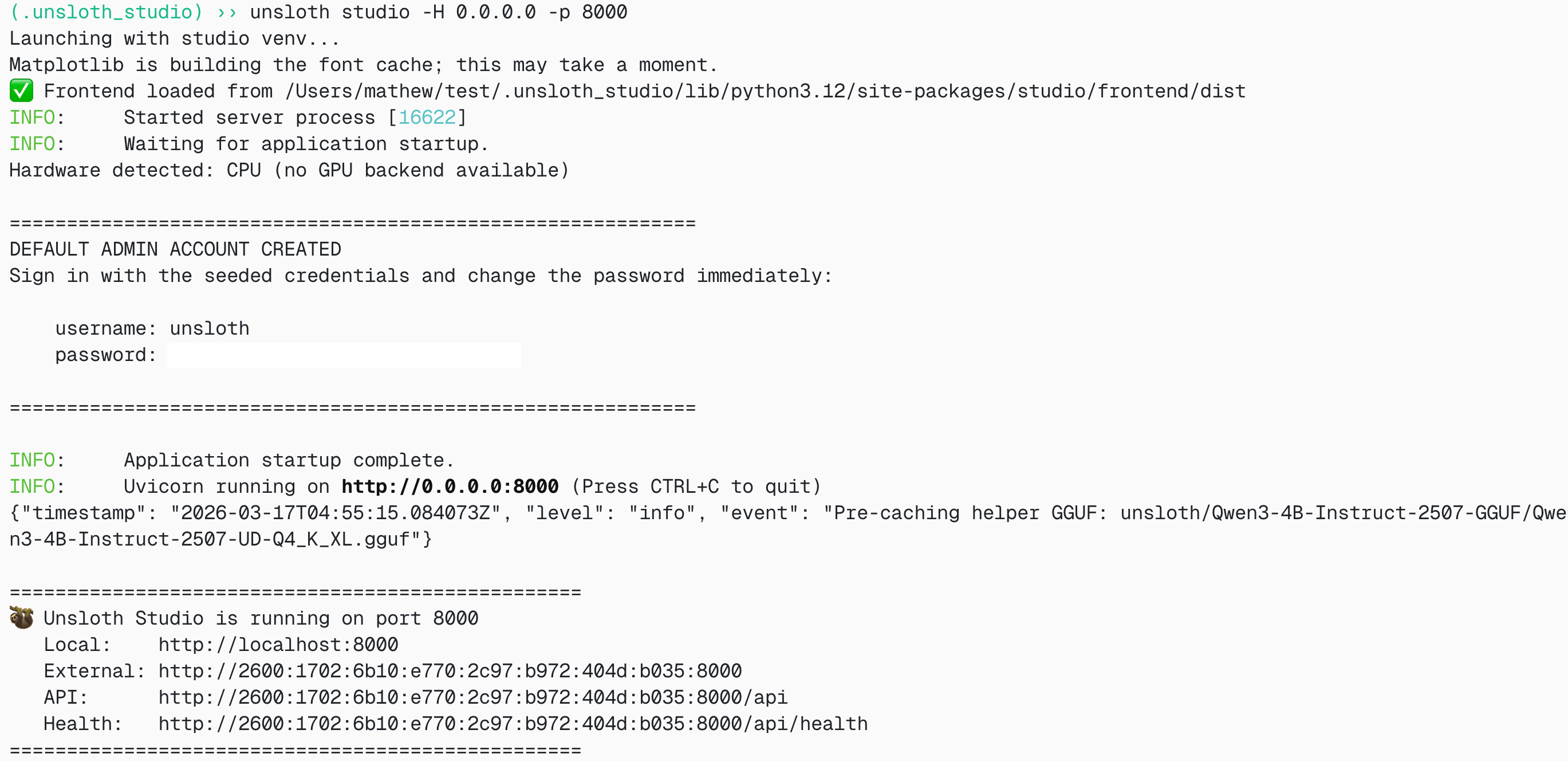
#### Launch Unsloth
**MacOS, Linux, WSL:**
```bash
source unsloth_studio/bin/activate
unsloth studio -H 0.0.0.0 -p 8888
```
**Windows Powershell:**
```bash
& .\unsloth_studio\Scripts\unsloth.exe studio -H 0.0.0.0 -p 8888
```
**Then open `http://localhost:8888` in your browser.**
{% endstep %}
{% step %}
#### Search and download Nemotron-3-Nano-30B-A3B
On first launch you will need to create a password to secure your account and sign in again later. You’ll then see a brief onboarding wizard to choose a model, dataset, and basic settings. You can skip it at any time.
Then go to the [Unsloth Chat](/docs/new/studio/chat.md) tab and search for Nemotron-3-Nano-4B in the search bar and download your desired model and quant.
{% endstep %}
{% step %}
#### Run Nemotron-3-Nano-30B-A3B
Inference parameters should be auto-set when using Unsloth Studio, however you can still change it manually. You can also edit the context length, chat template and other settings.
For more information, you can view our [Unsloth Studio inference guide](/docs/new/studio/chat.md).
{% endstep %}
{% endstepper %}
### Llama.cpp Tutorial:
Instructions to run in llama.cpp (note we will be using 4-bit to fit most devices):
{% stepper %}
{% step %}
Obtain the latest `llama.cpp` on [GitHub here](https://github.com/ggml-org/llama.cpp). You can follow the build instructions below as well. Change `-DGGML_CUDA=ON` to `-DGGML_CUDA=OFF` if you don't have a GPU or just want CPU inference. **For Apple Mac / Metal devices**, set `-DGGML_CUDA=OFF` then continue as usual - Metal support is on by default.
{% code overflow="wrap" %}
```bash
apt-get update
apt-get install pciutils build-essential cmake curl libcurl4-openssl-dev -y
git clone https://github.com/ggml-org/llama.cpp
cmake llama.cpp -B llama.cpp/build \
-DBUILD_SHARED_LIBS=OFF -DGGML_CUDA=ON -DLLAMA_CURL=ON
cmake --build llama.cpp/build --config Release -j --clean-first --target llama-cli llama-mtmd-cli llama-server llama-gguf-split
cp llama.cpp/build/bin/llama-* llama.cpp
```
{% endcode %}
{% endstep %}
{% step %}
You can directly pull from Hugging Face. You can increase the context to 1M as your RAM/VRAM allows.
Follow this for **general instruction** use-cases:
```bash
./llama.cpp/llama-cli \
-hf unsloth/Nemotron-3-Nano-30B-A3B-GGUF:UD-Q4_K_XL \
--ctx-size 32768 \
--temp 1.0 --top-p 1.0
```
Follow this for **tool-calling** use-cases:
```bash
./llama.cpp/llama-cli \
-hf unsloth/Nemotron-3-Nano-30B-A3B-GGUF:UD-Q4_K_XL \
--ctx-size 32768 \
--temp 0.6 --top-p 0.95
```
{% endstep %}
{% step %}
Download the model via (after installing `pip install huggingface_hub hf_transfer` ). You can choose `UD-Q4_K_XL` or other quantized versions.
```python
# !pip install huggingface_hub hf_transfer
import os
os.environ["HF_HUB_ENABLE_HF_TRANSFER"] = "1"
from huggingface_hub import snapshot_download
snapshot_download(
repo_id = "unsloth/Nemotron-3-Nano-30B-A3B-GGUF",
local_dir = "unsloth/Nemotron-3-Nano-30B-A3B-GGUF",
allow_patterns = ["*UD-Q4_K_XL*"],
)
```
{% endstep %}
{% step %}
Then run the model in conversation mode:
{% code overflow="wrap" %}
```bash
./llama.cpp/llama-cli \
--model unsloth/Nemotron-3-Nano-30B-A3B-GGUF/Nemotron-3-Nano-30B-A3B-UD-Q4_K_XL.gguf \
--ctx-size 16384 \
--seed 3407 \
--prio 2 \
--temp 0.6 \
--top-p 0.95
```
{% endcode %}
Also, adjust **context window** as required. Ensure your hardware can handle more than a 256K context window. Setting it to 1M may trigger CUDA OOM and crash, which is why the default is 262,144.
{% hint style="info" %}
Nemotron 3 uses `` with token ID 12 and `` with token ID 13 for reasoning. Use `--special` to see the tokens for llama.cpp. You might also need `--verbose-prompt` to see `` since it's prepended.
{% endhint %}
{% endstep %}
{% endstepper %}
### 🦥 Fine-tuning Nemotron 3 and RL
Unsloth now supports fine-tuning of all Nemotron models, including Nemotron 3 Super and Nano.
The 4B model fits on a free Colab GPU however the 30B model does not fit. We still made an 80GB A100 Colab notebook for you to fine-tune with. 16-bit LoRA fine-tuning of Nemotron 3 Nano will use around **60GB VRAM**:
* [Nemotron-3-Nano-30B-A3B SFT LoRA notebook](https://colab.research.google.com/github/unslothai/notebooks/blob/main/nb/Nemotron-3-Nano-30B-A3B_A100.ipynb)
{% embed url="" %}
On fine-tuning MoE's - it's probably not a good idea to fine-tune the router layer so we disabled it by default. If you want to maintain its reasoning capabilities (optional), you can use a mix of direct answers and chain-of-thought examples. Use at least 75% reasoning and 25% non-reasoning in your dataset to make the model retain its reasoning capabilities.
#### :sparkles:Reinforcement Learning + NeMo Gym
We worked with the open-source NVIDIA [NeMo Gym](https://github.com/NVIDIA-NeMo/Gym/pull/492) team to enable the democratization of RL environments. Our collab enables single-turn rollout RL training for many domains of interest, including math, coding, tool-use, etc, using training environments and datasets from NeMo Gym:
{% columns %}
{% column %}
[NeMo Gym Sudoku Reinforcement Learning notebook](https://colab.research.google.com/github/unslothai/notebooks/blob/main/nb/nemo_gym_sudoku.ipynb)
{% embed url="" %}
{% endcolumn %}
{% column %}
[NeMo Gym Multi Environments for Reinforcement Learning notebook](https://colab.research.google.com/github/unslothai/notebooks/blob/main/nb/NeMo-Gym-Multi-Environment.ipynb)
{% embed url="" %}
{% endcolumn %}
{% endcolumns %}
{% hint style="success" %}
**Also check out our latest collab guide published on NVIDIA’s official Developer blog:**
#### [How to Fine-Tune an LLM on NVIDIA GPUs With Unsloth](https://blogs.nvidia.com/blog/rtx-ai-garage-fine-tuning-unsloth-dgx-spark/)
{% endhint %}
{% embed url="" %}
### 🦙Llama-server serving & deployment
To deploy Nemotron 3 for production, we use `llama-server` In a new terminal say via tmux, deploy the model via:
{% code overflow="wrap" %}
```bash
./llama.cpp/llama-server \
--model unsloth/Nemotron-3-Nano-30B-A3B-GGUF/Nemotron-3-Nano-30B-A3B-UD-Q4_K_XL.gguf \
--alias "unsloth/Nemotron-3-Nano-30B-A3B" \
--prio 3 \
--min-p 0.01 \
--temp 0.6 \
--top-p 0.95 \
--ctx-size 16384 \
--port 8001
```
{% endcode %}
When you run the above, you will get:
Then in a new terminal, after doing `pip install openai`, do:
{% code overflow="wrap" %}
```python
from openai import OpenAI
import json
openai_client = OpenAI(
base_url = "http://127.0.0.1:8001/v1",
api_key = "sk-no-key-required",
)
completion = openai_client.chat.completions.create(
model = "unsloth/Nemotron-3-Nano-30B-A3B",
messages = [{"role": "user", "content": "What is 2+2?"},],
)
print(completion.choices[0].message.content)
```
{% endcode %}
Which will print
{% code overflow="wrap" %}
```
User asks a simple question: "What is 2+2?" The answer is 4. Provide answer.
2 + 2 = 4.
```
{% endcode %}
### Benchmarks
Nemotron-3-Nano-4B is the best performing model for its size, including throughput.
Nemotron-3-Nano-30B-A3B is the best performing model across all benchmarks, including throughput.
---
# Agent Instructions
This documentation is published with GitBook. GitBook is the documentation platform designed so that both humans and AI agents can read, navigate, and reason over technical content effectively. Learn more at gitbook.com.
## Querying This Documentation
If you need additional information that is not directly available in this page, you can query the documentation by asking a question.
Perform an HTTP GET request on the following URL with the `ask` and `goal` query parameters:
```
GET https://unsloth.ai/docs/models/nemotron-3.md?ask=&goal=
```
`ask` is the immediate question: it should be specific, self-contained, and written in natural language.
`goal` is what the user is ultimately trying to achieve, the reason they need the answer. Sharing it helps GitBook give you a better, more relevant answer. A goal is most helpful when it describes the outcome the user wants rather than restating the question. For example, with `ask=how do I create an API token`, a goal like `automate deployments from our CI pipeline` lets GitBook tailor the answer to that use case.
The response will contain a direct answer to the question and relevant excerpts and sources from the documentation.
Use this mechanism when the answer is not explicitly present in the current page, you need clarification or additional context, or you want to retrieve related documentation sections.



.png?alt=media&token=f66979d9-1bf9-47ca-ba65-0a7a04de9a52)
