> For the complete documentation index, see [llms.txt](https://unsloth.ai/docs/llms.txt). Markdown versions of documentation pages are available by appending `.md` to page URLs; this page is available as [Markdown](https://unsloth.ai/docs/jp/moderu/tutorials/qwen3-how-to-run-and-fine-tune/qwen3-vl-how-to-run-and-fine-tune.md).
# Qwen3-VL: 実行ガイド
Unslothを使ってQwen3-VLをローカルでファインチューニングおよび実行する方法を学びましょう。
Qwen3-VL は、Qwen の新しい視覚モデルで **インストラクト** そして **思考** バージョンです。2B、4B、8B、32B の各モデルは dense で、30B と 235B は MoE です。235B の思考 LLM は、GPT-5(high)および Gemini 2.5 Pro に匹敵する最先端の視覚性能とコーディング性能を発揮します。\
\
Qwen3-VL には視覚、動画、OCR の機能に加え、256K のコンテキスト(1M まで拡張可能)があります。\
\
[Unsloth](https://github.com/unslothai/unsloth) サポートしています **Qwen3-VL のファインチューニングと** [**RL**](/docs/jp/meru/reinforcement-learning-rl-guide/vision-reinforcement-learning-vlm-rl.md). 無料で Qwen3-VL(8B)を学習しましょう。 [ノートブック](#fine-tuning-qwen3-vl).
Qwen3-VL の実行Qwen3-VL のファインチューニング
## 🖥️ **Qwen3-VL の実行**
llama.cpp、vLLM、Ollama などでモデルを実行するには、以下の推奨設定を使ってください:
### :gear: 推奨設定
Qwen は両方のモデルに対してこれらの設定を推奨しています(Instruct と Thinking で少し異なります):
| Instruct 設定: | Thinking 設定: |
| ------------------------------------------------------------------------ | ------------------------------------------------------------------------ |
| **Temperature = 0.7** | **Temperature = 1.0** |
| **Top\_P = 0.8** | **Top\_P = 0.95** |
| **presence\_penalty = 1.5** | **presence\_penalty = 0.0** |
| 出力長 = 32768(最大 256K) | 出力長 = 40960(最大 256K) |
| Top\_K = 20 | Top\_K = 20 |
Qwen3-VL は、GitHub で述べられているように、ベンチマーク数値の算出にも以下の設定を使用していました [GitHub 上で](https://github.com/QwenLM/Qwen3-VL/tree/main?tab=readme-ov-file#generation-hyperparameters).
{% columns %}
{% column %}
Instruct 設定:
```bash
export greedy='false'
export seed=3407
export top_p=0.8
export top_k=20
export temperature=0.7
export repetition_penalty=1.0
export presence_penalty=1.5
export out_seq_length=32768
```
{% endcolumn %}
{% column %}
Thinking 設定:
```bash
export greedy='false'
export seed=1234
export top_p=0.95
export top_k=20
export temperature=1.0
export repetition_penalty=1.0
export presence_penalty=0.0
export out_seq_length=40960
```
{% endcolumn %}
{% endcolumns %}
### :bug:チャットテンプレートのバグ修正
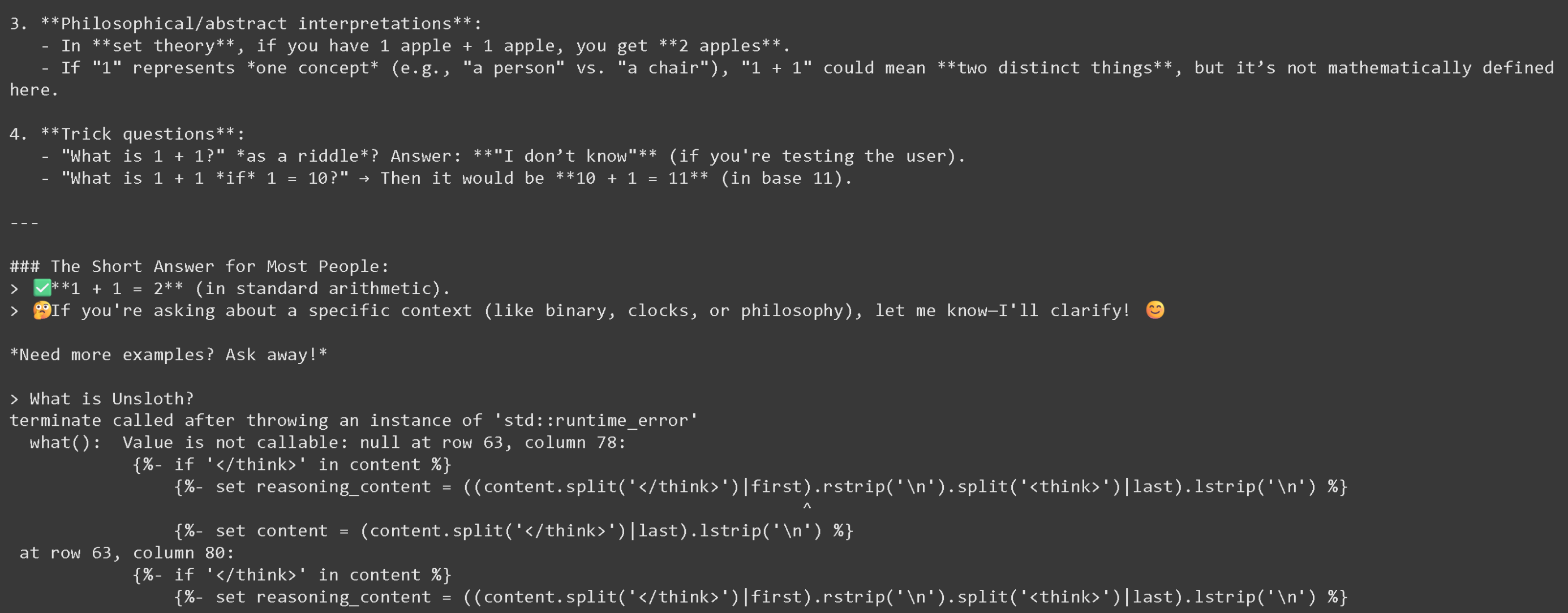
Unsloth では精度を最も重視しているため、Thinking モデルを 2 回目に実行したあとに llama.cpp が壊れる理由を調査しました。以下のような挙動です:
{% columns %}
{% column %}
 {% endcolumn %}
{% column %}
エラーコード:
```
terminate called after throwing an instance of 'std::runtime_error'
what(): Value is not callable: null at row 63, column 78:
{%- if '' in content %}
{%- set reasoning_content = ((content.split('')|first).rstrip('\n').split('')|last).lstrip('\n') %}
^
```
{% endcolumn %}
{% endcolumns %}
VL モデル向けの Thinking チャットテンプレートの修正に成功したため、Thinking の全量子化版と Unsloth の量子化版を再アップロードしました。これで 2 回目の会話以降もすべて動作するはずです - **その他の量子化版は 2 回目の会話の後に読み込みに失敗します。**
### **Qwen3-VL の Unsloth アップロード**:
2025 年 10 月 30 日時点で Qwen3-VL は llama.cpp により GGUF としてサポートされるようになったので、ローカルで実行できます!
| 動的 GGUF(実行用) | 4-bit BnB Unsloth Dynamic | 16-bit フル精度 |
| ----------------------------------------------------------------------------------------------------------------------------------------------------------------------------------------------------------------------------------------------------------------------------------------------------------------------------------------------------------------------------------------------------------------------------------------------------------------------------------------------------------------------------------------------------------------------------------------------------------------------------------------------------------------------------------------------------------------------------------------------------------------------------------------------------------------------------------------------------------------------------------------------------------------------------------------------------------------------------------------------------------------------------------------------------------------------------------------------------------------------------------------------------------------------------------------- | --------------------------------------------------------------------------------------------------------------------------------------------------------------------------------------------------------------------------------------------------------------------------------------------------------------------------------------------------------------------------------------------------------------------------------------------------------------------------------------------------------------------------------------------------------------------------------------------------------------------------------------------------------------------------------------------------------------------------------------------------------------------------------------------------------------------------------------------------------------------- | --------------------------------------------------------------------------------------------------------------------------------------------------------------------------------------------------------------------------------------------------------------------------------------------------------------------------------------------------------------------------------------------------------------------------------------------------------------------------------------------------------------------------------------------------------------------------------------------------------------------------------------------------------------------------------------------------------------------------------------------------------------------------------------------------------------------------------------------------------------------------------------------------------------------------------------------------------------------------------------------------------------------------------------- |
| | | |
### 📖 Llama.cpp: Qwen3-VL を実行するチュートリアル
1. 最新の `llama.cpp` を [GitHubこちら](https://github.com/ggml-org/llama.cpp)。以下のビルド手順に従うこともできます。変更してください `-DGGML_CUDA=ON` を `-DGGML_CUDA=OFF` GPUがない場合、またはCPU推論のみを使いたい場合は。 **Apple Mac / Metalデバイスの場合**、次を設定します `-DGGML_CUDA=OFF` その後は通常どおり続けてください。Metalサポートはデフォルトで有効です。
```bash
apt-get update
apt-get install pciutils build-essential cmake curl libcurl4-openssl-dev -y
git clone https://github.com/ggml-org/llama.cpp
cmake llama.cpp -B llama.cpp/build \
-DBUILD_SHARED_LIBS=OFF -DGGML_CUDA=ON -DLLAMA_CURL=ON
cmake --build llama.cpp/build --config Release -j --clean-first
cp llama.cpp/build/bin/llama-* llama.cpp
```
2. **まずは画像を取得しましょう!** 画像をアップロードすることもできます。ここでは次を使用します 。これは、Unsloth でファインチューニングがどのように作られるかを示す小さなロゴです:
{% endcolumn %}
{% column %}
エラーコード:
```
terminate called after throwing an instance of 'std::runtime_error'
what(): Value is not callable: null at row 63, column 78:
{%- if '' in content %}
{%- set reasoning_content = ((content.split('')|first).rstrip('\n').split('')|last).lstrip('\n') %}
^
```
{% endcolumn %}
{% endcolumns %}
VL モデル向けの Thinking チャットテンプレートの修正に成功したため、Thinking の全量子化版と Unsloth の量子化版を再アップロードしました。これで 2 回目の会話以降もすべて動作するはずです - **その他の量子化版は 2 回目の会話の後に読み込みに失敗します。**
### **Qwen3-VL の Unsloth アップロード**:
2025 年 10 月 30 日時点で Qwen3-VL は llama.cpp により GGUF としてサポートされるようになったので、ローカルで実行できます!
| 動的 GGUF(実行用) | 4-bit BnB Unsloth Dynamic | 16-bit フル精度 |
| ----------------------------------------------------------------------------------------------------------------------------------------------------------------------------------------------------------------------------------------------------------------------------------------------------------------------------------------------------------------------------------------------------------------------------------------------------------------------------------------------------------------------------------------------------------------------------------------------------------------------------------------------------------------------------------------------------------------------------------------------------------------------------------------------------------------------------------------------------------------------------------------------------------------------------------------------------------------------------------------------------------------------------------------------------------------------------------------------------------------------------------------------------------------------------------------- | --------------------------------------------------------------------------------------------------------------------------------------------------------------------------------------------------------------------------------------------------------------------------------------------------------------------------------------------------------------------------------------------------------------------------------------------------------------------------------------------------------------------------------------------------------------------------------------------------------------------------------------------------------------------------------------------------------------------------------------------------------------------------------------------------------------------------------------------------------------------- | --------------------------------------------------------------------------------------------------------------------------------------------------------------------------------------------------------------------------------------------------------------------------------------------------------------------------------------------------------------------------------------------------------------------------------------------------------------------------------------------------------------------------------------------------------------------------------------------------------------------------------------------------------------------------------------------------------------------------------------------------------------------------------------------------------------------------------------------------------------------------------------------------------------------------------------------------------------------------------------------------------------------------------------- |
| | | |
### 📖 Llama.cpp: Qwen3-VL を実行するチュートリアル
1. 最新の `llama.cpp` を [GitHubこちら](https://github.com/ggml-org/llama.cpp)。以下のビルド手順に従うこともできます。変更してください `-DGGML_CUDA=ON` を `-DGGML_CUDA=OFF` GPUがない場合、またはCPU推論のみを使いたい場合は。 **Apple Mac / Metalデバイスの場合**、次を設定します `-DGGML_CUDA=OFF` その後は通常どおり続けてください。Metalサポートはデフォルトで有効です。
```bash
apt-get update
apt-get install pciutils build-essential cmake curl libcurl4-openssl-dev -y
git clone https://github.com/ggml-org/llama.cpp
cmake llama.cpp -B llama.cpp/build \
-DBUILD_SHARED_LIBS=OFF -DGGML_CUDA=ON -DLLAMA_CURL=ON
cmake --build llama.cpp/build --config Release -j --clean-first
cp llama.cpp/build/bin/llama-* llama.cpp
```
2. **まずは画像を取得しましょう!** 画像をアップロードすることもできます。ここでは次を使用します 。これは、Unsloth でファインチューニングがどのように作られるかを示す小さなロゴです:
 3. この画像をダウンロードしましょう
{% code overflow="wrap" %}
```bash
wget https://raw.githubusercontent.com/unslothai/unsloth/refs/heads/main/images/unsloth%20made%20with%20love.png -O unsloth.png
```
{% endcode %}
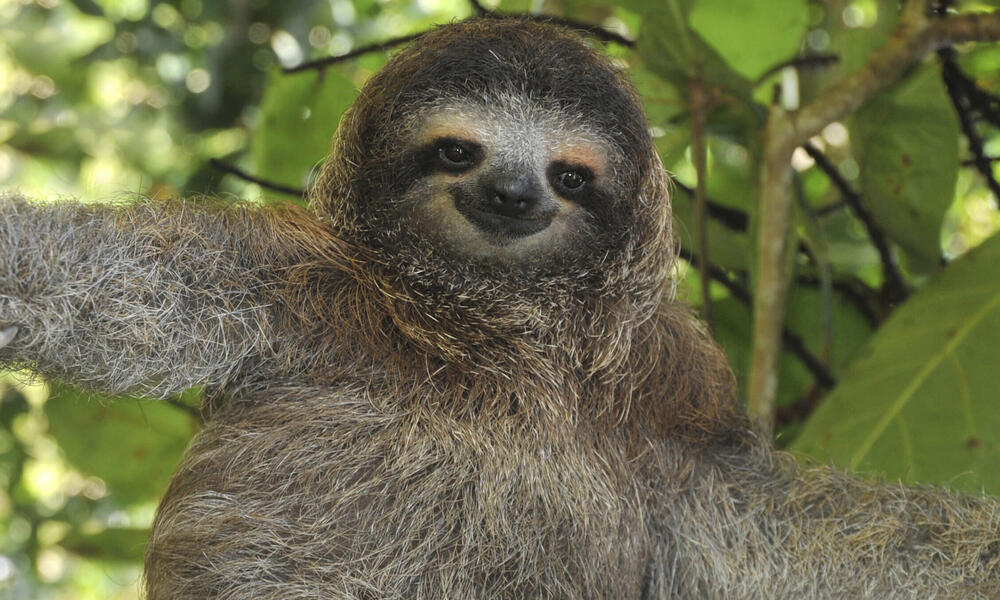
4. 2枚目の画像は次のURLから取得します
3. この画像をダウンロードしましょう
{% code overflow="wrap" %}
```bash
wget https://raw.githubusercontent.com/unslothai/unsloth/refs/heads/main/images/unsloth%20made%20with%20love.png -O unsloth.png
```
{% endcode %}
4. 2枚目の画像は次のURLから取得します
 {% code overflow="wrap" %}
```bash
wget https://files.worldwildlife.org/wwfcmsprod/images/Sloth_Sitting_iStock_3_12_2014/story_full_width/8l7pbjmj29_iStock_000011145477Large_mini__1_.jpg -O picture.png
```
{% endcode %}
5. では、llama.cpp の自動モデル डाउनलोड機能を使ってみましょう。8B Instruct モデルでは次を試してください:
```bash
./llama.cpp/llama-mtmd-cli \
-hf unsloth/Qwen3-VL-8B-Instruct-GGUF:UD-Q4_K_XL \
--n-gpu-layers 99 \\
--jinja \\
--top-p 0.8 \
--top-k 20 \\
--temp 0.7 \\
--min-p 0.0 \\
--flash-attn on \\
--presence-penalty 1.5 \
--ctx-size 8192
```
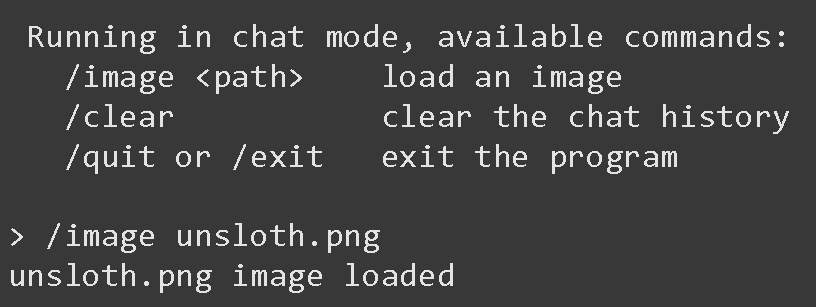
6. 入ると、以下の画面が表示されます:
{% code overflow="wrap" %}
```bash
wget https://files.worldwildlife.org/wwfcmsprod/images/Sloth_Sitting_iStock_3_12_2014/story_full_width/8l7pbjmj29_iStock_000011145477Large_mini__1_.jpg -O picture.png
```
{% endcode %}
5. では、llama.cpp の自動モデル डाउनलोड機能を使ってみましょう。8B Instruct モデルでは次を試してください:
```bash
./llama.cpp/llama-mtmd-cli \
-hf unsloth/Qwen3-VL-8B-Instruct-GGUF:UD-Q4_K_XL \
--n-gpu-layers 99 \\
--jinja \\
--top-p 0.8 \
--top-k 20 \\
--temp 0.7 \\
--min-p 0.0 \\
--flash-attn on \\
--presence-penalty 1.5 \
--ctx-size 8192
```
6. 入ると、以下の画面が表示されます:
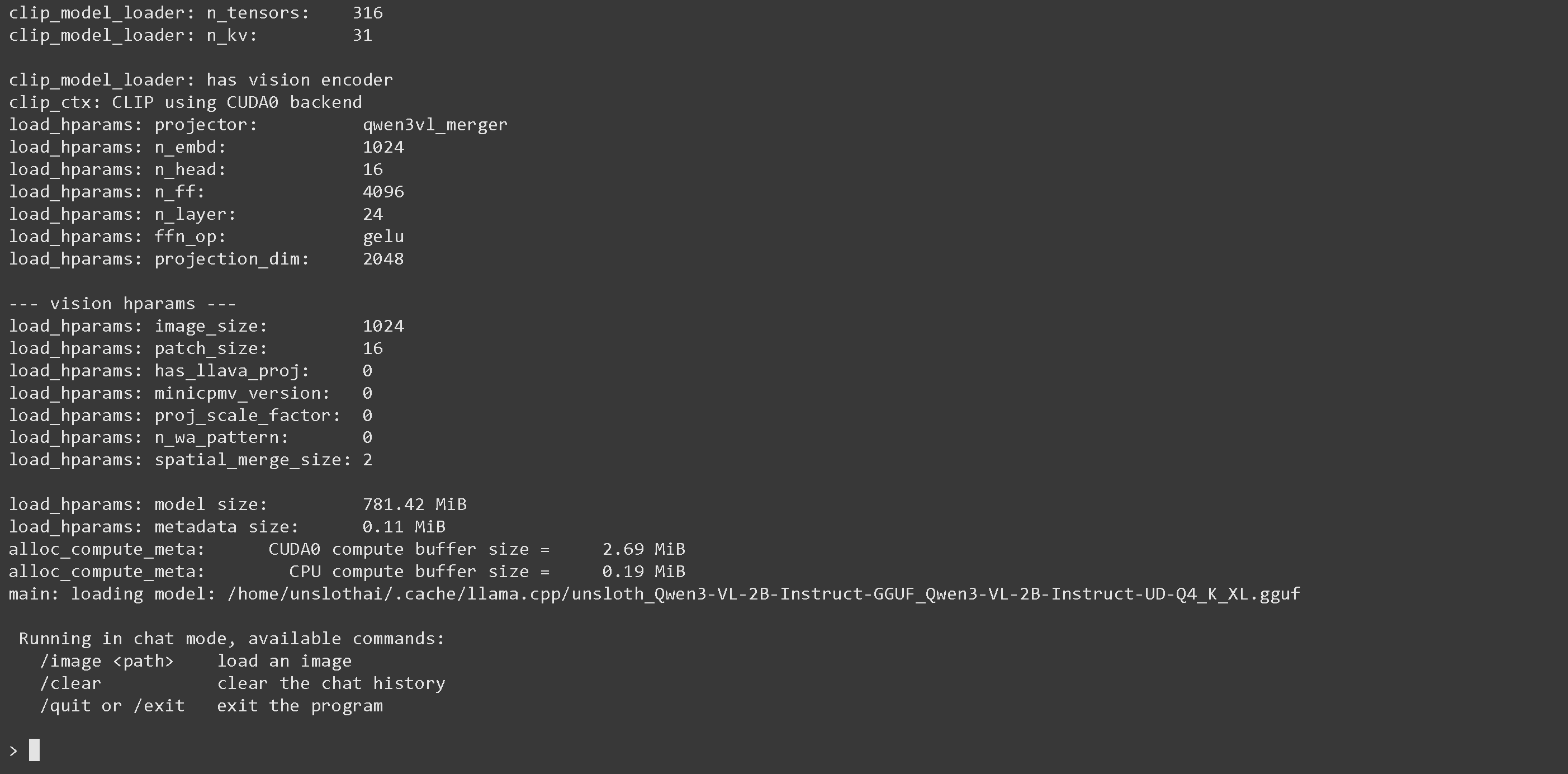 7. 以下で画像を読み込みます `/image PATH` すなわち `/image unsloth.png` その後 ENTER を押します
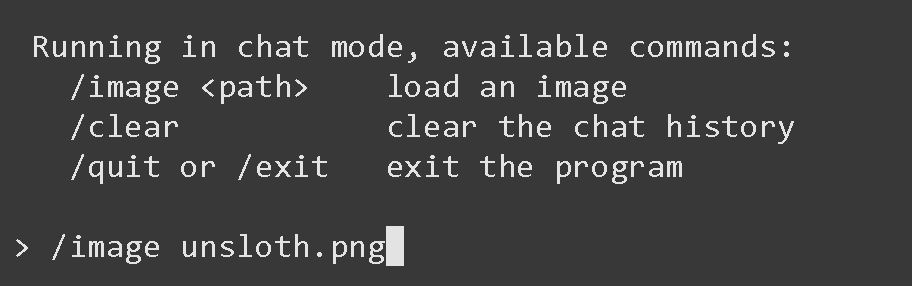 8. ENTER を押すと、「unsloth.png image loaded」と表示されます
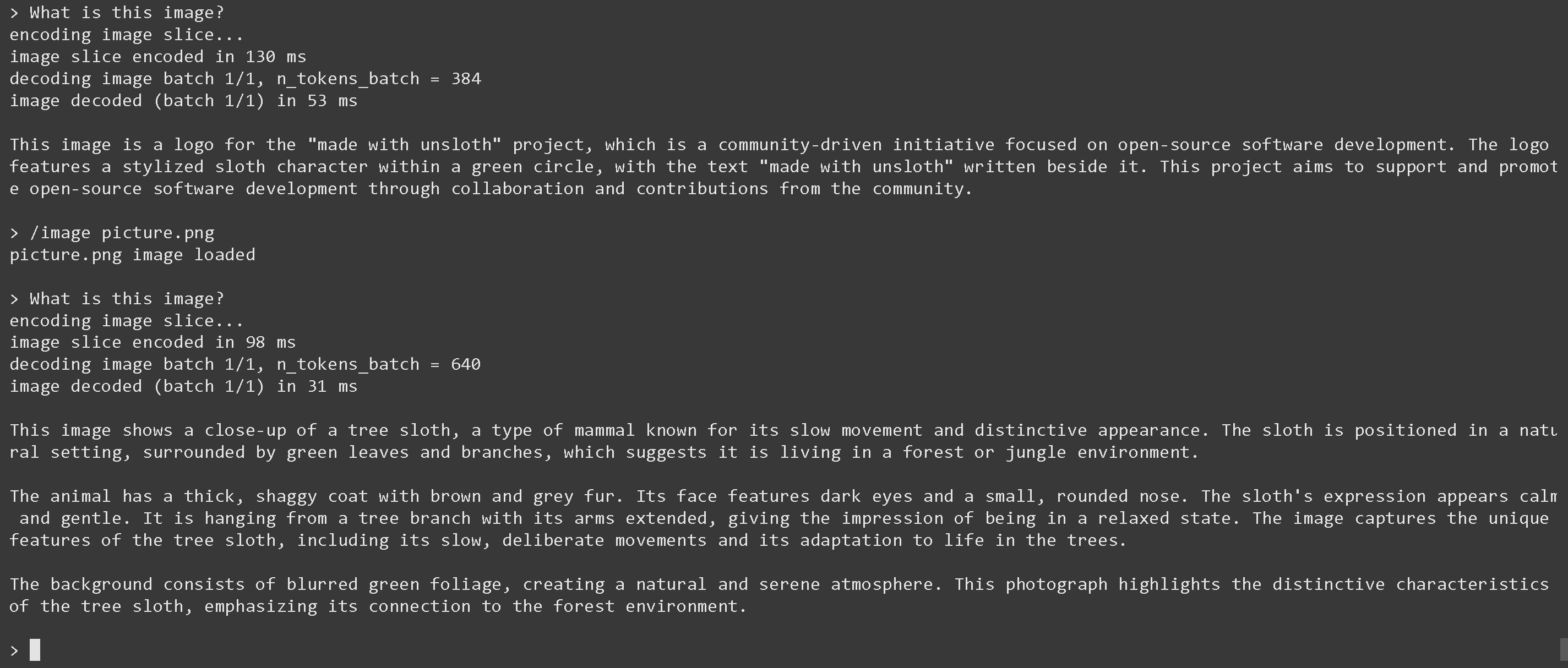
 9. では、「この画像は何ですか?」のような質問をしてみましょう:
 10. 次に 2 枚目の画像を以下で読み込みます `/image picture.png` その後 ENTER を押して、「この画像は何ですか?」と質問します
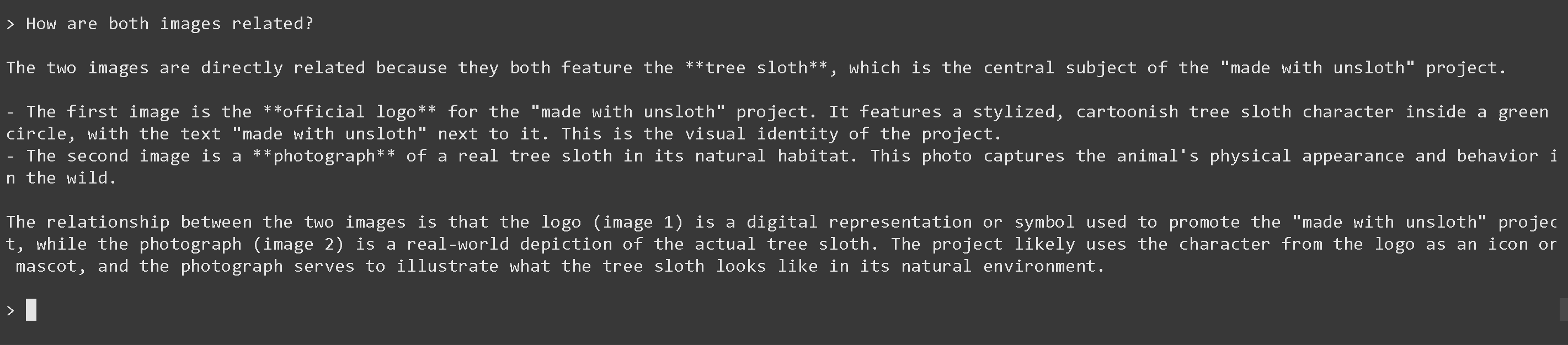
 11. 最後に、2 つの画像がどのように関連しているかを尋ねてみましょう(動作します!)
{% code overflow="wrap" %}
```
2 つの画像はどちらも **ツリー・スロス** を特徴としているため、直接関連しています。これは「made with unsloth」プロジェクトの中心的な対象です。
- 1 枚目の画像は、「made with unsloth」プロジェクトの **公式ロゴ** です。緑の円の中に様式化された漫画風のツリー・スロスのキャラクターが描かれており、その横に「made with unsloth」という文字があります。これはプロジェクトの視覚的アイデンティティです。
- 2 枚目の画像は、自然の生息環境にいる実際のツリー・スロスの **写真** です。この写真は、野生での動物の外見や行動を捉えています。
2 つの画像の関係は、ロゴ(画像 1)が「made with unsloth」プロジェクトを促進するために使われるデジタル表現またはシンボルであるのに対し、写真(画像 2)は実際のツリー・スロスを বাস্ত際の世界で表したものだということです。プロジェクトでは、おそらくロゴのキャラクターをアイコンやマスコットとして使っており、写真はツリー・スロスが自然環境でどのように見えるかを示すものになっています。
```
{% endcode %}
11. 最後に、2 つの画像がどのように関連しているかを尋ねてみましょう(動作します!)
{% code overflow="wrap" %}
```
2 つの画像はどちらも **ツリー・スロス** を特徴としているため、直接関連しています。これは「made with unsloth」プロジェクトの中心的な対象です。
- 1 枚目の画像は、「made with unsloth」プロジェクトの **公式ロゴ** です。緑の円の中に様式化された漫画風のツリー・スロスのキャラクターが描かれており、その横に「made with unsloth」という文字があります。これはプロジェクトの視覚的アイデンティティです。
- 2 枚目の画像は、自然の生息環境にいる実際のツリー・スロスの **写真** です。この写真は、野生での動物の外見や行動を捉えています。
2 つの画像の関係は、ロゴ(画像 1)が「made with unsloth」プロジェクトを促進するために使われるデジタル表現またはシンボルであるのに対し、写真(画像 2)は実際のツリー・スロスを বাস্ত際の世界で表したものだということです。プロジェクトでは、おそらくロゴのキャラクターをアイコンやマスコットとして使っており、写真はツリー・スロスが自然環境でどのように見えるかを示すものになっています。
```
{% endcode %}
 12. また、モデルは(インストール後に)以下からダウンロードすることもできます `pip install huggingface_hub hf_transfer` ) HuggingFace の `snapshot_download` これは大規模モデルのダウンロードに便利です **llama.cpp の自動ダウンローダーは遅くなることがあるためです。** Q4\_K\_M や、ほかの量子化版を選べます。
```python
# !pip install huggingface_hub hf_transfer
import os
os.environ["HF_HUB_ENABLE_HF_TRANSFER"] = "1"
from huggingface_hub import snapshot_download
snapshot_download(
repo_id = "unsloth/Qwen3-VL-8B-Instruct-GGUF", # または "unsloth/Qwen3-VL-8B-Thinking-GGUF"
local_dir = "unsloth/Qwen3-VL-8B-Instruct-GGUF", # または "unsloth/Qwen3-VL-8B-Thinking-GGUF"
allow_patterns = ["*UD-Q4_K_XL*", "*mmproj-F16*"],
)
```
13. モデルを実行して、任意のプロンプトを試してください。 **Instruct の場合:**
```bash
./llama.cpp/llama-mtmd-cli \
--model unsloth/Qwen3-VL-8B-Instruct-GGUF/Qwen3-VL-8B-Instruct-UD-Q4_K_XL.gguf \
--mmproj unsloth/Qwen3-VL-8B-Instruct-GGUF/mmproj-F16.gguf \
--n-gpu-layers 99 \\
--jinja \\
--top-p 0.8 \
--top-k 20 \\
--temp 0.7 \\
--min-p 0.0 \\
--flash-attn on \\
--presence-penalty 1.5 \
--ctx-size 8192
```
14. **Thinking の場合**:
```bash
./llama.cpp/llama-mtmd-cli \
--model unsloth/Qwen3-VL-8B-Thinking-GGUF/Qwen3-VL-8B-Thinking-UD-Q4_K_XL.gguf \
--mmproj unsloth/Qwen3-VL-8B-Thinking-GGUF/mmproj-F16.gguf \
--n-gpu-layers 99 \\
--jinja \\
--top-p 0.95 \\
--top-k 20 \\
--temp 1.0 \\
--min-p 0.0 \\
--flash-attn on \\
--presence-penalty 0.0 \
--ctx-size 8192
```
### :magic\_wand:Qwen3-VL-235B-A22B と Qwen3-VL-30B-A3B の実行
Qwen3-VL-235B-A22B では、最適化された推論と豊富なオプションのために llama.cpp を使用します。
1. 上と同様の手順に従いますが、今回はモデルが非常に大きいため、追加の手順も必要です。
2. 以下をインストールした後、( `pip install huggingface_hub hf_transfer` )。UD-Q2\_K\_XL やその他の量子化版を選べます。
```python
# !pip install huggingface_hub hf_transfer
import os
os.environ["HF_HUB_ENABLE_HF_TRANSFER"] = "1"
from huggingface_hub import snapshot_download
snapshot_download(
repo_id = "unsloth/Qwen3-VL-235B-A22B-Instruct-GGUF",
local_dir = "unsloth/Qwen3-VL-235B-A22B-Instruct-GGUF",
allow_patterns = ["*UD-Q2_K_XL*", "*mmproj-F16*"],
)
```
3. モデルを実行して、プロンプトを試してください。Thinking と Instruct に対して正しいパラメータを設定してください。
**Instruct:**
{% code overflow="wrap" %}
```bash
./llama.cpp/llama-mtmd-cli \
--model unsloth/Qwen3-VL-235B-A22B-Instruct-GGUF/UD-Q2_K_XL/Qwen3-VL-235B-A22B-Instruct-UD-Q2_K_XL-00001-of-00002.gguf \
--mmproj unsloth/Qwen3-VL-235B-A22B-Instruct-GGUF/mmproj-F16.gguf
--jinja \\
--top-p 0.8 \
--top-k 20 \\
--temp 0.7 \\
--min-p 0.0 \\
--flash-attn on \\
--presence-penalty 1.5 \
--ctx-size 8192 \\
```
{% endcode %}
**Thinking:**
{% code overflow="wrap" %}
```bash
./llama.cpp/llama-mtmd-cli \
--model unsloth/Qwen3-VL-235B-A22B-Thinking-GGUF/UD-Q2_K_XL/Qwen3-VL-235B-A22B-Thinking-UD-Q2_K_XL-00001-of-00002.gguf \
--mmproj unsloth/Qwen3-VL-235B-A22B-Thinking-GGUF/mmproj-F16.gguf \
--n-gpu-layers 99 \\
--jinja \\
--top-p 0.95 \\
--top-k 20 \\
--temp 1.0 \\
--min-p 0.0 \\
--flash-attn on \\
--presence-penalty 0.0 \
--ctx-size 8192 \\
-ot ".ffn_.*_exps.=CPU"
```
{% endcode %}
4. 編集、 `--ctx-size 16384` コンテキスト長は `--n-gpu-layers 99` GPUオフロードする層数です。GPUがメモリ不足になったら調整してみてください。CPUのみで推論する場合は削除してください。
{% hint style="success" %}
**次を使います: `--fit on` 2025年12月15日に導入され、GPU と CPU を最大限活用できるようになりました。**
必要に応じて、 `-ot ".ffn_.*_exps.=CPU"` を試して、すべての MoE 層を CPU にオフロードしてください!これにより、非MoE層すべてを1枚のGPUに収められるようになり、生成速度が向上します。GPU容量がさらにあれば、正規表現を調整してより多くの層を収めることもできます。
{% endhint %}
### 🐋 Docker: Qwen3-VL を実行
すでに Docker Desktop があるなら、Hugging Face から Unsloth のモデルを実行するには、以下のコマンドを実行するだけで完了です:
```bash
docker model pull hf.co/unsloth/Qwen3-VL-8B-Instruct-GGUF:UD-Q4_K_XL
```
または、Docker にアップロードされた Qwen3-VL モデルを実行できます:
```bash
docker model run ai/qwen3-vl
```
## 🦥 **Qwen3-VL のファインチューニング**
Unsloth は、より大きな 32B および 235B モデルを含む Qwen3-VL のファインチューニングと強化学習(RL)をサポートしています。これには、動画と物体検出のファインチューニングのサポートも含まれます。いつものように、Unsloth は Qwen3-VL モデルを VRAM を 60% 少なく使いながら 1.7 倍高速に学習させ、精度を落とさずにコンテキスト長を 8 倍に拡張します。\
\
Colab で無料で学習できる Qwen3-VL(8B)の学習ノートブックを 2 つ用意しました:
* [通常の SFT ファインチューニング ノートブック](https://colab.research.google.com/github/unslothai/notebooks/blob/main/nb/Qwen3_VL_\(8B\)-Vision.ipynb)
* [GRPO/GSPO RL ノートブック](https://colab.research.google.com/github/unslothai/notebooks/blob/main/nb/Qwen3_VL_\(8B\)-Vision-GRPO.ipynb)
{% hint style="success" %}
**llama.cpp が対応したので、Qwen3-VL を GGUF に保存できるようになりました!**
他の Qwen3-VL モデルを使いたい場合は、8B モデルを 2B、32B などに置き換えるだけです。
{% endhint %}
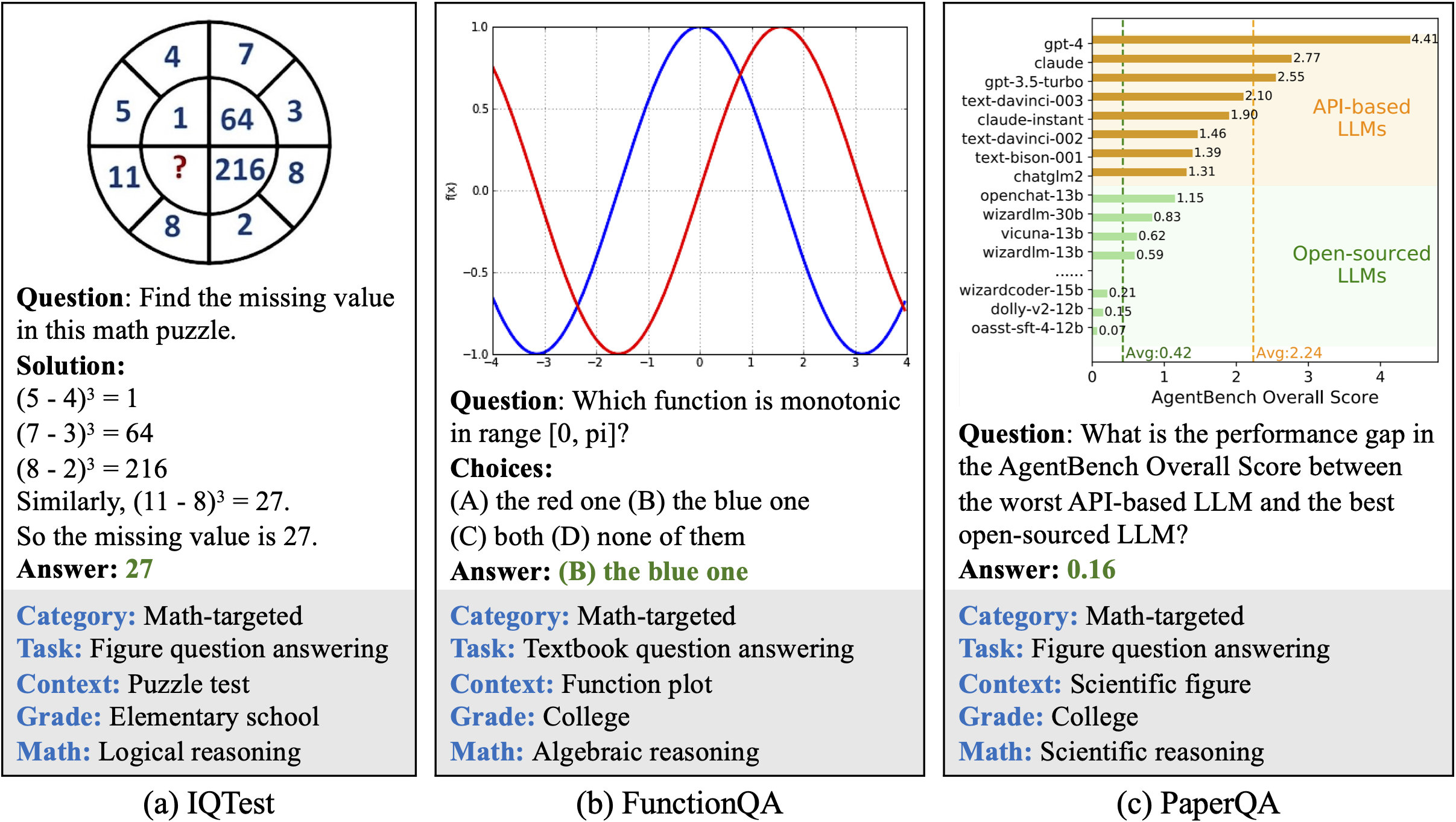
GRPO ノートブックの目的は、下のような画像入力を与えたときに、RL によって視覚言語モデルに数学の問題を解かせることです:
12. また、モデルは(インストール後に)以下からダウンロードすることもできます `pip install huggingface_hub hf_transfer` ) HuggingFace の `snapshot_download` これは大規模モデルのダウンロードに便利です **llama.cpp の自動ダウンローダーは遅くなることがあるためです。** Q4\_K\_M や、ほかの量子化版を選べます。
```python
# !pip install huggingface_hub hf_transfer
import os
os.environ["HF_HUB_ENABLE_HF_TRANSFER"] = "1"
from huggingface_hub import snapshot_download
snapshot_download(
repo_id = "unsloth/Qwen3-VL-8B-Instruct-GGUF", # または "unsloth/Qwen3-VL-8B-Thinking-GGUF"
local_dir = "unsloth/Qwen3-VL-8B-Instruct-GGUF", # または "unsloth/Qwen3-VL-8B-Thinking-GGUF"
allow_patterns = ["*UD-Q4_K_XL*", "*mmproj-F16*"],
)
```
13. モデルを実行して、任意のプロンプトを試してください。 **Instruct の場合:**
```bash
./llama.cpp/llama-mtmd-cli \
--model unsloth/Qwen3-VL-8B-Instruct-GGUF/Qwen3-VL-8B-Instruct-UD-Q4_K_XL.gguf \
--mmproj unsloth/Qwen3-VL-8B-Instruct-GGUF/mmproj-F16.gguf \
--n-gpu-layers 99 \\
--jinja \\
--top-p 0.8 \
--top-k 20 \\
--temp 0.7 \\
--min-p 0.0 \\
--flash-attn on \\
--presence-penalty 1.5 \
--ctx-size 8192
```
14. **Thinking の場合**:
```bash
./llama.cpp/llama-mtmd-cli \
--model unsloth/Qwen3-VL-8B-Thinking-GGUF/Qwen3-VL-8B-Thinking-UD-Q4_K_XL.gguf \
--mmproj unsloth/Qwen3-VL-8B-Thinking-GGUF/mmproj-F16.gguf \
--n-gpu-layers 99 \\
--jinja \\
--top-p 0.95 \\
--top-k 20 \\
--temp 1.0 \\
--min-p 0.0 \\
--flash-attn on \\
--presence-penalty 0.0 \
--ctx-size 8192
```
### :magic\_wand:Qwen3-VL-235B-A22B と Qwen3-VL-30B-A3B の実行
Qwen3-VL-235B-A22B では、最適化された推論と豊富なオプションのために llama.cpp を使用します。
1. 上と同様の手順に従いますが、今回はモデルが非常に大きいため、追加の手順も必要です。
2. 以下をインストールした後、( `pip install huggingface_hub hf_transfer` )。UD-Q2\_K\_XL やその他の量子化版を選べます。
```python
# !pip install huggingface_hub hf_transfer
import os
os.environ["HF_HUB_ENABLE_HF_TRANSFER"] = "1"
from huggingface_hub import snapshot_download
snapshot_download(
repo_id = "unsloth/Qwen3-VL-235B-A22B-Instruct-GGUF",
local_dir = "unsloth/Qwen3-VL-235B-A22B-Instruct-GGUF",
allow_patterns = ["*UD-Q2_K_XL*", "*mmproj-F16*"],
)
```
3. モデルを実行して、プロンプトを試してください。Thinking と Instruct に対して正しいパラメータを設定してください。
**Instruct:**
{% code overflow="wrap" %}
```bash
./llama.cpp/llama-mtmd-cli \
--model unsloth/Qwen3-VL-235B-A22B-Instruct-GGUF/UD-Q2_K_XL/Qwen3-VL-235B-A22B-Instruct-UD-Q2_K_XL-00001-of-00002.gguf \
--mmproj unsloth/Qwen3-VL-235B-A22B-Instruct-GGUF/mmproj-F16.gguf
--jinja \\
--top-p 0.8 \
--top-k 20 \\
--temp 0.7 \\
--min-p 0.0 \\
--flash-attn on \\
--presence-penalty 1.5 \
--ctx-size 8192 \\
```
{% endcode %}
**Thinking:**
{% code overflow="wrap" %}
```bash
./llama.cpp/llama-mtmd-cli \
--model unsloth/Qwen3-VL-235B-A22B-Thinking-GGUF/UD-Q2_K_XL/Qwen3-VL-235B-A22B-Thinking-UD-Q2_K_XL-00001-of-00002.gguf \
--mmproj unsloth/Qwen3-VL-235B-A22B-Thinking-GGUF/mmproj-F16.gguf \
--n-gpu-layers 99 \\
--jinja \\
--top-p 0.95 \\
--top-k 20 \\
--temp 1.0 \\
--min-p 0.0 \\
--flash-attn on \\
--presence-penalty 0.0 \
--ctx-size 8192 \\
-ot ".ffn_.*_exps.=CPU"
```
{% endcode %}
4. 編集、 `--ctx-size 16384` コンテキスト長は `--n-gpu-layers 99` GPUオフロードする層数です。GPUがメモリ不足になったら調整してみてください。CPUのみで推論する場合は削除してください。
{% hint style="success" %}
**次を使います: `--fit on` 2025年12月15日に導入され、GPU と CPU を最大限活用できるようになりました。**
必要に応じて、 `-ot ".ffn_.*_exps.=CPU"` を試して、すべての MoE 層を CPU にオフロードしてください!これにより、非MoE層すべてを1枚のGPUに収められるようになり、生成速度が向上します。GPU容量がさらにあれば、正規表現を調整してより多くの層を収めることもできます。
{% endhint %}
### 🐋 Docker: Qwen3-VL を実行
すでに Docker Desktop があるなら、Hugging Face から Unsloth のモデルを実行するには、以下のコマンドを実行するだけで完了です:
```bash
docker model pull hf.co/unsloth/Qwen3-VL-8B-Instruct-GGUF:UD-Q4_K_XL
```
または、Docker にアップロードされた Qwen3-VL モデルを実行できます:
```bash
docker model run ai/qwen3-vl
```
## 🦥 **Qwen3-VL のファインチューニング**
Unsloth は、より大きな 32B および 235B モデルを含む Qwen3-VL のファインチューニングと強化学習(RL)をサポートしています。これには、動画と物体検出のファインチューニングのサポートも含まれます。いつものように、Unsloth は Qwen3-VL モデルを VRAM を 60% 少なく使いながら 1.7 倍高速に学習させ、精度を落とさずにコンテキスト長を 8 倍に拡張します。\
\
Colab で無料で学習できる Qwen3-VL(8B)の学習ノートブックを 2 つ用意しました:
* [通常の SFT ファインチューニング ノートブック](https://colab.research.google.com/github/unslothai/notebooks/blob/main/nb/Qwen3_VL_\(8B\)-Vision.ipynb)
* [GRPO/GSPO RL ノートブック](https://colab.research.google.com/github/unslothai/notebooks/blob/main/nb/Qwen3_VL_\(8B\)-Vision-GRPO.ipynb)
{% hint style="success" %}
**llama.cpp が対応したので、Qwen3-VL を GGUF に保存できるようになりました!**
他の Qwen3-VL モデルを使いたい場合は、8B モデルを 2B、32B などに置き換えるだけです。
{% endhint %}
GRPO ノートブックの目的は、下のような画像入力を与えたときに、RL によって視覚言語モデルに数学の問題を解かせることです:
 この Qwen3-VL のサポートには、さらにメモリ効率が高く高速な RL のための最新アップデートも統合されており、以下も含まれます [スタンバイ機能](/docs/jp/meru/reinforcement-learning-rl-guide/memory-efficient-rl.md#unsloth-standby)。これは、他の実装と比べて速度低下を独自に抑えます。RL を使って視覚 LLM を学習させる方法については、以下でさらに詳しく読めます [VLM GRPO ガイド](/docs/jp/meru/reinforcement-learning-rl-guide/vision-reinforcement-learning-vlm-rl.md).
### 複数画像での学習
複数画像で Qwen3-VL をファインチューニングまたは学習するには、最も簡単な変更は
```python
ds_converted = ds.map(
convert_to_conversation,
)
```
次を指定して:
```python
ds_converted = [convert_to_converation(sample) for sample in dataset]
```
map を使うと、データセットの標準化と arrow の処理ルールが有効になりますが、これらは厳格で、定義がより複雑になることがあります。
---
# Agent Instructions
This documentation is published with GitBook. GitBook is the documentation platform designed so that both humans and AI agents can read, navigate, and reason over technical content effectively. Learn more at gitbook.com.
## Querying This Documentation
If you need additional information that is not directly available in this page, you can query the documentation by asking a question.
Perform an HTTP GET request on the following URL with the `ask` and `goal` query parameters:
```
GET https://unsloth.ai/docs/jp/moderu/tutorials/qwen3-how-to-run-and-fine-tune/qwen3-vl-how-to-run-and-fine-tune.md?ask=&goal=
```
`ask` is the immediate question: it should be specific, self-contained, and written in natural language.
`goal` is what the user is ultimately trying to achieve, the reason they need the answer. Sharing it helps GitBook give you a better, more relevant answer. A goal is most helpful when it describes the outcome the user wants rather than restating the question. For example, with `ask=how do I create an API token`, a goal like `automate deployments from our CI pipeline` lets GitBook tailor the answer to that use case.
The response will contain a direct answer to the question and relevant excerpts and sources from the documentation.
Use this mechanism when the answer is not explicitly present in the current page, you need clarification or additional context, or you want to retrieve related documentation sections.
この Qwen3-VL のサポートには、さらにメモリ効率が高く高速な RL のための最新アップデートも統合されており、以下も含まれます [スタンバイ機能](/docs/jp/meru/reinforcement-learning-rl-guide/memory-efficient-rl.md#unsloth-standby)。これは、他の実装と比べて速度低下を独自に抑えます。RL を使って視覚 LLM を学習させる方法については、以下でさらに詳しく読めます [VLM GRPO ガイド](/docs/jp/meru/reinforcement-learning-rl-guide/vision-reinforcement-learning-vlm-rl.md).
### 複数画像での学習
複数画像で Qwen3-VL をファインチューニングまたは学習するには、最も簡単な変更は
```python
ds_converted = ds.map(
convert_to_conversation,
)
```
次を指定して:
```python
ds_converted = [convert_to_converation(sample) for sample in dataset]
```
map を使うと、データセットの標準化と arrow の処理ルールが有効になりますが、これらは厳格で、定義がより複雑になることがあります。
---
# Agent Instructions
This documentation is published with GitBook. GitBook is the documentation platform designed so that both humans and AI agents can read, navigate, and reason over technical content effectively. Learn more at gitbook.com.
## Querying This Documentation
If you need additional information that is not directly available in this page, you can query the documentation by asking a question.
Perform an HTTP GET request on the following URL with the `ask` and `goal` query parameters:
```
GET https://unsloth.ai/docs/jp/moderu/tutorials/qwen3-how-to-run-and-fine-tune/qwen3-vl-how-to-run-and-fine-tune.md?ask=&goal=
```
`ask` is the immediate question: it should be specific, self-contained, and written in natural language.
`goal` is what the user is ultimately trying to achieve, the reason they need the answer. Sharing it helps GitBook give you a better, more relevant answer. A goal is most helpful when it describes the outcome the user wants rather than restating the question. For example, with `ask=how do I create an API token`, a goal like `automate deployments from our CI pipeline` lets GitBook tailor the answer to that use case.
The response will contain a direct answer to the question and relevant excerpts and sources from the documentation.
Use this mechanism when the answer is not explicitly present in the current page, you need clarification or additional context, or you want to retrieve related documentation sections.