> For the complete documentation index, see [llms.txt](https://unsloth.ai/docs/llms.txt). Markdown versions of documentation pages are available by appending `.md` to page URLs; this page is available as [Markdown](https://unsloth.ai/docs/jp/moderu/tutorials/qwen3-how-to-run-and-fine-tune.md).
# Qwen3 - 実行とファインチューニングの方法
UnslothとDynamic 2.0量子化を使ってQwen3をローカルで実行・ファインチューニングする方法を学びましょう
Qwenの新しいQwen3モデルは、推論、指示追従、エージェント機能、マルチリンガル対応において最先端の進歩をもたらします。
{% hint style="success" %}
**新登場!** Qwen3は2025年7月にアップデートされました。最新モデルを実行・ファインチューニングするには: [**Qwen-2507**](/docs/jp/moderu/tutorials/qwen3-next.md)
{% endhint %}
すべてのアップロードは Unsloth の [Dynamic 2.0](/docs/jp/ji-chu/dynamic-3.0-ggufs.md) SOTAの5-shot MMLUとKLダイバージェンス性能を実現しており、量子化したQwen LLMを精度損失を最小限に抑えて実行・ファインチューニングできます。
また、ネイティブな128Kコンテキスト長を持つQwen3もアップロードしました。QwenはYaRNを使って元の40Kウィンドウを128Kまで拡張しています。
[Unsloth](https://github.com/unslothai/unsloth) も、今ではファインチューニングと [強化学習(RL)](/docs/jp/meru/reinforcement-learning-rl-guide.md) Qwen3およびQwen3 MOEモデルは—2倍高速で、VRAMを70%削減し、コンテキスト長は8倍長くなります。Qwen3 (14B) を無料でファインチューニングするには、当社の [Colabノートブック。](https://colab.research.google.com/github/unslothai/notebooks/blob/main/nb/Qwen3_\(14B\)-Reasoning-Conversational.ipynb)
Qwen3の実行チュートリアル Qwen3のファインチューニング
#### **Qwen3 - Unsloth Dynamic 2.0** 最適な設定で:
| Dynamic 2.0 GGUF(実行用) | 128KコンテキストGGUF | Dynamic 4-bit Safetensor(ファインチューニング/デプロイ用) |
| ----------------------------------------------------------------------------------------------------------------------------------------------------------------------------------------------------------------------------------------------------------------------------------------------------------------------------------------------------------------------------------------------------------------------------------------------------------------------------------------------------------------------------------------------------------------------------------------------------------------------------- | ------------------------------------------------------------------------------------------------------------------------------------------------------------------------------------------------------------------------------------------------------------------------------------------------------------------------------------------------------------------------------------------------------------------------------------------------------------------------------------------------------- | --------------------------------------------------------------------------------------------------------------------------------------------------------------------------------------------------------------------------------------------------------------------------------------------------------------------------------------------------------------------------------------------------------------------------------------------------------------------------------------------------------------------------------------------------------------------------------------------------------------------- |
| | | |
## 🖥️ **Qwen3の実行**
1秒あたり6トークン以上の推論速度を達成するには、利用可能なメモリが使用するモデルのサイズと同等以上であることを推奨します。たとえば、30GBの1ビット量子化モデルには少なくとも150GBのメモリが必要です。180GBのQ2\_K\_XL量子化モデルには少なくとも **180GBのユニファイドメモリ** (VRAM + RAM)または **180GBのRAM** が最適なパフォーマンスのために必要です。
**注:** モデルを **総メモリが少ない** サイズより少ないメモリ(つまり、VRAM不足、RAM不足、または合計がそれより少ない状態)で実行することも可能です。ただし、その場合は推論速度が遅くなります。十分なメモリが必要なのは、スループットを最大化し、最速の推論時間を実現したい場合のみです。
### :gear: 公式推奨設定
Qwenによると、推論には以下の設定が推奨されています:
| 非思考モードの設定: | 思考モードの設定: |
| ----------------------------------------------------------------- | ----------------------------------------------------------------- |
| **Temperature = 0.7** | **Temperature = 0.6** |
| Min\_P = 0.0(任意ですが、0.01でもうまく機能します。llama.cppのデフォルトは0.1です) | Min\_P = 0.0 |
| Top\_P = 0.8 | Top\_P = 0.95 |
| TopK = 20 | TopK = 20 |
**チャットテンプレート/プロンプト形式:**
{% code overflow="wrap" %}
```
<|im_start|>user\nWhat is 2+2?<|im_end|>\n<|im_start|>assistant\n
```
{% endcode %}
{% hint style="success" %}
非思考モードでは、あえて \ と \ の間を空にします:
{% endhint %}
{% code overflow="wrap" %}
```
<|im_start|>user\nWhat is 2+2?<|im_end|>\n<|im_start|>assistant\n\n\n\n\n
```
{% endcode %}
{% hint style="warning" %}
**思考モードでは、greedy decoding を使用しないでください**、性能低下や無限反復につながる可能性があるためです。
{% endhint %}
### 思考モードと非思考モードの切り替え
Qwen3モデルには、推論力を高め応答品質を改善する組み込みの「思考モード」が搭載されています。これは、〜の仕組みに似ています [QwQ-32B](/docs/jp/moderu/tutorials/qwq-32b-how-to-run-effectively.md) 動作しました。切り替え手順は使用する推論エンジンによって異なるため、正しい手順を使用してください。
#### llama.cpp と Ollama の手順:
追加できます `/think` そして `/no_think` をユーザープロンプトまたはシステムメッセージに追加すると、ターンごとにモデルの思考モードを切り替えられます。モデルはマルチターン会話では最新の指示に従います。
以下はマルチターン会話の例です:
```
> あなたは誰ですか /no_think
私はQwen、Alibaba Cloudが開発した大規模言語モデルです。 [...]
> "strawberries" には 'r' がいくつありますか? /think
さて、見てみましょう。ユーザーは「strawberries」という単語に文字「r」が何回出てくるかを尋ねています。 [...]
strawberries という単語には、文字 r が3回含まれています。 [...]
```
#### transformers と vLLM の手順:
**思考モード:**
`enable_thinking=True`
デフォルトでは、Qwen3では思考が有効になっています。呼び出すときは `tokenizer.apply_chat_template`、あなたは **手動で何も設定する必要はありません。**
```python
text = tokenizer.apply_chat_template(
messages,
tokenize=False,
add_generation_prompt=True,
enable_thinking=True # デフォルトは True
)
```
思考モードでは、モデルは追加の `...` ブロックを最終回答の前に生成します。これにより、回答を「計画」し、洗練させることができます。
**非思考モード:**
`enable_thinking=False`
非思考を有効にすると、Qwen3は思考ステップをすべて省略し、通常のLLMのように動作します。
```python
text = tokenizer.apply_chat_template(
messages,
tokenize=False,
add_generation_prompt=True,
enable_thinking=False # 思考モードを無効化
)
```
このモードでは最終回答を直接返します — no `` ブロックも、思考の連鎖もありません。
### 🦙 Ollama: Qwen3実行チュートリアル
1. インストール `ollama` まだの場合は!サイズが32Bまでのモデルしか実行できません。完全な235B-A22Bモデルを実行するには、 [こちらを参照](#running-qwen3-235b-a22b).
```bash
apt-get update
apt-get install pciutils -y
curl -fsSL https://ollama.com/install.sh | sh
```
2. モデルを実行してください!必要に応じて `ollama serve`を別のターミナルで呼び出せます。失敗した場合でも大丈夫です!私たちの修正と推奨パラメータ(temperature など)はすべて `params` として Hugging Face のアップロードに含めています!
```bash
ollama run hf.co/unsloth/Qwen3-8B-GGUF:UD-Q4_K_XL
```
3. 思考を無効化するには、次を使用します(またはシステムプロンプトで設定できます):
```
>>> ここにプロンプトを入力 /nothink
```
{% hint style="warning" %}
ループが発生している場合、Ollamaがコンテキスト長ウィンドウを2,048程度に設定しているかもしれません。その場合は32,000まで上げて、問題がまだ続くか確認してください。
{% endhint %}
### 📖 Llama.cpp: Qwen3実行チュートリアル
1. 最新の `llama.cpp` を [GitHubこちら](https://github.com/ggml-org/llama.cpp)。以下のビルド手順に従うこともできます。変更してください `-DGGML_CUDA=ON` を `-DGGML_CUDA=OFF` GPUがない場合、またはCPU推論のみを使いたい場合は。 **Apple Mac / Metalデバイスの場合**、次を設定します `-DGGML_CUDA=OFF` その後は通常どおり続けてください。Metalサポートはデフォルトで有効です。
```bash
apt-get update
apt-get install pciutils build-essential cmake curl libcurl4-openssl-dev -y
git clone https://github.com/ggml-org/llama.cpp
cmake llama.cpp -B llama.cpp/build \
-DBUILD_SHARED_LIBS=OFF -DGGML_CUDA=ON -DLLAMA_CURL=ON
cmake --build llama.cpp/build --config Release -j --clean-first --target llama-cli llama-gguf-split
cp llama.cpp/build/bin/llama-* llama.cpp
```
2. 以下をインストールした後、( `pip install huggingface_hub hf_transfer` )。Q4\_K\_M や他の量子化版を選べます。
```python
# !pip install huggingface_hub hf_transfer
import os
os.environ["HF_HUB_ENABLE_HF_TRANSFER"] = "1"
from huggingface_hub import snapshot_download
snapshot_download(
repo_id = "unsloth/Qwen3-14B-GGUF",
local_dir = "unsloth/Qwen3-14B-GGUF",
allow_patterns = ["*UD-Q4_K_XL*"],
)
```
3. モデルを実行して、任意のプロンプトを試してください。
```bash
./llama.cpp/llama-cli \
--model unsloth/Qwen3-14B-GGUF/Qwen3-14B-UD-Q2_K_XL.gguf \\
--ctx-size 16384 \\
--n-gpu-layers 99 \\
-ot ".ffn_.*_exps.=CPU" \\
--seed 3407 \\
--prio 3 \\
--temp 0.6 \
--min-p 0.0 \\
--top-p 0.95 \\
--top-k 20 \\
-no-cnv
```
思考を無効化するには、次を使用します(またはシステムプロンプトで設定できます):
```
>>> ここにプロンプトを入力 /nothink
```
### Qwen3-235B-A22Bの実行
Qwen3-235B-A22Bでは、最適化された推論と豊富なオプションのために、特にLlama.cppを使用します。
1. 上と同様の手順に従いますが、今回はモデルが非常に大きいため、追加の手順も必要です。
2. 以下をインストールした後、( `pip install huggingface_hub hf_transfer` )。UD-Q2\_K\_XL やその他の量子化版を選べます。
```python
# !pip install huggingface_hub hf_transfer
import os
os.environ["HF_HUB_ENABLE_HF_TRANSFER"] = "1"
from huggingface_hub import snapshot_download
snapshot_download(
repo_id = "unsloth/Qwen3-235B-A22B-GGUF",
local_dir = "unsloth/Qwen3-235B-A22B-GGUF",
allow_patterns = ["*UD-Q2_K_XL*"],
)
```
3. モデルを実行して、任意のプロンプトを試してください。
4. 編集 `--threads 32` CPUスレッド数は `--ctx-size 16384` コンテキスト長は `--n-gpu-layers 99` GPUオフロードする層数です。GPUがメモリ不足になったら調整してみてください。CPUのみで推論する場合は削除してください。
{% hint style="success" %}
次を使います: `-ot ".ffn_.*_exps.=CPU"` を試して、すべての MoE 層を CPU にオフロードしてください!これにより、非MoE層すべてを1枚のGPUに収められるようになり、生成速度が向上します。GPU容量がさらにあれば、正規表現を調整してより多くの層を収めることもできます。
{% endhint %}
{% code overflow="wrap" %}
```bash
./llama.cpp/llama-cli \
--model unsloth/Qwen3-235B-A22B-GGUF/Qwen3-235B-A22B-UD-Q2_K_XL.gguf \\
--ctx-size 16384 \\
--n-gpu-layers 99 \\
-ot ".ffn_.*_exps.=CPU" \\
--seed 3407 \\
--prio 3 \\
--temp 0.6 \
--min-p 0.0 \\
--top-p 0.95 \\
--top-k 20 \\
-no-cnv \\
--prompt "<|im_start|>user\nPythonでFlappy Birdゲームを作成してください。以下の内容を必ず含めてください:\n1. pygameを使用すること。\n2. 背景色はランダムに選ばれる明るい色にすること。最初は薄い青にする。\n3. SPACEを何度も押すと鳥が加速すること。\n4. 鳥の形は四角形、円、三角形のいずれかからランダムに選ばれること。色は暗い色からランダムに選ぶこと。\n5. 下部に、ランダムに選ばれた濃い茶色または黄色の地面を配置すること。\n6. 右上にスコアを表示すること。パイプを通り抜けて当たらなければ加算すること。\n7. 十分な間隔を空けてパイプをランダムに配置すること。色は濃い緑、薄い茶色、または濃い灰色からランダムにすること。\n8. 負けたら、ベストスコアを表示すること。テキストは画面内に収めること。q または Esc を押すとゲームを終了する。再開は SPACE をもう一度押すこと。\n最終的なゲームは Python のマークダウンセクション内に入れること。最終的なマークダウンセクションの前に、コードのエラーを確認して修正してください。<|im_end|>\n<|im_start|>assistant\n"
```
{% endcode %}
## 🦥 UnslothでQwen3をファインチューニング
Unslothにより、Qwen3のファインチューニングは2倍高速になり、VRAM使用量は70%削減され、8倍長いコンテキスト長に対応します。Qwen3 (14B) はGoogle Colabの16GB VRAM Tesla T4 GPUに余裕で収まります。
Qwen3は推論ありと推論なしの両方をサポートしているため、推論なしのデータセットでファインチューニングできますが、その場合は推論能力に影響する可能性があります。推論能力を維持したい場合(任意)、直接回答とchain-of-thoughtの例を混ぜて使うことができます。使用する 推論75% そして 非推論25% をデータセットに含めて、モデルに推論能力を保持させてください。
当社のConversationalノートブックでは、NVIDIAのopen-math-reasoningデータセット75%とMaximeのFineTomeデータセット(推論なし)25%を組み合わせています。Qwen3をファインチューニングできる無料のUnsloth Colabノートブックはこちらです:
* [Qwen3 (14B) 推論 + 会話ノートブック](https://colab.research.google.com/github/unslothai/notebooks/blob/main/nb/Qwen3_\(14B\)-Reasoning-Conversational.ipynb) (推奨)
* [**Qwen3(4B)**](https://colab.research.google.com/github/unslothai/notebooks/blob/main/nb/Qwen3_\(4B\)-GRPO.ipynb) **- 高度なGRPO LoRA**
* [Qwen3 (14B) Alpacaノートブック](https://colab.research.google.com/github/unslothai/notebooks/blob/main/nb/Qwen3_\(14B\)-Alpaca.ipynb) (ベースモデル向け)
古いバージョンのUnslothを使っている場合、および/またはローカルでファインチューニングする場合は、最新バージョンのUnslothをインストールしてください:
```
pip install --upgrade --force-reinstall --no-cache-dir unsloth unsloth_zoo
```
### Qwen3 MOEモデルのファインチューニング
ファインチューニング対応には、新しい2026年の [より高速なMOE ](/docs/jp/ji-chu/faster-moe.md)アップデート:30B-A3B と 235B-A22B。Qwen3-30B-A3B はUnslothでわずか17.5GBのVRAMで動作します。MoEのファインチューニングでは、ルーター層をファインチューニングするのはおそらく良くないため、デフォルトで無効化しています。
30B-A3B は17.5GBのVRAMに収まりますが、QLoRAファインチューニングのために完全な16ビットモデルをダウンロードしてその場で4ビットに変換する必要があるため、RAMやディスク容量が不足する場合があります。これは4-bit BnB MOEモデルを直接インポートする際の問題によるものです。これはMOEモデルにのみ影響します。
```python
from unsloth import FastModel
import torch
model, tokenizer = FastModel.from_pretrained(
model_name = "unsloth/Qwen3-30B-A3B",
max_seq_length = 2048, # 長いコンテキスト用に任意の値を選択!
load_in_4bit = True, # メモリ削減のための 4bit 量子化
load_in_8bit = False, # [NEW!] 少し高精度で、メモリを2倍使用します
full_finetuning = False, # [NEW!] いまはフルファインチューニングも可能です!
# token = "hf_...", # ゲート付きモデルを使う場合は1つ使用してください
)
```
### ノートブックガイド:
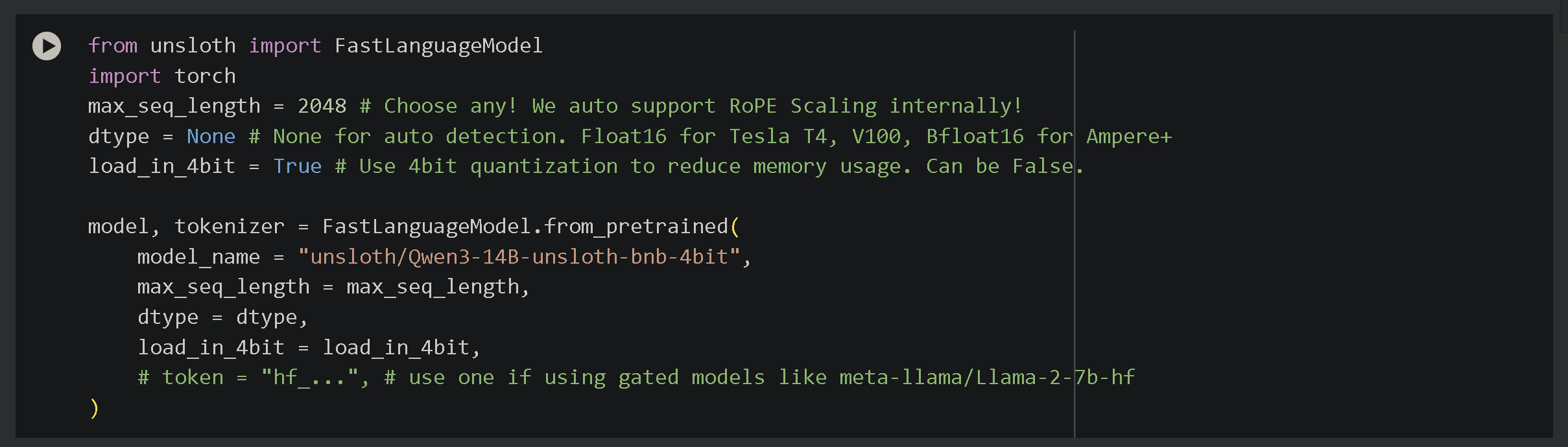 ノートブックを使うには、Runtime をクリックしてから Run all を選ぶだけです。ノートブック内の設定は好きなように変更できます。デフォルトでは自動的に設定してあります。Hugging Face 上のモデル名に合わせて、モデル名をお好みに変更してください。たとえば 'unsloth/Qwen3-8B' や 'unsloth/Qwen3-0.6B-unsloth-bnb-4bit' です。
他にも切り替えられる設定があります:
* **`max_seq_length = 2048`** – コンテキスト長を制御します。Qwen3は40960をサポートしていますが、テストでは2048を推奨します。Unslothは8倍長いコンテキストでのファインチューニングを可能にします。
* **`load_in_4bit = True`** – 4ビット量子化を有効にし、16GB GPUでのファインチューニング時のメモリ使用量を4分の1に削減します。
* 以下では **フルファインチューニング** - 設定 `full_finetuning = True` そして **8ビットファインチューニング** - 設定 `load_in_8bit = True`
Unslothノートブックを使ったファインチューニングの方法を最初から最後まで解説した完全ガイドを読みたい場合や、単にファインチューニング、作成について学びたい場合は [datasets](/docs/jp/meru/fine-tuning-llms-guide/datasets-guide.md) などについては、こちらの [完全ガイドをご覧ください](/docs/jp/meru/fine-tuning-llms-guide.md):
{% content-ref url="/pages/ae7926a0f371a1f594e3344d85571edf864a5259" %}
[Fine-tuning Guide](/docs/jp/meru/fine-tuning-llms-guide.md)
{% endcontent-ref %}
{% content-ref url="/pages/0169f16f28bd29579ad4805156b35641f23090aa" %}
[データセットガイド](/docs/jp/meru/fine-tuning-llms-guide/datasets-guide.md)
{% endcontent-ref %}
### Qwen3でのGRPO
Qwen3をファインチューニングするための新しい高度なGRPOノートブックを作成しました。新しい近接ベースの報酬関数(より近い回答ほど報酬が高い)と、Hugging FaceのOpen-R1数学データセットの使い方を学べます。\
Unslothでは評価も改善され、vLLMの最新バージョンを使用しています。
[**Qwen3(4B)**](https://colab.research.google.com/github/unslothai/notebooks/blob/main/nb/Qwen3_\(4B\)-GRPO.ipynb) **ノートブック - 高度なGRPO LoRA**
学べること:
* Qwen3(Base)で推論を有効にし、特定のタスクを実行するよう導く
* GRPOが書式を学習しがちな傾向を回避するための事前ファインチューニング
* 新しい正規表現マッチングによる評価精度の向上
* 'think' だけでなく、\\ などのカスタムGRPOテンプレート
* 近接ベースのスコアリング:より良い回答ほど多くのポイントを獲得し(例:正解が10のときに9と予測するなど)、外れ値は減点されます
ノートブックを使うには、Runtime をクリックしてから Run all を選ぶだけです。ノートブック内の設定は好きなように変更できます。デフォルトでは自動的に設定してあります。Hugging Face 上のモデル名に合わせて、モデル名をお好みに変更してください。たとえば 'unsloth/Qwen3-8B' や 'unsloth/Qwen3-0.6B-unsloth-bnb-4bit' です。
他にも切り替えられる設定があります:
* **`max_seq_length = 2048`** – コンテキスト長を制御します。Qwen3は40960をサポートしていますが、テストでは2048を推奨します。Unslothは8倍長いコンテキストでのファインチューニングを可能にします。
* **`load_in_4bit = True`** – 4ビット量子化を有効にし、16GB GPUでのファインチューニング時のメモリ使用量を4分の1に削減します。
* 以下では **フルファインチューニング** - 設定 `full_finetuning = True` そして **8ビットファインチューニング** - 設定 `load_in_8bit = True`
Unslothノートブックを使ったファインチューニングの方法を最初から最後まで解説した完全ガイドを読みたい場合や、単にファインチューニング、作成について学びたい場合は [datasets](/docs/jp/meru/fine-tuning-llms-guide/datasets-guide.md) などについては、こちらの [完全ガイドをご覧ください](/docs/jp/meru/fine-tuning-llms-guide.md):
{% content-ref url="/pages/ae7926a0f371a1f594e3344d85571edf864a5259" %}
[Fine-tuning Guide](/docs/jp/meru/fine-tuning-llms-guide.md)
{% endcontent-ref %}
{% content-ref url="/pages/0169f16f28bd29579ad4805156b35641f23090aa" %}
[データセットガイド](/docs/jp/meru/fine-tuning-llms-guide/datasets-guide.md)
{% endcontent-ref %}
### Qwen3でのGRPO
Qwen3をファインチューニングするための新しい高度なGRPOノートブックを作成しました。新しい近接ベースの報酬関数(より近い回答ほど報酬が高い)と、Hugging FaceのOpen-R1数学データセットの使い方を学べます。\
Unslothでは評価も改善され、vLLMの最新バージョンを使用しています。
[**Qwen3(4B)**](https://colab.research.google.com/github/unslothai/notebooks/blob/main/nb/Qwen3_\(4B\)-GRPO.ipynb) **ノートブック - 高度なGRPO LoRA**
学べること:
* Qwen3(Base)で推論を有効にし、特定のタスクを実行するよう導く
* GRPOが書式を学習しがちな傾向を回避するための事前ファインチューニング
* 新しい正規表現マッチングによる評価精度の向上
* 'think' だけでなく、\\ などのカスタムGRPOテンプレート
* 近接ベースのスコアリング:より良い回答ほど多くのポイントを獲得し(例:正解が10のときに9と予測するなど)、外れ値は減点されます
 ---
# Agent Instructions
This documentation is published with GitBook. GitBook is the documentation platform designed so that both humans and AI agents can read, navigate, and reason over technical content effectively. Learn more at gitbook.com.
## Querying This Documentation
If you need additional information that is not directly available in this page, you can query the documentation by asking a question.
Perform an HTTP GET request on the following URL with the `ask` and `goal` query parameters:
```
GET https://unsloth.ai/docs/jp/moderu/tutorials/qwen3-how-to-run-and-fine-tune.md?ask=&goal=
```
`ask` is the immediate question: it should be specific, self-contained, and written in natural language.
`goal` is what the user is ultimately trying to achieve, the reason they need the answer. Sharing it helps GitBook give you a better, more relevant answer. A goal is most helpful when it describes the outcome the user wants rather than restating the question. For example, with `ask=how do I create an API token`, a goal like `automate deployments from our CI pipeline` lets GitBook tailor the answer to that use case.
The response will contain a direct answer to the question and relevant excerpts and sources from the documentation.
Use this mechanism when the answer is not explicitly present in the current page, you need clarification or additional context, or you want to retrieve related documentation sections.
---
# Agent Instructions
This documentation is published with GitBook. GitBook is the documentation platform designed so that both humans and AI agents can read, navigate, and reason over technical content effectively. Learn more at gitbook.com.
## Querying This Documentation
If you need additional information that is not directly available in this page, you can query the documentation by asking a question.
Perform an HTTP GET request on the following URL with the `ask` and `goal` query parameters:
```
GET https://unsloth.ai/docs/jp/moderu/tutorials/qwen3-how-to-run-and-fine-tune.md?ask=&goal=
```
`ask` is the immediate question: it should be specific, self-contained, and written in natural language.
`goal` is what the user is ultimately trying to achieve, the reason they need the answer. Sharing it helps GitBook give you a better, more relevant answer. A goal is most helpful when it describes the outcome the user wants rather than restating the question. For example, with `ask=how do I create an API token`, a goal like `automate deployments from our CI pipeline` lets GitBook tailor the answer to that use case.
The response will contain a direct answer to the question and relevant excerpts and sources from the documentation.
Use this mechanism when the answer is not explicitly present in the current page, you need clarification or additional context, or you want to retrieve related documentation sections.