{% endstep %}
{% step %}
#### MiniMax-M2.7を実行する
Unsloth Studio を使用すると推論パラメータは自動設定されるはずですが、手動で変更することもできます。コンテキスト長、チャットテンプレート、その他の設定も編集できます。
詳細については、次を参照してください。 [Unsloth Studio 推論ガイド](/docs/jp/shii/studio/chat.md).
{% endstep %}
{% endstepper %}
### ✨ llama.cpp で実行
{% hint style="warning" %}
CUDA 13.2はモデルの実行に使用しないでください。文字化けした出力や品質の低い出力の原因となる可能性があります。NVIDIAは修正に取り組んでいます。
{% endhint %}
{% stepper %}
{% step %}
最新の `llama.cpp` を [GitHubこちら](https://github.com/ggml-org/llama.cpp)。以下のビルド手順に従うこともできます。変更してください `-DGGML_CUDA=ON` を `-DGGML_CUDA=OFF` GPUがない場合、またはCPU推論のみを使いたい場合は。 **Apple Mac / Metalデバイスの場合**、次を設定します `-DGGML_CUDA=OFF` その後は通常どおり続けてください。Metalサポートはデフォルトで有効です。
{% code overflow="wrap" %}
```bash
apt-get update
apt-get install pciutils build-essential cmake curl libcurl4-openssl-dev -y
git clone https://github.com/ggml-org/llama.cpp
cmake llama.cpp -B llama.cpp/build \
-DBUILD_SHARED_LIBS=OFF -DGGML_CUDA=ON
cmake --build llama.cpp/build --config Release -j --clean-first --target llama-cli llama-mtmd-cli llama-server llama-gguf-split
cp llama.cpp/build/bin/llama-* llama.cpp
```
{% endcode %}
{% endstep %}
{% step %}
を使いたい場合は `llama.cpp` モデルを直接読み込むには、以下を実行できます。(:IQ4\_XS)は量子化タイプです。Hugging Face経由でもダウンロードできます(3番目)。これは〜と似ています `ollama run` に似ています。 `export LLAMA_CACHE="folder"` を使って `llama.cpp` 特定の場所に保存するためです。モデルのコンテキスト長の上限は 200K であることを忘れないでください。
これに従ってください: **ほとんどのデフォルト** ユースケース:
```bash
export LLAMA_CACHE="unsloth/MiniMax-M2.7-GGUF"
./llama.cpp/llama-cli \
-hf unsloth/MiniMax-M2.7-GGUF:UD-IQ4_XS \
--temp 1.0 \\
--top-p 0.95 \\
--top-k 40
```
{% endstep %}
{% step %}
モデルをダウンロードするには( `pip install huggingface_hub hf_transfer`)。UD-IQ4\_XS(動的4ビット量子化)または次のような他の量子化版を選択できます `UD-Q6_K_XL` 。サイズと精度のバランスを取るために、4ビット動的量子化UD-IQ4\_XSの使用を推奨します。ダウンロードが止まった場合は、次を参照してください [Hugging Face Hub、XET のデバッグ](/docs/jp/ji-chu/troubleshooting-and-faqs/hugging-face-hub-xet-debugging.md)
```bash
hf download unsloth/MiniMax-M2.7-GGUF \
--local-dir unsloth/MiniMax-M2.7-GGUF \
--include "*UD-IQ4_XS*" # 8ビットには"*Q8_0*"を使用
```
{% endstep %}
{% step %}
編集できます `--threads 32` CPUスレッド数は `--ctx-size 16384` コンテキスト長は `--n-gpu-layers 2` GPUオフロードする層数です。GPUがメモリ不足になったら調整してみてください。CPUのみで推論する場合は削除してください。
{% code overflow="wrap" %}
```bash
./llama.cpp/llama-cli \
--model unsloth/MiniMax-M2.7-GGUF/UD-IQ4_XS/MiniMax-M2.7-UD-IQ4_XS-00001-of-00004.gguf \
--temp 1.0 \\
--top-p 0.95 \\
--top-k 40
```
{% endcode %}
{% endstep %}
{% endstepper %}
#### 🦙 Llama-server と OpenAI の completion ライブラリ
MiniMax-M2.7を本番環境へデプロイするには、〜を使用します `llama-server` または OpenAI API を使用します。新しいターミナルで tmux などを使い、次の方法でモデルをデプロイします:
{% code overflow="wrap" %}
```bash
./llama.cpp/llama-server \
--model unsloth/MiniMax-M2.7-GGUF/UD-IQ4_XS/MiniMax-M2.7-UD-IQ4_XS-00001-of-00004.gguf \
--alias "unsloth/MiniMax-M2.7" \
--prio 3 \\
--temp 1.0 \\
--top-p 0.95 \\
--min-p 0.01 \\
--top-k 40 \
--port 8001
```
{% endcode %}
次に、新しいターミナルで、 `pip install openai`を実行した後、次を行います:
{% code overflow="wrap" %}
```python
from openai import OpenAI
import json
openai_client = OpenAI(
base_url = "http://127.0.0.1:8001/v1",
api_key = "sk-no-key-required",
)
completion = openai_client.chat.completions.create(
model = "unsloth/MiniMax-M2.7",
messages = [{"role": "user", "content": "Snake ゲームを作成してください。"},],
)
print(completion.choices[0].message.content)
```
{% endcode %}
## 📊 ベンチマーク
### GGUFベンチマーク
以下はMiniMax-M2.7のKLD 99%ベンチマークです。左下ほど良いです:
MiniMax-M2.7はMiniMax-M2.5と同じアーキテクチャを利用しているため、M2.7のGGUF量子化ベンチマークはM2.5と非常に似ているはずです。そのため、M2.5で実施した以前の量子化ベンチマークも参照します:
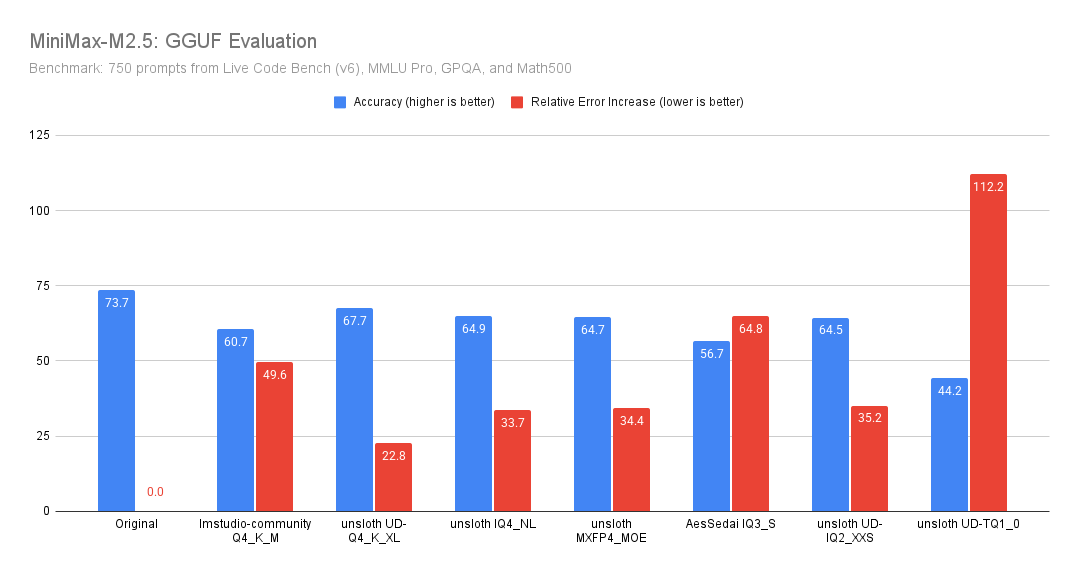
[Benjamin Marie(第三者)がベンチマークを実施](https://x.com/bnjmn_marie/status/2027043753484021810/photo/1) **MiniMax-M2.5** を使用して **Unsloth GGUF 量子化** 上で **750プロンプトの混合スイートで** (LiveCodeBench v6、MMLU Pro、GPQA、Math500)を評価し、両方を報告しています **全体精度** そして **相対誤差増加** (量子化モデルが元モデルよりどれだけ多く誤るか)。
Unsloth の量子化版は、精度に関わらず、非 Unsloth 版よりも、正確性と相対誤差の両方で大幅に優れています(しかも 8GB 小さいにもかかわらず)。
**主な結果:**
* **ここでの品質/サイズの最適なトレードオフ: `unsloth UD-Q4_K_XL`.**\
Original に最も近いのはこれです: たった **6.0ポイント** 低下で、しかも「たった」 **+22.8%** ベースラインより誤りが多いだけです。
* **他の Unsloth Q4 量子化版は互いに非常によく似た性能です(精度は約 64.5〜64.9)。**\
`IQ4_NL`, `MXFP4_MOE`と `UD-IQ2_XXS` はこのベンチマークではどれも基本的に同じ品質で、 **約 33〜35%** Original より誤りが多いです。
* Unsloth GGUF は、他の非 Unsloth GGUF より大幅に優れています。例として、 `lmstudio-community - Q4_K_M` (8GB 小さいにもかかわらず)および `AesSedai - IQ3_S`.
### 公式ベンチマーク
---
# Agent Instructions
This documentation is published with GitBook. GitBook is the documentation platform designed so that both humans and AI agents can read, navigate, and reason over technical content effectively. Learn more at gitbook.com.
## Querying This Documentation
If you need additional information that is not directly available in this page, you can query the documentation by asking a question.
Perform an HTTP GET request on the following URL with the `ask` and `goal` query parameters:
```
GET https://unsloth.ai/docs/jp/moderu/tutorials/minimax-m27.md?ask=&goal=
```
`ask` is the immediate question: it should be specific, self-contained, and written in natural language.
`goal` is what the user is ultimately trying to achieve, the reason they need the answer. Sharing it helps GitBook give you a better, more relevant answer. A goal is most helpful when it describes the outcome the user wants rather than restating the question. For example, with `ask=how do I create an API token`, a goal like `automate deployments from our CI pipeline` lets GitBook tailor the answer to that use case.
The response will contain a direct answer to the question and relevant excerpts and sources from the documentation.
Use this mechanism when the answer is not explicitly present in the current page, you need clarification or additional context, or you want to retrieve related documentation sections.


(1).png?alt=media&token=ce73524f-1db2-410a-ac2f-a26cba04d270)