> For the complete documentation index, see [llms.txt](https://unsloth.ai/docs/llms.txt). Markdown versions of documentation pages are available by appending `.md` to page URLs; this page is available as [Markdown](https://unsloth.ai/docs/jp/moderu/qwen3.5/fine-tune.md).

# Qwen3.5ファインチューニングガイド

これでファインチューニングできます [Qwen3.5](/docs/jp/moderu/qwen3.5.md) モデルファミリー（0.8B、2B、4B、9B、27B、35B‑A3B、122B‑A10B）を [**Unsloth**](https://github.com/unslothai/unsloth)。サポートには [ビジョン](/docs/jp/moderu/qwen3.5/fine-tune.md#vision-fine-tuning)、テキスト、 [RL](#reinforcement-learning-rl) のファインチューニングの両方が含まれます。 **Qwen3.5‑35B‑A3B** - bf16 LoRA は **74GB の VRAM で動作します。**

* Unsloth を使うと Qwen3.5 の学習が **1.5倍高速** になり、 **VRAM 使用量が50%少なく** なります。FA2 構成と比べて。
* Qwen3.5 bf16 LoRA の VRAM 使用量： **0.8B**：3GB ・ **2B**：5GB ・ **4B**：10GB ・ **9B**：22GB ・ **27B**：56GB
* ファインチューニング **0.8B**, **2B** と **4B** bf16 LoRA を私たちの **無料の** **Google Colab ノートブックを通じて**:

| [Qwen3.5-**0.8B**](https://colab.research.google.com/github/unslothai/notebooks/blob/main/nb/Qwen3_5_\(0_8B\)_Vision.ipynb) | [Qwen3.5-**2B**](https://colab.research.google.com/github/unslothai/notebooks/blob/main/nb/Qwen3_5_\(2B\)_Vision.ipynb) | [Qwen3.5-**4B**](https://colab.research.google.com/github/unslothai/notebooks/blob/main/nb/Qwen3_5_\(4B\)_Vision.ipynb) | [Qwen3.5-4B **GRPO**](https://colab.research.google.com/github/unslothai/notebooks/blob/main/nb/Qwen3_5_\(4B\)_Vision_GRPO.ipynb) |
| --------------------------------------------------------------------------------------------------------------------------- | ----------------------------------------------------------------------------------------------------------------------- | ----------------------------------------------------------------------------------------------------------------------- | --------------------------------------------------------------------------------------------------------------------------------- |

* もし **推論能力を維持したい** の機能では、推論スタイルの例と直接回答を混在できます（推論を最低75%に保ってください）。それ以外の場合は完全に出力できます。
* **フルファインチューニング（FFT）** も動作します。VRAM は4倍多く使用される点に注意してください。
* Qwen3.5 は201言語をサポートしているため、多言語ファインチューニングに強力です。
* ファインチューニング後は、 [GGUF](#saving-export-your-fine-tuned-model) （llama.cpp/Ollama など用）または [vLLM](#saving-export-your-fine-tuned-model)
* [強化学習](/docs/jp/meru/reinforcement-learning-rl-guide.md) （RL）を Qwen3.5 で [VLM RL](/docs/jp/meru/reinforcement-learning-rl-guide/vision-reinforcement-learning-vlm-rl.md) も Unsloth inference 経由で動作します。
* 私たちは **A100** Colab ノートブックを [Qwen3.5‑27B](https://colab.research.google.com/github/unslothai/notebooks/blob/main/nb/Qwen_3_5_27B_A100\(80GB\).ipynb) と [Qwen3.5‑35B‑A3B](https://colab.research.google.com/github/unslothai/notebooks/blob/main/nb/Qwen3_5_MoE.ipynb).

古いバージョンを使っている場合（またはローカルでファインチューニングする場合）は、先に更新してください：

{% columns %}
{% column width="50%" %}
Unsloth Studio：

{% code expandable="true" %}

```bash
unsloth studio update
```

{% endcode %}
{% endcolumn %}

{% column width="50%" %}
Unsloth コードベース：

```bash
pip install --upgrade --force-reinstall --no-cache-dir unsloth unsloth_zoo
```

{% endcolumn %}
{% endcolumns %}

{% hint style="warning" %}
**以下を使用してください `transformers v5` Qwen3.5 では旧バージョンは動作しません。Unsloth は現在、デフォルトで transformers v5 を自動的に使用します（Colab 環境を除く）。**

学習が **通常より遅い**ように見える場合、それは Qwen3.5 がカスタムの Mamba Triton カーネルを使用しているためです。これらのカーネルのコンパイルは通常より時間がかかることがあり、特に T4 GPU では顕著です。

量子化差が通常より大きいため、Qwen3.5 モデルでは MoE か dense かに関わらず QLoRA（4-bit）学習を行うことは推奨されません。
{% endhint %}

### MoE ファインチューニング（35B、122B）

次のような MoE モデルでは **Qwen3.5‑35B‑A3B / 122B‑A10B / 397B‑A17B**:

* 私たちの [Qwen3.5‑35B‑A3B（A100）](https://colab.research.google.com/github/unslothai/notebooks/blob/main/nb/Qwen3_5_MoE.ipynb) ファインチューニング用ノートブックを使用できます
* 最近の約12倍高速な [MoE 学習アップデート](/docs/jp/ji-ben/faster-moe.md) に対応しており、VRAM を35%以上削減し、コンテキスト長を約6倍に拡張できます
* **bf16 構成（例：LoRA またはフルファインチューニング）の使用を推奨します** （MoE QLoRA 4-bit は BitsandBytes の制限により推奨されません）。
* Unsloth の MoE カーネルはデフォルトで有効で、異なるバックエンドを使用できます。 `UNSLOTH_MOE_BACKEND`.
* の切り替えで変更できます。安定性のため、ルーター層のファインチューニングはデフォルトで無効です。
* Qwen3.5‑122B‑A10B - bf16 LoRA は256GB の VRAM で動作します。マルチ GPU を使う場合は、     `device_map = "balanced"` を追加するか、私たちの [マルチGPU ガイド](/docs/jp/ji-ben/multi-gpu-training-with-unsloth.md).

### クイックスタート

#### 🦥 Unsloth Studio ガイド

Qwen3.5 は、 [Unsloth Studio](/docs/jp/xin-zhe/studio.md)で実行およびファインチューニングできます。これはローカル AI 向けの新しいオープンソース Web UI です。Unsloth Studio を使えば、モデルをローカルで **MacOS、Windows**、Linux 上で、そして：

{% columns %}
{% column %}

* [LLM を学習](/docs/jp/xin-zhe/studio.md#no-code-training) VRAM 70%削減で2倍高速に
* 検索、ダウンロード、 [GGUF を実行](/docs/jp/xin-zhe/studio.md#run-models-locally) および safetensor モデル
* [**自己修復** ツール呼び出し](/docs/jp/xin-zhe/studio.md#execute-code--heal-tool-calling) + **ウェブ検索**
* [**コード実行**](/docs/jp/xin-zhe/studio.md#run-models-locally) （Python、Bash）
* [自動推論](/docs/jp/xin-zhe/studio.md#model-arena) パラメータ調整（temp、top-p など）
* llama.cpp による高速な CPU + GPU 推論
  {% endcolumn %}

{% column %}

<div data-with-frame="true"><figure><img src="/files/1dca1ac20e7781d7f38fc9e9fdd60ccb9731850d" alt=""><figcaption></figcaption></figure></div>
{% endcolumn %}
{% endcolumns %}

{% stepper %}
{% step %}

#### Unsloth をインストール

ターミナルで実行：

**MacOS、Linux、WSL：**

```bash
curl -fsSL https://unsloth.ai/install.sh | sh
```

**Windows PowerShell：**

```bash
irm https://unsloth.ai/install.ps1 | iex
```

{% hint style="success" %}
**インストールはすぐに終わり、約1〜2分かかります。**
{% endhint %}
{% endstep %}

{% step %}

#### Unsloth を起動

**MacOS、Linux、WSL、Windows：**

```bash
unsloth studio -H 0.0.0.0 -p 8888
```

**次に `http://localhost:8888` をブラウザで開いてください。**
{% endstep %}

{% step %}

#### Qwen3.5 を学習

初回起動時には、アカウントを保護するためのパスワードを作成し、後で再度サインインする必要があります。その後、モデル、データセット、基本設定を選ぶ簡単なオンボーディングウィザードが表示されます。いつでもスキップできます。

検索バーで Qwen3.5 を検索し、希望するモデルとデータセットを選択してください。次に、ハイパーパラメータとコンテキスト長を必要に応じて調整します。

<div data-with-frame="true"><figure><img src="/files/597b19d205ceefd0dc260d8162c186a95bdf56f3" alt="" width="563"><figcaption></figcaption></figure></div>
{% endstep %}

{% step %}

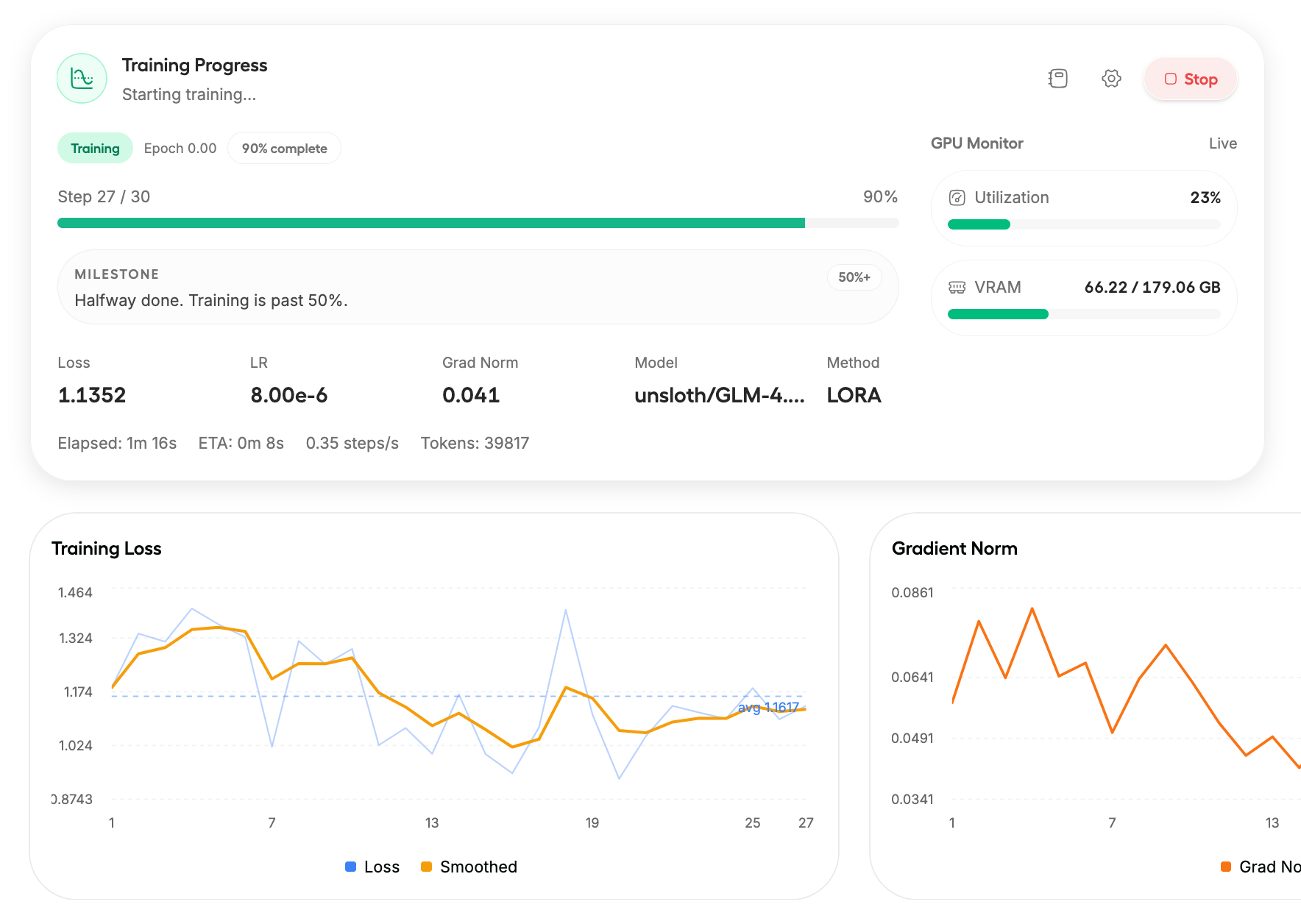
#### 学習の進捗を監視

学習開始をクリックすると、モデルの学習進捗を監視・確認できます。学習損失は着実に減少していくはずです。\
完了すると、モデルは自動的に保存されます。

<div data-with-frame="true"><figure><img src="/files/37b7daa61649aaf6fc97baa8c981a09e3c2c44f6" alt="" width="563"><figcaption></figcaption></figure></div>
{% endstep %}

{% step %}

#### ファインチューニング済みモデルをエクスポート

完了すると、Unsloth Studio でモデルを GGUF、safetensor などの形式にエクスポートできます。

<div data-with-frame="true"><figure><img src="/files/34d6eafe6b5092d1809cda0ad06e9837102b1c47" alt="" width="563"><figcaption></figcaption></figure></div>
{% endstep %}
{% endstepper %}

#### Unsloth Core（コードベース）ガイド：

以下は最小限の SFT レシピです（「テキストのみ」のファインチューニングで動作します）。また、私たちの [Vision のファインチューニング](/docs/jp/ji-ben/vision-fine-tuning.md) セクションもご覧ください。

{% hint style="info" %}
Qwen3.5 は「Vision Encoder 付き因果言語モデル」（統合 VLM）なので、通常のビジョン依存関係（`torchvision`, `pillow`）が必要ならインストールし、Transformers は最新に保ってください。Qwen3.5 には最新の Transformers を使用してください。

**もし** [**GRPO**](/docs/jp/meru/reinforcement-learning-rl-guide.md)**をやりたいなら、高速 vLLM 推論を無効にして Unsloth 推論を使えば Unsloth で動作します。私たちの** [**Vision RL**](/docs/jp/meru/reinforcement-learning-rl-guide/vision-reinforcement-learning-vlm-rl.md) **ノートブック例に従ってください。**
{% endhint %}

{% code expandable="true" %}

```python
from unsloth import FastLanguageModel
import torch
from datasets import load_dataset
from trl import SFTTrainer, SFTConfig

max_seq_length = 2048  # まずは小さく始め、動作したら拡大してください

# サンプルデータセット（自分のものに置き換えてください）。「text」列が必要です。
url = "https://huggingface.co/datasets/laion/OIG/resolve/main/unified_chip2.jsonl"
dataset = load_dataset("json", data_files={"train": url}, split="train")

model, tokenizer = FastLanguageModel.from_pretrained(
    model_name = "Qwen/Qwen3.5-27B",
    max_seq_length = max_seq_length,
    load_in_4bit = False,     # MoE QLoRA は推奨されませんが、dense 27B なら問題ありません
    load_in_16bit = True,     # bf16/16-bit LoRA
    full_finetuning = False,
)

model = FastLanguageModel.get_peft_model(
    model,
    r = 16,
    target_modules = [
        "q_proj", "k_proj", "v_proj", "o_proj",
        "gate_proj", "up_proj", "down_proj",
    ],
    lora_alpha = 16,
    lora_dropout = 0,
    bias = "none",
    # 「unsloth」チェックポイント方式は非常に長いコンテキスト + 低 VRAM 向けです
    use_gradient_checkpointing = "unsloth",
    random_state = 3407,
    max_seq_length = max_seq_length,
)

trainer = SFTTrainer(
    model = model,
    train_dataset = dataset,
    tokenizer = tokenizer,
    args = SFTConfig(
        max_seq_length = max_seq_length,
        per_device_train_batch_size = 1,
        gradient_accumulation_steps = 4,
        warmup_steps = 10,
        max_steps = 100,
        logging_steps = 1,
        output_dir = "outputs_qwen35",
        optim = "adamw_8bit",
        seed = 3407,
        dataset_num_proc = 1,
    ),
)

trainer.train()
```

{% endcode %}

{% hint style="info" %}
OOM が発生したら：

* 下げる `per_device_train_batch_size` を **1** および/または下げる `max_seq_length`.&#x20;
* 有効にしたままにする `use_`[`gradient_checkpointing`](/docs/jp/burogu/500k-context-length-fine-tuning.md#unsloth-gradient-checkpointing-enhancements)`="unsloth"` （VRAM 使用量を減らし、コンテキスト長を延ばすよう設計されています）。
  {% endhint %}

**MoE（bf16 LoRA）用ローダー例：**

```python
import os
import torch
from unsloth import FastModel

model, tokenizer = FastModel.from_pretrained(
    model_name = "unsloth/Qwen3.5-35B-A3B",
    max_seq_length = 2048,
    load_in_4bit = False,     # MoE QLoRA は推奨されませんが、dense 27B なら問題ありません
    load_in_16bit = True,     # bf16/16-bit LoRA
    full_finetuning = False,
)
```

読み込んだら、LoRA アダプタを追加し、上の SFT 例と同様に学習します。

### ビジョンのファインチューニング

Unsloth は [Vision のファインチューニング](/docs/jp/ji-ben/vision-fine-tuning.md) マルチモーダル Qwen3.5 モデルをサポートしています。以下の Qwen3.5 ノートブックを使用し、各モデル名を希望する Qwen3.5 モデルに変更してください。

| [Qwen3.5-**0.8B**](https://colab.research.google.com/github/unslothai/notebooks/blob/main/nb/Qwen3_5_\(0_8B\)_Vision.ipynb) | [Qwen3.5-**2B**](https://colab.research.google.com/github/unslothai/notebooks/blob/main/nb/Qwen3_5_\(2B\)_Vision.ipynb) | [Qwen3.5-**4B**](https://colab.research.google.com/github/unslothai/notebooks/blob/main/nb/Qwen3_5_\(4B\)_Vision.ipynb) | Qwen3.5-**9B** |
| --------------------------------------------------------------------------------------------------------------------------- | ----------------------------------------------------------------------------------------------------------------------- | ----------------------------------------------------------------------------------------------------------------------- | -------------- |

* [Qwen3-VL GRPO/GSPO RL ノートブック](https://colab.research.google.com/github/unslothai/notebooks/blob/main/nb/Qwen3_VL_\(8B\)-Vision-GRPO.ipynb) （モデル名を Qwen3.5-4B などに変更）

**ビジョン / テキストのみのファインチューニングを無効化：**

ビジョンモデルをファインチューニングするために、現在はモデルのどの部分をファインチューニングするかを選べます。ビジョン層のみ、言語層のみ、あるいは attention / MLP 層のみをファインチューニングすることも可能です！デフォルトではすべて有効になっています！

{% code expandable="true" %}

```python
model = FastVisionModel.get_peft_model(
    model,
    finetune_vision_layers     = True, # Vision レイヤーをファインチューニングしないなら False
    finetune_language_layers   = True, # Language レイヤーをファインチューニングしないなら False
    finetune_attention_modules = True, # Attention レイヤーをファインチューニングしないなら False
    finetune_mlp_modules       = True, # MLP レイヤーをファインチューニングしないなら False

    r = 16,                           # 大きいほど精度は上がるが、過学習する可能性があります
    lora_alpha = 16,                  # 少なくとも alpha == r を推奨
    lora_dropout = 0,
    bias = "none",
    random_state = 3407,
    use_rslora = False,               # rank stabilized LoRA をサポートしています
    loftq_config = None,               # LoftQ も利用可能
    target_modules = "all-linear",    # ここではオプションです！必要ならリストを指定できます
    modules_to_save=[
        "lm_head",
        "embed_tokens",
    ],
)
```

{% endcode %}

マルチ画像で Qwen3.5 をファインチューニングまたは学習するには、 私たちの [**マルチ画像ビジョンガイド**](/docs/jp/ji-ben/vision-fine-tuning.md#multi-image-training)**.**

### 強化学習（RL）

Qwen3.5 を RL、GSPO、GRPO などで学習できるようになりました。 [無料ノートブック](https://colab.research.google.com/github/unslothai/notebooks/blob/main/nb/Qwen3_5_\(4B\)_Vision_GRPO.ipynb):

{% embed url="<https://colab.research.google.com/github/unslothai/notebooks/blob/main/nb/Qwen3_5_(4B)_Vision_GRPO.ipynb>" %}

vLLM ではサポートされていませんが、次を設定することで Unsloth で Qwen3.5 RL を実行できます： `fast_inference=False` をモデル読み込み時に設定してください：

```python
from unsloth import FastLanguageModel

model, tokenizer = FastLanguageModel.from_pretrained(
    model_name="unsloth/Qwen3.5-4B",
    fast_inference=False,
)
```

### ファインチューニング済みモデルの保存 / エクスポート

以下について、各種推論 / デプロイガイドをご覧いただけます [Unsloth Studio](/docs/jp/xin-zhe/studio/export.md), [llama.cpp](/docs/jp/ji-ben/inference-and-deployment/saving-to-gguf.md), [vLLM](/docs/jp/ji-ben/inference-and-deployment/vllm-guide.md), [llama-server](/docs/jp/ji-ben/inference-and-deployment/llama-server-and-openai-endpoint.md), [Ollama](/docs/jp/ji-ben/inference-and-deployment/saving-to-ollama.md).

#### GGUF に保存

Unsloth は GGUF への直接保存をサポートしています:

```python
model.save_pretrained_gguf("directory", tokenizer, quantization_method = "q4_k_m")
model.save_pretrained_gguf("directory", tokenizer, quantization_method = "q8_0")
model.save_pretrained_gguf("directory", tokenizer, quantization_method = "f16")
```

または GGUF を Hugging Face にプッシュします:

```python
model.push_to_hub_gguf("hf_username/directory", tokenizer, quantization_method = "q4_k_m")
model.push_to_hub_gguf("hf_username/directory", tokenizer, quantization_method = "q8_0")
```

エクスポートしたモデルが別のランタイムで悪化する場合、Unsloth は最も一般的な原因を示します: **推論時のチャットテンプレート / EOS トークンの誤り** （学習時と同じチャットテンプレートを使用する必要があります）。

#### vLLM に保存

{% hint style="warning" %}
vLLM バージョン `0.16.0` は Qwen3.5 をサポートしていません。 `0.170` まで待つか、Nightly リリースを試してください。
{% endhint %}

vLLM 用に16-bitで保存するには、次を使用します：

{% code overflow="wrap" %}

```python
model.save_pretrained_merged("finetuned_model", tokenizer, save_method = "merged_16bit")
## または HuggingFace にアップロードするには：
model.push_to_hub_merged("hf/model", tokenizer, save_method = "merged_16bit", token = "")
```

{% endcode %}

LoRA アダプターだけを保存するには、次のいずれかを使用します：

```python
model.save_pretrained("finetuned_lora")
tokenizer.save_pretrained("finetuned_lora")
```

または、組み込み関数を使用します：

{% code overflow="wrap" %}

```python
model.save_pretrained_merged("finetuned_model", tokenizer, save_method = "lora")
## または HuggingFace にアップロードするには
model.push_to_hub_merged("hf/model", tokenizer, save_method = "lora", token = "")
```

{% endcode %}

詳細は推論ガイドをご覧ください:

{% columns %}
{% column width="50%" %}
{% content-ref url="/pages/d5ae43f1915ceda3d304ad7c413cb4efbe3d1a3f" %}
[推論とデプロイ](/docs/jp/ji-ben/inference-and-deployment.md)
{% endcontent-ref %}

{% content-ref url="/pages/9bfa988baa17c249340a58c332b8584f20d2537c" %}
[GGUF & llama.cpp](/docs/jp/ji-ben/inference-and-deployment/saving-to-gguf.md)
{% endcontent-ref %}
{% endcolumn %}

{% column width="50%" %}
{% content-ref url="/pages/a58a8ab897451539e1493312c6a640b4d5ee40b7" %}
[Model Export](/docs/jp/xin-zhe/studio/export.md)
{% endcontent-ref %}

{% content-ref url="/pages/0fde417d83989a8108b1d466ec2b53c46e9f4279" %}
[vLLM](/docs/jp/ji-ben/inference-and-deployment/vllm-guide.md)
{% endcontent-ref %}
{% endcolumn %}
{% endcolumns %}


---

# Agent Instructions
This documentation is published with GitBook. GitBook is the documentation platform designed so that both humans and AI agents can read, navigate, and reason over technical content effectively. Learn more at gitbook.com.

## Querying This Documentation
If you need additional information that is not directly available in this page, you can query the documentation dynamically by asking a question.

Perform an HTTP GET request on the current page URL with the `ask` query parameter:

```
GET https://unsloth.ai/docs/jp/moderu/qwen3.5/fine-tune.md?ask=<question>
```

The question should be specific, self-contained, and written in natural language.
The response will contain a direct answer to the question and relevant excerpts and sources from the documentation.

Use this mechanism when the answer is not explicitly present in the current page, you need clarification or additional context, or you want to retrieve related documentation sections.