> For the complete documentation index, see [llms.txt](https://unsloth.ai/docs/llms.txt). Markdown versions of documentation pages are available by appending `.md` to page URLs; this page is available as [Markdown](https://unsloth.ai/docs/jp/moderu/kimi-k3.md).

# Kimi K3 - ローカル実行方法

Moonshot AI の Kimi K3 は、SOTA コーディング、エージェント的、長文脈、チャット向けのワークロードのために構築された 2.8T パラメータのオープンウェイトモデル（有効 104B）です。これは **最強のオープンモデル** 現時点で、Claude 4.8 Opus と GPT-5.6 に匹敵します。Kimi K3 はネイティブなビジョン、100万トークンのコンテキストウィンドウを備え、MXFP4 を使用します。フル精度推論には 1.56 TB のストレージが必要で、1ビットの Kimi K3 [Unsloth](https://github.com/unslothai/unsloth) 動的 GGUF には **594 GB（62% 小さい）**.

{% columns %}
{% column %}
動的 1ビット（右図参照）は **\~78.9%** トップ1精度を達成しつつ **62% 小さい**。動的 2ビット 861.3GB は **\~90%** 精度を達成しつつ **45% 小さい**。実行 [**Kimi-K3-GGUF**](https://huggingface.co/unsloth/Kimi-K3-GGUF) 経由で [Unsloth Studio](/docs/jp/xin-gui/studio.md) または llama.cpp で実行できます。Kimi K3 は、NVIDIA DGX Station、または 128GB RAM デバイスに接続した Mac Studio 上で動作可能です。&#x20;

ロスレスな **ロスレス** Kimi K3 では、Q8（`UD-Q8_K_XL`）、これは **50GB 大きい** Q4（`UD-Q4_K_XL`）。モデルを損なわずに 512GiB 未満にできるかは、まだ調査中です（動的 1ビットは 553.2 GiB です）。

<a href="/pages/335086c72f3270ee21c3c5142bcf04bb46883008" class="button primary">Kimi K3 チュートリアルを実行</a><a href="/pages/335086c72f3270ee21c3c5142bcf04bb46883008#usage-guide" class="button secondary">量子化結果</a>
{% endcolumn %}

{% column %}

<figure><img src="/files/9fc97723e72ff47dfb44be604be2c91d2a529099" alt=""><figcaption><p>1ビット Kimi K3 GGUF vs Claude 5 vs GPT 5.6</p></figcaption></figure>
{% endcolumn %}
{% endcolumns %}

**表：ハードウェア要件** (単位 = 合計メモリ: RAM + VRAM、またはユニファイドメモリ)

| 動的 1ビット S | 動的 1ビット M | 動的 2ビット XXS | 動的 2ビット XL | Q8（ロスレス） |
| --------- | --------- | ----------- | ---------- | -------- |
| 610 GB    | 665 GB    | 726 GB      | 880 GB     | 1.6 TB   |

### Kimi K3 GGUF 実装詳細

私たちは [llama.cpp の PR](https://github.com/ggml-org/llama.cpp/pull/26185) の上に [自分たちのフォーク](https://github.com/unslothai/llama.cpp/pull/48) を構築し、そこにはビジョンサポートといくつかのバグ修正が含まれています。

1. mmproj / vision tower は Kimi-K2.5 tower に似ていますが、RMSNorm、bias なし、非正方形の fused QKV（qkv width != n\_embd）、および post-norm projector を備えています。
2. llama.cpp を実行しているときに分かったのは、 `n_tokens * 40` の予算が大きなバッチサイズで失敗したため、私たちは `n_tokens * 160`&#x20;
3. まで引き上げる必要がありました。
4. また、Kimi のチャットテンプレートを jinja 形式に変換する必要がありました。 **思考を保持する設定で**、そのため、すべての思考トレースは削除されず、保持されます。

### 📊 量子化分析

Kimi [K2.6](/docs/jp/moderu/kimi-k2.6.md) と [K2.7](/docs/jp/moderu/kimi-k2.7-code.md)と同様に、K3 の `UD-Q8_K_XL` はロスレスです。というのも、Kimi は MoE 重みに MXFP4 を、それ以外すべてに BF16 を使用しており、 `Q8_K_XL` はそれを正確に踏襲しています。 `UD-Q4_K_XL` は、残りのテンソルの一部（norm などを除く）が `Q8_0`、そのためほぼフル精度で、1.56 TB の RAM/VRAM が必要です。 `UD-Q8_K_XL` は、MXFP4 の完全 safetensors 版に対して「真にロスレス」です。

<table><thead><tr><th width="119.20001220703125">量子化</th><th width="71.60000610351562" align="right">GB</th><th width="124.800048828125" align="right">平均KLD</th><th width="104.9998779296875" align="right">PPL(q)</th><th width="188.79998779296875" align="right">top-1 一致率 %</th><th width="140.20001220703125" align="right">RMS dp %</th></tr></thead><tbody><tr><td><code>UD-IQ1_S</code></td><td align="right">594.0</td><td align="right">0.5645</td><td align="right">2.5789</td><td align="right">78.875 +/- 0.107</td><td align="right">36.495</td></tr><tr><td><code>UD-IQ1_M</code></td><td align="right">648.9</td><td align="right">0.4789</td><td align="right">2.3639</td><td align="right">81.219 +/- 0.103</td><td align="right">33.629</td></tr><tr><td><code>UD-IQ2_XXS</code></td><td align="right">711.1</td><td align="right">0.3784</td><td align="right">2.1266</td><td align="right">84.127 +/- 0.096</td><td align="right">29.826</td></tr><tr><td><code>UD-Q2_K_XL</code></td><td align="right">861.3</td><td align="right">0.1779</td><td align="right">1.7359</td><td align="right">90.390 +/- 0.077</td><td align="right">19.862</td></tr><tr><td><code>UD-Q4_K_XL</code></td><td align="right">1,510</td><td align="right"></td><td align="right">1.4579</td><td align="right"></td><td align="right"></td></tr><tr><td><code>UD-Q8_K_XL</code></td><td align="right">1,560</td><td align="right"></td><td align="right">1.4581</td><td align="right"></td><td align="right"></td></tr></tbody></table>

imatrix の生成と量子化には、1.56 TB のロスレス版を `UD-Q8_K_XL` 較正全体で使用しました。そのパープレキシティは 1.4581 です。私たちの Dynamic-1bit 量子化はパープレキシティ 2.58、top-1 精度 79% に達し、驚くほど実用的です。

他のコミュニティ製量子化はより大きいにもかかわらず、劣化ははるかに大きいです。例えば、ある 618.9 GB の量子化は `IQ1_M` 私たちの 594 GB 1ビット量子化を上回りますが、パープレキシティは 54.56 に跳ね上がり、21倍悪化します。同じ傾向は `IQ2_XXS`にも当てはまり、725 GB で 96 PPL に対し、私たちは 711 GB で 2.12 PPL です。45倍悪化しており、つまり彼らの 2ビットは 1ビットよりさらに悪い性能です。これは、動的量子化 + 適切な較正の重要性を強調しています。

**Top-1% 精度、KLD プロットも提供しています：**

<div><figure><img src="/files/53b6918c7612debed5a61f40f80a311b910ce5e3" alt=""><figcaption></figcaption></figure> <figure><img src="/files/c00cba83ebdf746a630d4aede2a9642ad9b772b3" alt=""><figcaption></figcaption></figure> <figure><img src="/files/9b35f584666ea707815d87ec92375b307d25a243" alt=""><figcaption></figcaption></figure></div>

### :gear: 使用ガイド

Kimi K3 は **思考専用**で、 **`preserve_thinking` が常に有効です** と **最大** デフォルトで思考がオンです。Instant モードはサポートされていません。思考強度は `reasoning_effort` request フィールドで設定され、K3 は `「low」`, `「high」`、および `「max」` の思考強度に対応しています。

| デフォルト             | エージェント型           |
| ----------------- | ----------------- |
| temperature = 1.0 | temperature = 1.0 |
| top\_p = 0.95     | top\_p = 1.0      |

* コンテキスト長 = 最大 `1,048,576`
* Unsloth では Low、High、Max の思考を切り替え可能です

モデルが収まるなら、B200 を使用した場合は約 20 tokens/s の生成、120 tokens/s 超のスループットが得られます。おすすめは [`UD-IQ1_S`](https://huggingface.co/unsloth/Kimi-K3-GGUF?show_file_info=UD-IQ1_S%2FKimi-K3-UD-IQ1_S-00001-of-00015.gguf) （594GB）を、サイズ/品質の良いバランスとしておすすめします。経験則としては、RAM+VRAM ≈ 量子化サイズです。そうでなくても動作はしますが、ディスクオフロードのためかなり遅くなります。

## Kimi K3 実行ガイド

これで Kimi K3 を [llama.cpp](#run-in-llama.cpp) と [Unsloth Studio](https://unsloth.ai/docs/jp/moderu/pages/1d43caebcc2925464cc42990bf5ebdc3d13c3c85#run-glm-5.2-in-unsloth-studio)。私たちは 594GB の [`UD-IQ1_S`](https://huggingface.co/unsloth/Kimi-K3-GGUF?show_file_info=UD-IQ1_S%2FKimi-K3-UD-IQ1_S-00001-of-00015.gguf) 量子化を、アクセシビリティと精度の面で最良の結果を得るために使用し、少なくとも 610GB の RAM が必要になります。量子化タイプは自由に変更してください。GGUF： [**Kimi-K3-GGUF**](https://huggingface.co/unsloth/Kimi-K3-GGUF)

### 🦥 Unsloth Studio で Kimi-K3 を実行

Kimi K3 は実行できます [Unsloth Studio](/docs/jp/xin-gui/studio.md)ローカルAI向けのオープンソースWeb UIで実行できます。 **Unsloth Studioは自動的にRAMへオフロードし、マルチGPU構成を検出します**。Unsloth Studioを使えば、モデルをローカルで **MacOS、Windows**、Linux、そして:

{% columns %}
{% column %}

* 検索、ダウンロード、 [GGUFの実行](/docs/jp/xin-gui/studio.md#run-models-locally) およびsafetensorモデル
* [**自己修復** ツール呼び出し](/docs/jp/xin-gui/studio.md#execute-code--heal-tool-calling) + **ウェブ検索**
* [**コード実行**](/docs/jp/xin-gui/studio.md#run-models-locally) (Python、Bash)
* [自動推論](/docs/jp/xin-gui/studio.md#model-arena) パラメータ調整（temp、top-pなど）
* llama.cpp による高速 CPU + GPU 推論
* [LLMを学習](/docs/jp/xin-gui/studio.md#no-code-training) VRAMを70%削減しつつ2倍高速
  {% endcolumn %}

{% column %}

<figure><img src="/files/4d290e6db3084061982a4dfe5ece693546bb048f" alt=""><figcaption></figcaption></figure>
{% endcolumn %}
{% endcolumns %}

{% stepper %}
{% step %}
**Unslothのインストールと起動**

インストールするには、ターミナルで次を実行してください：

MacOS、Linux、WSL：

```bash
curl -fsSL https://unsloth.ai/install.sh | sh
```

Windows PowerShell：

```bash
irm https://unsloth.ai/install.ps1 | iex
```

**Unslothを起動**

MacOS、Linux、WSL、Windows:

```bash
unsloth studio
```

その後、 `http://127.0.0.1:8888` （または指定の URL）をブラウザで開いてください。

**HTTPS と Cloudflare で Unsloth を安全に起動**

**新機能！** Unsloth は、無料の Cloudflare トンネルを通じて HTTPS で Unsloth を起動する安全な方法を提供します。以下を使用してください（Windows、Mac、Linux で動作します）:

```bash
unsloth studio --secure
```

{% endstep %}

{% step %}
**Kimi K3 を検索してダウンロード**

Unsloth Studioは自動的にRAMへオフロードし、マルチGPU構成を検出します。初回起動時には、アカウントを保護するためのパスワードを作成し、後で再度サインインする必要があります。

次に Model hub タブに移動し、 **Kimi K3** を検索バーで探し、目的のモデルと量子化版をダウンロードしてください。モデルを実行するのに十分な計算資源があることを確認してください。

<figure><img src="/files/bea4285c7c35439f4cb90bf2f059fc189ba191ec" alt=""><figcaption></figcaption></figure>
{% endstep %}

{% step %}
**Kimi K3 を実行**

Unsloth Studio を使用すると推論パラメータは自動設定されますが、手動で変更することもできます。また、 **低・高・最大の思考**を切り替えたり、コンテキスト長、チャットテンプレート、その他の設定を編集したりできます。

詳細については、以下をご覧ください [Unsloth Studio推論ガイド](/docs/jp/xin-gui/studio/chat.md).

<figure><img src="/files/4d290e6db3084061982a4dfe5ece693546bb048f" alt=""><figcaption><p>Unsloth の Canvas で動作する 1ビット Kimi-K3 の例</p></figcaption></figure>
{% endstep %}
{% endstepper %}

### 🦙 llama.cpp で Kimi K3 を実行

これらのチュートリアルでは、以下を使用します [llama.cpp](https://github.com/ggml-org/llama.cpp) 高速なローカル推論のために、特に CPU のみの場合に有用です。私たちは [フォークを作成しました](https://github.com/unslothai/llama.cpp/pull/48) これは、Kimi K3 のビジョンをサポートするために特別に作成したものです。これは別の [llama.cpp の PR](https://github.com/ggml-org/llama.cpp/pull/26185).

{% stepper %}
{% step %}
以下の SPECIFIC な Unsloth フォークを取得してください `llama.cpp` を [**GitHubで入手してください**](https://github.com/unslothai/llama.cpp/pull/48) ビジョンサポートを有効にするためです。以下のビルド手順に従っても構いません。変更してください `-DGGML_CUDA=ON` を `-DGGML_CUDA=OFF` に変更してください。GPUがない場合や、CPU推論だけを使いたい場合は変更してください。 **Apple Mac / Metalデバイスの場合**は、 `-DGGML_CUDA=OFF` に設定してから通常どおり続けてください。Metalサポートはデフォルトで有効です。

```bash
git clone https://github.com/unslothai/llama.cpp
cd llama.cpp
git fetch origin pull/48/head:kimi-k3-fullsize-vision
git checkout kimi-k3-fullsize-vision
cd ..
cmake llama.cpp -B llama.cpp/build \
    -DBUILD_SHARED_LIBS=OFF -DGGML_CUDA=ON
cmake --build llama.cpp/build --config Release -j --clean-first --target llama-cli llama-mtmd-cli llama-server llama-gguf-split
cp llama.cpp/build/bin/llama-* llama.cpp
```

{% endstep %}

{% step %}
**まずは画像を取得しましょう！** 画像をアップロードすることもできます。ここでは [この画像](https://raw.githubusercontent.com/unslothai/unsloth/refs/heads/main/images/unsloth%20made%20with%20love.png)を使います。これは、Unslothでファインチューニングがどのように作られるかを示す小さなロゴです：

{% code overflow="wrap" %}

```bash
wget https://raw.githubusercontent.com/unslothai/unsloth/refs/heads/main/images/unsloth%20made%20with%20love.png -O unsloth.png
```

{% endcode %}

<figure><img src="/files/8ae02fb49d0894924cd953777ab38bc4d56ba3f8" alt="" width="188"><figcaption></figcaption></figure>

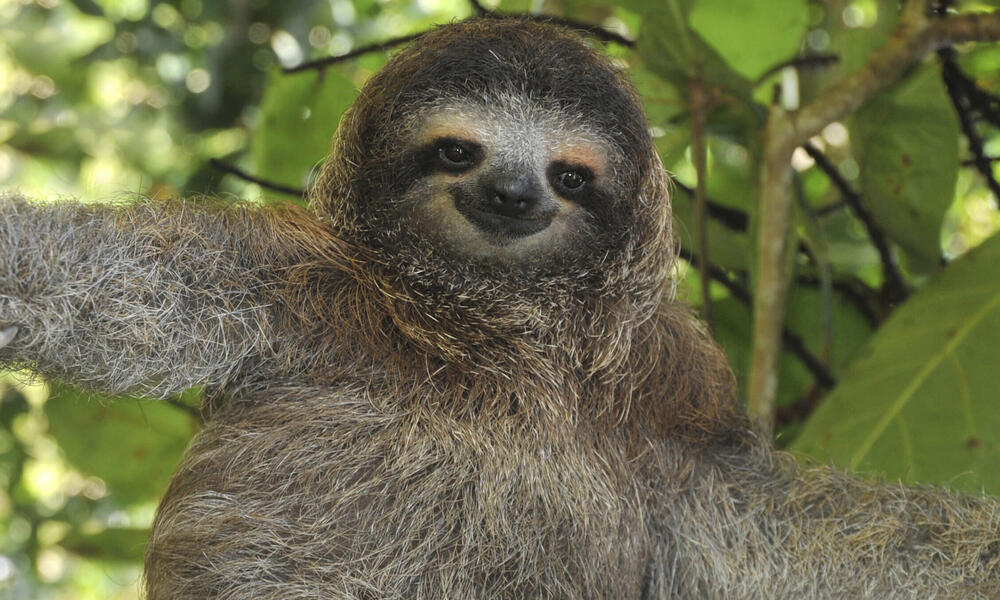
2枚目の画像を取得しましょう [ここ](https://files.worldwildlife.org/wwfcmsprod/images/Sloth_Sitting_iStock_3_12_2014/story_full_width/8l7pbjmj29_iStock_000011145477Large_mini__1_.jpg)

{% code overflow="wrap" %}

```bash
wget https://files.worldwildlife.org/wwfcmsprod/images/Sloth_Sitting_iStock_3_12_2014/story_full_width/8l7pbjmj29_iStock_000011145477Large_mini__1_.jpg -O picture.png
```

{% endcode %}

<figure><img src="/files/5e1b9352de623a1d57f735cf6be692f421bca972" alt="" width="188"><figcaption></figcaption></figure>
{% endstep %}

{% step %}
現在、以下を使用できます `llama.cpp` を直接使ってモデルを読み込み・ダウンロードできます。まるで `ollama run`のように使えます。まず、希望する量子化タイプを `IQ1_S`。また、 `export LLAMA_CACHE="folder"` を使って `llama.cpp` を特定の場所に保存するよう強制します。 **このダウンロード処理は非常に遅くなる可能性があることに注意してください**。そのため、次のセクションの手動ダウンロード手順を使うのが最善でしょう。

```bash
export LLAMA_CACHE="unsloth/Kimi-K3-GGUF"
./llama.cpp/llama-cli \
    -hf unsloth/Kimi-K3-GGUF:UD-IQ1_S \
    --temp 1.0 \
    --top-p 0.95
```

{% endstep %}

{% step %}
モデルを手動でダウンロードしたい場合は、以下のコードでモデルをダウンロードできます（ `pip install huggingface_hub`をインストールした後）。ダウンロードが止まる場合は、以下を参照してください： [Hugging Face Hub、XETのデバッグ](/docs/jp/ji-chu/troubleshooting-and-faqs/hugging-face-hub-xet-debugging.md)

```bash
hf download unsloth/Kimi-K3-GGUF \
    --local-dir unsloth/Kimi-K3-GGUF \
    --include "*mmproj-BF16*" \
    --include "*UD-IQ1_S*" # 完全精度には "*UD-Q8_K_XL*" を使用
```

{% endstep %}

{% step %}
その後、会話モードでモデルを実行します：

{% code overflow="wrap" %}

```bash
./llama.cpp/llama-cli \
    --model unsloth/Kimi-K3-GGUF/UD-IQ1_S/Kimi-K3-UD-IQ1_S-00001-of-00014.gguf \
    --mmproj unsloth/Kimi-K3-GGUF/mmproj-BF16.gguf \
    --temp 1.0 \
    --top-p 0.95
```

{% endcode %}
{% endstep %}

{% step %}
すると次のように表示されます：

<figure><img src="/files/255a9f2c6124c95be527af2c27d5375168fecf71" alt=""><figcaption></figcaption></figure>

そして私は「-1 の平方根は何ですか？」と尋ねました：

<figure><img src="/files/b8497694b37265a6284bbd2deaba6e559a73b045" alt=""><figcaption></figcaption></figure>

Kimi K3 は画像にも対応しており、たとえば Unsloth の画像を読み込めます：

<figure><img src="/files/ec4caca34e8e652683e9a912e97405d3d9cb2a8f" alt=""><figcaption></figcaption></figure>

そして sloth の画像を使って、それがどう関係するかを尋ねます：

<figure><img src="/files/279838caa3325445700c3daa96ed26f08120a489" alt=""><figcaption></figcaption></figure>
{% endstep %}
{% endstepper %}

### 📊 ベンチマーク

ベンチマークは下の表形式でも確認できます：

<div><figure><img src="/files/aeba4a88fc3ad190371dcdd093fcd0f205aa7a61" alt=""><figcaption></figcaption></figure> <figure><img src="/files/4bf13abb5f766519367ba282f08e233180331583" alt=""><figcaption></figcaption></figure></div>

|       ベンチマーク       | Kimi K3&#xA;（max） | Claude Fable 5&#xA;（max） | GPT-5.6 Sol&#xA;（max） | Claude Opus 4.8&#xA;（max） | GPT-5.5&#xA;（xhigh） | GLM-5.2&#xA;（max） |
| :----------------: | :---------------: | :----------------------: | :-------------------: | :-----------------------: | :-----------------: | :---------------: |
|      **推論と知識**     |                   |                          |                       |                           |                     |                   |
|    GPQA Diamond    |        93.5       |           92.6           |        **94.1**       |            91.0           |         93.5        |        91.2       |
|      HLE-Full      |    43.5 / 56.0    |      **53.3 / 63.0**     |      44.5 / 58.0      |        49.8 / 57.9        |     41.4 / 52.2     |         —         |
|     **コーディング**     |                   |                          |                       |                           |                     |                   |
|       DeepSWE      |        67.5       |           70.0           |        **73.0**       |            59.0           |         67.0        |        46.2       |
| Terminal-Bench 2.1 |        88.3       |           88.0           |        **88.8**       |            84.6           |         83.4        |        82.7       |
|     **エージェント型**    |                   |                          |                       |                           |                     |                   |
|     BrowseComp     |      **91.2**     |           88.0           |          90.4         |            84.3           |         84.4        |         —         |
| GDPval-AA v2 (Elo) |        1686       |         **1747**         |          1736         |            1593           |         1491        |        1510       |
|     OSWorld 2.0    |        58.3       |         **66.1**         |          62.6         |            55.7           |         49.5        |         —         |
|      **ビジョン**      |                   |                          |                       |                           |                     |                   |
|      MMMU-Pro      |    81.6 / 83.4    |      81.2 / **86.5**     |    **83.0** / 84.6    |        78.9 / 82.7        |     81.2 / 83.2     |         —         |
|     MathVision     |    94.3 / 97.8    |      94.8 / **98.6**     |    **95.8** / 97.8    |        86.7 / 97.1        |     92.2 / 96.8     |         —         |

DeepSWE ベンチマークでは、Kimi-K3 が非常に効率的に動作していることが示されています！

<figure><img src="/files/f2f89dbb5bb60769c6c682aaf4e5745631b6734d" alt=""><figcaption></figcaption></figure>


---

# Agent Instructions
This documentation is published with GitBook. GitBook is the documentation platform designed so that both humans and AI agents can read, navigate, and reason over technical content effectively. Learn more at gitbook.com.

## Querying This Documentation
If you need additional information that is not directly available in this page, you can query the documentation dynamically by asking a question.

Perform an HTTP GET request on the current page URL with the `ask` query parameter, and the optional `goal` query parameter:

```
GET https://unsloth.ai/docs/jp/moderu/kimi-k3.md?ask=<question>&goal=<endgoal>
```

`ask` is the immediate question: it should be specific, self-contained, and written in natural language.
`goal` is optional and describes the broader end goal you are ultimately trying to accomplish on behalf of the user. GitBook uses it to tailor the answer towards what is most useful for that goal.

The response will contain a direct answer to the question and relevant excerpts and sources from the documentation.

Use this mechanism when the answer is not explicitly present in the current page, you need clarification or additional context, or you want to retrieve related documentation sections.