> For the complete documentation index, see [llms.txt](https://unsloth.ai/docs/llms.txt). Markdown versions of documentation pages are available by appending `.md` to page URLs; this page is available as [Markdown](https://unsloth.ai/docs/jp/ji-chu/vision-fine-tuning.md).

# ビジョンのファインチューニング

Unsloth を使ってビジョン／マルチモーダル LLM をファインチューニングする方法を学びます

Visionモデルをファインチューニングすると、通常のLLMでは得意でない特定のタスク、たとえば物体/動き検出でモデルが優れた性能を発揮できます。 **また、学習することもできます** [**VLMをRLで**](/docs/jp/meru/reinforcement-learning-rl-guide/vision-reinforcement-learning-vlm-rl.md)**.** Visionのファインチューニング用の無料ノートブックを多数用意しています:

* [**Qwen3-VL**](/docs/jp/moderu/tutorials/qwen3-how-to-run-and-fine-tune/qwen3-vl-how-to-run-and-fine-tune.md) **(8B) Vision:** [**ノートブック**](https://colab.research.google.com/github/unslothai/notebooks/blob/main/nb/Qwen3_VL_\(8B\)-Vision.ipynb)
* [**Ministral 3**](/docs/jp/moderu/tutorials/ministral-3.md): 一般的なQ\&A向けのvisionファインチューニング: [ノートブック](https://colab.research.google.com/github/unslothai/notebooks/blob/main/nb/Pixtral_\(12B\)-Vision.ipynb)\
  一般的なQ\&Aデータセットを、よりニッチなデータセットと連結することで、ファインチューニングによってベースモデルの能力を忘れにくくできます。
* **Gemma 3 (4B) Vision:** [ノートブック](https://colab.research.google.com/github/unslothai/notebooks/blob/main/nb/Gemma3_\(4B\)-Vision.ipynb)
* **Llama 3.2 Vision** X線撮影向けのファインチューニング: [ノートブック](https://colab.research.google.com/github/unslothai/notebooks/blob/main/nb/Llama3.2_\(11B\)-Vision.ipynb)\
  X線、CTスキャン、超音波をより速く分析できるよう、医療従事者をどう支援できるでしょうか。
* **Qwen2.5 VL** 手書きをLaTeXに変換するためのファインチューニング: [ノートブック](https://colab.research.google.com/github/unslothai/notebooks/blob/main/nb/Qwen2.5_VL_\(7B\)-Vision.ipynb)\
  これにより、複雑な数式を手で書かずにLaTeXとして簡単に書き起こせます。

{% hint style="info" %}
データセット内の画像はすべて同じサイズ/寸法に揃えるのが最善です。学習が長引いたり、リソースを使いすぎたりしないよう、300〜1000pxの寸法を使用してください。
{% endhint %}

### Vision / テキストのみのファインチューニングを無効化

Visionモデルをファインチューニングするために、どの部分のモデルをファインチューニングするか選択できるようになりました。Vision層だけ、言語層だけ、あるいはattention / MLP層だけをファインチューニングできます。デフォルトではすべて有効にしています！

```python
model = FastVisionModel.get_peft_model(
    model,
    finetune_vision_layers     = True, # Vision層をファインチューニングしない場合はFalse
    finetune_language_layers   = True, # 言語層をファインチューニングしない場合はFalse
    finetune_attention_modules = True, # Attention層をファインチューニングしない場合はFalse
    finetune_mlp_modules       = True, # MLP層をファインチューニングしない場合はFalse

    r = 16,                           # 大きいほど精度は高くなりますが、過学習する可能性があります
    lora_alpha = 16,                  # 推奨は少なくとも alpha == r です
    lora_dropout = 0,
    bias = "none",
    random_state = 3407,
    use_rslora = False,               # rank安定化LoRAをサポートしています
    loftq_config = None,               # LoftQにも対応しています
    target_modules = "all-linear",    # いまは任意です！必要ならリストを指定できます
    modules_to_save=[
        "lm_head",
        "embed_tokens",
    ],
)
```

### Visionデータコレータ

Visionデータセット専用の特別なデータコレータがあります:

{% code overflow="wrap" %}

```python
from unsloth.trainer import UnslothVisionDataCollator
from trl import SFTTrainer, SFTConfig
trainer = SFTTrainer(
    model = model,
    tokenizer = tokenizer,
    data_collator = UnslothVisionDataCollator(model, tokenizer),
    train_dataset = dataset,
    args = SFTConfig(...),
)
```

{% endcode %}

そして、データコレータの引数は次のとおりです:

{% code expandable="true" %}

```python
class UnslothVisionDataCollator:
def __init__(
self,
model,
processor,
max_seq_length  = None, # [Optional] これは `FastVisionModel.from_pretrained(max_seq_length = ...)
formatting_func = None, # テキストを変換する関数
resize = "min", # (10, 10) や "min" を指定して、モデルのデフォルトの image_size または "max" に合うようにリサイズできます
                # リサイズせず、画像をそのままにする
ignore_index = -100, # [Optional] デフォルトは -100

# from unsloth.chat_templates import train_on_responses_only
# trainer = train_on_responses_only(
#     trainer,
#     instruction_part = "<|start_header_id|>user<|end_header_id|>\n\n",
#     response_part = "<|start_header_id|>assistant<|end_header_id|>\n\n",
# )
train_on_responses_only = False, # LLMではtrain_on_responses_onlyに相当
instruction_part = None, # train_on_responses_only(instruction_part = ...)に相当
response_part    = None, # train_on_responses_only(response_part = ...)に相当
force_match      = True, # 改行も一致させる！

num_proc         = None, # [Optional] GPUの数を自動選択します
completion_only_loss = True, # [Optional] パディングされたvisionトークンを無視します - 常にTrueであるべきです！
pad_to_multiple_of = None, # [Optional] データコレータのパディング用
resize_dimension = 0, # 0、1、'max'、'min' を指定できます
                      # (max は高さと幅の最大値に基づいてリサイズし、min は最小サイズ、0 は最初の次元、など)
snap_to_patch_size = False, # [Optional] 画像をパッチサイズの倍数に強制します
)
```

{% endcode %}

### 複数画像の学習

複数画像でモデルをファインチューニング/学習するには、最も手っ取り早い変更は次のように置き換えることです:

```python
ds_converted = ds.map(
    convert_to_conversation,
)
```

次のオプションで：

```python
ds_converted = [convert_to_conversation(sample) for sample in dataset]
```

mapを使うと、データセットの標準化とArrow処理ルールが適用されますが、これらは厳格で、定義がより複雑になることがあります。

### Visionファインチューニング用データセット

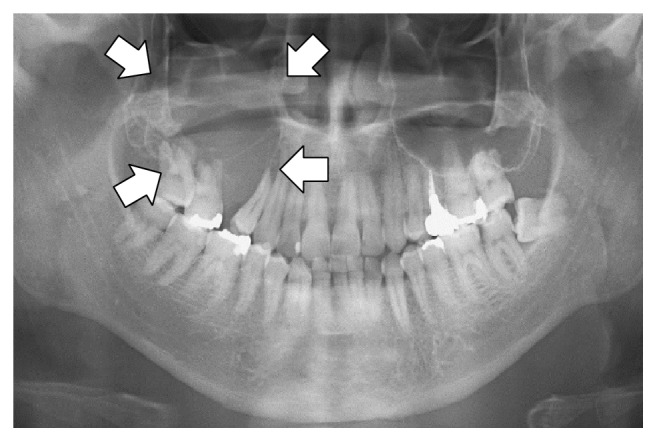
Visionモデルやマルチモーダルモデルのファインチューニング用データセットは、標準的な質問と回答のペアと似ています [datasets ](/docs/jp/meru/fine-tuning-llms-guide/datasets-guide.md)、ただし今回は画像入力も含まれます。たとえば、 [Llama 3.2 Visionノートブック](https://colab.research.google.com/github/unslothai/notebooks/blob/main/nb/Llama3.2_\(11B\)-Vision.ipynb#scrollTo=vITh0KVJ10qX) は、AIが医療従事者によるX線、CTスキャン、超音波の分析をより効率的に支援できることを示すために放射線画像のケースを使っています。

ROCO放射線画像データセットのサンプリング版を使います。データセットにアクセスできます [ここ](https://www.google.com/url?q=https%3A%2F%2Fhuggingface.co%2Fdatasets%2Funsloth%2FRadiology_mini)。このデータセットには、医療状態や疾患を示すX線、CTスキャン、超音波が含まれています。各画像には、専門家が書いた説明文が付いています。目的は、VLMをファインチューニングして医療従事者に役立つ分析ツールにすることです。

データセットを見て、最初の例が何を示しているか確認しましょう：

```
Dataset({
    features: ['image', 'image_id', 'caption', 'cui'],
    num_rows: 1978
})
```

| 画像                                                                                                                                                                                                                                                                                | キャプション                                       |
| --------------------------------------------------------------------------------------------------------------------------------------------------------------------------------------------------------------------------------------------------------------------------------- | -------------------------------------------- |
| <div><figure><img src="https://735611837-files.gitbook.io/~/files/v0/b/gitbook-x-prod.appspot.com/o/spaces%2FxhOjnexMCB3dmuQFQ2Zq%2Fuploads%2Fgit-blob-97d4489827403bd4795494f33d01a10979788c30%2Fxray.png?alt=media" alt="" width="164"><figcaption></figcaption></figure></div> | パノラマX線写真は、右上顎後方部の骨溶解性病変と、上顎洞底の吸収を示しています（矢印）。 |

データセットを整形するには、すべてのVisionファインチューニングタスクを以下のように整形する必要があります：

```python
[
{ "role": "user",
  "content": [{"type": "text",  "text": instruction}, {"type": "image", "image": image} ]
},
{ "role": "assistant",
  "content": [{"type": "text",  "text": answer} ]
},
]
```

VLMが放射線診断の専門家であるようにするカスタム指示を作成します。1つの指示だけでなく、複数ターンを追加して動的な会話にできることにも注目してください。

{% code expandable="true" %}

```notebook-python
instruction = "あなたは放射線診断の専門家です。この画像に見えるものを正確に説明してください。"

def convert_to_conversation(sample):
    conversation = [
        { "role": "user",
          "content" : [
            {"type" : "text",  "text"  : instruction},
            {"type" : "image", "image" : sample["image"]} ]
        },
        { "role" : "assistant",
          "content" : [
            {"type" : "text",  "text"  : sample["caption"]} ]
        },
    ]
    return { "messages" : conversation }
pass
```

{% endcode %}

データセットをファインチューニング用の「正しい」形式に変換しましょう：

```notebook-python
converted_dataset = [convert_to_conversation(sample) for sample in dataset]
```

最初の例は次のように構造化されます：

```notebook-python
converted_dataset[0]
```

{% code overflow="wrap" %}

```
{'messages': [{'role': 'user',
   'content': [{'type': 'text',
     'text': 'あなたは放射線診断の専門家です。この画像に見えるものを正確に説明してください。'},
    {'type': 'image',
     'image': <PIL.PngImagePlugin.PngImageFile image mode=L size=657x442>}]},
  {'role': 'assistant',
   'content': [{'type': 'text',
     'text': 'パノラマX線写真は、右上顎後方部の骨溶解性病変と、上顎洞底の吸収を示しています（矢印）。'}]}]}
```

{% endcode %}

ファインチューニングを行う前に、もしかするとVisionモデルはすでに画像の分析方法を知っているかもしれません。これが当てはまるか確認しましょう！

{% code expandable="true" %}

```notebook-python
FastVisionModel.for_inference(model) # 推論を有効化！

image = dataset[0]["image"]
instruction = "あなたは放射線診断の専門家です。この画像に見えるものを正確に説明してください。"

messages = [
    {"role": "user", "content": [
        {"type": "image"},
        {"type": "text", "text": instruction}
    ]}
]
input_text = tokenizer.apply_chat_template(messages, add_generation_prompt = True)
inputs = tokenizer(
    image,
    input_text,
    add_special_tokens = False,
    return_tensors = "pt",
).to("cuda")

from transformers import TextStreamer
text_streamer = TextStreamer(tokenizer, skip_prompt = True)
_ = model.generate(**inputs, streamer = text_streamer, max_new_tokens = 128,
                   use_cache = True, temperature = 1.5, min_p = 0.1)
```

{% endcode %}

そして結果は：

```
このX線写真は、上顎と下顎の歯列全体のパノラマ画像、具体的にはオルソパントモグラム（OPG）と思われます。

* パノラマX線写真は正常な歯科構造を示しています。
* 右上に異常領域があり、これは透過像を示す骨領域として表され、上顎洞に対応しています。

**主な観察点**

* 左上の歯の間の骨は比較的X線不透過性です。
* 画像の上に2本の大きな矢印があり、この領域をより詳しく調べる必要があることを示唆しています。矢印の1本は左側に、もう1本は右側にあります。ただし、
```

詳細については、のデータセットセクションをご覧ください [ノートブックはこちら](https://colab.research.google.com/github/unslothai/notebooks/blob/main/nb/Llama3.2_\(11B\)-Vision.ipynb#scrollTo=vITh0KVJ10qX).

### &#x20;:mag\_right:視覚モデル、VLMでアシスタント応答のみに学習する

言語モデルでは、 `from unsloth.chat_templates import train_on_responses_only` を前述のとおり使えます。視覚モデルでは、 `UnslothVisionDataCollator` 前と同じです！参照してください [#vision-data-collator](#vision-data-collator "mention") Visionデータコレータの使い方の詳細は

{% code overflow="wrap" %}

```python
class UnslothVisionDataCollator:
def __init__(
    self,
    ...
    # from unsloth.chat_templates import train_on_responses_only
    # trainer = train_on_responses_only(
    #     trainer,
    #     instruction_part = "<|start_header_id|>user<|end_header_id|>\n\n",
    #     response_part = "<|start_header_id|>assistant<|end_header_id|>\n\n",
    # )
    train_on_responses_only = False, # LLMではtrain_on_responses_onlyに相当
    instruction_part = None, # train_on_responses_only(instruction_part = ...)に相当
    response_part    = None, # train_on_responses_only(response_part = ...)に相当
    force_match      = True, # 改行も一致させる！
)
```

{% endcode %}

たとえば Llama 3.2 Vision の場合：

```python
UnslothVisionDataCollator(
    model, tokenizer,
    ...
    train_on_responses_only = True,
    instruction_part = "<|start_header_id|>user<|end_header_id|>\n\n",
    response_part = "<|start_header_id|>assistant<|end_header_id|>\n\n",
    ...
)
```


---

# Agent Instructions
This documentation is published with GitBook. GitBook is the documentation platform designed so that both humans and AI agents can read, navigate, and reason over technical content effectively. Learn more at gitbook.com.

## Querying This Documentation
If you need additional information that is not directly available in this page, you can query the documentation by asking a question.

Perform an HTTP GET request on the following URL with the `ask` and `goal` query parameters:

```
GET https://unsloth.ai/docs/jp/ji-chu/vision-fine-tuning.md?ask=<question>&goal=<user_goal>
```

`ask` is the immediate question: it should be specific, self-contained, and written in natural language.
`goal` is what the user is ultimately trying to achieve, the reason they need the answer. Sharing it helps GitBook give you a better, more relevant answer. A goal is most helpful when it describes the outcome the user wants rather than restating the question. For example, with `ask=how do I create an API token`, a goal like `automate deployments from our CI pipeline` lets GitBook tailor the answer to that use case.

The response will contain a direct answer to the question and relevant excerpts and sources from the documentation.

Use this mechanism when the answer is not explicitly present in the current page, you need clarification or additional context, or you want to retrieve related documentation sections.