> For the complete documentation index, see [llms.txt](https://unsloth.ai/docs/llms.txt). Markdown versions of documentation pages are available by appending `.md` to page URLs; this page is available as [Markdown](https://unsloth.ai/docs/integrations/connections/connect-llama.cpp-to-unsloth-run-ggufs-with-llama-server.md).
# Connect llama.cpp to Unsloth: Run GGUFs with llama-server
Llama.cpp is an open-source inference engine for running GGUF models efficiently on local hardware, and [Unsloth](https://github.com/unslothai/unsloth) makes it easy to run those models directly into a open-source UI chat interface. By starting a local `llama-server`, you can serve a GGUF model from your machine or Hugging Face, connect it to Unsloth, and use it like any other external chat model.
This guide walks through installing llama.cpp, launching `llama-server`, connecting it to Unsloth, enabling your model, and configuring prompt caching, context length, API keys, FA, and chat templates.
## Setup
{% stepper %}
{% step %}
### Install llama.cpp
Install llama.cpp first so you can run the `llama-server` command.
Use one of the official install options:
* Download a prebuilt [llama.cpp binary](https://github.com/ggml-org/llama.cpp/releases)
* Build llama.cpp from [source](https://github.com/ggml-org/llama.cpp/blob/master/docs/build.md)
After installing, check that llama-server works in your terminal:
`llama-server --help`
{% endstep %}
{% step %}
### Choose a GGUF model
llama-server can load a local .gguf file or download a GGUF model from Hugging Face.
To serve a Hugging Face GGUF repo directly, use the repo and quant name:
`llama-server -hf unsloth/Qwen3.6-27B-GGUF:UD-Q4_K_XL`
If you wish to load a local model, you can also follow the steps below.
Start `llama-server` with the model you want to serve:
```bash
llama-server \
--model /path/to/model.gguf \
--host 0.0.0.0 \
--port 8080
```
This exposes an API endpoint at: `http://localhost:8080/v1`
To require an API key, add:
```bash
--api-key 1234-myapi-key
```
{% endstep %}
{% step %}
### Connect Llama.cpp to Unsloth
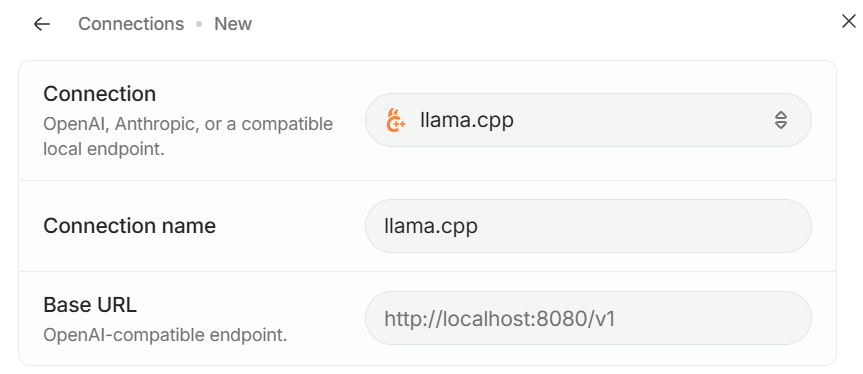
Open **Settings → Connections**, then click **Add Connection**. Select **llama.cpp**, then enter your server details:
if you did not start llama-server with `--api-key`, leave the API key field empty. Enter the base URL of your server, e.g. `http://localhost:8080/v1`\
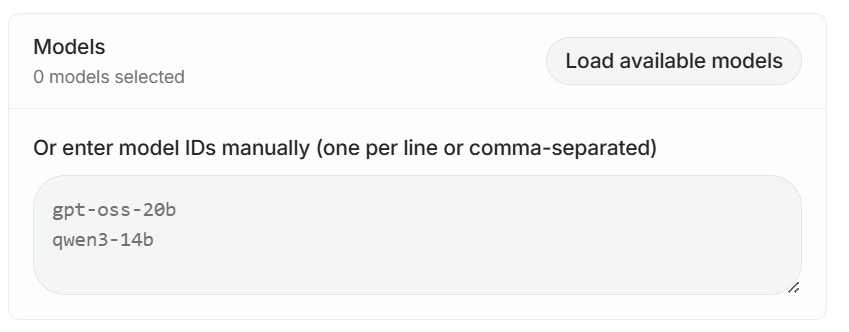
Click **Load Models** to fetch available model IDs, or enter model IDs manually if your server does not expose `/models`.
Then, after you click **Add Connection,** The models you enabled will now appear under **Connected** in the **Select Model** dropdown.
{% endstep %}
{% step %}
### Ready to Chat
After saving the connection, your llama.cpp model will appear under **Connection** in the model dropdown. Select it to start chatting through you **llama-server**.
{% endstep %}
{% endstepper %}
### Prompt Caching
Prompt caching reduces latency and cost when requests reuse the same long prefix. Use the **Prompt caching** setting in the Unsloth side panel to control caching behaviour for supported connections.
With llama.cpp, prompt caching is enabled by default and can be disabled when starting\
`llama-server` with:
```bash
--no-cache-prompt
```
### **Common llama-server arguments**
The example above only uses the required connection settings. You can add more llama-server arguments depending on your model and hardware.
Common options include:
```bash
--ctx-size 8192 \ # Set the context length
--parallel 2 \ # Set the number of parallel slots
--flash-attn on \ # Enable Flash Attention when supported
--jinja \ # Use the model chat template
--api-key 1234-key \ # Require an API key
--no-cache-prompt # Disable prompt caching
```
For the full list of server arguments, see the official [llama.cpp server README](https://github.com/ggml-org/llama.cpp/blob/master/tools/server/README.md).
---
# Agent Instructions
This documentation is published with GitBook. GitBook is the documentation platform designed so that both humans and AI agents can read, navigate, and reason over technical content effectively. Learn more at gitbook.com.
## Querying This Documentation
If you need additional information that is not directly available in this page, you can query the documentation by asking a question.
Perform an HTTP GET request on the following URL with the `ask` and `goal` query parameters:
```
GET https://unsloth.ai/docs/integrations/connections/connect-llama.cpp-to-unsloth-run-ggufs-with-llama-server.md?ask=&goal=
```
`ask` is the immediate question: it should be specific, self-contained, and written in natural language.
`goal` is what the user is ultimately trying to achieve, the reason they need the answer. Sharing it helps GitBook give you a better, more relevant answer. A goal is most helpful when it describes the outcome the user wants rather than restating the question. For example, with `ask=how do I create an API token`, a goal like `automate deployments from our CI pipeline` lets GitBook tailor the answer to that use case.
The response will contain a direct answer to the question and relevant excerpts and sources from the documentation.
Use this mechanism when the answer is not explicitly present in the current page, you need clarification or additional context, or you want to retrieve related documentation sections.

.png?alt=media&token=ade433bf-5eaf-4146-a266-525a85a6c98d)