# LoRA fine-tuning Hyperparameters Guide

LoRA hyperparameters are tunable settings that govern how Low-Rank Adaptation [fine-tunes](https://unsloth.ai/docs/get-started/fine-tuning-llms-guide) LLMs. With many choices (e.g., learning rate and epochs) and countless combinations, picking the right values is key to accuracy, stability, quality, and fewer hallucinations. Done well, **LoRA can match full fine-tuning performance** while using 4× less VRAM.

You'll learn the best practices for these parameters, based on insights from hundreds of research papers and experiments, and see how they impact the model. **While we recommend using Unsloth's defaults**, understanding these concepts will give you full control.\
\
The goal is to change hyperparameter numbers to increase accuracy while counteracting [**overfitting or underfitting**](#overfitting-poor-generalization-too-specialized). Overfitting occurs when the model memorizes the training data, harming its ability to generalize to new, unseen inputs. The objective is a model that generalizes well, not one that simply memorizes.

{% columns %}
{% column %}

#### :question:But what is LoRA?

In LLMs, we have model weights. Llama 70B has 70 billion numbers. Instead of changing all 70b numbers, we instead add thin matrices A and B to each weight, and optimize those. This means we only optimize 1% of weights.
{% endcolumn %}

{% column %}

<figure><img src="https://3215535692-files.gitbook.io/~/files/v0/b/gitbook-x-prod.appspot.com/o/spaces%2FxhOjnexMCB3dmuQFQ2Zq%2Fuploads%2Fgit-blob-715b6260aae497f160d7f9a1019bcfa472675dcf%2Fimage%20(7)%20(1)%20(1).png?alt=media" alt=""><figcaption><p>Instead of optimizing Model Weights (yellow), we optimize 2 thin matrices A and B.</p></figcaption></figure>
{% endcolumn %}
{% endcolumns %}

## :1234: Key Fine-tuning Hyperparameters

### **Learning Rate**

Defines how much the model’s weights are adjusted during each training step.

* **Higher Learning Rates**: Lead to faster initial convergence but can cause training to become unstable or fail to find an optimal minimum if set too high.
* **Lower Learning Rates**: Result in more stable and precise training but may require more epochs to converge, increasing overall training time. While low learning rates are often thought to cause underfitting, they actually can lead to **overfitting** or even prevent the model from learning.
* **Typical Range**: `2e-4` (0.0002) to `5e-6` (0.000005).\
  :green\_square: ***For normal LoRA/QLoRA Fine-tuning***, *we recommend* **`2e-4`** *as a starting point.*\
  :blue\_square: ***For Reinforcement Learning** (DPO, GRPO etc.), we recommend* **`5e-6` .**\
  :white\_large\_square: ***For Full Fine-tuning,** lower learning rates are generally more appropriate.*

### **Epochs**

The number of times the model sees the full training dataset.

* **More Epochs:** Can help the model learn better, but a high number can cause it to **memorize the training data**, hurting its performance on new tasks.
* **Fewer Epochs:** Reduces training time and can prevent overfitting, but may result in an undertrained model if the number is insufficient for the model to learn the dataset's underlying patterns.
* **Recommended:** 1-3 epochs. For most instruction-based datasets, training for more than 3 epochs offers diminishing returns and increases the risk of overfitting.

### **LoRA or QLoRA**

LoRA uses 16-bit precision, while QLoRA is a 4-bit fine-tuning method.

* **LoRA:** 16-bit fine-tuning. It's slightly faster and slightly more accurate, but consumes significantly more VRAM (4× more than QLoRA). Recommended for 16-bit environments and scenarios where maximum accuracy is required.
* **QLoRA:** 4-bit fine-tuning. Slightly slower and marginally less accurate, but uses much less VRAM (4× less).\
  :sloth: *70B LLaMA fits in <48GB VRAM with QLoRA in Unsloth -* [*more details here*](https://unsloth.ai/blog/llama3-3)*.*

### Hyperparameters & Recommendations:

<table><thead><tr><th width="154.39678955078125">Hyperparameter</th><th width="383.6192626953125">Function</th><th>Recommended Settings</th></tr></thead><tbody><tr><td><strong>LoRA Rank</strong> (<code>r</code>)</td><td>Controls the number of trainable parameters in the LoRA adapter matrices. A higher rank increases model capacity but also memory usage.</td><td>8, 16, 32, 64, 128<br><br>Choose 16 or 32</td></tr><tr><td><strong>LoRA Alpha</strong> (<code>lora_alpha</code>)</td><td>Scales the strength of the fine-tuned adjustments in relation to the rank (<code>r</code>).</td><td><code>r</code> (standard) or <code>r * 2</code> (common heuristic). <a href="#lora-alpha-and-rank-relationship">More details here</a>.</td></tr><tr><td><strong>LoRA Dropout</strong></td><td>A regularization technique that randomly sets a fraction of LoRA activations to zero during training to prevent overfitting. <strong>Not that useful</strong>, so we default set it to 0.</td><td>0 (default) to 0.1</td></tr><tr><td><strong>Weight Decay</strong></td><td>A regularization term that penalizes large weights to prevent overfitting and improve generalization. Don't use too large numbers!</td><td>0.01 (recommended) - 0.1</td></tr><tr><td><strong>Warmup Steps</strong></td><td>Gradually increases the learning rate at the start of training.</td><td>5-10% of total steps</td></tr><tr><td><strong>Scheduler Type</strong></td><td>Adjusts the learning rate dynamically during training.</td><td><code>linear</code> or <code>cosine</code></td></tr><tr><td><strong>Seed (<code>random_state</code>)</strong></td><td>A fixed number to ensure reproducibility of results.</td><td>Any integer (e.g., <code>42</code>, <code>3407</code>)</td></tr><tr><td><strong>Target Modules</strong></td><td><p>Specify which parts of the model you want to apply LoRA adapters to — either the attention, the MLP, or both.</p><p><br>Attention: <code>q_proj, k_proj, v_proj, o_proj</code><br><br>MLP: <code>gate_proj, up_proj, down_proj</code></p></td><td>Recommended to target all major linear layers: <code>q_proj, k_proj, v_proj, o_proj, gate_proj, up_proj, down_proj</code>.</td></tr></tbody></table>

## :deciduous\_tree: Gradient Accumulation and Batch Size equivalency

### Effective Batch Size

Correctly configuring your batch size is critical for balancing training stability with your GPU's VRAM limitations. This is managed by two parameters whose product is the **Effective Batch Size**.\
\
**Effective Batch Size** = `batch_size * gradient_accumulation_steps`

* A **larger Effective Batch Size** generally leads to smoother, more stable training.
* A **smaller Effective Batch Size** may introduce more variance.

While every task is different, the following configuration provides a great starting point for achieving a stable **Effective Batch Size** of 16, which works well for most fine-tuning tasks on modern GPUs.

| Parameter                                                 | Description                                                                                                                                                                                                                                                                     | Recommended Setting                             |
| --------------------------------------------------------- | ------------------------------------------------------------------------------------------------------------------------------------------------------------------------------------------------------------------------------------------------------------------------------- | ----------------------------------------------- |
| **Batch Size** (`batch_size`)                             | <p>The number of samples processed in a single forward/backward pass on one GPU.<br><br><strong>Primary Driver of VRAM Usage</strong>. Higher values can improve hardware utilization and speed up training, but only if they fit in memory.</p>                                | 2                                               |
| **Gradient Accumulation** (`gradient_accumulation_steps`) | <p>The number of micro-batches to process before performing a single model weight update.<br><br><strong>Primary Driver of Training Time.</strong> Allows simulation of a larger <code>batch\_size</code> to conserve VRAM. Higher values increase training time per epoch.</p> | 8                                               |
| **Effective Batch Size** (Calculated)                     | The true batch size used for each gradient update. It directly influences training stability, quality, and final model performance.                                                                                                                                             | <p>4 to 16<br>Recommended: 16 (from 2 \* 8)</p> |

### The VRAM & Performance Trade-off

Assume you want 32 samples of data per training step. Then you can use any of the following configurations:

* `batch_size = 32, gradient_accumulation_steps = 1`
* `batch_size = 16, gradient_accumulation_steps = 2`
* `batch_size = 8, gradient_accumulation_steps = 4`
* `batch_size = 4, gradient_accumulation_steps = 8`
* `batch_size = 2, gradient_accumulation_steps = 16`
* `batch_size = 1, gradient_accumulation_steps = 32`

While all of these are equivalent for the model's weight updates, they have vastly different hardware requirements.

The first configuration (`batch_size = 32`) uses the **most VRAM** and will likely fail on most GPUs. The last configuration (`batch_size = 1`) uses the **least VRAM,** but at the cost of slightly slower trainin&#x67;**.** To avoid OOM (out of memory) errors, always prefer to set a smaller `batch_size` and increase `gradient_accumulation_steps` to reach your target **Effective Batch Size**.

### :sloth: Unsloth Gradient Accumulation Fix

Gradient accumulation and batch sizes <mark style="color:green;">**are now fully equivalent in Unsloth**</mark> due to our bug fixes for gradient accumulation. We have implemented specific bug fixes for gradient accumulation that resolve a common issue where the two methods did not produce the same results. This was a known challenge in the wider community, but for Unsloth users, the two methods are now interchangeable.

[Read our blog post](https://unsloth.ai/blog/gradient) for more details.

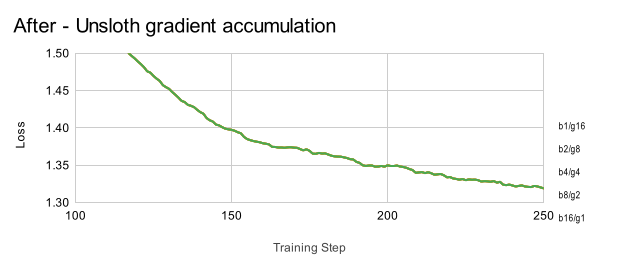
Prior to our fixes, combinations of `batch_size` and `gradient_accumulation_steps` that yielded the same **Effective Batch Size** (i.e., `batch_size × gradient_accumulation_steps = 16`) did not result in equivalent training behavior. For example, configurations like `b1/g16`, `b2/g8`, `b4/g4`, `b8/g2`, and `b16/g1` all have an **Effective Batch Size** of 16, but as shown in the graph, the loss curves did not align when using standard gradient accumulation:

<figure><img src="https://3215535692-files.gitbook.io/~/files/v0/b/gitbook-x-prod.appspot.com/o/spaces%2FxhOjnexMCB3dmuQFQ2Zq%2Fuploads%2Fgit-blob-66eb907fd9ce38ab29dacef82794d0525057aeb4%2FBefore_-_Standard_gradient_accumulation_UQOFkUggudXuV9dzrh8MA.svg?alt=media" alt=""><figcaption><p>(Before - Standard Gradient Accumulation)</p></figcaption></figure>

After applying our fixes, the loss curves now align correctly, regardless of how the **Effective Batch Size** of 16 is achieved:

<figure><img src="https://3215535692-files.gitbook.io/~/files/v0/b/gitbook-x-prod.appspot.com/o/spaces%2FxhOjnexMCB3dmuQFQ2Zq%2Fuploads%2Fgit-blob-61f7c60412a2a39584f75cce5dca41e3e35eb7f2%2FAfter_-_Unsloth_gradient_accumulation_6Y4pJdJF0vruzradUpymY.svg?alt=media" alt=""><figcaption><p>(After - 🦥 <mark style="color:green;">Unsloth Gradient Accumulation</mark>)</p></figcaption></figure>

## 🦥 **LoRA Hyperparameters in Unsloth**

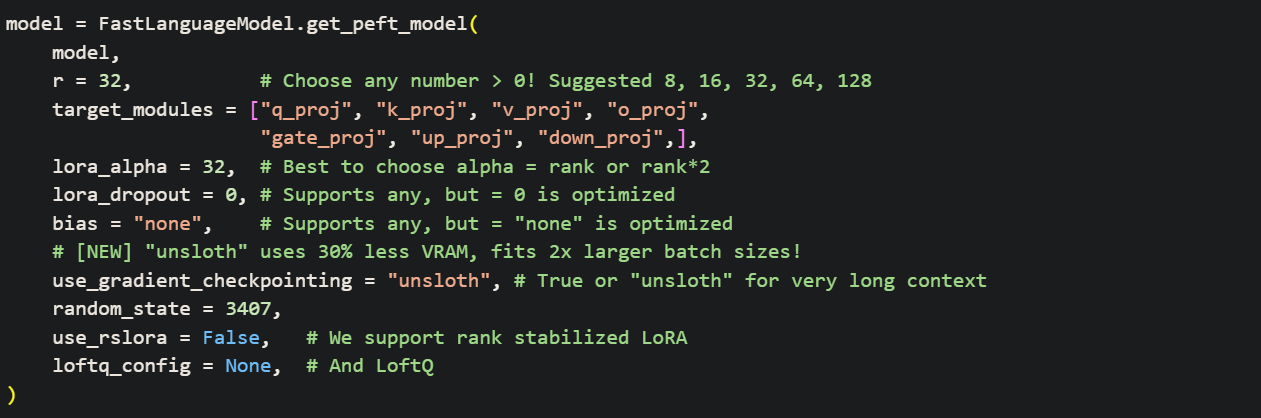
The following demonstrates a standard configuration. **While Unsloth provides optimized defaults**, understanding these parameters is key to manual tuning.

<div data-full-width="false"><figure><img src="https://3215535692-files.gitbook.io/~/files/v0/b/gitbook-x-prod.appspot.com/o/spaces%2FxhOjnexMCB3dmuQFQ2Zq%2Fuploads%2Fgit-blob-9843f8cc26aac6445236250f5c32394186eace59%2Fnotebook_parameter_screenshott.png?alt=media" alt=""><figcaption></figcaption></figure></div>

1. ```python
   r = 16, # Choose any number > 0 ! Suggested 8, 16, 32, 64, 128
   ```

   The rank (`r`) of the fine-tuning process. A larger rank uses more memory and will be slower, but can increase accuracy on complex tasks. We suggest ranks like 8 or 16 (for fast fine-tunes) and up to 128. Using a rank that is too large can cause overfitting and harm your model's quality.\\
2. ```python
   target_modules = ["q_proj", "k_proj", "v_proj", "o_proj",
                     "gate_proj", "up_proj", "down_proj",],
   ```

   For optimal performance, <mark style="background-color:blue;">**LoRA should be applied to all major linear layers**</mark>. [Research has shown](#lora-target-modules-and-qlora-vs-lora) that targeting all major layers is crucial for matching the performance of full fine-tuning. While it's possible to remove modules to reduce memory usage, we strongly advise against it to preserve maximum quality as the savings are minimal.\\
3. ```python
   lora_alpha = 16,
   ```

   A scaling factor that controls the strength of the fine-tuned adjustments. Setting it equal to the rank (`r`) is a reliable baseline. A popular and effective heuristic is to set it to double the rank (`r * 2`), which makes the model learn more aggressively by giving more weight to the LoRA updates. [More details here](#lora-alpha-and-rank-relationship).\\
4. ```python
   lora_dropout = 0, # Supports any, but = 0 is optimized
   ```

   A regularization technique that helps [prevent overfitting](#overfitting-poor-generalization-too-specialized) by randomly setting a fraction of the LoRA activations to zero during each training step. [Recent research suggests](https://arxiv.org/abs/2410.09692) that for **the short training runs** common in fine-tuning, `lora_dropout` may be an unreliable regularizer.\
   🦥 *Unsloth's internal code can optimize training when* `lora_dropout = 0`*, making it slightly faster, but we recommend a non-zero value if you suspect overfitting.*\\
5. ```python
   bias = "none",    # Supports any, but = "none" is optimized
   ```

   Leave this as `"none"` for faster training and reduced memory usage. This setting avoids training the bias terms in the linear layers, which adds trainable parameters for little to no practical gain.\\
6. ```python
   use_gradient_checkpointing = "unsloth", # True or "unsloth" for very long context
   ```

   Options are `True`, `False`, and `"unsloth"`.\
   🦥 *We recommend* `"unsloth"` *as it reduces memory usage by an extra 30% and supports extremely long context fine-tunes. You can read more on* [*our blog post about long context training*](https://unsloth.ai/blog/long-context)*.*\\
7. ```python
   random_state = 3407,
   ```

   The seed to ensure deterministic, reproducible runs. Training involves random numbers, so setting a fixed seed is essential for consistent experiments.\\
8. ```python
   use_rslora = False,  # We support rank stabilized LoRA
   ```

   An advanced feature that implements [**Rank-Stabilized LoRA**](https://arxiv.org/abs/2312.03732). If set to `True`, the effective scaling becomes `lora_alpha / sqrt(r)` instead of the standard `lora_alpha / r`. This can sometimes improve stability, particularly for higher ranks. [More details here](#lora-alpha-and-rank-relationship).\\
9. ```python
   loftq_config = None, # And LoftQ
   ```

   An advanced technique, as proposed in [**LoftQ**](https://arxiv.org/abs/2310.08659), initializes LoRA matrices with the top 'r' singular vectors from the pretrained weights. This can improve accuracy but may cause a significant memory spike at the start of training.

### **Verifying LoRA Weight Updates:**

When validating that **LoRA** adapter weights have been updated after fine-tuning, avoid using **np.allclose()** for comparison. This method can miss subtle but meaningful changes, particularly in **LoRA A**, which is initialized with small Gaussian values. These changes may not register as significant under loose numerical tolerances. Thanks to [contributors](https://github.com/unslothai/unsloth/issues/3035) for this section.

To reliably confirm weight updates, we recommend:

* Using **checksum or hash comparisons** (e.g., MD5)
* Computing the **sum of absolute differences** between tensors
* Inspecting t**ensor statistics** (e.g., mean, variance) manually
* Or using **np.array\_equal()** if exact equality is expected

## :triangular\_ruler:LoRA Alpha and Rank relationship

{% hint style="success" %}
It's best to set `lora_alpha = 2 * lora_rank` or `lora_alpha = lora_rank`
{% endhint %}

{% columns %}
{% column width="50%" %}
$$
\hat{W} = W + \frac{\alpha}{\text{rank}} \times AB
$$

<figure><img src="https://3215535692-files.gitbook.io/~/files/v0/b/gitbook-x-prod.appspot.com/o/spaces%2FxhOjnexMCB3dmuQFQ2Zq%2Fuploads%2Fgit-blob-8e4f60c002f22e8ca9c534b48323e9e77e4b5ea6%2Fimage.png?alt=media" alt=""><figcaption><p>rsLoRA other scaling options. sqrt(r) is the best.</p></figcaption></figure>

$$
\hat{W}\_{\text{rslora}} = W + \frac{\alpha}{\sqrt{\text{rank}}} \times AB
$$
{% endcolumn %}

{% column %}
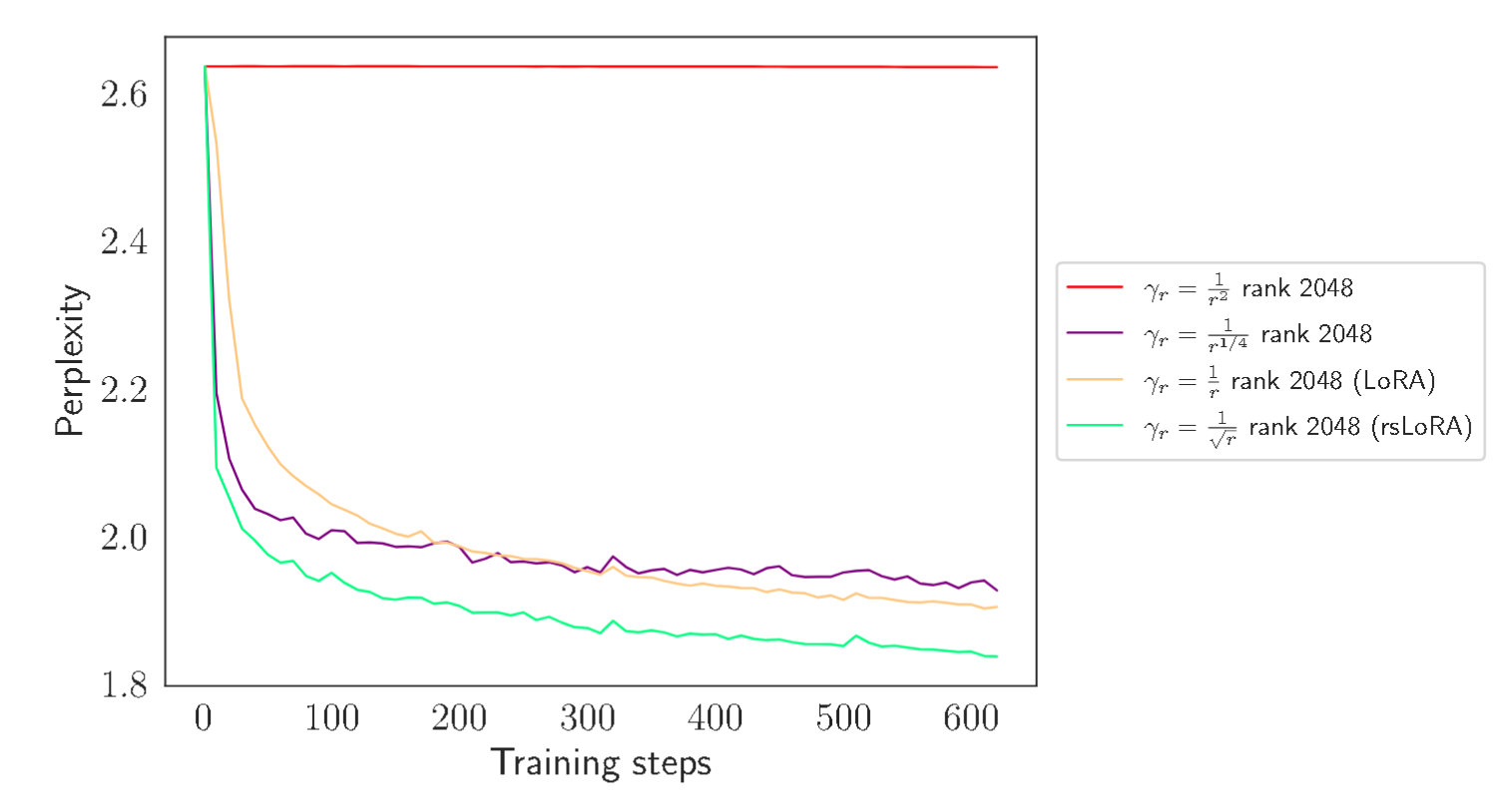
The formula for LoRA is on the left. We need to scale the thin matrices A and B by alpha divided by the rank. <mark style="background-color:blue;">**This means we should keep alpha/rank at least = 1**</mark>.

According to the [rsLoRA (rank stabilized lora) paper](https://arxiv.org/abs/2312.03732), we should instead scale alpha by the sqrt of the rank. Other options exist, but theoretically this is the optimum. The left plot shows other ranks and their perplexities (lower is better). To enable this, set `use_rslora = True` in Unsloth.

Our recommendation is to set the <mark style="background-color:green;">**alpha to equal to the rank, or at least 2 times the rank.**</mark> This means alpha/rank = 1 or 2.
{% endcolumn %}
{% endcolumns %}

## :dart: LoRA Target Modules and QLoRA vs LoRA

{% hint style="success" %}
Use:\
`target_modules = ["q_proj", "k_proj", "v_proj", "o_proj", "gate_proj", "up_proj", "down_proj",]` to target both **MLP** and **attention** layers to increase accuracy.

**QLoRA uses 4-bit precision**, reducing VRAM usage by over 75%.

**LoRA (16-bit)** is slightly more accurate and faster.
{% endhint %}

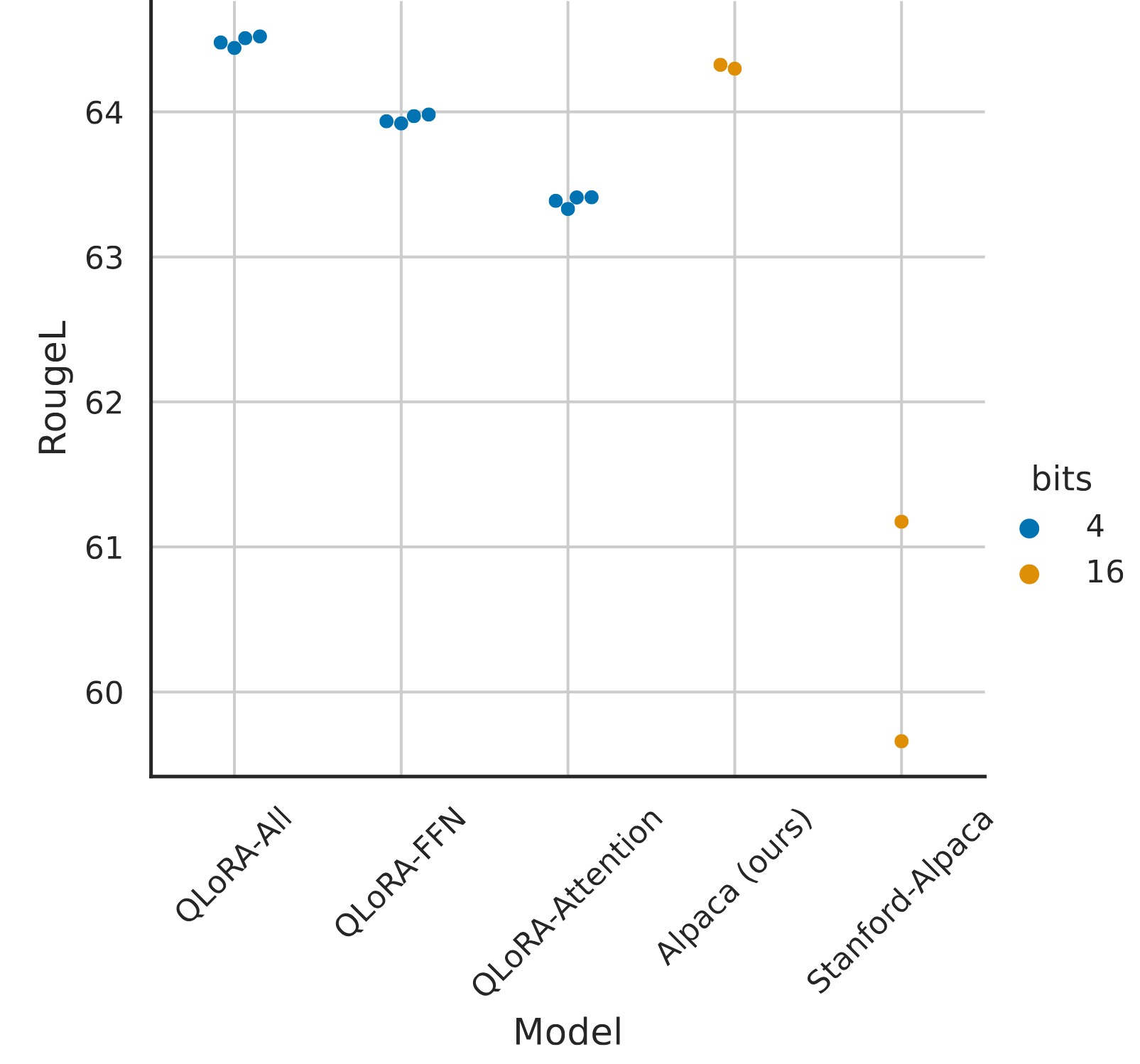
According to empirical experiments and research papers like the original [QLoRA paper](https://arxiv.org/pdf/2305.14314), it's best to apply LoRA to both attention and MLP layers.

{% columns %}
{% column %}

<figure><img src="https://3215535692-files.gitbook.io/~/files/v0/b/gitbook-x-prod.appspot.com/o/spaces%2FxhOjnexMCB3dmuQFQ2Zq%2Fuploads%2Fgit-blob-16bef8165ccace21d0533f1941b8268a165c6a37%2Fimage.png?alt=media" alt=""><figcaption></figcaption></figure>
{% endcolumn %}

{% column %}
The chart shows RougeL scores (higher is better) for different target module configurations, comparing LoRA vs QLoRA.

The first 3 dots show:

1. **QLoRA-All:** LoRA applied to all FFN/MLP and Attention layers.\
   :fire: *This performs best overall.*
2. **QLoRA-FFN**: LoRA only on FFN.\
   Equivalent to: `gate_proj`, `up_proj`, `down_proj.`
3. **QLoRA-Attention**: LoRA applied only to Attention layers.\
   Equivalent to: `q_proj`, `k_proj`, `v_proj`, `o_proj`.
   {% endcolumn %}
   {% endcolumns %}

## :sunglasses: Training on completions only, masking out inputs

The [QLoRA paper](https://arxiv.org/pdf/2305.14314) shows that masking out inputs and **training only on completions** (outputs or assistant messages) can further **increase accuracy** by a few percentage points (*1%*). Below demonstrates how this is done in Unsloth:

{% columns %}
{% column %}
**NOT** training on completions only:

**USER:** <mark style="background-color:green;">Hello what is 2+2?</mark>\
**ASSISTANT:** <mark style="background-color:green;">The answer is 4.</mark>\
**USER:** <mark style="background-color:green;">Hello what is 3+3?</mark>\
**ASSISTANT:** <mark style="background-color:green;">The answer is 6.</mark>
{% endcolumn %}

{% column %}
**Training** on completions only:

**USER:** ~~Hello what is 2+2?~~\
**ASSISTANT:** <mark style="background-color:green;">The answer is 4.</mark>\
**USER:** ~~Hello what is 3+3?~~\
**ASSISTANT:** <mark style="background-color:green;">The answer is 6</mark><mark style="background-color:green;">**.**</mark>
{% endcolumn %}
{% endcolumns %}

The QLoRA paper states that **training on completions only** increases accuracy by quite a bit, especially for multi-turn conversational finetunes! We do this in our [conversational notebooks here](https://colab.research.google.com/github/unslothai/notebooks/blob/main/nb/Llama3.2_\(1B_and_3B\)-Conversational.ipynb).

<figure><img src="https://3215535692-files.gitbook.io/~/files/v0/b/gitbook-x-prod.appspot.com/o/spaces%2FxhOjnexMCB3dmuQFQ2Zq%2Fuploads%2Fgit-blob-7e73b480d1db1dd3d52dd0d4a7e24caff6a54be0%2Fimage.png?alt=media" alt=""><figcaption></figcaption></figure>

To enable **training on completions** in Unsloth, you will need to define the instruction and assistant parts. :sloth: *We plan to further automate this for you in the future!*

For Llama 3, 3.1, 3.2, 3.3 and 4 models, you define the parts as follows:

```python
from unsloth.chat_templates import train_on_responses_only
trainer = train_on_responses_only(
    trainer,
    instruction_part = "<|start_header_id|>user<|end_header_id|>\n\n",
    response_part = "<|start_header_id|>assistant<|end_header_id|>\n\n",
)
```

For Gemma 2, 3, 3n models, you define the parts as follows:

```python
from unsloth.chat_templates import train_on_responses_only
trainer = train_on_responses_only(
    trainer,
    instruction_part = "<start_of_turn>user\n",
    response_part = "<start_of_turn>model\n",
)
```

## &#x20;:mag\_right:Training on assistant responses only for vision models, VLMs

For language models, we can use `from unsloth.chat_templates import train_on_responses_only` as described previously. For vision models, use the extra arguments as part of `UnslothVisionDataCollator` just like before!

{% code overflow="wrap" %}

```python
class UnslothVisionDataCollator:
def __init__(
    self,
    ...
    # from unsloth.chat_templates import train_on_responses_only
    # trainer = train_on_responses_only(
    #     trainer,
    #     instruction_part = "<|start_header_id|>user<|end_header_id|>\n\n",
    #     response_part = "<|start_header_id|>assistant<|end_header_id|>\n\n",
    # )
    train_on_responses_only = False, # EQUIVALENT to train_on_responses_only for LLMs
    instruction_part = None, # EQUIVALENT to train_on_responses_only(instruction_part = ...)
    response_part    = None, # EQUIVALENT to train_on_responses_only(response_part = ...)
    force_match      = True, # Match newlines as well!
)
```

{% endcode %}

For example for Llama 3.2 Vision:

```python
UnslothVisionDataCollator(
    model, tokenizer,
    ...
    train_on_responses_only = True,
    instruction_part = "<|start_header_id|>user<|end_header_id|>\n\n",
    response_part = "<|start_header_id|>assistant<|end_header_id|>\n\n",
    ...
)
```

## :key: **Avoiding Overfitting & Underfitting**

### **Overfitting** (Poor Generalization/Too Specialized)

The model memorizes the training data, including its statistical noise, and consequently fails to generalize to unseen data.

{% hint style="success" %}
If your training loss drops below 0.2, your model is likely **overfitting** — meaning it may perform poorly on unseen tasks.

One simple trick is LoRA alpha scaling — just multiply the alpha value of each LoRA matrix by 0.5. This effectively scales down the impact of fine-tuning.

**This is closely related to merging / averaging weights.**\
You can take the original base (or instruct) model, add the LoRA weights, then divide the result by 2. This gives you an averaged model — which is functionally equivalent to reducing the `alpha` by half.
{% endhint %}

**Solution:**

* **Adjust the learning rate:** A high learning rate often leads to overfitting, especially during short training runs. For longer training, a higher learning rate may work better. It’s best to experiment with both to see which performs best.
* **Reduce the number of training epochs**. Stop training after 1, 2, or 3 epochs.
* **Increase** `weight_decay`. A value of `0.01` or `0.1` is a good starting point.
* **Increase** `lora_dropout`. Use a value like `0.1` to add regularization.
* **Increase batch size or gradient accumulation steps**.
* **Dataset expansion** - make your dataset larger by combining or concatenating open source datasets with your dataset. Choose higher quality ones.
* **Evaluation early stopping** - enable evaluation and stop when the evaluation loss increases for a few steps.
* **LoRA Alpha Scaling** - scale the alpha down after training and during inference - this will make the finetune less pronounced.
* **Weight averaging** - literally add the original instruct model and the finetune and divide the weights by 2.

### **Underfitting** (Too Generic)

The model fails to capture the underlying patterns in the training data, often due to insufficient complexity or training duration.

**Solution:**

* **Adjust the Learning Rate:** If the current rate is too low, increasing it may speed up convergence, especially for short training runs. For longer runs, try lowering the learning rate instead. Test both approaches to see which works best.
* **Increase Training Epochs:** Train for more epochs, but monitor validation loss to avoid overfitting.
* **Increase LoRA Rank** (`r`) and alpha: Rank should at least equal to the alpha number, and rank should be bigger for smaller models/more complex datasets; it usually is between 4 and 64.
* **Use a More Domain-Relevant Dataset**: Ensure the training data is high-quality and directly relevant to the target task.
* **Decrease batch size to 1**. This will cause the model to update more vigorously.

{% hint style="success" %}
Fine-tuning has no single "best" approach, only best practices. Experimentation is key to finding what works for your specific needs. Our notebooks automatically set optimal parameters based on many papers research and our experiments, giving you a great starting point. Happy fine-tuning!
{% endhint %}

***Acknowledgements:** A huge thank you to* [*Eyera*](https://huggingface.co/Orenguteng) *for contributing to this guide!*