> For the complete documentation index, see [llms.txt](https://unsloth.ai/docs/llms.txt). Markdown versions of documentation pages are available by appending `.md` to page URLs; this page is available as [Markdown](https://unsloth.ai/docs/desktop.md).
# Introducing Unsloth Desktop
Unsloth Desktop is a free, open-source app for Mac, Windows and Linux.
Introducing Unsloth Desktop
Unsloth Desktop (Beta) is a free, open-source app for running and training AI models on your own local hardware. Available for macOS, Windows, and Linux.
Unsloth lets you run, train and deploy LLMs, diffusion image/video, MLX, GGUF and audio models.
{% columns %}
{% column width="16.666666666666664%" %}
{% endcolumn %}
{% column width="66.66666666666667%" %}
{% stepper %}
{% step %}
### Install Unsloth Desktop
1. Download [Unsloth Desktop](https://unsloth.ai/download)
2. Install the app for [macOS](/docs/get-started/install/mac.md), [Windows](/docs/get-started/install/windows-installation.md), [Linux](/docs/get-started/install/linux.md)
3. Launch the app
{% endstep %}
{% step %}
### Choose a model
Open 'Select model' dropdown on top or 'Model hub' tab, choose a model and a quantization that fits your device, then download it. Once it finishes, start chatting - no setup required.
{% endstep %}
{% step %}
### Unsloth is now ready
To chat, type a message and press Enter.
* **Connect tools:** [Claude Code](/docs/basics/claude-code.md), [Codex](/docs/basics/codex.md), [web search](/docs/new/studio/chat.md#advanced-web-search), [MCP](/docs/basics/mcp.md) and more
* **Train models:** Fine-tune text, diffusion, [embedding](/docs/basics/embedding-finetuning.md), and more
* **Generate media:** Create and train [images](/docs/basics/diffusion-image.md), video, [TTS](/docs/basics/text-to-speech-tts-fine-tuning.md) locally
{% endstep %}
{% endstepper %}
{% endcolumn %}
{% column width="16.666666666666657%" %}
{% endcolumn %}
{% endcolumns %}
Feature Deep Dive ⭐
See everything Unsloth Desktop has to offer:
{% columns %}
{% column %}
{% endcolumn %}
{% column width="41.66666666666667%" %}
{% endcolumn %}
{% column width="41.666666666666686%" %}
## :shield: Control permissions
Unsloth, like Claude Code and Codex, provides permission controls for any model that uses tool calls. This means the model and Unsloth cannot access, modify, or edit your files or use the internet without your approval.
You can choose the level of access you want: Unsloth can run tools inside a secure environment to protect your system, or, if you prefer, you can allow it to directly access and edit your files.
{% endcolumn %}
{% column %}
{% endcolumn %}
{% endcolumns %}
{% columns %}
{% column %}
{% endcolumn %}
{% column width="41.666666666666664%" %}
## :globe-pointer: **Any Endpoint. Every Tool.**
Unsloth removes the barrier between your inference setup and your workflow. Whether your model is running through Unsloth’s inference or your own remote OpenAI-compatible endpoint, you can give it access to Unsloth’s full suite of tools, including web search, code execution, deep research, and more.
{% endcolumn %}
{% column width="41.666666666666664%" %}
{% endcolumn %}
{% column width="8.333333333333332%" %}
{% endcolumn %}
{% endcolumns %}
{% columns %}
{% column %}
{% endcolumn %}
{% column width="41.66666666666667%" %}
{% endcolumn %}
{% column width="41.666666666666686%" %}
## :comment: Access model anywhere
Serve your local or over HTTPS through Unsloth's free [Cloudflare tunnel](/docs/basics/how-to-serve-local-llms-anywhere-secure-remote-access-with-cloudflare-and-unsloth.md). Check a run from **your phone**, your laptop, or anywhere else you happen to be.
Bind the app to your network with `-H 0.0.0.0`, or open a free Cloudflare tunnel for HTTPS.
{% endcolumn %}
{% column %}
{% endcolumn %}
{% endcolumns %}
{% columns %}
{% column %}
{% endcolumn %}
{% column width="41.66666666666666%" %}
## :terminal: Code execution
Get up to 50% more accurate tool-calling with self-healing tool calls that detect, repair and retry failures automatically.
Execute Bash and Python in a secure environment. Unsloth offers more reliable call termination to reduce loops, better healing and deduplication to prevent XML leakage.
{% endcolumn %}
{% column width="41.66666666666667%" %}
{% endcolumn %}
{% column %}
{% endcolumn %}
{% endcolumns %}
{% columns %}
{% column width="8.333333333333332%" %}
{% endcolumn %}
{% column width="41.66666666666667%" %}
{% endcolumn %}
{% column width="41.66666666666667%" %}
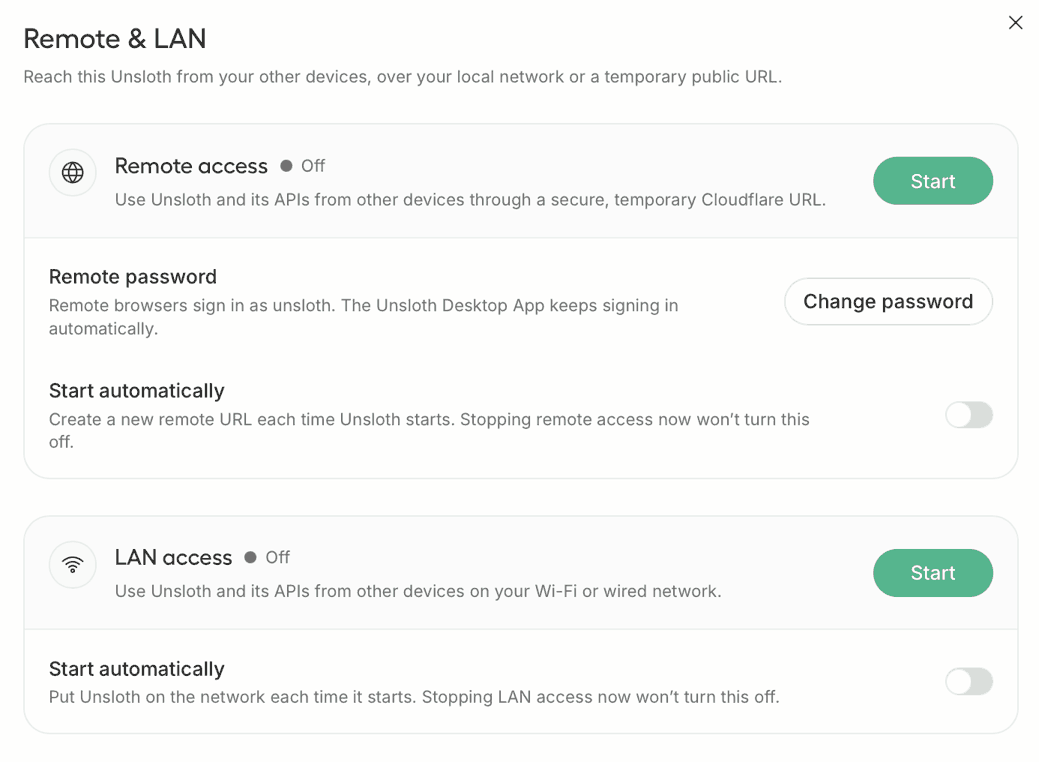
## :wifi: Serve on your local network
Put Unsloth on your Wi-Fi or wired network and [serve the Unlosth over LAN](/docs/basics/lan.md). Traffic never leaves your network, so latency is low, and it works with no internet at all.
Press **Start** on the **LAN access** card, or launch with `-H 0.0.0.0`.
{% endcolumn %}
{% column width="8.333333333333336%" %}
{% endcolumn %}
{% endcolumns %}
{% columns %}
{% column %}
{% endcolumn %}
{% column width="41.66666666666667%" %}
## :image: **Image and Video Generation**
For MiniMax-H3 FP8 on an NVIDIA B200, a 960×544, 124-frame, 8-step generation dropped from 70+ seconds to **13 seconds**. Generate with [Qwen-Image-2.1](/docs/models/qwen-image-2.1.md)**,** FLUX, Z-Image, LTX, Wan and fine-tuned LoRA adapters.
Transform, inpaint, extend, upscale, reference and edit existing images.
{% endcolumn %}
{% column width="41.666666666666664%" %}
{% endcolumn %}
{% column width="8.333333333333325%" %}
{% endcolumn %}
{% endcolumns %}
{% columns %}
{% column width="8.333333333333332%" %}
{% endcolumn %}
{% column width="41.66666666666667%" %}
## :rectangle-api: Serve models via API
You can use `unsloth run` command and serve models like [Qwen3.8](/docs/models/qwen3.8.md) and change any settings, including context sizing, GPU layers, threading, sampling, networking, and tool configuration. For more info see our [API docs](/docs/basics/api.md).
{% endcolumn %}
{% column width="49.99999999999999%" %}
See an example of using Unsloth API with Qwen3.8:
{% code overflow="wrap" %}
```bash
unsloth run --model unsloth/Qwen3.8-27B-GGUF-GGUF:UD-Q4_K_XL
--temp 1.0 \
--top-p 0.95 \
--top-k 20 \
--min-p 0.0 \
--chat-template-kwargs '{"reasoning_effort":"medium"}'
```
{% endcode %}
{% endcolumn %}
{% endcolumns %}
{% columns %}
{% column width="8.333333333333332%" %}
{% endcolumn %}
{% column width="41.66666666666667%" %}
## :image: Use the Latest models
You can run and train nearly every model, including upcoming ones. Expect Day Zero support for models like Qwen3.8, Gemma, Meta, NVIDIA, GLM, Gemma models and more. It's all thanks to llama.cpp and Hugging Face and we're also proud to contribute back to the ecosystem.
{% endcolumn %}
{% column width="49.99999999999999%" %}
{% endcolumn %}
{% endcolumns %}
{% columns %}
{% column %}
{% endcolumn %}
{% column width="41.666666666666664%" %}
{% endcolumn %}
{% column width="41.66666666666667%" %}
## :magnifying-glass: Deep Research
Normal search utilises the web for its answers and happens while the model is still thinking.
Deep research plans first, searches for the best sources, then produces a detailed report with all citations.
{% endcolumn %}
{% column width="8.33333333333334%" %}
{% endcolumn %}
{% endcolumns %}
{% columns %}
{% column width="8.333333333333332%" %}
{% endcolumn %}
{% column width="41.66666666666666%" %}
## :cloud: Connect Providers
You can connect Unsloth directly to your ChatGPT/Codex subscription.
Run models from OpenAI, Anthropic, Ollama, llama.cpp, vLLM, and more.
Use the same Unsloth chat interface for local and cloud models with support for tool-calling, image gen, [prompt caching](https://sites.gitbook.com/preview/site_mXXTe/~/revisions/KsWgqmEjr66G4kYiZdG8#prompt-caching) to reduce token usage while preserving provider-native features like OpenAI’s [web search](https://sites.gitbook.com/preview/site_mXXTe/~/revisions/KsWgqmEjr66G4kYiZdG8#web-search-and-thinking) and [code execution](https://sites.gitbook.com/preview/site_mXXTe/~/revisions/KsWgqmEjr66G4kYiZdG8#code-execution).
{% endcolumn %}
{% column width="41.66666666666667%" %}
{% embed url="" %}
{% endcolumn %}
{% column width="8.333333333333336%" %}
{% endcolumn %}
{% endcolumns %}
{% columns %}
{% column %}
{% endcolumn %}
{% column width="41.66666666666667%" %}
{% endcolumn %}
{% column width="41.66666666666667%" %}
## :image: **Train Diffusion Models**
Train LoRA adapters for SDXL, FLUX.2, Qwen-Image and Z-Image on your own images. Caption them in Unsloth, pick a rank, and hit train. Then you can export it and load the model back in Unsloth for inference.
{% endcolumn %}
{% column %}
{% endcolumn %}
{% endcolumns %}
{% columns %}
{% column %}
{% endcolumn %}
{% column width="41.66666666666666%" %}
## :flask: Train with no code
Drop in a PDF, CSV or JSON and go. LoRA, full fine-tuning, pretraining. All 2x faster, 70% less VRAM, no accuracy loss. Multi-GPU and latest models work.
Text, diffusion, [audio](/docs/basics/text-to-speech-tts-fine-tuning.md) and [image](/docs/basics/vision-fine-tuning.md) models are supported!
{% endcolumn %}
{% column width="41.66666666666667%" %}
{% endcolumn %}
{% column width="8.333333333333353%" %}
{% endcolumn %}
{% endcolumns %}
{% columns %}
{% column width="8.333333333333332%" %}
{% endcolumn %}
{% column width="41.66666666666667%" %}
{% endcolumn %}
{% column width="41.66666666666666%" %}
## :microphone: Transcribe/generate audio
Generate, fine-tune or transcribe audio with Unsloth completely locally. Text-to-speech, speech-to-text, Whisper, Qwen3-ASR, you name it!
{% endcolumn %}
{% column width="8.333333333333336%" %}
{% endcolumn %}
{% endcolumns %}
{% columns %}
{% column width="8.333333333333332%" %}
{% endcolumn %}
{% column width="41.66666666666667%" valign="middle" %}
## :alien-8bit: Connect your Agent
[Unsloth Start](/docs/integrations/unsloth-start.md) lets you connect [Claude Code](/docs/basics/claude-code.md), [Codex](/docs/basics/codex.md) and other agents to local models via the `unsloth start` command.
Start Unsloth, load a model, open your project folder, and then run:
```bash
unsloth start claude
```
{% endcolumn %}
{% column width="49.99999999999997%" %}
{% endcolumn %}
{% column %}
{% endcolumn %}
{% endcolumns %}
{% columns %}
{% column width="8.333333333333332%" %}
{% endcolumn %}
{% column width="41.66666666666667%" %}
#### Do you collect my data?
No telemetry. Unsloth detects your GPU type and device so the app can know what works. The app can run entirely offline.
#### Can I use models I already downloaded?
Yes, they are found automatically. If yours are not you can specify your own custom folders.
#### Why is inference slower sometimes?
Web search, code execution and tool-call healing all cost time. Turn them off and speed should match any other llama.cpp app. Still slow? Open a GitHub issue.
{% endcolumn %}
{% column width="41.66666666666667%" %}
#### GPU only?
No. Unsloth works on a wide variety of CPU, Mac etc setups.
#### Does it support OpenAI-compatible APIs?
Yes. See the [API guide](/docs/basics/api.md). We also support connection to [Cloud models](/docs/integrations/connections.md) or other APIs like Anthropic or OpenAI.
#### What devices does Unsloth support?
Unsloth supports all OS including Mac, Windows, Linux and WSL and supports NVIDIA, Intel, AMD and Mac GPUs/CPUs. Older hardware however may not be well supported.
{% endcolumn %}
{% column %}
{% endcolumn %}
{% endcolumns %}
{% columns %}
{% column width="8.333333333333332%" %}
{% endcolumn %}
{% column width="83.33333333333333%" %}
A huge thank you to NVIDIA and Hugging Face for being part of our launch. Also thanks to all of our early beta testers for Unsloth Desktop, we truly appreciate your time and feedback. We’d also like to thank Jan for inspiration and llama.cpp, PyTorch, stablediffusion.cpp, and open model labs for providing the infrastructure that made Unsloth Desktop possible.
{% endcolumn %}
{% column width="8.333333333333321%" %}
{% endcolumn %}
{% endcolumns %}
---
# Agent Instructions
This documentation is published with GitBook. GitBook is the documentation platform designed so that both humans and AI agents can read, navigate, and reason over technical content effectively. Learn more at gitbook.com.
## Querying This Documentation
If you need additional information that is not directly available in this page, you can query the documentation by asking a question.
Perform an HTTP GET request on the following URL with the `ask` and `goal` query parameters:
```
GET https://unsloth.ai/docs/desktop.md?ask=&goal=
```
`ask` is the immediate question: it should be specific, self-contained, and written in natural language.
`goal` is what the user is ultimately trying to achieve, the reason they need the answer. Sharing it helps GitBook give you a better, more relevant answer. A goal is most helpful when it describes the outcome the user wants rather than restating the question. For example, with `ask=how do I create an API token`, a goal like `automate deployments from our CI pipeline` lets GitBook tailor the answer to that use case.
The response will contain a direct answer to the question and relevant excerpts and sources from the documentation.
Use this mechanism when the answer is not explicitly present in the current page, you need clarification or additional context, or you want to retrieve related documentation sections.


.gif?alt=media&token=3df768c6-07d8-40c6-9c02-a881547d44bd)