> For the complete documentation index, see [llms.txt](https://unsloth.ai/docs/llms.txt). Markdown versions of documentation pages are available by appending `.md` to page URLs; this page is available as [Markdown](https://unsloth.ai/docs/de/modelle/nemotron-3-ultra.md).
# NVIDIA Nemotron 3 Ultra - Lokal ausführen
Führe Nemotron-3-Ultra-550B-A55B lokal auf deinem Gerät aus!
NVIDIA Nemotron 3 Ultra ist ein offenes **550B-Parameter-, 55B-aktive** Modell für Frontier-Reasoning und ist NVIDIAs **größtes Modell** bisher veröffentlicht. Nemotron-3-Ultra-550B-A55B ist für langfristig laufende autonome Agenten und Reasoning über Coding- und Deep-Research-Workflows hinweg konzipiert. Es ist das **stärkste westliche offene Modell**, und verwendet die neue Open Model, Weights & Data License.
Mit bis zu **1 Mio. Kontext**, verwendet Nemotron 3 Ultra eine Hybrid-Transformer-Mamba-MoE-Architektur und kann langfristigen Agentenzustand, Protokolle und Pläne über längere Sitzungen hinweg beibehalten. GGUFs liegen bei [Nemotron-3-Ultra-550B-A55B](https://huggingface.co/unsloth/NVIDIA-Nemotron-3-Ultra-550B-A55B-GGUF) mit dynamischem 1bit und benötigt 189 GB Festplattenspeicher. Es wurde außerdem mit NVFP4 vortrainiert. Wir haben auch [GGUF-KLD-Benchmarks](#kld-benchmarks).
### ⚙️ Gebrauchsanleitung
NVIDIA empfiehlt diese Einstellungen für die Inferenz:
* `temperature = 1.0`
* `top_p = 0.95`
| Detail | Nemotron 3 Ultra |
| ------------ | ------------------------------------------------------------------------------------------------------------- |
| Modellgröße | 550B Gesamtparameter / 55B aktive Parameter |
| Kontextlänge | Bis zu 1 Mio. Token |
| Architektur | Hybrid Transformer-Mamba MoE mit Latent MoE, Multi-Token Prediction (MTP derzeit für GGUFs nicht unterstützt) |
| Modell-I/O | Texteingabe, Textausgabe |
Die Chat-Vorlage sieht wie folgt aus:
{% code overflow="wrap" %}
```
<|im_start|>system\n<|im_end|>\n<|im_start|>user\nWas ist 1+1?<|im_end|>\n<|im_start|>assistant\n2<|im_end|>\n<|im_start|>assistant\n\n
```
{% endcode %}
### Nemotron-3-Ultra ausführen
Die 3-Bit-Versionen des Modells benötigen etwa 256 GB RAM, 4-Bit benötigen etwa 300 GB und 8-Bit benötigen 600 GB. Für diese Anleitungen verwenden wir 3-Bit `UD-IQ3_XXS` was auf ein 256-GB-Gerät passt und ein guter Kompromiss zwischen Größe und Genauigkeit ist. Je nach Anwendungsfall müssen Sie [unterschiedliche Einstellungen](#usage-guide). **GGUF:** [Nemotron-3-Ultra-550B-A55B](https://huggingface.co/unsloth/NVIDIA-Nemotron-3-Ultra-550B-A55B-GGUF)
In Unsloth Studio ausführenIn llama.cpp ausführen
### 🦥 Unsloth Studio-Leitfaden
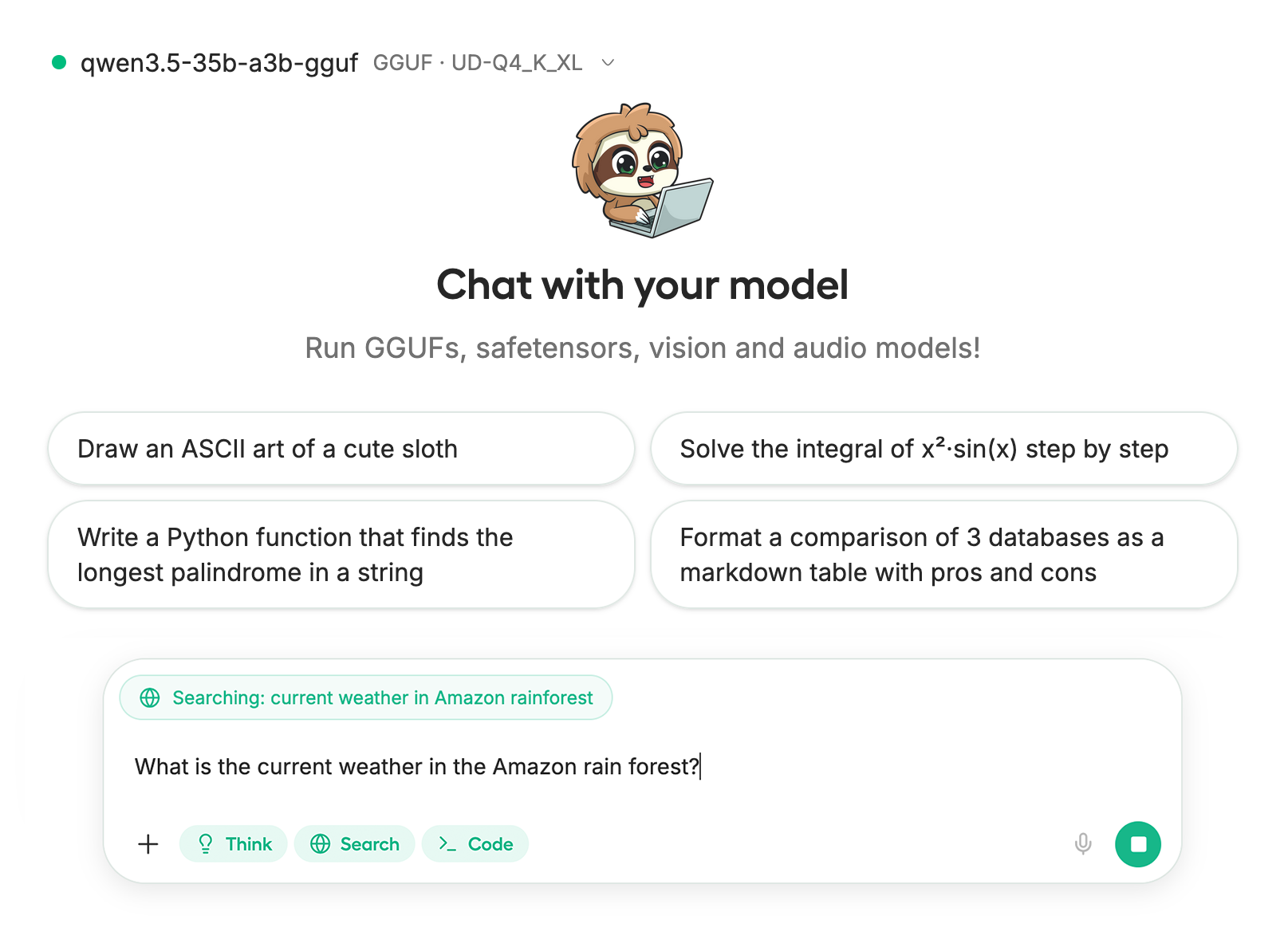
Für dieses Tutorial verwenden wir [Unsloth Studio](/docs/de/neu/studio.md), welches unsere UI zum Ausführen und Trainieren von LLMs ist. Mit Unsloth Studio können Sie Modelle ausführen und Bild- und Texteingaben lokal auf **Mac, Windows**, und Linux sowie:
{% columns %}
{% column %}
* Suchen, herunterladen, [GGUFs ausführen](/docs/de/neu/studio.md#run-models-locally) und Safetensor-Modelle
* **Vergleichen** Modelle **nebeneinander**
* [**Selbstheilend** Tool-Aufrufe](/docs/de/neu/studio.md#execute-code--heal-tool-calling) + **Websuche**
* [**Codeausführung**](/docs/de/neu/studio.md#run-models-locally) (Python, Bash)
* [Automatische Inferenz](https://unsloth.ai/docs/desktop#feature-deep-dive) Abstimmung der Parameter (Temp., Top-p usw.)
* [LLMs trainieren](/docs/de/neu/studio.md#no-code-training) 2x schneller mit 70 % weniger VRAM
{% endcolumn %}
{% column %}
{% endcolumn %}
{% endcolumns %}
{% stepper %}
{% step %}
#### Unsloth installieren
**macOS, Linux, WSL:**
```bash
curl -fsSL https://unsloth.ai/install.sh | sh
```
**Windows PowerShell:**
```bash
irm https://unsloth.ai/install.ps1 | iex
```
{% endstep %}
{% step %}
#### Unsloth Studio einrichten (einmalig)
Die Einrichtung installiert automatisch Node.js (über nvm), baut das Frontend, installiert alle Python-Abhängigkeiten und baut llama.cpp mit CUDA-Unterstützung.
{% hint style="info" %}
**Für WSL-Nutzer:** Sie werden zur Eingabe Ihres `sudo` Passworts aufgefordert, um Build-Abhängigkeiten zu installieren (`cmake`, `git`, `libcurl4-openssl-dev`).
{% endhint %}
{% endstep %}
{% step %}
#### Unsloth starten
**macOS, Linux, WSL:**
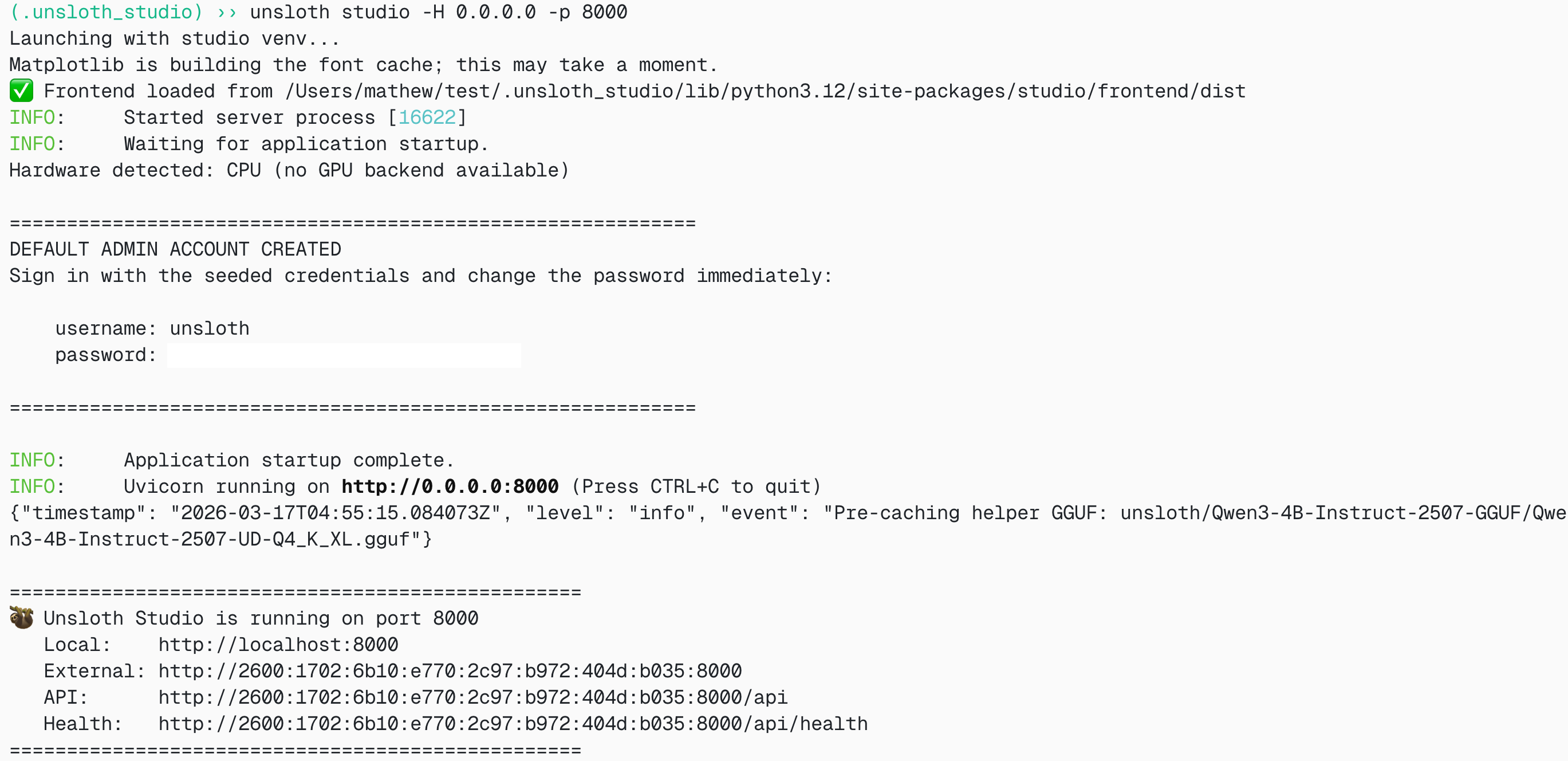
```bash
source unsloth_studio/bin/activate
unsloth studio -H 0.0.0.0 -p 8888
```
**Windows PowerShell:**
```bash
unsloth studio
```
Dann öffnen Sie `http://127.0.0.1:8888` in Ihrem Browser.
{% endstep %}
{% step %}
#### Nemotron-3-Ultra suchen und herunterladen
Beim ersten Start müssen Sie ein Passwort erstellen, um Ihr Konto zu schützen, und sich später erneut anmelden. Gehen Sie dann zum [Unsloth Chat](/docs/de/neu/studio/chat.md) Registerkarte und suchen Sie in der Suchleiste nach Nemotron-3-Ultra und laden Sie Ihr gewünschtes Modell und Ihre gewünschte Quantisierung herunter.
{% endstep %}
{% step %}
#### Nemotron-3-Ultra ausführen
Die Inferenzparameter sollten bei der Verwendung von Unsloth Studio automatisch gesetzt werden, Sie können sie jedoch weiterhin manuell ändern. Sie können auch die Kontextlänge, das Chat-Template und andere Einstellungen bearbeiten.
Für weitere Informationen können Sie unseren [Inferenzleitfaden für Unsloth Studio](/docs/de/neu/studio/chat.md).
{% endstep %}
{% step %}
#### Nemotron-3-Ultra bereitstellen
Du kannst auch `unsloth studio run` um das Modell etwa über llama-server bereitzustellen:
{% code overflow="wrap" %}
```bash
unsloth studio run --model unsloth/NVIDIA-Nemotron-3-Ultra-550B-A55B-GGUF:UD-Q4_K_XL
```
{% endcode %}
{% endstep %}
{% endstepper %}
### 🦙 Llama.cpp-Tutorial:
Anweisungen zur Ausführung in llama.cpp (beachten Sie, dass wir 4-Bit verwenden werden, damit es auf die meisten Geräte passt):
{% stepper %}
{% step %}
Holen Sie sich die neueste `llama.cpp` auf [hier auf GitHub](https://github.com/ggml-org/llama.cpp). Sie können auch die folgenden Build-Anweisungen befolgen. Ändern Sie `-DGGML_CUDA=ON` zu `-DGGML_CUDA=OFF` wenn Sie keine GPU haben oder nur CPU-Inferenz möchten. **Für Apple-Mac-/Metal-Geräte**, setzen Sie `-DGGML_CUDA=OFF` und fahren Sie dann wie gewohnt fort – Metal-Unterstützung ist standardmäßig aktiviert.
{% code overflow="wrap" %}
```bash
apt-get update
apt-get install pciutils build-essential cmake curl libcurl4-openssl-dev -y
git clone https://github.com/ggml-org/llama.cpp
cmake llama.cpp -B llama.cpp/build \\
-DBUILD_SHARED_LIBS=OFF -DGGML_CUDA=ON -DLLAMA_CURL=ON
cmake --build llama.cpp/build --config Release -j --clean-first --target llama-cli llama-mtmd-cli llama-server llama-gguf-split
cp llama.cpp/build/bin/llama-* llama.cpp
```
{% endcode %}
{% endstep %}
{% step %}
Laden Sie das Modell über den folgenden Code herunter (nach der Installation von `pip install huggingface_hub`). Sie können Q4\_K\_M oder andere quantisierte Versionen wie `UD-Q4_K_XL` . Wir empfehlen, mindestens eine 2-Bit-Dynamik-Quantisierung zu verwenden `UD-Q2_K_XL` um Größe und Genauigkeit auszubalancieren. Wenn Downloads hängen bleiben, siehe: [Hugging Face Hub, XET-Debugging](/docs/de/grundlagen/troubleshooting-and-faqs/hugging-face-hub-xet-debugging.md)
{% code overflow="wrap" %}
```bash
pip install huggingface_hub
hf download unsloth/NVIDIA-Nemotron-3-Ultra-550B-A55B-GGUF \\
--local-dir unsloth/NVIDIA-Nemotron-3-Ultra-550B-A55B-GGUF \\
--include "*UD-IQ3_XXS*" # Verwenden Sie "*UD-Q2_K_XL*" für dynamisches 2-Bit
```
{% endcode %}
{% endstep %}
{% step %}
Führen Sie das Modell dann im Konversationsmodus aus:
{% code overflow="wrap" %}
```bash
./llama.cpp/llama-cli \\
--model unsloth/NVIDIA-Nemotron-3-Ultra-550B-A55B-GGUF/UD-IQ3_XXS/NVIDIA-Nemotron-3-Ultra-550B-A55B-UD-IQ3_XXS-00001-of-00006.gguf \\
--temp 1.0 \\
--top-p 0.95 \\
--min-p 0.01
```
{% endcode %}
{% endstep %}
{% endstepper %}
#### Llama-Server-Bereitstellung & Deployment
Um Nemotron-3-Ultra lokal bereitzustellen, verwenden Sie `llama-server`. In einem neuen Terminal, zum Beispiel über `tmux`, stellen Sie das Modell bereit:
```bash
./llama.cpp/llama-server \\
-hf unsloth/NVIDIA-Nemotron-3-Ultra-550B-A55B-GGUF:UD-IQ3_XXS \\
--alias "unsloth/NVIDIA-Nemotron-3-Ultra-550B-A55B" \\
--temp 1.0 \\
--top-p 0.95 \\
--port 8001
```
Wenn Sie das Modell manuell heruntergeladen haben, verwenden Sie:
{% code overflow="wrap" %}
```bash
./llama.cpp/llama-server \\
--model unsloth/NVIDIA-Nemotron-3-Ultra-550B-A55B-GGUF/UD-IQ3_XXS/NVIDIA-Nemotron-3-Ultra-550B-A55B-UD-IQ3_XXS-00001-of-00006.gguf \\
--alias "unsloth/NVIDIA-Nemotron-3-Ultra-550B-A55B" \\
--temp 1.0 \\
--top-p 0.95 \\
--port 8001
```
{% endcode %}
Dann in einem neuen Terminal, nach der Installation des OpenAI-Clients mit `pip install openai`:
```python
from openai import OpenAI
openai_client = OpenAI(
base_url = "http://127.0.0.1:8001/v1",
api_key = "sk-no-key-required",
)
completion = openai_client.chat.completions.create(
model = "unsloth/NVIDIA-Nemotron-3-Ultra-550B-A55B",
messages = [
{"role": "user", "content": "Was ist 2+2?"},
],
)
print(completion.choices[0].message.reasoning_content)
print(completion.choices[0].message.content)
```
Und auf 4 B200s sieht man bei der Generierung etwa 40 Token/s!
### Unsloth-GGUF-Benchmarks
Wir haben auch eine KLD-Analyse für unsere GGUF-Quantisierungen durchgeführt – auf einer logarithmischen mittleren KLD-Skala verliert das Modell dank unserer [dynamischen Methodik](/docs/de/grundlagen/dynamic-3.0-ggufs.md) bei der wichtigere Schichten in höherer Präzision und der Rest in niedrigeren Bits belassen wird.
Für eine lineare Skala:
### Offizielle Benchmarks
Nemotron 3 Ultra ist NVIDIAs größtes Nemotron-3-Reasoning-Modell und ist auf führende Genauigkeit bei Frontier-Reasoning-, Coding- und agentischen Aufgaben ausgerichtet, während es durch hohen Durchsatz die Zeit bis zum Abschluss der Aufgabe optimiert.
Ultra eignet sich besonders für Workloads, bei denen der Aufgabenerfolg von nachhaltigem Reasoning statt von kurzen Einzeldurchläufen abhängt:
* Autonome Coding-Sitzungen über große Repositories hinweg
* Tiefgehende Recherche über viele Quellen mit widersprüchlichen Belegen
* Unternehmens-Workflows mit persistenten Tool-Nutzungsschleifen
* EDA / Verifikations- und Fehleranalyse im Chipdesign
Wie in Abbildung 1 und Abbildung 2 gezeigt, liegt Nemotron 3 Ultra bei der Genauigkeit in den Bereichen Agent-Produktivität, Befolgung von Anweisungen und langen Kontextaufgaben vorn und bietet führenden Durchsatz, wodurch im Vergleich zu anderen führenden offenen Modellen 30 % der Kosten eingespart werden.
Abbildung 1: Nemotron 3 Ultra liegt unter offenen Modellen bei agentischen Benchmarks für Agentenproduktivität, Coding und Befolgung von Anweisungen vorn.
Abbildung 2: Nemotron 3 Ultra spart bis zu 30 % Kosten und führt an der Kosteneffizienz-Frontier
Weitere Benchmarks von NVIDIA:
| Benchmark | N-3-Ultra 550B-A55B | MiniMax-2.7 230B-A10B | GLM-5.1 744B-A40B | Kimi-K2.6 1T-A32B | | | |
| ------------------------------------------------------ | :-----------------: | :-------------------: | :---------------: | :---------------: | :---: | :---: | :--: |
| **Agentisch** | | | | | | | |
| Terminal Bench 2.1 | 56.4 | 55.5 | 59.3 | 67.2 | 49.9 | 49.2 | 54.2 |
| GDPVal | 46.7 | 47.6 | 54.7 | 50.4 | 34.6 | 54.6 | 50.2 |
| SWE-Bench Verified | 71.9 | 72.2 | 73.8 | 69.5 | 69.9 | 74.0 | 72.4 |
| SWE-Bench Multilingual | 67.7 | 69.2 | 73.8 | 65.9 | 67.7 | 71.9 | 72.1 |
| ProfBench (Search) | 56.0 | 52.0 | 46.0 | 56.0 | 53.0 | 59.9 | 57.0 |
| PinchBench | 90.0 | 77.6 | 81.2 | 90.2 | 86.6 | 88.6 | 91.3 |
| TauBench V3 | | | | | | | |
| Airline | 81.5 | 75.3 | 85.0 | 85.8 | 76.5 | 80.8 | 80.8 |
| Einzelhandel | 86.4 | 84.9 | 84.1 | 82.9 | 88.5 | 88.9 | 89.1 |
| Telekommunikation | 92.9 | 89.6 | 96.9 | 97.8 | 98.0 | 96.3 | 98.3 |
| Bankwesen | 22.6 | 14.6 | 12.8 | 23.1 | 20.9 | 25.9 | 26.7 |
| Durchschnitt | 70.9 | 66.1 | 69.7 | 72.4 | 71.0 | 73.2 | 73.7 |
| BrowseComp | 44.4 | 54.1 | 59.4 | 61.3 | 40.5 | 59.4 | 46.9 |
| Vals.ai Financial Agent 1.1 | | | | | | | |
| ohne Websuche | 60.1 | 51.3 | 60.2 | 54.0 | 61.3 | 58.9 | 58.4 |
| mit Websuche | 53.7 | 50.5 | 60.7 | 58.8 | 59.0 | 62.3 | 60.1 |
| **Reasoning und Wissen** | | | | | | | |
| IOI 2025 | 570.0 | -- | 456.5 | 585.0 | 441.3 | 580.1 | -- |
| LiveCodeBench (v6) | 89.0 | 77.2 | 85.7 | 90.2 | 79.3 | 92.5 | 90.9 |
| IMOAnswerBench (ohne Tools) | 88.6 | 68.3 | 86.8 | 91.1 | 83.1 | 93.0 | 91.1 |
| IMOAnswerBench (mit Tools) | 92.3 | 75.1 | 91.1 | 93.71 | 84.51 | 85.4 | 89.6 |
| Apex-Shortlist (ohne Tools) | 74.9 | 28.9 | 71.1 | 77.4 | 61.4 | 85.8 | 82.4 |
| Apex-Shortlist (mit Tools) | 84.8 | 51.9 | 79.0 | 73.2 | 60.4 | 86.5 | 82.0 |
| GPQA (ohne Tools) | 87.0 | 86.6 | 86.1 | 91.0 | 87.1 | 87.8 | 88.5 |
| SciCode (Teilaufgabe) | 44.6 | 38.3 | 47.7 | 52.0 | 48.0 | 50.5 | 48.2 |
| HLE (ohne Tools) | 26.7 | 23.1 | 27.2 | 34.8 | 28.5 | 37.7 | 32.2 |
| HLE (mit Tools) | 37.4 | -- | 50.4 | 54.0 | 48.3 | 48.2 | 45.1 |
| CritPt (ohne Tools) | 3.1 | 0.6 | 3.7 | 9.1 | 2.4 | 14.0 | 10.6 |
| MMLU-Pro | 86.8 | 81.9 | 85.9 | 88.1 | 88.3 | 87.5 | 86.4 |
| OmniScience-Genauigkeit | 24.1 | 20.5 | 31.3 | 35.5 | 35.9 | 46.8 | 39.9 |
| OmniScience ohne Halluzinationen | 78.7 | 74.4 | 66.8 | 67.1 | 7.4 | 5.7 | 2.8 |
| **Chat & Befolgung von Anweisungen** | | | | | | | |
| IFBench (lockerer Prompt) | 81.7 | 74.6 | 76.6 | 73.7 | 78.2 | 79.1 | 82.0 |
| Multi-Challenge | 63.8 | 42.5 | 63.0 | 63.1 | 63.9 | 64.1 | 63.5 |
| **Langer Kontext** | | | | | | | |
| AA-LCR | 65.4 | 69.8 | 66.9 | 70.2 | 68.3 | 67.3 | 62.7 |
| RULER (1M) | 94.7 | -- | -- | -- | 90.1 | 94.2 | 87.7 |
| Longbench v2 (≤ 1 Mio.) | 61.9 | -- | -- | -- | 68.9 | 62.1 | 57.0 |
| **Mehrsprachig** | | | | | | | |
| MMLU-ProX (Durchschnitt en/de/fr/es/it/ja/zh/hi/pt/ko) | 83.0 | 78.4 | 85.8 | 85.0 | 86.4 | 85.6 | 84.3 |
| WMT24++ (en→xx) | 83.7 | 82.8 | 84.4 | 84.5 | 86.8 | 85.9 | 85.9 |
---
# Agent Instructions
This documentation is published with GitBook. GitBook is the documentation platform designed so that both humans and AI agents can read, navigate, and reason over technical content effectively. Learn more at gitbook.com.
## Querying This Documentation
If you need additional information that is not directly available in this page, you can query the documentation by asking a question.
Perform an HTTP GET request on the following URL with the `ask` and `goal` query parameters:
```
GET https://unsloth.ai/docs/de/modelle/nemotron-3-ultra.md?ask=&goal=
```
`ask` is the immediate question: it should be specific, self-contained, and written in natural language.
`goal` is what the user is ultimately trying to achieve, the reason they need the answer. Sharing it helps GitBook give you a better, more relevant answer. A goal is most helpful when it describes the outcome the user wants rather than restating the question. For example, with `ask=how do I create an API token`, a goal like `automate deployments from our CI pipeline` lets GitBook tailor the answer to that use case.
The response will contain a direct answer to the question and relevant excerpts and sources from the documentation.
Use this mechanism when the answer is not explicitly present in the current page, you need clarification or additional context, or you want to retrieve related documentation sections.


.png?alt=media&token=24eef28f-875f-4cca-a1c5-d5c1d9dfca3e)

