> For the complete documentation index, see [llms.txt](https://unsloth.ai/docs/llms.txt). Markdown versions of documentation pages are available by appending `.md` to page URLs; this page is available as [Markdown](https://unsloth.ai/docs/de/modelle/kimi-k3.md).

# Kimi K3 - Lokal ausführen

Leitfaden zum Ausführen von Kimi K3 Quants in deiner lokalen Umgebung.

Kimi K3 von Moonshot AI ist ein Modell mit 2,8T Parametern und offenen Gewichten (104B aktiv), gebaut für SOTA-Coding-, agentische, Long-Context- und Chat-Workloads. Es ist das **stärkste offene Modell** bis heute und konkurriert mit Claude 4.8 Opus und GPT-5.6. Kimi K3 verfügt über natives Vision, ein Kontextfenster von 1M Token und verwendet MXFP4. Vollpräzisions-Inferenz erfordert 1,56 TB Speicher und 1-Bit Kimi K3 [Unsloth](https://github.com/unslothai/unsloth) Dynamisches GGUF erfordert **594 GB (62 % weniger)**.

{% columns %}
{% column %}
Dynamisches 1-Bit (siehe rechts) erreicht **\~78.9%** Top-1-Genauigkeit bei **62 % kleiner**. Dynamisches 2-Bit 861,3 GB erreicht **\~90%** Genauigkeit und ist dabei **45 % kleiner**. Ausführen [**Kimi-K3-GGUF**](https://huggingface.co/unsloth/Kimi-K3-GGUF) über [Unsloth Studio](/docs/de/neu/studio.md) oder llama.cpp. Kimi K3 kann auf einer NVIDIA DGX Station oder auf einem mit einem 128-GB-RAM-Gerät verbundenen Mac Studio laufen.&#x20;

Für **verlustfreies** Kimi K3, verwenden Sie Q8 (`UD-Q8_K_XL`), das ist **50 GB größer** als Q4 (`UD-Q4_K_XL`). Wir untersuchen noch, ob wir es unter 512 GiB bringen können (dynamisches 1-Bit ist 553,2 GiB), ohne das Modell zu beschädigen.

<a href="/docs/de/modelle/kimi-k3.md" class="button primary">Kimi K3 Tutorials ausführen</a><a href="/docs/de/modelle/kimi-k3.md#usage-guide" class="button secondary">Quantisierungsergebnisse</a>
{% endcolumn %}

{% column %}

<figure><img src="https://797013937-files.gitbook.io/~/files/v0/b/gitbook-x-prod.appspot.com/o/spaces%2FxhOjnexMCB3dmuQFQ2Zq%2Fuploads%2FIGaAihxYkmTtlCYjIMQT%2Fglm%20example.gif?alt=media&amp;token=5738222c-69e6-4be1-b777-4ccc0baf0aa3" alt=""><figcaption><p>1-Bit Kimi K3 GGUF vs. Claude 5 vs. GPT 5.6</p></figcaption></figure>
{% endcolumn %}
{% endcolumns %}

**Tabelle: Hardwareanforderungen** (Einheiten = Gesamtspeicher: RAM + VRAM oder Unified Memory)

| Dynamisches 1-Bit S | Dynamisches 1-Bit M | Dynamisches 2-Bit XXS | Dynamisches 2-Bit XL | Q8 (verlustfrei) |
| ------------------- | ------------------- | --------------------- | -------------------- | ---------------- |
| 610 GB              | 665 GB              | 726 GB                | 880 GB               | 1,6 TB           |

### Details zur Kimi K3 GGUF-Implementierung

Wir haben darauf aufgebaut [llama.cpp-PR](https://github.com/ggml-org/llama.cpp/pull/26185) mit [unserem Fork](https://github.com/unslothai/llama.cpp/pull/48) der Vision-Unterstützung und einige Fehlerbehebungen enthält.

1. Der mmproj-/Vision-Tower ähnelt dem Kimi-K2.5-Tower, jedoch mit RMSNorm, ohne Biases, einem nicht-quadratischen fusionierten QKV (qkv width != n\_embd) und einem Projektor mit Post-Norm.
2. Wir stellten beim Ausführen von llama.cpp fest, dass das `n_tokens * 40` Budget bei großen Batchgrößen versagte, sodass wir auf `n_tokens * 160`&#x20;
3. Wir mussten auch die Kimi-Chat-Vorlage in ein Jinja-Format umwandeln.
4. Wir haben so viel wie möglich getestet, um alle Fälle abzudecken. Kimi wurde standardmäßig mit **erhaltenem Denken bei**, sodass alle Denkspuren nicht gelöscht, sondern beibehalten werden.

### 📊 Quantisierungsanalyse

Wie Kimi [K2.6](/docs/de/modelle/kimi-k2.6.md) und [K2.7](/docs/de/modelle/kimi-k2.7-code.md), K3s `UD-Q8_K_XL` ist verlustfrei, da Kimi MXFP4 für MoE-Gewichte und BF16 für alles andere verwendet, und `Q8_K_XL` folgt dem genau. `UD-Q4_K_XL` ist ähnlich, außer dass einige der restlichen Tensoren (außer Normen usw.) `Q8_0`, sodass es nahezu voller Präzision entspricht und 1,56 TB RAM/VRAM erfordert. `UD-Q8_K_XL` ist „wirklich verlustfrei“ gegenüber der vollständigen MXFP4-Safetensors-Version.

<table><thead><tr><th width="119.20001220703125">Quant</th><th width="71.60000610351562" align="right">GB</th><th width="124.800048828125" align="right">durchschnittliche KLD</th><th width="104.9998779296875" align="right">PPL(q)</th><th width="188.79998779296875" align="right">Top-1-Übereinstimmung %</th><th width="140.20001220703125" align="right">RMS dp %</th></tr></thead><tbody><tr><td><code>UD-IQ1_S</code></td><td align="right">594.0</td><td align="right">0.5645</td><td align="right">2.5789</td><td align="right">78.875 +/- 0.107</td><td align="right">36.495</td></tr><tr><td><code>UD-IQ1_M</code></td><td align="right">648.9</td><td align="right">0.4789</td><td align="right">2.3639</td><td align="right">81.219 +/- 0.103</td><td align="right">33.629</td></tr><tr><td><code>UD-IQ2_XXS</code></td><td align="right">711.1</td><td align="right">0.3784</td><td align="right">2.1266</td><td align="right">84.127 +/- 0.096</td><td align="right">29.826</td></tr><tr><td><code>UD-Q2_K_XL</code></td><td align="right">861.3</td><td align="right">0.1779</td><td align="right">1.7359</td><td align="right">90.390 +/- 0.077</td><td align="right">19.862</td></tr><tr><td><code>UD-Q4_K_XL</code></td><td align="right">1,510</td><td align="right"></td><td align="right">1.4579</td><td align="right"></td><td align="right"></td></tr><tr><td><code>UD-Q8_K_XL</code></td><td align="right">1,560</td><td align="right"></td><td align="right">1.4581</td><td align="right"></td><td align="right"></td></tr></tbody></table>

Für die Generierung und Quantisierung von imatrix verwendeten wir das verlustfreie 1,56-TB-Modell `UD-Q8_K_XL` während der Kalibrierung; seine Perplexität beträgt 1,4581. Unsere Dynamic-1-Bit-Quantisierung erreicht eine Perplexität von 2,58 mit 79 % Top-1-Genauigkeit, was sie überraschend brauchbar macht.

Andere Community-Quants sind größer, verschlechtern sich jedoch weitaus stärker. Zum Beispiel übertrifft ein 618,9-GB-Quant `IQ1_M` unser 594-GB-1-Bit-Quant, aber seine Perplexität springt auf 54,56 – 21× schlechter. Dasselbe Muster gilt für `IQ2_XXS`: 725 GB bei 96 PPL gegenüber unseren 711 GB bei 2,12 PPL – 45× schlechter, was bedeutet, dass deren 2-Bit sogar schlechter abschneidet als deren 1-Bit. Dies unterstreicht die Bedeutung dynamischer Quantisierung + korrekter Kalibrierung.

**Wir bieten auch Top-1%-Genauigkeit, KLD-Diagramme:**

<div><figure><img src="https://797013937-files.gitbook.io/~/files/v0/b/gitbook-x-prod.appspot.com/o/spaces%2FxhOjnexMCB3dmuQFQ2Zq%2Fuploads%2FfJOkWbg4O0vmlatF2nDY%2Ftop1_agreement_vs_disk_space_kld_style.png?alt=media&amp;token=77eb470c-b203-4ba8-a3d6-87d04af5c671" alt=""><figcaption></figcaption></figure> <figure><img src="https://797013937-files.gitbook.io/~/files/v0/b/gitbook-x-prod.appspot.com/o/spaces%2FxhOjnexMCB3dmuQFQ2Zq%2Fuploads%2Fk4oLNDcM6nP8MG432DKE%2Fimage.png?alt=media&amp;token=4e5bdff7-6656-43d5-a902-62d97fd07fe1" alt=""><figcaption></figcaption></figure> <figure><img src="https://797013937-files.gitbook.io/~/files/v0/b/gitbook-x-prod.appspot.com/o/spaces%2FxhOjnexMCB3dmuQFQ2Zq%2Fuploads%2FfNYtyZStOo5RY6NSod4r%2Fmean_kld_vs_disk_space.png?alt=media&amp;token=1cd52540-48e2-49fa-9320-8b62c7b3f455" alt=""><figcaption></figcaption></figure></div>

### :gear: Nutzungsleitfaden

Kimi K3 ist **nur für Denken**, mit **`preserve_thinking` immer aktiviert** und **max** Denken standardmäßig aktiviert. Der Sofortmodus wird nicht unterstützt. Der Denkaufwand wird mit dem `reasoning_effort` Anforderungsfeld konfiguriert, und K3 unterstützt `"niedrig"`, `"hoch"`, und `"max"` Denkaufwände.

| Standard          | Agentisch         |
| ----------------- | ----------------- |
| temperature = 1.0 | temperature = 1.0 |
| top\_p = 0.95     | top\_p = 1.0      |

* Kontextlänge = bis zu `1,048,576`
* Low, High, Max Thinking ist in Unsloth umschaltbar

Wenn das Modell passt, erhalten Sie bei Verwendung von B200s etwa 20 Token/s Generierung und >120 Token/s Durchsatz. Wir empfehlen [`UD-IQ1_S`](https://huggingface.co/unsloth/Kimi-K3-GGUF?show_file_info=UD-IQ1_S%2FKimi-K3-UD-IQ1_S-00001-of-00015.gguf) (594 GB) als guten Kompromiss zwischen Größe und Qualität. Beste Faustregel: RAM+VRAM ≈ die Quantisierungsgröße; andernfalls funktioniert es zwar weiterhin, ist aber wegen des Auslagerns auf die Festplatte deutlich langsamer.

## Anleitung zum Ausführen von Kimi K3

Sie können Kimi K3 jetzt in [llama.cpp](#run-in-llama.cpp) und [Unsloth Desktop](https://unsloth.ai/docs/de/modelle/pages/58e5f3df7be61773c8d7055c30a65310240079a4#run-glm-5.2-in-unsloth-studio). Wir werden die 594-GB- [`UD-IQ1_S`](https://huggingface.co/unsloth/Kimi-K3-GGUF?show_file_info=UD-IQ1_S%2FKimi-K3-UD-IQ1_S-00001-of-00015.gguf) Quantisierung für die besten Ergebnisse hinsichtlich Zugänglichkeit und Genauigkeit verwenden, und sie erfordert mindestens 610 GB RAM. Ändern Sie den Quantisierungstyp gern. GGUF: [**Kimi-K3-GGUF**](https://huggingface.co/unsloth/Kimi-K3-GGUF)

### 🦥 Kimi-K3 in Unsloth ausführen

Kimi K3 kann in [Unsloth Desktop](/docs/de/desktop.md), einer Open-Source-Desktop-Oberfläche für lokale KI. **Unsloth Desktop lagert automatisch in den RAM aus und erkennt Multi-GPU-Setups**. Mit Unsloth Studio kannst du Modelle lokal ausführen auf **macOS, Windows**, Linux und:

{% columns %}
{% column %}

* Suchen, herunterladen, [GGUFs ausführen](/docs/de/neu/studio.md#run-models-locally) und Safetensor-Modelle
* [**Selbstheilend** Tool-Aufrufe](/docs/de/neu/studio.md#execute-code--heal-tool-calling) + **Websuche**
* [**Codeausführung**](/docs/de/neu/studio.md#run-models-locally) (Python, Bash)
* [Automatische Inferenz](https://unsloth.ai/docs/desktop#feature-deep-dive) Abstimmung der Parameter (Temp., Top-p usw.)
* Schnelle CPU- + GPU-Inferenz über llama.cpp
* [LLMs trainieren](/docs/de/neu/studio.md#no-code-training) 2x schneller mit 70 % weniger VRAM
  {% endcolumn %}

{% column %}

<figure><img src="https://797013937-files.gitbook.io/~/files/v0/b/gitbook-x-prod.appspot.com/o/spaces%2FxhOjnexMCB3dmuQFQ2Zq%2Fuploads%2F6IXaXdTVyvbrnjehlxys%2Fkimik3.gif?alt=media&amp;token=31e1213b-d7da-46e9-bc7f-3a8c402513fc" alt=""><figcaption></figcaption></figure>
{% endcolumn %}
{% endcolumns %}

{% stepper %}
{% step %}
**Unsloth installieren und starten**

Der einfachste Einstieg ist das Herunterladen der [Unsloth-Desktop-App](/docs/de/desktop.md). Funktioniert auf [macOS](/docs/de/loslegen/install/mac.md), [Windows](/docs/de/loslegen/install/windows-installation.md), und [Linux](/docs/de/loslegen/install/linux.md).

<a href="https://unsloth.ai/download" class="button primary" data-icon="down-to-bracket">Unsloth herunterladen</a>

* <i class="fa-apple">:apple:</i> [Für macOS herunterladen](https://unsloth.ai/download/mac)
* <i class="fa-windows">:windows:</i> [Für Windows herunterladen](https://unsloth.ai/download/windows)
* <i class="fa-linux">:linux:</i> [Für Linux herunterladen](https://unsloth.ai/download/linux)

Oder, wenn du lieber manuell installieren möchtest:

macOS, Linux, WSL:

```bash
curl -fsSL https://unsloth.ai/install.sh | sh
```

Windows PowerShell:

```bash
irm https://unsloth.ai/install.ps1 | iex
```

**Unsloth starten**

macOS, Linux, WSL und Windows:

```bash
unsloth studio
```

Dann öffnen Sie `http://127.0.0.1:8888` (oder Ihre spezifische URL) in Ihrem Browser.

**Unsloth sicher mit HTTPS und Cloudflare starten**

**NEU!** Unsloth bietet jetzt eine sichere Möglichkeit, Unsloth über HTTPS mittels eines kostenlosen Cloudflare-Tunnels zu starten. Verwende das Folgende (funktioniert unter Windows, Mac & Linux):

```bash
unsloth studio --secure
```

{% endstep %}

{% step %}
**Kimi K3 suchen und herunterladen**

Unsloth Studio lagert automatisch in den RAM aus und erkennt Multi-GPU-Setups. Beim ersten Start musst du ein Passwort erstellen, um dein Konto zu sichern, und dich später erneut anmelden.

Gehen Sie dann zum Tab des Model Hubs und suchen Sie nach **Kimi K3** in der Suchleiste und lade dein gewünschtes Modell und die gewünschte Quantisierung herunter. Stelle sicher, dass du genügend Rechenleistung hast, um das Modell auszuführen.

<figure><img src="https://797013937-files.gitbook.io/~/files/v0/b/gitbook-x-prod.appspot.com/o/spaces%2FxhOjnexMCB3dmuQFQ2Zq%2Fuploads%2Fl55nPVDRlWRPoZOnHyg2%2FScreenshot%202026-07-29%20at%203.12.19%E2%80%AFAM.png?alt=media&amp;token=4f910816-8075-4d14-b398-bc00a417a710" alt=""><figcaption></figcaption></figure>
{% endstep %}

{% step %}
**Kimi K3 ausführen**

Die Inferenzparameter sollten bei Verwendung von Unsloth Studio automatisch gesetzt werden; Sie können sie jedoch weiterhin manuell ändern. Sie können auch umschalten **niedriges, hohes oder maximales Denken**, die Kontextlänge, die Chat-Vorlage und andere Einstellungen bearbeiten.

Für weitere Informationen können Sie unseren [Inferenzleitfaden für Unsloth Studio](/docs/de/neu/studio/chat.md).

<figure><img src="https://797013937-files.gitbook.io/~/files/v0/b/gitbook-x-prod.appspot.com/o/spaces%2FxhOjnexMCB3dmuQFQ2Zq%2Fuploads%2F6IXaXdTVyvbrnjehlxys%2Fkimik3.gif?alt=media&amp;token=31e1213b-d7da-46e9-bc7f-3a8c402513fc" alt=""><figcaption><p>Beispiel für ein mit Unsloths Canvas laufendes 1-Bit-Kimi-K3</p></figcaption></figure>
{% endstep %}
{% endstepper %}

### 🦙 Kimi K3 in llama.cpp ausführen

Für diese Tutorials verwenden wir [llama.cpp](https://github.com/ggml-org/llama.cpp) für schnelle lokale Inferenz, besonders wenn Sie eine CPU haben. Wir [haben einen Fork erstellt](https://github.com/unslothai/llama.cpp/pull/48) speziell, um Kimi-K3-Vision zu unterstützen. Dies baut auf einem weiteren [llama.cpp-PR](https://github.com/ggml-org/llama.cpp/pull/26185).

{% stepper %}
{% step %}
Holen Sie sich den spezifischen Unsloth-Fork von `llama.cpp` auf [**hier auf GitHub**](https://github.com/unslothai/llama.cpp/pull/48) um Vision-Unterstützung zu aktivieren. Sie können auch den unten stehenden Build-Anweisungen folgen. Ändern Sie `-DGGML_CUDA=ON` zu `-DGGML_CUDA=OFF` wenn Sie keine GPU haben oder nur CPU-Inferenz möchten. **Für Apple-Mac-/Metal-Geräte**, setzen Sie `-DGGML_CUDA=OFF` und fahren Sie dann wie gewohnt fort – Metal-Unterstützung ist standardmäßig aktiviert.

```bash
git clone https://github.com/unslothai/llama.cpp
cd llama.cpp
git fetch origin pull/48/head:kimi-k3-fullsize-vision
git checkout kimi-k3-fullsize-vision
cd ..
cmake llama.cpp -B llama.cpp/build \\
    -DBUILD_SHARED_LIBS=OFF -DGGML_CUDA=ON
cmake --build llama.cpp/build --config Release -j --clean-first --target llama-cli llama-mtmd-cli llama-server llama-gguf-split
cp llama.cpp/build/bin/llama-* llama.cpp
```

{% endstep %}

{% step %}
**Lassen Sie uns zuerst ein Bild holen!** Sie können auch Bilder hochladen. Wir werden verwenden [dieses Bild](https://raw.githubusercontent.com/unslothai/unsloth/refs/heads/main/images/unsloth%20made%20with%20love.png), das lediglich unser Mini-Logo ist und zeigt, wie Fine-Tunes mit Unsloth erstellt werden:

{% code overflow="wrap" %}

```bash
wget https://raw.githubusercontent.com/unslothai/unsloth/refs/heads/main/images/unsloth%20made%20with%20love.png -O unsloth.png
```

{% endcode %}

<figure><img src="https://797013937-files.gitbook.io/~/files/v0/b/gitbook-x-prod.appspot.com/o/spaces%2FxhOjnexMCB3dmuQFQ2Zq%2Fuploads%2Fgit-blob-9bf7ec93680f889d7602e5f56a8d677d6a58ae6a%2Funsloth%20made%20with%20love.png?alt=media" alt="" width="188"><figcaption></figcaption></figure>

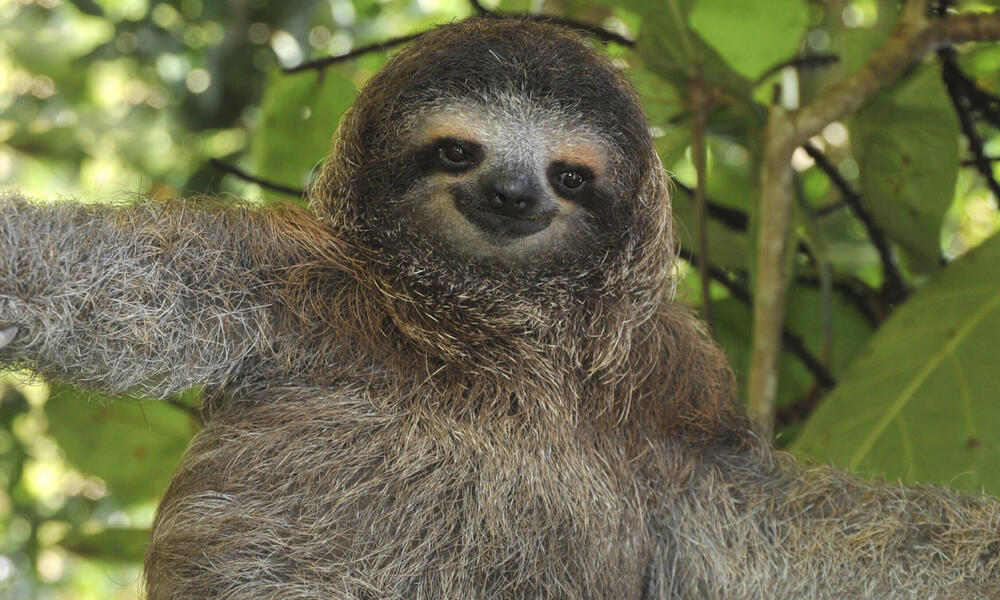
Lassen Sie uns das 2. Bild holen [hier](https://files.worldwildlife.org/wwfcmsprod/images/Sloth_Sitting_iStock_3_12_2014/story_full_width/8l7pbjmj29_iStock_000011145477Large_mini__1_.jpg)

{% code overflow="wrap" %}

```bash
wget https://files.worldwildlife.org/wwfcmsprod/images/Sloth_Sitting_iStock_3_12_2014/story_full_width/8l7pbjmj29_iStock_000011145477Large_mini__1_.jpg -O picture.png
```

{% endcode %}

<figure><img src="https://797013937-files.gitbook.io/~/files/v0/b/gitbook-x-prod.appspot.com/o/spaces%2FxhOjnexMCB3dmuQFQ2Zq%2Fuploads%2Fgit-blob-4b30cc86b2c75edf95ee1ec6fe0c51fb30afd6c0%2F8l7pbjmj29_iStock_000011145477Large_mini__1_.jpg?alt=media" alt="" width="188"><figcaption></figcaption></figure>
{% endstep %}

{% step %}
Du kannst jetzt `llama.cpp` direkt verwenden, um Modelle zu laden und herunterzuladen, genau wie `ollama run`Bevorzugst du zunächst den gewünschten Quantisierungstyp wie `IQ1_S`. Verwende auch `export LLAMA_CACHE="folder"` um zu erzwingen `llama.cpp` um an einem bestimmten Speicherort zu speichern. **Beachten Sie, dass dieser Downloadprozess sehr langsam sein kann**, daher ist es wahrscheinlich am besten, den manuellen Download-Prozess im nächsten Abschnitt zu verwenden.

```bash
export LLAMA_CACHE="unsloth/Kimi-K3-GGUF"
./llama.cpp/llama-cli \\
    -hf unsloth/Kimi-K3-GGUF:UD-IQ1_S \\
    --temp 1.0 \\
    --top-p 0.95
```

{% endstep %}

{% step %}
Wenn du das Modell manuell herunterladen möchtest, können wir das Modell über den folgenden Code herunterladen (nach der Installation von `pip install huggingface_hub`). Wenn Downloads hängen bleiben, siehe: [Hugging Face Hub, XET-Debugging](/docs/de/grundlagen/troubleshooting-and-faqs/hugging-face-hub-xet-debugging.md)

```bash
hf download unsloth/Kimi-K3-GGUF \\
    --local-dir unsloth/Kimi-K3-GGUF \\
    --include "*mmproj-BF16*" \\
    --include "*UD-IQ1_S*" # Verwenden Sie "*UD-Q8_K_XL*" für volle Präzision
```

{% endstep %}

{% step %}
Führen Sie das Modell dann im Konversationsmodus aus:

{% code overflow="wrap" %}

```bash
./llama.cpp/llama-cli \\
    --model unsloth/Kimi-K3-GGUF/UD-IQ1_S/Kimi-K3-UD-IQ1_S-00001-of-00014.gguf \\
    --mmproj unsloth/Kimi-K3-GGUF/mmproj-BF16.gguf \\
    --temp 1.0 \\
    --top-p 0.95
```

{% endcode %}
{% endstep %}

{% step %}
Dann siehst du:

<figure><img src="https://797013937-files.gitbook.io/~/files/v0/b/gitbook-x-prod.appspot.com/o/spaces%2FxhOjnexMCB3dmuQFQ2Zq%2Fuploads%2FtouOdsj4Tp5WUdcL2cPW%2Fimage.png?alt=media&amp;token=4d0f99e4-a445-4192-9f46-0ccddbef491a" alt=""><figcaption></figcaption></figure>

Und ich fragte: "Was ist die Quadratwurzel von -1":

<figure><img src="https://797013937-files.gitbook.io/~/files/v0/b/gitbook-x-prod.appspot.com/o/spaces%2FxhOjnexMCB3dmuQFQ2Zq%2Fuploads%2FT4nvcX4WX5gj2v2Xy9QZ%2Fimage.png?alt=media&amp;token=131a605c-71ea-4d63-8ed4-2c2bcbe3a33d" alt=""><figcaption></figcaption></figure>

Kimi K3 unterstützt auch Bilder, z. B. beim Laden des Unsloth-Bildes:

<figure><img src="https://797013937-files.gitbook.io/~/files/v0/b/gitbook-x-prod.appspot.com/o/spaces%2FxhOjnexMCB3dmuQFQ2Zq%2Fuploads%2F6MtRrPbvTC4hJES82tVr%2Fimage.png?alt=media&amp;token=c22702b1-ba97-4daf-8ea2-9c215d63a989" alt=""><figcaption></figcaption></figure>

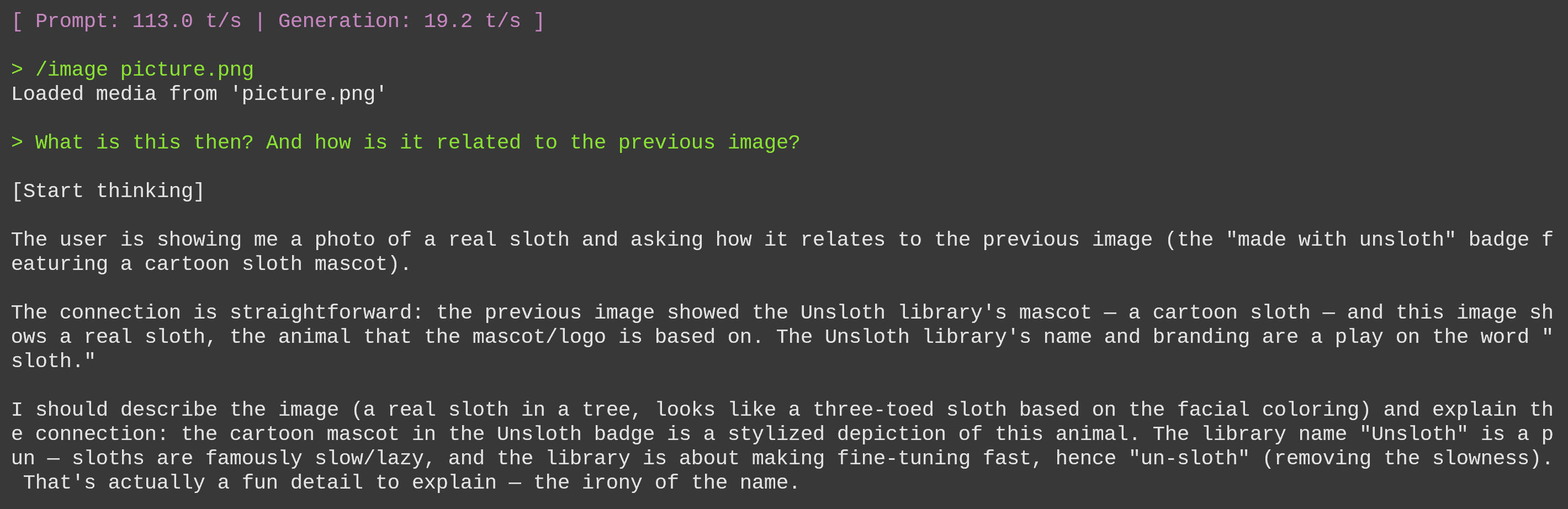
Und dann verwenden wir das Faultierbild und fragen, wie es zusammenhängt:

<figure><img src="https://797013937-files.gitbook.io/~/files/v0/b/gitbook-x-prod.appspot.com/o/spaces%2FxhOjnexMCB3dmuQFQ2Zq%2Fuploads%2FG78fX5KL4c4ua0A0JGv2%2Fimage.png?alt=media&amp;token=26ef7516-7f63-4ad2-932f-fc0b5e6b4f07" alt=""><figcaption></figcaption></figure>
{% endstep %}
{% endstepper %}

### 📊 Benchmarks

Weiter unten können Sie die Benchmarks in Tabellenform ansehen:

<div><figure><img src="https://797013937-files.gitbook.io/~/files/v0/b/gitbook-x-prod.appspot.com/o/spaces%2FxhOjnexMCB3dmuQFQ2Zq%2Fuploads%2FD2DjGdyP0gZOWx2aNHql%2Fkimik3%20bench.png?alt=media&amp;token=2d53268a-fb98-486e-a60d-fe187f8bf946" alt=""><figcaption></figcaption></figure> <figure><img src="https://797013937-files.gitbook.io/~/files/v0/b/gitbook-x-prod.appspot.com/o/spaces%2FxhOjnexMCB3dmuQFQ2Zq%2Fuploads%2F04Z9ZT24kAfEmyXYgdrK%2Fkimik3agentbench.png?alt=media&amp;token=a0a23807-ce6d-4ac5-8bd3-e08c547a5cfd" alt=""><figcaption></figcaption></figure></div>

|          Benchmark          | Kimi K3\n(max) | Claude Fable 5\n(max) | GPT-5.6 Sol\n(max) | Claude Opus 4.8\n(max) | GPT-5.5\n(xhigh) | GLM-5.2\n(max) |
| :-------------------------: | :------------: | :-------------------: | :----------------: | :--------------------: | :--------------: | :------------: |
| **Schlussfolgern & Wissen** |                |                       |                    |                        |                  |                |
|         GPQA Diamond        |      93.5      |          92.6         |      **94.1**      |          91.0          |       93.5       |      91.2      |
|       HLE-Vollständig       |   43.5 / 56.0  |    **53.3 / 63.0**    |     44.5 / 58.0    |       49.8 / 57.9      |    41.4 / 52.2   |        —       |
|      **Programmierung**     |                |                       |                    |                        |                  |                |
|           DeepSWE           |      67.5      |          70.0         |      **73.0**      |          59.0          |       67.0       |      46.2      |
|      Terminal-Bench 2.1     |      88.3      |          88.0         |      **88.8**      |          84.6          |       83.4       |      82.7      |
|        **Agentisch**        |                |                       |                    |                        |                  |                |
|          BrowseComp         |    **91.2**    |          88.0         |        90.4        |          84.3          |       84.4       |        —       |
|      GDPval-AA v2 (Elo)     |      1686      |        **1747**       |        1736        |          1593          |       1491       |      1510      |
|         OSWorld 2.0         |      58.3      |        **66.1**       |        62.6        |          55.7          |       49.5       |        —       |
|          **Vision**         |                |                       |                    |                        |                  |                |
|           MMMU-Pro          |   81.6 / 83.4  |    81.2 / **86.5**    |   **83.0** / 84.6  |       78.9 / 82.7      |    81.2 / 83.2   |        —       |
|          MathVision         |   94.3 / 97.8  |    94.8 / **98.6**    |   **95.8** / 97.8  |       86.7 / 97.1      |    92.2 / 96.8   |        —       |

DeepSWE-Benchmarks zeigen, dass Kimi-K3 sehr effizient abschneidet!

<figure><img src="https://797013937-files.gitbook.io/~/files/v0/b/gitbook-x-prod.appspot.com/o/spaces%2FxhOjnexMCB3dmuQFQ2Zq%2Fuploads%2F2CHd2zfDwn6J3kYIwtXq%2Fimage.png?alt=media&amp;token=d8fe50b6-e581-4de1-8c9d-6647280bb8b0" alt=""><figcaption></figcaption></figure>


---

# Agent Instructions
This documentation is published with GitBook. GitBook is the documentation platform designed so that both humans and AI agents can read, navigate, and reason over technical content effectively. Learn more at gitbook.com.

## Querying This Documentation
If you need additional information that is not directly available in this page, you can query the documentation by asking a question.

Perform an HTTP GET request on the following URL with the `ask` and `goal` query parameters:

```
GET https://unsloth.ai/docs/de/modelle/kimi-k3.md?ask=<question>&goal=<user_goal>
```

`ask` is the immediate question: it should be specific, self-contained, and written in natural language.
`goal` is what the user is ultimately trying to achieve, the reason they need the answer. Sharing it helps GitBook give you a better, more relevant answer. A goal is most helpful when it describes the outcome the user wants rather than restating the question. For example, with `ask=how do I create an API token`, a goal like `automate deployments from our CI pipeline` lets GitBook tailor the answer to that use case.

The response will contain a direct answer to the question and relevant excerpts and sources from the documentation.

Use this mechanism when the answer is not explicitly present in the current page, you need clarification or additional context, or you want to retrieve related documentation sections.