> For the complete documentation index, see [llms.txt](https://unsloth.ai/docs/llms.txt). Markdown versions of documentation pages are available by appending `.md` to page URLs; this page is available as [Markdown](https://unsloth.ai/docs/de/modelle/glm-5.3-flash.md).
# GLM-5.3-Flash: Wie man lokal ausführt
Führe das neue GLM-5.3-Flash, auch bekannt als ox-alpha, Modell von Z.ai aus.
GLM-5.3-Flash, auch bekannt als **`ox-alpha`**, ist Z.ai’s neues multimodales Open-Model mit 320B Parametern (18B aktiv), das **übertrifft** [GLM-5.2](/docs/de/modelle/glm-5.2.md). GLM-5.3-Flash ist die kleinere Version von [GLM-5.3](/docs/de/modelle/glm-5.3.md) und konkurriert mit **Claude Opus 4.8** bei Coding- und agentischen Benchmarks. Du kannst das 1-Bit-Modell jetzt lokal auf 102 GB RAM/VRAM oder das 3-Bit-Modell auf 128-GB-Setups über llama.cpp oder [Unsloth](https://github.com/unslothai/unsloth). Danke an Z.ai für den Zugang ab Tag null.
Unsloth dynamisch **1-Bit** (93 GB) GGUFs behält **71 % der Top-1-Genauigkeit** wobei es **85 % kleiner ist** als BF16 (642 GB). Dynamisches 3-Bit ist 76 % kleiner und behält 87 % Genauigkeit.
Anleitung zum Ausführen von GLM-5.3-FlashUnsloth herunterladen
{% hint style="success" %}
**4. Sep.:** GLM-5.3-Flash läuft jetzt mit [**3,3x schnellerer Inferenz**](#faster-inference-and-mtp-support)**!**
{% endhint %}
{% columns %}
{% column width="50%" %}
GLM-5.3-Flash wurde auf 30 T Token trainiert und basiert auf einem neu trainierten Basismodell. Seine hybride Architektur aus sparsamer und linearer Attention senkt die Bereitstellungskosten für lange Kontexte, ohne die Genauigkeit zu beeinträchtigen.
Du kannst das Modell jetzt direkt in [Unsloth Desktop](#run-glm-5.3-flash-in-unsloth).
{% endcolumn %}
{% column width="50%" %}
{% endcolumn %}
{% endcolumns %}
### :gear: Nutzungsanleitung
#### Anforderungen für GLM-5.3-Flash:
Die kleinste 1-Bit-Quantisierung funktioniert mit 100 GB RAM, während 3-Bit auf 128-GB-Geräten wie einem Mac oder NVIDIA DGX Spark funktioniert.\
**Tabelle: Hardwareanforderungen** (Einheiten = Gesamtspeicher: RAM + VRAM oder Unified Memory)
| 1-Bit | 2-Bit | 3-Bit | 4-Bit | 8-Bit | BF16 |
| ------ | ------ | ---------- | ---------- | ------ | ------ |
| 100 GB | 115 GB | 128-150 GB | 162-210 GB | 350 GB | 650 GB |
### Empfohlene Einstellungen
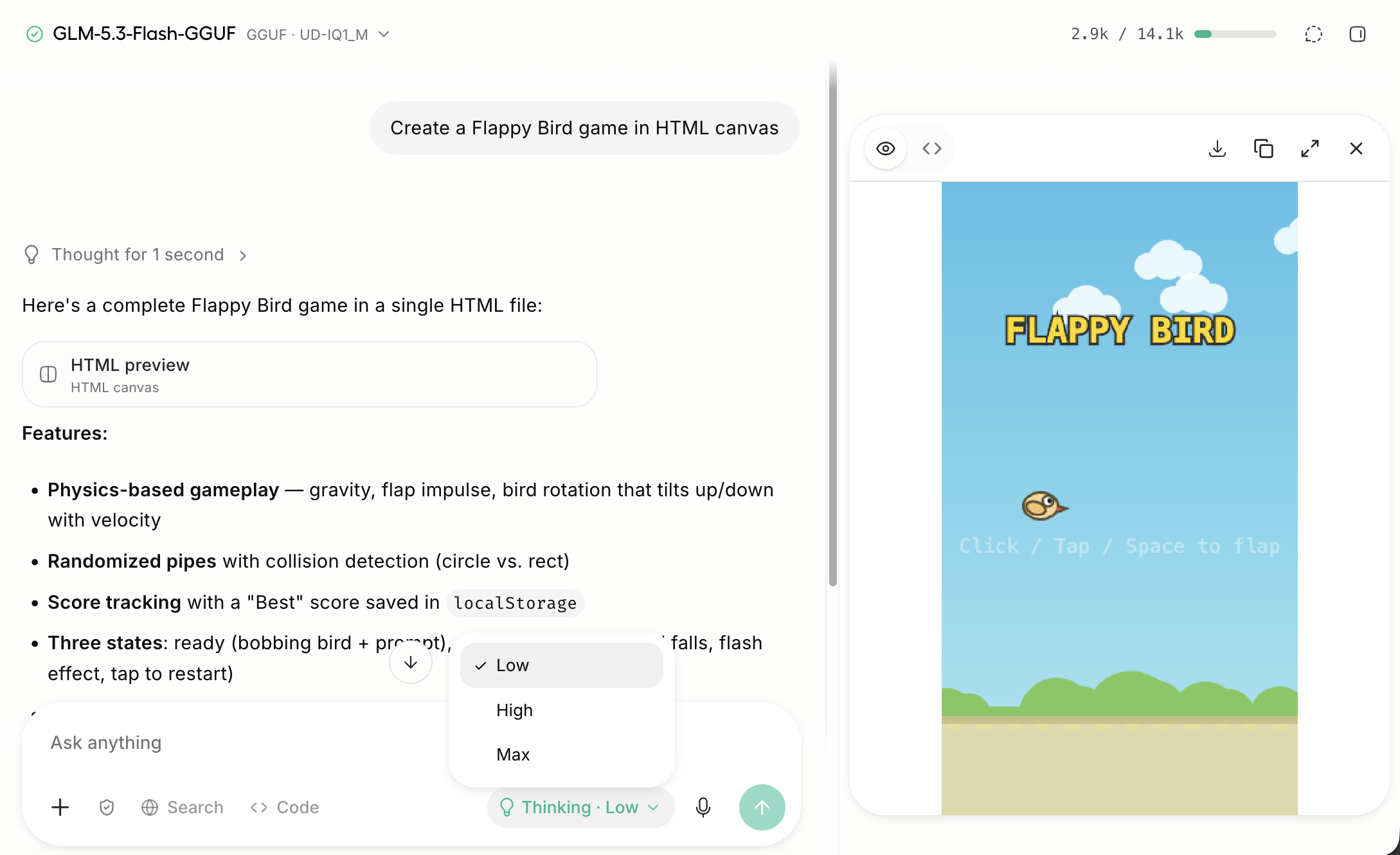
GLM-5.3-Flash hat **3 Denkmodi**: Niedrig, Hoch und Max. Verwende Max Thinking für komplizierte Aufgaben. In [Unsloth](#run-glm-5.2-in-unsloth-studio), kannst du Niedrig, Hoch oder Max Thinking ganz einfach mit einem Schalter im Chatbereich auswählen.
Verwende diese Einstellungen für die meisten Anwendungsfälle:
| Standardeinstellungen (die meisten Aufgaben) | DeepSWE |
| -------------------------------------------- | ------------------- |
| `Temperatur` = 1.0 | `Temperatur` = 0.95 |
| `top_p` = 0.95 | `top_p` = 1.0 |
* **Maximales Kontextfenster:** `1,048,576`.
#### Ändern des Reasoning-Aufwands
GLM-5.3-Flash verwendet standardmäßig Max Reasoning. Es unterstützt auch Reasoning-Aufwände, bei denen `reasoning_effort` kann "low", "high" oder "max" sein.
### Schnellere Inferenz und MTP-Unterstützung
Seit dem 4. Sep. haben wir mehrere Verbesserungen und Optimierungen zu unserem Tag-null [llama.cpp-PR](https://github.com/ggml-org/llama.cpp/pull/27754). Wir haben einen schnelleren Decoding-Pfad plus zusätzliche MTP-Unterstützung implementiert, was bis zu **3,3× schnellere Inferenz** bei langen Kontexten ermöglicht!
Alles funktioniert sofort in [Unsloth Desktop](#run-glm-5.3-flash-in-unsloth), aktualisiere einfach bei Bedarf auf die neueste Version. Es sind keine zusätzlichen Module oder MTP-Dateien erforderlich. Alternativ kannst du unserer [llama.cpp](#run-glm-5.3-flash-in-llama.cpp) Anleitung folgen.
Wenn wir GLM-5.3-Flash UD-IQ1\_S auf 1xB200 verwenden und MTP zunächst ignorieren, erhalten wir:
| Test | Basis tok/s | Optimierte tok/s |
| ------------ | ----------: | ---------------: |
| pp512 | 1121.80 | 1122.0 |
| tg32 | 62.79 | 63.10 |
| tg32 @ 4096 | 53.52 | 59.50 |
| tg32 @ 16384 | 41.02 | 57.99 |
| tg32 @ 65536 | 20.66 | 48.99 |
Sobald wir MTP hinzufügen, sehen wir noch größere Vorteile, insbesondere bei längeren Kontexten. Wir sollten jedoch bei etwa n=2 aufhören, da mehr Draft-Token die Inferenz verlangsamen.
| Prompt | MTP aus | n=2 | n=3 | n=5 |
| ------ | ------: | ---: | ---: | ---: |
| 4096 | 58.6 | 86.5 | 80.2 | 63.7 |
| 16K | 55.0 | | 77.2 | |
Bei kürzeren Kontextlängen sehen wir weiterhin Beschleunigungen, allerdings bis zu 1,6x schneller.
### 📈 Quantisierungsanalyse
Wir haben GLM-5.3-Flash auf UD-IQ1\_S 1-Bit (93,09 GB) quantisiert, und es behält 71 % der Top-1%-Genauigkeit bei, während es 85 % kleiner ist als BF16 (641,64 GB)
Dynamisches 2-Bit UD-Q2\_K\_XL ist 109 GB, 83 % kleiner und behält 78 % der Genauigkeit bei.\
Dynamisches 3-Bit UD-IQ3\_XXS ist 120 GB, 81 % kleiner und behält 82 % der Genauigkeit bei.\
Dynamisches 4-Bit UD-Q4\_K\_XL ist 200 GB, 69 % kleiner und behält 93 % der Genauigkeit bei.
| Quant | Größe | Top-1-Genauigkeit | mittlere KLD | KLD 99,9 % |
| ------------ | ------ | ----------------- | ------------ | ---------- |
| UD-IQ1\_S | 93.09 | 70.89% | 0.669714 | 9.1658 |
| UD-IQ1\_M | 97.58 | 73.06% | 0.572413 | 8.5069 |
| UD-IQ2\_XXS | 101.84 | 76.30% | 0.450148 | 7.5764 |
| UD-Q2\_K\_XL | 108.72 | 78.34% | 0.380134 | 6.8412 |
| UD-IQ3\_XXS | 120.37 | 81.63% | 0.283772 | 5.9611 |
| UD-Q3\_K\_XL | 147.54 | 86.25% | 0.159697 | 4.0281 |
| UD-IQ4\_XS | 156.82 | 88.18% | 0.116652 | 3.1014 |
| UD-Q4\_K\_XL | 199.71 | 92.22% | 0.049294 | 1.4894 |
| UD-Q5\_K\_XL | 240.31 | 94.35% | 0.027052 | 0.8696 |
| UD-Q6\_K\_XL | 291.83 | 95.23% | 0.019007 | 0.6267 |
## GLM-5.3-Flash (Ox-Alpha) lokal ausführen
Du kannst GLM-5.3-Flash (Ox-Alpha) jetzt in Unsloth Desktop und llama.cpp mit unserer [speziellen PR](https://github.com/ggml-org/llama.cpp/pull/27754). Wir verwenden 3-Bit `UD-IQ3_XXS` in unseren Demos, da es auf 128-GB-Geräte passt. Du kannst den Quantisierungstyp gerne ändern.
* Hugging Face: [GLM-5.3-Flash-GGUF](https://huggingface.co/unsloth/GLM-5.3-Flash-GGUF)
In Unsloth Desktop ausführenIn llama.cpp ausführen
### 🦥 GLM-5.3-Flash in Unsloth ausführen
GLM-5.3-Flash kann jetzt in [Unsloth Desktop](#run-qwen3.8-in-unsloth-desktop), einer Open-Source-UI-App für lokale KI. **Unsloth lagert automatisch in den RAM aus und erkennt Multi-GPU-Setups**. Mit Unsloth Desktop kannst du Modelle lokal ausführen auf **MacOS, Windows**, Linux und:
{% columns %}
{% column %}
* Suchen, herunterladen, [GGUFs ausführen](/docs/de/neu/studio.md#run-models-locally), MLX- und Safetensor-Modelle
* [**Selbstheilend** Tool-Aufrufe](/docs/de/neu/studio/chat.md#auto-healing-tool-calling) + **Websuche**
* [**Codeausführung**](/docs/de/desktop.md#code-execution) (Python, Bash)
* [Automatische Inferenz](https://unsloth.ai/docs/desktop#feature-deep-dive) Parameterabstimmung (Temp, Top-p usw.)
* Schnelle CPU- und GPU-Inferenz über MLX und llama.cpp
* [LLMs trainieren](/docs/de/neu/studio.md#no-code-training) 2x schneller mit 70 % weniger VRAM
{% endcolumn %}
{% column %}
{% endcolumn %}
{% endcolumns %}
{% stepper %}
{% step %}
#### Unsloth installieren
Der einfachste Einstieg ist das Herunterladen der [Unsloth-Desktop-App](/docs/de/desktop.md). Funktioniert auf [macOS](/docs/de/loslegen/install/mac.md), [Windows](/docs/de/loslegen/install/windows-installation.md), und [Linux](/docs/de/loslegen/install/linux.md).
Unsloth herunterladen
* :apple: [Für macOS herunterladen](https://unsloth.ai/download/mac)
* :windows: [Für Windows herunterladen](https://unsloth.ai/download/windows)
* :linux: [Für Linux herunterladen](https://unsloth.ai/download/linux)
Oder, wenn du lieber manuell installieren möchtest:
MacOS, Linux, WSL:
```bash
curl -fsSL https://unsloth.ai/install.sh | sh
```
Windows PowerShell:
```bash
irm https://unsloth.ai/install.ps1 | iex
```
{% endstep %}
{% step %}
#### GLM-5.3-Flash suchen und herunterladen
Gehe zu [Unsloth Chat](/docs/de/neu/studio/chat.md) oder dem Model Hub und suche in der Suchleiste nach GLM-5.3-Flash und lade das gewünschte Modell und die gewünschte Quantisierung herunter.
{% endstep %}
{% step %}
#### GLM-5.3-Flash ausführen
Die Inferenzparameter sollten bei Verwendung von Unsloth automatisch gesetzt werden, du kannst sie jedoch weiterhin manuell ändern. Du kannst außerdem die Kontextlänge, die Chat-Vorlage und andere Einstellungen bearbeiten.
Weitere Informationen findest du in unserer [Unsloth-Inferenzanleitung](/docs/de/neu/studio/chat.md). 1-Bit-Ausführung unten:
{% endstep %}
{% step %}
#### GLM-5.3-Flash mit der Unsloth-API bereitstellen
Du kannst `unsloth run` den Befehl verwenden und GLM-5.3-Flash über eine API bereitstellen mit `llama-server` Laufzeit-Flags, einschließlich Kontextgröße, GPU-Layern, Threading, Sampling, Netzwerkkonfiguration und Tool-Konfiguration. Weitere Informationen findest du in unseren [API-Dokumenten](/docs/de/grundlagen/api.md) oder [unsloth start](/docs/de/integrationen/unsloth-start.md).
{% code overflow="wrap" %}
```bash
unsloth run --model unsloth/GLM-5.3-Flash-GGUF:UD-IQ3_XXS
```
{% endcode %}
{% endstep %}
{% step %}
#### Unsloth ist jetzt bereit
Du kannst mit GLM-5.3-Flash über Unsloth Desktop auch viele andere Dinge tun, wie zum Beispiel:
* **Tools verbinden:** [Claude Code](/docs/de/grundlagen/claude-code.md), [Codex](/docs/de/grundlagen/codex.md), [Websuche](/docs/de/neu/studio/chat.md#advanced-web-search), [MCP](/docs/de/grundlagen/mcp.md) und mehr
* **Modelle trainieren:** Text, Diffusion, [Embedding](/docs/de/grundlagen/embedding-finetuning.md), und mehr
* **Medien erzeugen:** Erstellen und trainieren [Bilder](/docs/de/grundlagen/diffusion-image.md), Video, [TTS](/docs/de/grundlagen/text-to-speech-tts-fine-tuning.md) lokal
{% endstep %}
{% endstepper %}
### :llama: GLM-5.3-Flash in llama.cpp ausführen
{% stepper %}
{% step %}
Wir müssen unsere spezielle llama.cpp-PR verwenden [hier](https://github.com/unslothai/llama.cpp/pull/61). Du kannst auch die folgenden Build-Anweisungen befolgen. Ändere `-DGGML_CUDA=ON` zu `-DGGML_CUDA=OFF` wenn du keine GPU hast oder einfach nur CPU-Inferenz möchtest. **Für Apple Mac-/Metal-Geräte**, setze `-DGGML_CUDA=OFF` und fahre dann wie gewohnt fort – Metal-Unterstützung ist standardmäßig aktiviert.
```bash
apt-get update
apt-get install pciutils build-essential cmake curl libcurl4-openssl-dev -y
git clone --branch glm5next/upstream https://github.com/unslothai/llama.cpp
cmake llama.cpp -B llama.cpp/build \\
-DBUILD_SHARED_LIBS=OFF -DGGML_CUDA=ON
cmake --build llama.cpp/build --config Release -j --clean-first --target llama-cli llama-mtmd-cli llama-server llama-gguf-split
cp llama.cpp/build/bin/llama-* llama.cpp
```
{% endstep %}
{% step %}
Um das Modell auszuführen, kannst du Folgendes tun:
{% code overflow="wrap" %}
```bash
pip install -U "huggingface_hub[cli]"
hf download unsloth/GLM-5.3-Flash-GGUF \\
--local-dir unsloth/GLM-5.3-Flash-GGUF \\
--include "*UD-IQ3_XXS*" # Verwende "*IQ2_XXS*" für 2-Bit
```
{% endcode %}
{% endstep %}
{% step %}
Dann zum Ausführen:
{% code overflow="wrap" %}
```bash
./llama.cpp/llama-cli \\
--model unsloth/GLM-5.3-Flash-GGUF/UD-IQ3_XXS/GLM-5.3-Flash-UD-IQ3_XXS-00001-of-00004.gguf \\
--temp 1.0 \\
--top-p 0.95 \\
--chat-template-kwargs '{"reasoning_effort":"max"}'
```
{% endcode %}
Ersetze `UD-IQ3_XXS` durch deine bevorzugte Quantisierung, z. B. `IQ2_XXS` für 2-Bit, sobald hochgeladen.
{% endstep %}
{% endstepper %}
## 📊 Benchmarks
| 78.0 | - | 64.3 | 75.0 | 68.0 | 65.0 |
| BabyVision | 53.4 | - | 35.1 | 46.8 | 61.6 | 70.9 |
| MVbench | 77.8 | - | 69.4 | 67.1 | 75.0 | 82.2 |
| MMVU | 80.5 | - | 72.7 | 67.4 | 75.8 | 82.3 |
---
# Agent Instructions
This documentation is published with GitBook. GitBook is the documentation platform designed so that both humans and AI agents can read, navigate, and reason over technical content effectively. Learn more at gitbook.com.
## Querying This Documentation
If you need additional information that is not directly available in this page, you can query the documentation by asking a question.
Perform an HTTP GET request on the following URL with the `ask` and `goal` query parameters:
```
GET https://unsloth.ai/docs/de/modelle/glm-5.3-flash.md?ask=&goal=
```
`ask` is the immediate question: it should be specific, self-contained, and written in natural language.
`goal` is what the user is ultimately trying to achieve, the reason they need the answer. Sharing it helps GitBook give you a better, more relevant answer. A goal is most helpful when it describes the outcome the user wants rather than restating the question. For example, with `ask=how do I create an API token`, a goal like `automate deployments from our CI pipeline` lets GitBook tailor the answer to that use case.
The response will contain a direct answer to the question and relevant excerpts and sources from the documentation.
Use this mechanism when the answer is not explicitly present in the current page, you need clarification or additional context, or you want to retrieve related documentation sections.